🤖 AI Disclosure
Shared Progress is made by Alkeari.
AI is solely used for the following items:
- Minimal assistance with code: bug fixes and updates
- Restructuring code for organization and clarity
- README
- Changelog
- Translations
⭐ What It Does
- On the host, it reads the guild roster, each member's unlocked technologies and each member's level and experience.
- It works out what would bring the guild level: technologies shared as a union, members below the guild's highest level caught up, and earned experience mirrored or split.
- With
dryRun on, as it ships, it only writes that plan to the UE4SS log. Turn dryRun off and it grants it through the game's own functions, then logs what actually changed.
- Every grant is checked as it lands; one it cannot confirm stops the pass and turns that kind of sharing off for the session.
- If it ever ends a game session, the next start names the cause in the UE4SS log and switches that step off for good.
📋 Requirements
- Palworld on Steam. The Microsoft Store and Game Pass builds are not supported.
- UE4SS for Palworld, the experimental-palworld line, installed the normal UE4SS way.
📥 Installation
- Install UE4SS and launch Palworld once.
- Download the file and extract the zip into your Palworld folder, the one holding
Palworld.exe.
- Open
Pal\Binaries\Win64\ue4ss\UE4SS.log and look for the [SharedProgress] lines it writes as it loads.
The zip carries the full path, so Pal\Binaries\Win64\ue4ss\Mods\SharedProgress\Scripts\main.lua ends up in place. To update, replace that folder; to remove it, delete it.
On a dedicated server, install the same files on the server as well: the part that changes the shared world runs where the world's authority lives.
⚙️ Configuration
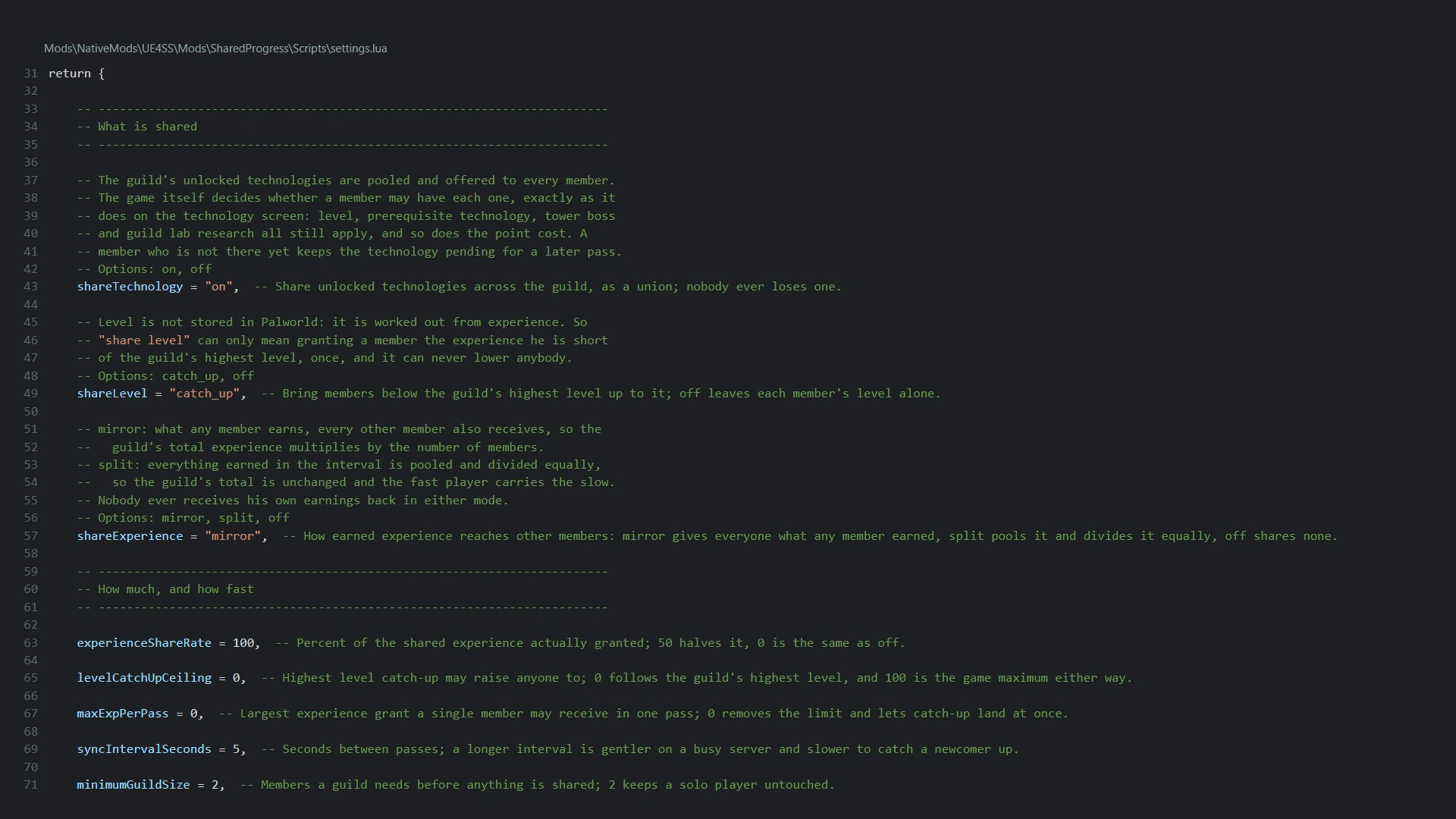
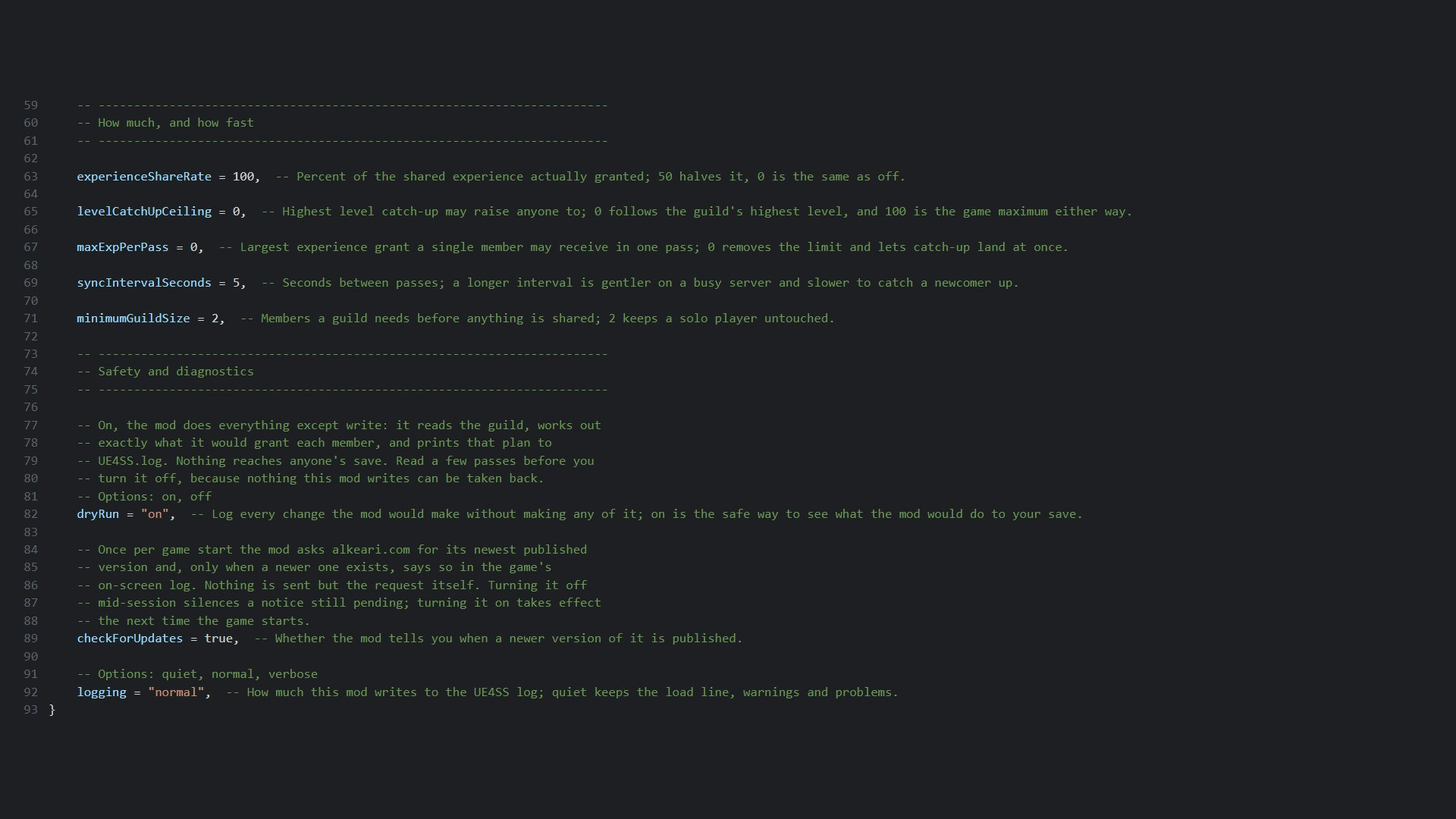
Every setting is in Scripts\settings.lua inside the mod folder. Each setting sits under a plain sentence saying what it does. Save the file and the change applies on the next pass while the game runs, wherever the setting allows it; a value the mod cannot use is named in the log and that setting keeps its default. An update reinstalls the file with defaults, so keep a copy of your edits.
shareTechnology, shareLevel, shareExperience: what is shared, each with its own off value.experienceShareRate, levelCatchUpCeiling, maxExpPerPass: how much experience and level a grant may carry.syncIntervalSeconds, minimumGuildSize: how often a pass runs and how big a guild must be.dryRun: on by default; the mod only logs what it would grant.logging: how much the mod writes to the UE4SS log.checkForUpdates: once per game start, the mod reads its newest published version from alkeari.com/updates/shared-progress.json and tells you in the on-screen log only when a newer one exists.- Nothing is sent but that one request. It is on by default; set
checkForUpdates to false to turn it off.
Every setting is also on the Mod Configs tab of Universal Config Manager if you run it, so you can change them without leaving the game. It is entirely optional and this mod never requires it.
🖥️ Compatibility
- Host side. The sync runs where the world's authority is: your own game in singleplayer, the co-op host's game, or the dedicated server.
- Client side: none. A joining player never runs the sync at all, so a copy of the settings on a joining player's machine is ignored and the host's values are the ones that apply.
- Install the same files on a dedicated server; that is where the sync runs, and it is the same package rather than a server build.
- Singleplayer is a guild of one, so there is nothing to share and the sync does nothing there.
- It never removes or lowers anything, and leaving a guild takes nothing back.
- By default the mod only plans:
dryRun is on, so it works out exactly what it would grant and writes that to the log instead of granting it. Set dryRun to off to let it grant.
- If a Palworld update renames something it depends on, it logs one line and stands down rather than writing anything.
🐛 Support
- Report bugs and ask questions in the Comments of this page.
- Include
Pal\Binaries\Win64\ue4ss\UE4SS.log, the mod version, and the Palworld version from the title screen.
📄 License
License terms are in the Alkeari License Agreement.
Every release, its changes and how to send feedback are on the project page at alkeari.com/projects/shared-progress.
💛 Donate
If you would like to donate, you can do so on Ko-fi, Patreon, PayPal, GitHub Sponsors or Buy Me a Coffee.