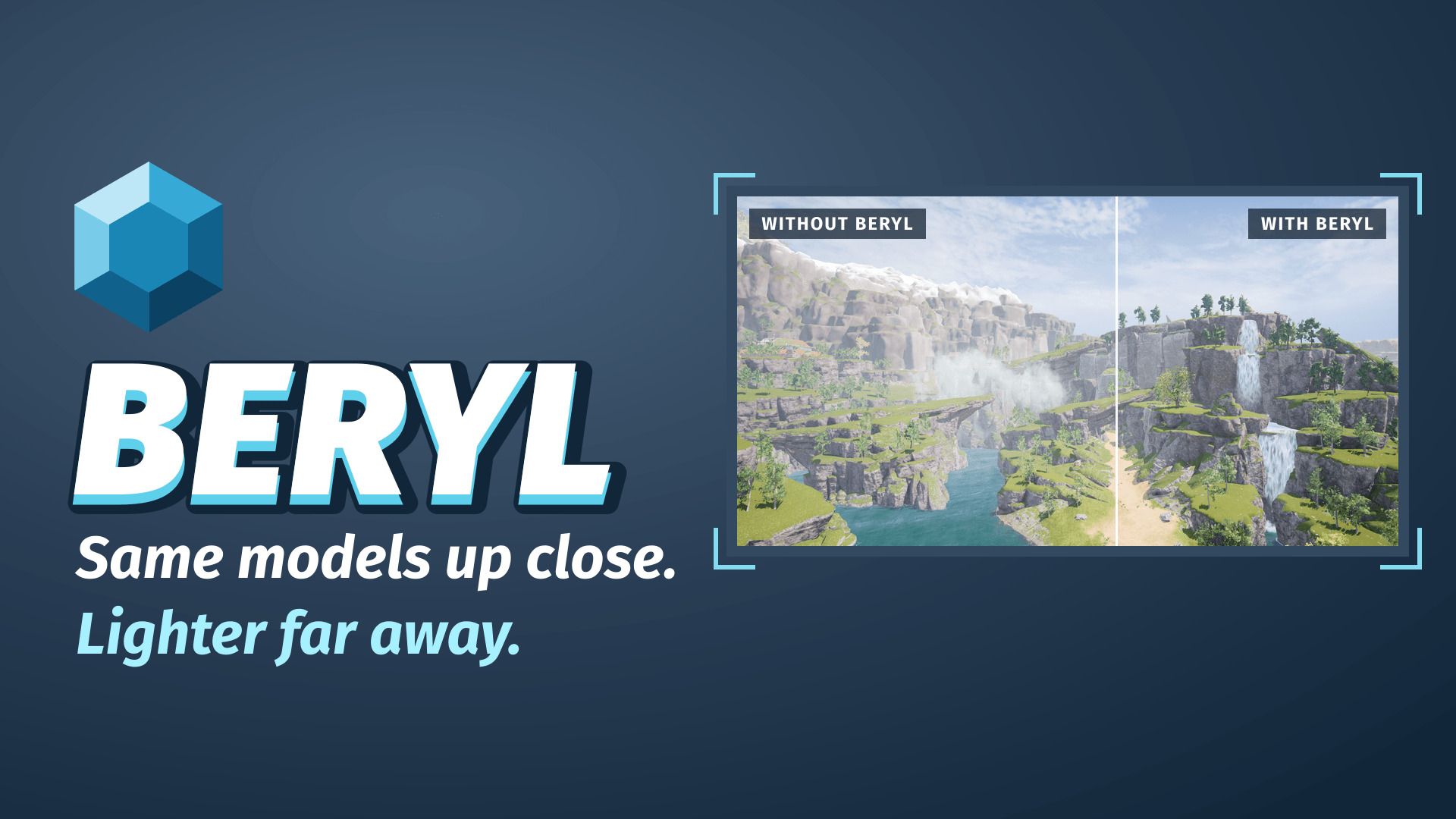
Choose how far, and how finely, Palworld draws its world.
Unofficial fan-made mod. Not affiliated with Pocketpair. Alpha.
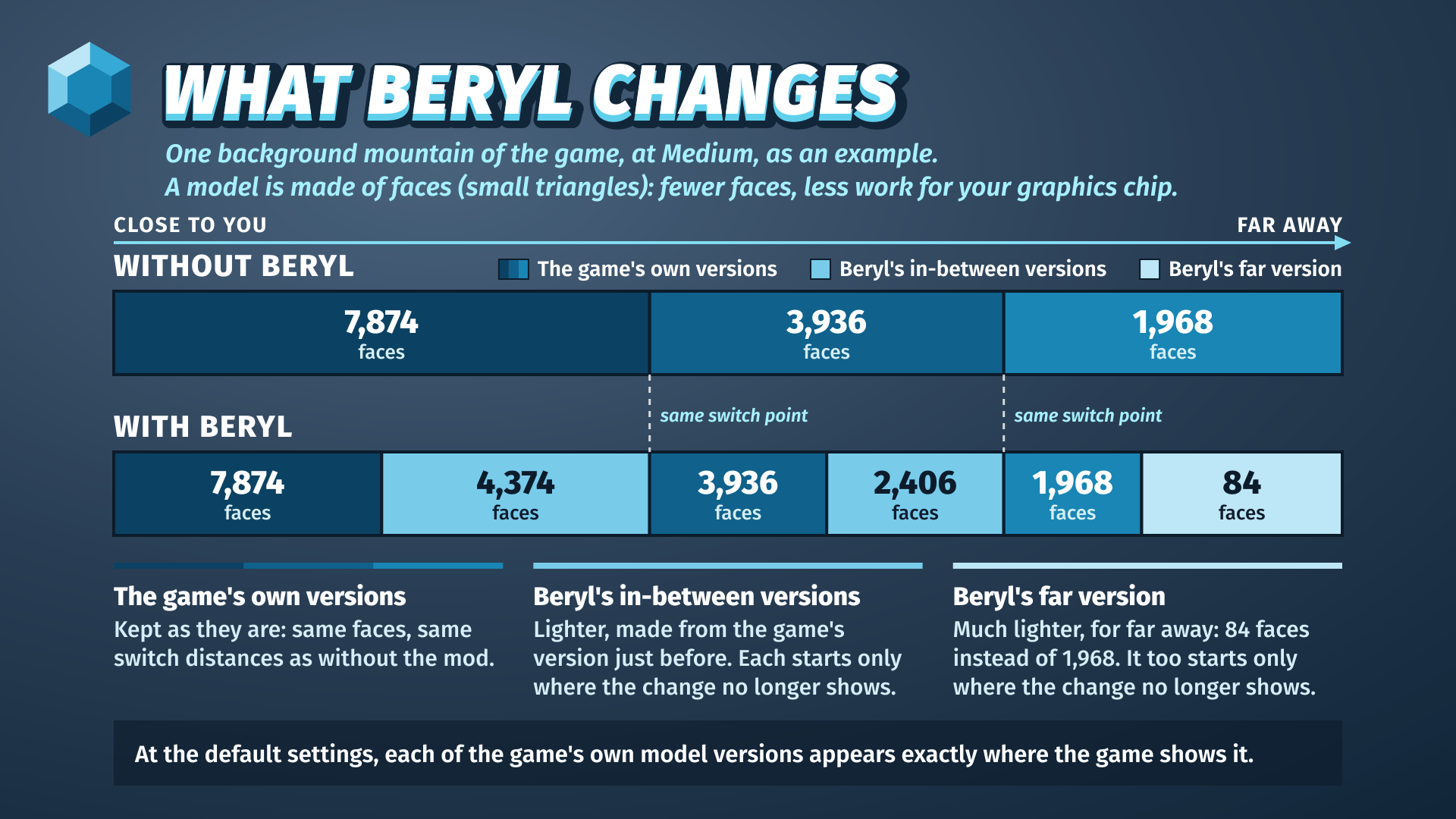
Most models in Palworld have a list of simpler versions, their levels of detail (LODs), that the game swaps in as the model gets further away. Beryl keeps the game's own versions and adds lighter ones of its own between them, only where the change no longer shows. It covers the trees, the cliffs and mountains, many rocks, the terrain and the grass. It also gives you settings in the game's own Graphics menu to decide where those steps happen.
At the default settings, each of the game's own model versions appears exactly where the game shows it, and Beryl runs at about the same speed as the game.
What Beryl changes
Your settings
The game and Beryl, side by side
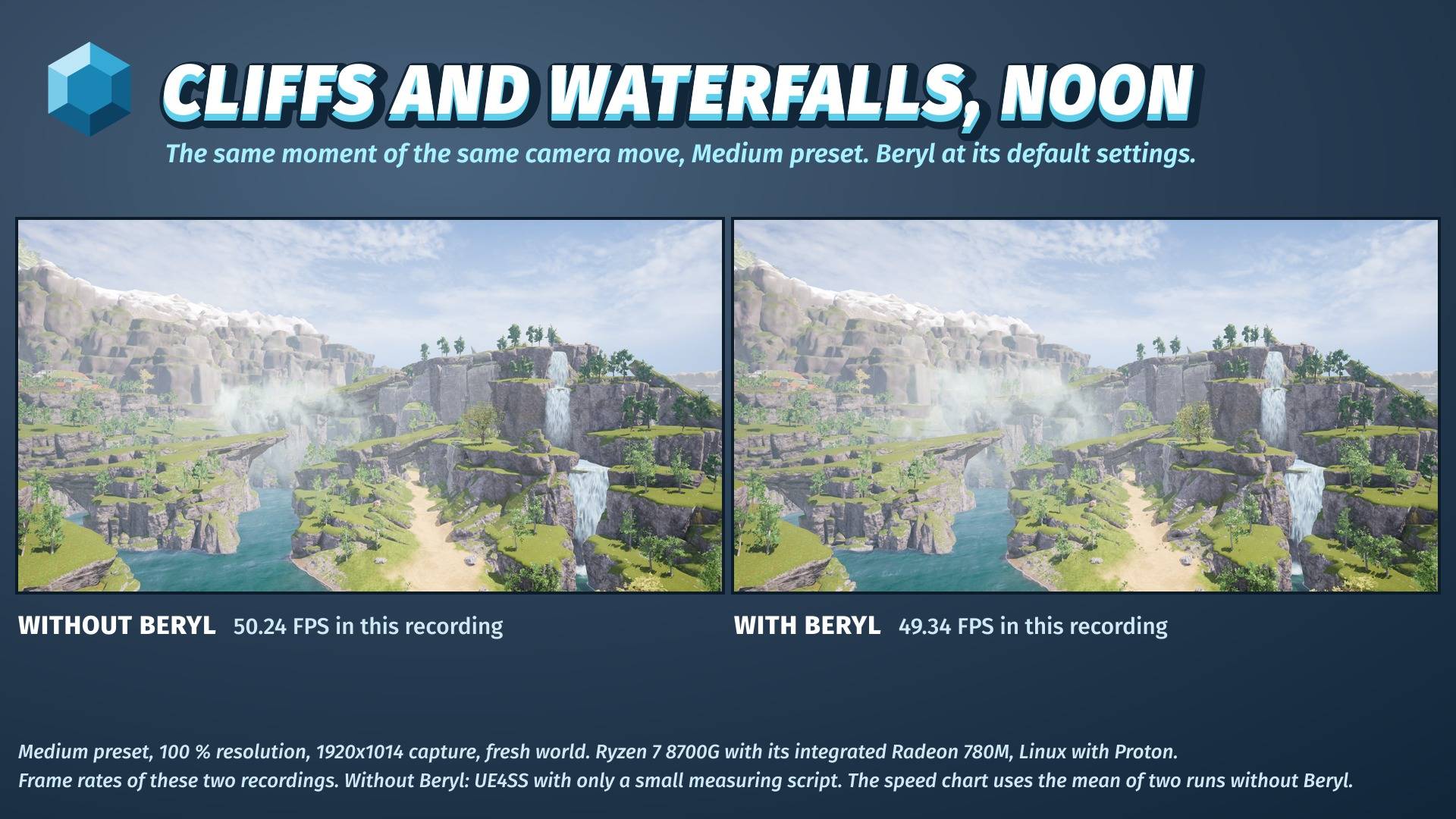
Same place, same camera, same Medium preset. Left: the game without Beryl. Right: Beryl at its default settings.
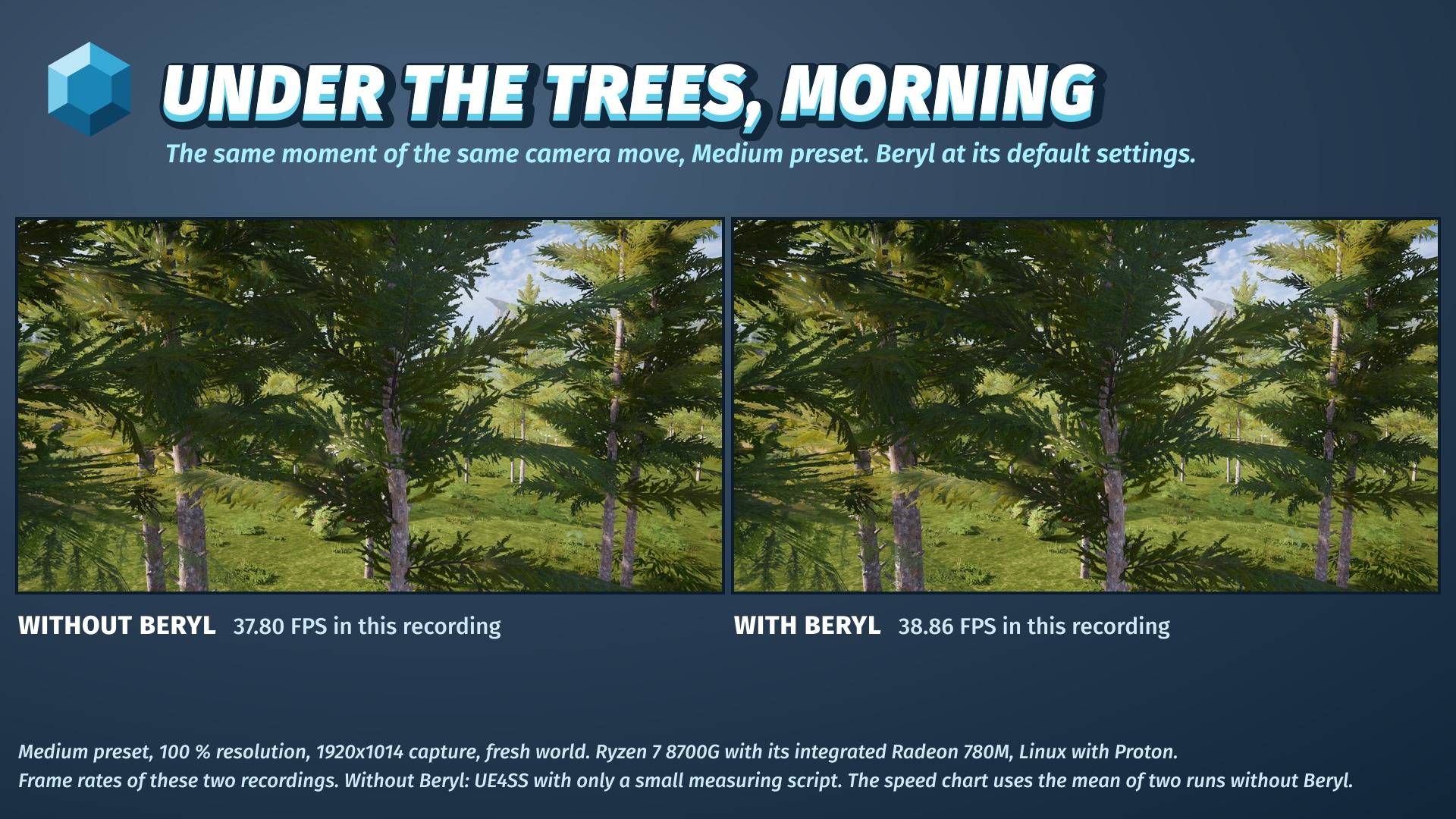
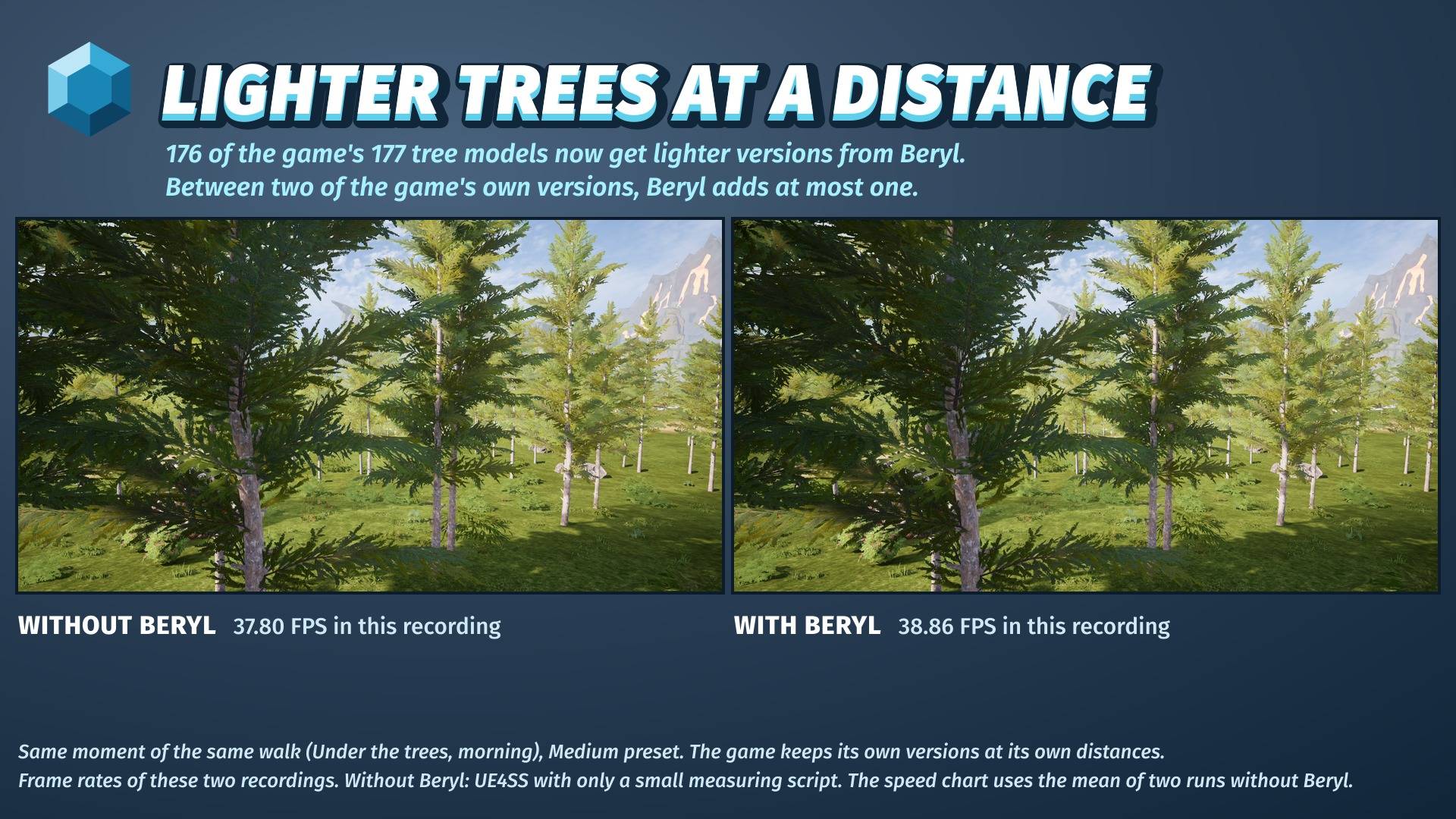
Trees
Performance
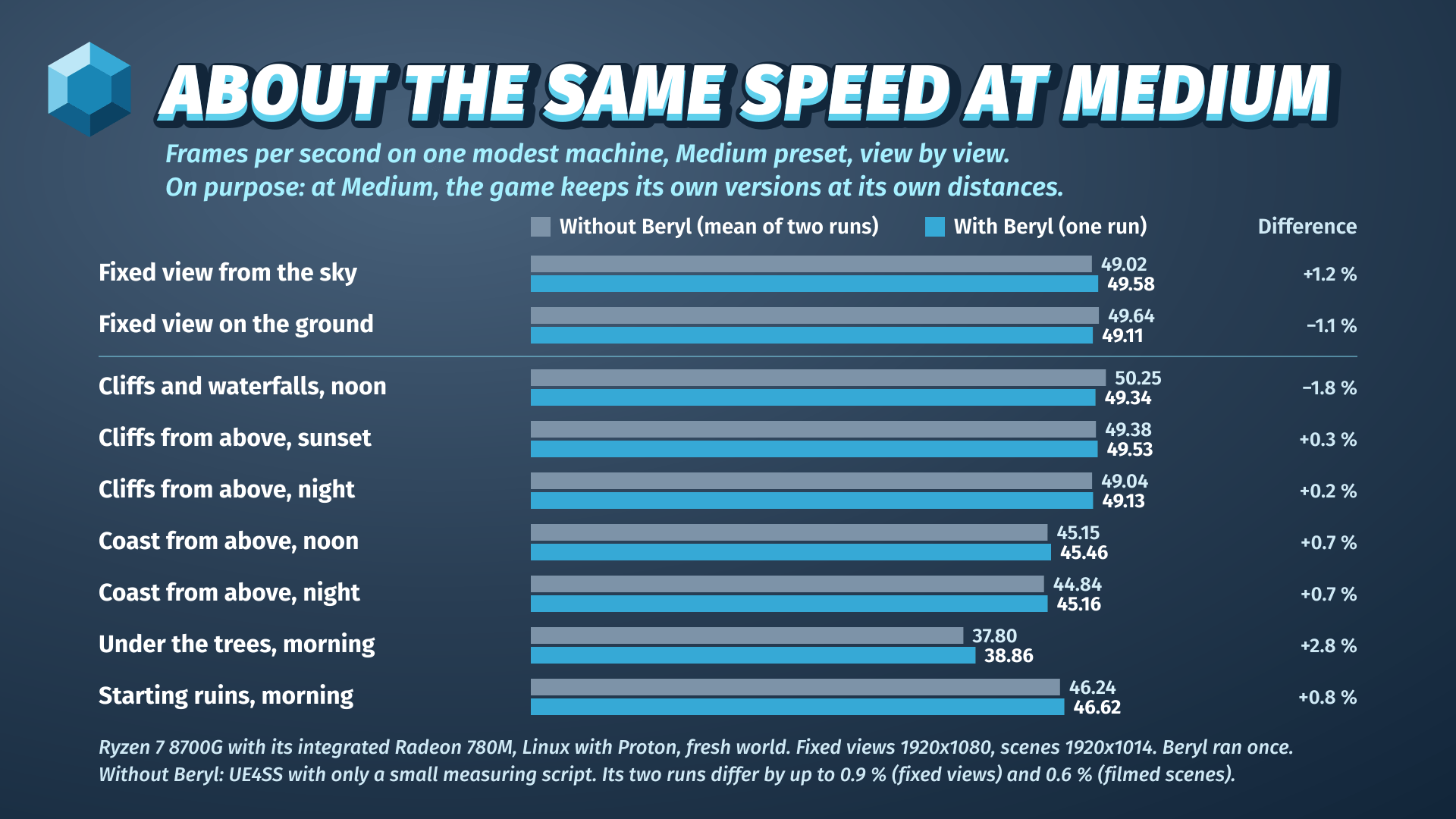
Measured on one machine (Ryzen 7 8700G with its integrated Radeon 780M, Linux with Proton; graphics chip busy 99 % of the time), Medium preset, on a fresh world. Frames per second: the game without Beryl (UE4SS with only a small measuring script; average of two runs, one before and one after Beryl), then Beryl 0.3.1, with the module, at the default settings.
- Fixed view from the sky: 49.02, then 49.58 (+1.2 %)
- Fixed view on the ground: 49.64, then 49.11 (-1.1 %)
- Cliffs and waterfalls, noon: 50.25, then 49.34 (-1.8 %)
- Cliffs from above, sunset: 49.38, then 49.53 (+0.3 %)
- Cliffs from above, night: 49.04, then 49.13 (+0.2 %)
- Coast from above, noon: 45.15, then 45.46 (+0.7 %)
- Coast from above, night: 44.84, then 45.16 (+0.7 %)
- Under the trees, morning: 37.80, then 38.86 (+2.8 %)
- Starting ruins, morning: 46.24, then 46.62 (+0.8 %)
At the default settings, Beryl 0.3.1 runs at about the same speed as the game. View by view, the difference goes from -1.8 % to +2.8 %. The two runs of the game without Beryl differ by up to 0.9 % in the fixed views and 0.6 % in the filmed scenes, and Beryl ran once. This is by design: at Medium, the game keeps its own model versions at their own distances. Lower Detail Distance and View Distance steps are lighter; they are not measured here.
These runs were made just before a last fix in 0.3.1: the lighter versions whose shading did not match the game's are now left out. At Medium, this fix makes Beryl draw a little more like the game. It was not measured on its own.
No overall figure is claimed. The small gains listed for 0.1.0 to 0.3.0 do not apply to 0.3.1. Results on your machine may differ: please tell us what you see.
What it does
This version covers the trees, the cliffs and mountains, many rocks, the terrain and the grass. Most buildings, bushes and plants, and the far-away blocks of the world, are not changed yet.
- One rule for trees, cliffs, mountains and the new rocks. The game's own versions of a model are kept as they are: same shape, same switch distances. Between two of them, Beryl adds at most one lighter version, made from the game's version before it. It comes in only where the change no longer shows. Since 0.3.1, the game's own versions are no longer brought in sooner.
- Trees. 176 of the 177 tree models get lighter versions; the other one has a single version in the game. For trees that the game turns into a flat picture far away, one more light version usually comes before the picture. Trunks and branches keep their shape and never turn into flat cards. Each Beryl version must keep the outline of the game's version it replaces.
- Cliffs, mountains and rocks. Each lighter version starts only where it differs by 10 pixels or less from what the game shows, at Medium. Floating islands keep a round shape in the distance. Lighter versions whose shading did not match the game's are left out. 114 more rock models in 0.3.1: scree, ground stones, crystals, lava rocks and pillars.
- Smaller models. About 350 smaller models (decor rocks, rocky ground pieces, 12 stone building pieces, a few mining rocks, and a few bushes and flowers) keep the lighter versions they have had since 0.1.0, minus those left out for their shading, sometimes several between two of the game's versions: the one rule does not cover them yet.
- Oil platform. Since 0.1.0, the pieces placed on the oil platform (stairs, containers, lamps, the crane) disappear with the pillars that hold them. In the game, the pillars go away first at a distance and these pieces stay, floating over the ocean.
- Terrain. By default, Custom Terrain is off and the ground uses the light Low detail at every View Distance. Switch Custom Terrain on to choose how far the ground keeps its fine shape.
- Grass. Grass Distance is its own setting, separate from View Distance.
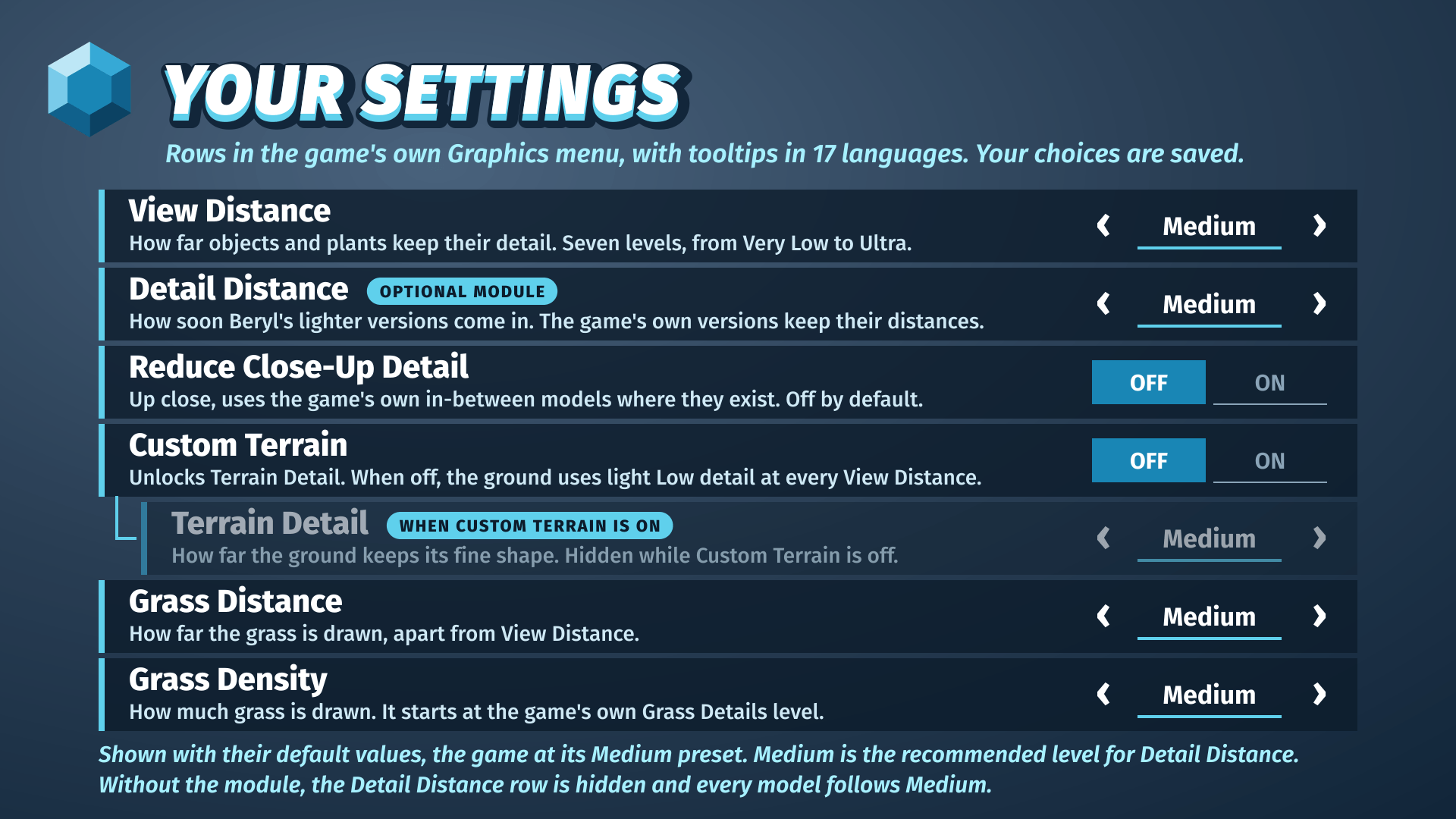
- Settings in the game's own Graphics menu. Beryl replaces the game's View Distance and Grass Details rows with its own View Distance and Grass Density rows, and adds Detail Distance (with the module), Reduce Close-Up Detail, Custom Terrain, Terrain Detail and Grass Distance. Tooltips in 17 game languages.
The settings
- View Distance: how far objects and plants keep their detail. Seven levels, Very Low to Ultra. Ultra keeps detail about three times further than Medium, mostly visible on trees; far-away mountains do not change. Heavy: for powerful graphics cards.
- Detail Distance (with the optional module): how soon Beryl's lighter versions come in. The game's own versions keep their distances at every level. Six levels, Very Low to Epic. Medium is the recommended level. Without the module, the row is hidden and Medium applies.
- Reduce Close-Up Detail: up close, uses the game's original intermediate models where they exist. Off by default.
- Custom Terrain and Terrain Detail: Custom Terrain is off by default, and the ground then uses the light Low detail at every View Distance. Switch it on to show Terrain Detail: how far the ground keeps its fine shape.
- Grass Density and Grass Distance: how much grass, and how far it is drawn. Grass Density starts at the game's own Grass Details level.
Your choices are saved in a small settings.ini file in the mod's folder.
Getting started
What you need
- Palworld on PC. Built and tested on v1.0.5.102999 (Steam build 25246127).
- UE4SS Experimental (Palworld), Git SHA 2281fa31, installed separately. It is not included.
- About 480 MB of free disk space.
Do not use mods on Pocketpair's official servers: the publisher does not allow it.
Two downloads
- Beryl (main download, needed): the Beryl folder and Beryl_P.pak. It has no compiled code.
- Detail Distance module (optional download): one small file, pk_s.dll, with its source code (also on GitLab). It brings back the Detail Distance row. Without it, Beryl works and every model steps down as at Detail Distance Medium, the recommended level.
Why two downloads? pk_s.dll is compiled code. It is offered as a separate, optional download, with its source code, so the main download has none.
Install
All paths below are inside the Palworld game folder.
- Close Palworld. Install UE4SS Experimental (Palworld) if you do not have it. Use only one copy of UE4SS.
- Copy the Beryl folder into your UE4SS Mods folder: Pal/Binaries/Win64/ue4ss/Mods/ (installed by hand) or Mods/NativeMods/UE4SS/Mods/ (installed through the game's Workshop).
- Copy Beryl_P.pak into Pal/Content/Paks/~mods/ (create the folder if it is missing). Do not rename it.
- Optional: copy pk_s.dll from the module into that Beryl folder, next to enabled.txt.
- Start Palworld and open the Graphics settings.
Coming from 0.2.0 or 0.3.0? Save settings.ini from the old Beryl folder, replace the Beryl folder and Beryl_P.pak together, then put settings.ini back. The old Beryl folder held pk_s.dll: install the module to keep Detail Distance. The full steps, with update and removal, are in INSTALL.txt inside the download.
Limits and testing
- Tested on one machine, on Linux with Proton. Native Windows is not verified. Other game or UE4SS versions are not verified.
- The mod does not check the game version. After any Palworld update, remove Beryl completely until a Beryl version names the new game version.
- Other mods that replace the same models can conflict. This is not tested.
- If the module cannot write the Detail Distance values, Detail Distance switches off and the other settings keep working.
- Known issue: at the default settings, seen from high above, some far-away shores can show a straight edge where the game draws a smooth beach. It probably comes from the light Low ground (Custom Terrain off); this is not verified yet.
- The .pak file contains modified copies of Palworld game files. Palworld and its game assets belong to their respective owners. Please follow Pocketpair's mod guidelines.
Share your experience
We would love to hear how Beryl looks and feels on your machine. Leave a comment in the Comments section of this page, share your experience or screenshots, or report a bug there so we can investigate and improve it. For bugs, please include your game and UE4SS versions, your settings, whether you use the module, what you expected and the steps to reproduce.
Made with OpenAI Codex and Claude under LeLorax's direction. Unofficial Palworld mod. Free to use; reuploads, published modifications and reuse require permission.
Optional tip jar: Ko-fi. Beryl is free and stays free.