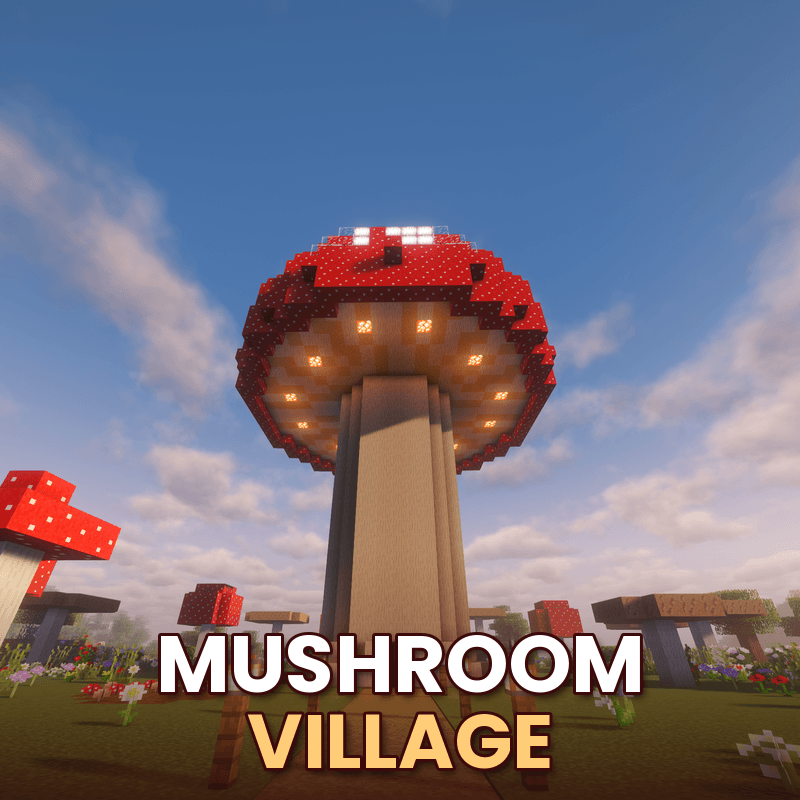
🍄 Mushroom Village — World + Schematic
Walk around the mushroom village in a ready-made world, or build it in your own world with the schematic.
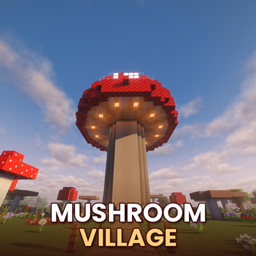
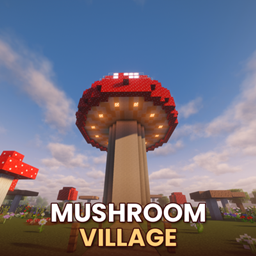
The world puts you on the lantern path in front of the giant mushroom, in creative mode, in a meadow full of giant red and brown mushrooms, flowers and a little pond. Go through the door, up the spiral stairs and into the four homes in the cap, then wait for the night to see it glow.
Size: 49 × 36 × 49 blocks with its grass island. The village itself is 3,682 blocks.
Play the world
- Unzip it into your saves folder (.minecraft/saves, or the saves folder of your CurseForge instance).
- Open the world Mushroom Village.
Build it with Litematica (survival)
- Copy mushroom_village.litematic from the world's schematics folder into your .minecraft/schematics folder.
- In game, press M → Load Schematics and pick it.
- Open the material list to see what you need, then build along with the hologram.
Paste it with WorldEdit (creative)
- Copy mushroom_village.schem into config/worldedit/schematics (or plugins/WorldEdit/schematics on a server).
- Stand where you want it and type
//schem load mushroom_village, then //paste -a.
Made in 1.20.1. The world and both schematics also open in newer versions; Minecraft, Litematica and WorldEdit update the blocks automatically.
Want mushroom villages to spawn in your worlds by themselves, with villagers, loot and sometimes mooshrooms? Get the Mushroom Village mod or data pack.
Made by Knowledge — @Knowledge_official on YouTube