🔥 PeakMC6725's Ultimate PvP Utilities
See more. React faster. Fight cleaner.
Tired of fire filling your screen while you're mid-fight? A shield or sword blocking your view? A black pumpkin overlay hiding everything? A huge totem popping up right in front of your opponent?
Yeah, those little visual distractions can get annoying, especially when every second matters.
PeakMC6725's Ultimate PvP Utilities combines handy visual improvements into one lightweight resource pack. It keeps Minecraft's familiar style while reducing visual distractions that can get in the way during PvP and Survival.
Whether you're fighting opponents, playing UHC-style PvP, exploring a Survival world, or simply looking for a cleaner first-person view, this pack brings several useful visual changes together in one place.
✨ Why Choose This Pack?
-
🎯 Clearer View: Reduce visual distractions that can obstruct your screen.
-
🎨 Vanilla-Style Visuals: Keep Minecraft's familiar look while making selected elements less intrusive.
-
⚡ Lightweight Design: Uses resource-pack changes and is intended to have minimal performance impact.
-
📦 Two Version Options: Separate downloads for Minecraft Java Edition 1.21.11 and newer, and Minecraft Java Edition 1.8.9.
-
🧩 Individual Features Available: Download standalone versions if you only want a specific visual improvement.
-
🎮 Client-Side: No server installation is required.
Choose the file that matches your Minecraft version when downloading.
The 1.21.11+ version includes four features: Low Fire, Low Shield, No Carved Pumpkin Blur, and Smaller Totem Pops.
The 1.8.9 version includes three features: Low Fire, Lower Sword Blocks, and No Carved Pumpkin Blur. Shields and Totems of Undying don't exist in Minecraft 1.8.9, so Lower Sword Blocks takes the place of the shield and totem features.
Prefer individual features instead of the complete pack? Standalone versions are available as separate projects by PeakMC6725.
✨ WHAT'S INCLUDED
🔥 1. Low Fire Overlay
<text>Available in: Minecraft Java Edition 1.21.11+ and 1.8.9</text>
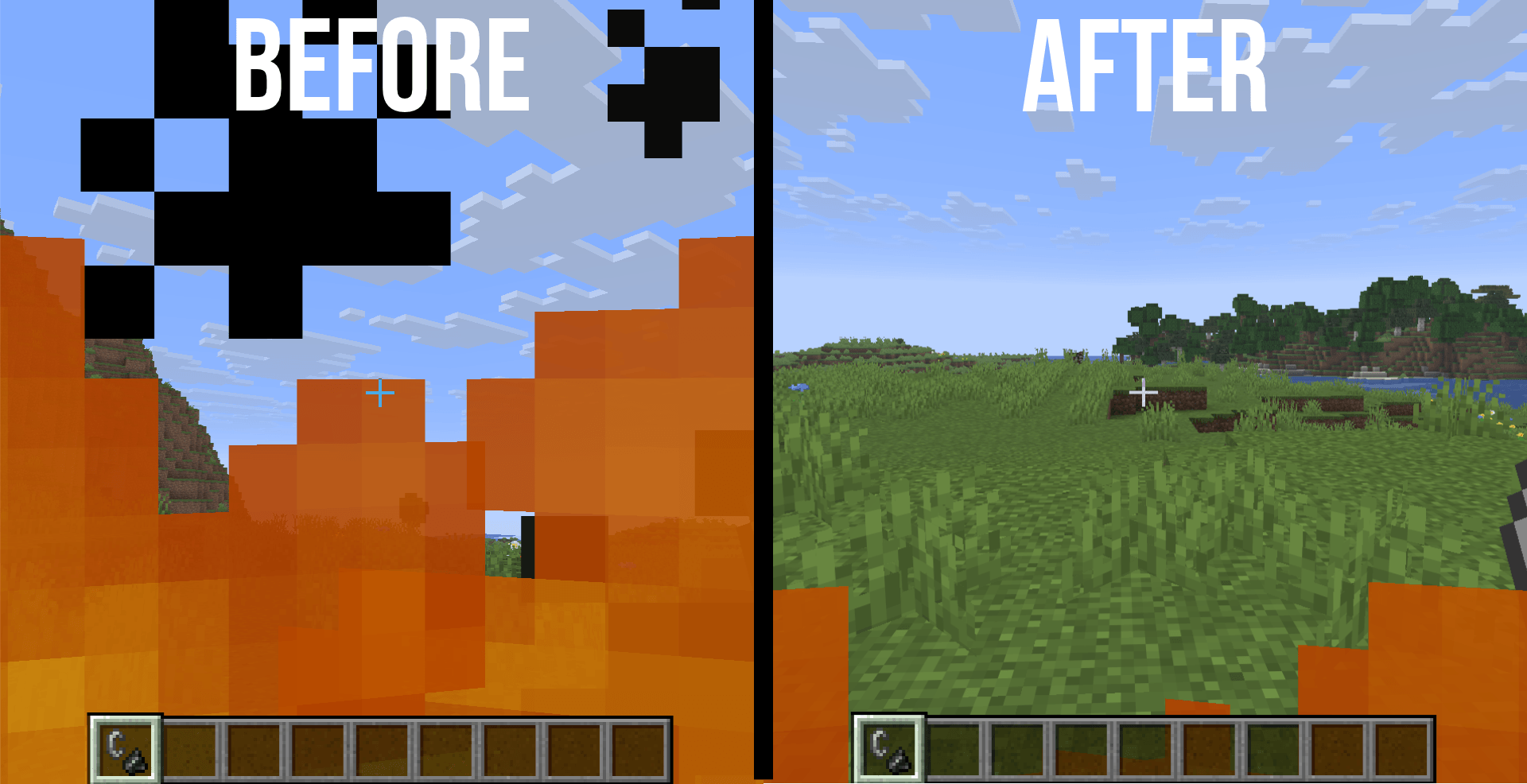
The problem: Vanilla fire can cover a large part of your screen when you're burning, making it harder to track opponents and see your surroundings.
The solution: Low Fire moves the first-person fire overlay down so the flames cover only the bottom part of your screen. You can still tell you're on fire while keeping more of your view clear.
Features:
-
Uses Minecraft's familiar flame appearance.
-
Keeps the normal fire animation.
-
Helps you see your surroundings while burning.
-
The exact visible fire height depends on your FOV setting.
-
Burning mobs and players may look a little different because some textures are shared.
Want only this feature? Get Low on Fire By PeakMC6725, the standalone version.
🛡️ 2. Low Shield
<text>Available in: Minecraft Java Edition 1.21.11+ only</text>
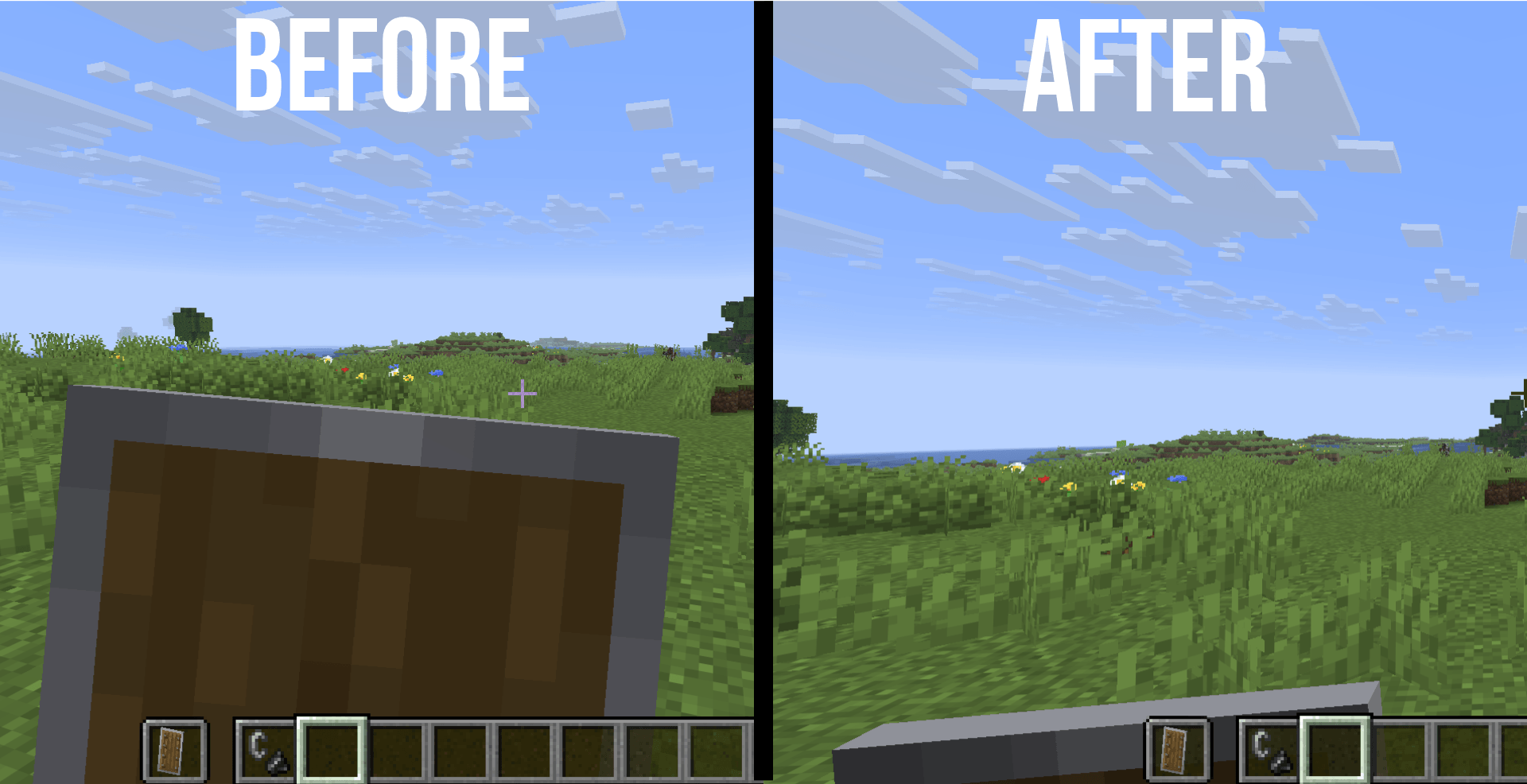
The problem: A shield held in first person can take up a lot of screen space and obstruct your view during combat, especially while blocking.
The solution: Low Shield moves the shield lower in first-person view, including when held in the main hand or off-hand and while blocking.
Features:
-
Keeps more of your central view clear.
-
Preserves normal shield functionality.
-
Shield banner patterns remain visible.
-
Third-person views and inventory appearance are intended to remain unchanged.
Want only this feature? Get Lower Shields By PeakMC6725, the standalone version.
⚔️ 3. Lower Sword Blocks
<text>Available in: Minecraft Java Edition 1.8.9 only</text>
The problem: In Minecraft 1.8.9, a sword held up while blocking takes up a lot of your screen. This can be distracting when you're trying to keep track of your opponent.
The solution: Lower Sword Blocks moves the sword lower in first-person view for all five sword types, helping keep more of your central view clear.
Features:
-
Keeps the sword visible, including while blocking.
-
Swords work exactly as they do in vanilla Minecraft.
-
Third-person view is intended to remain unchanged.
-
Designed specifically for the classic Minecraft 1.8.9 PvP experience.
Want only this feature? Get Lower Sword Blocks By PeakMC6725, the standalone version.
🎃 4. No Carved Pumpkin Blur
<text>Available in: Minecraft Java Edition 1.21.11+ and 1.8.9</text>
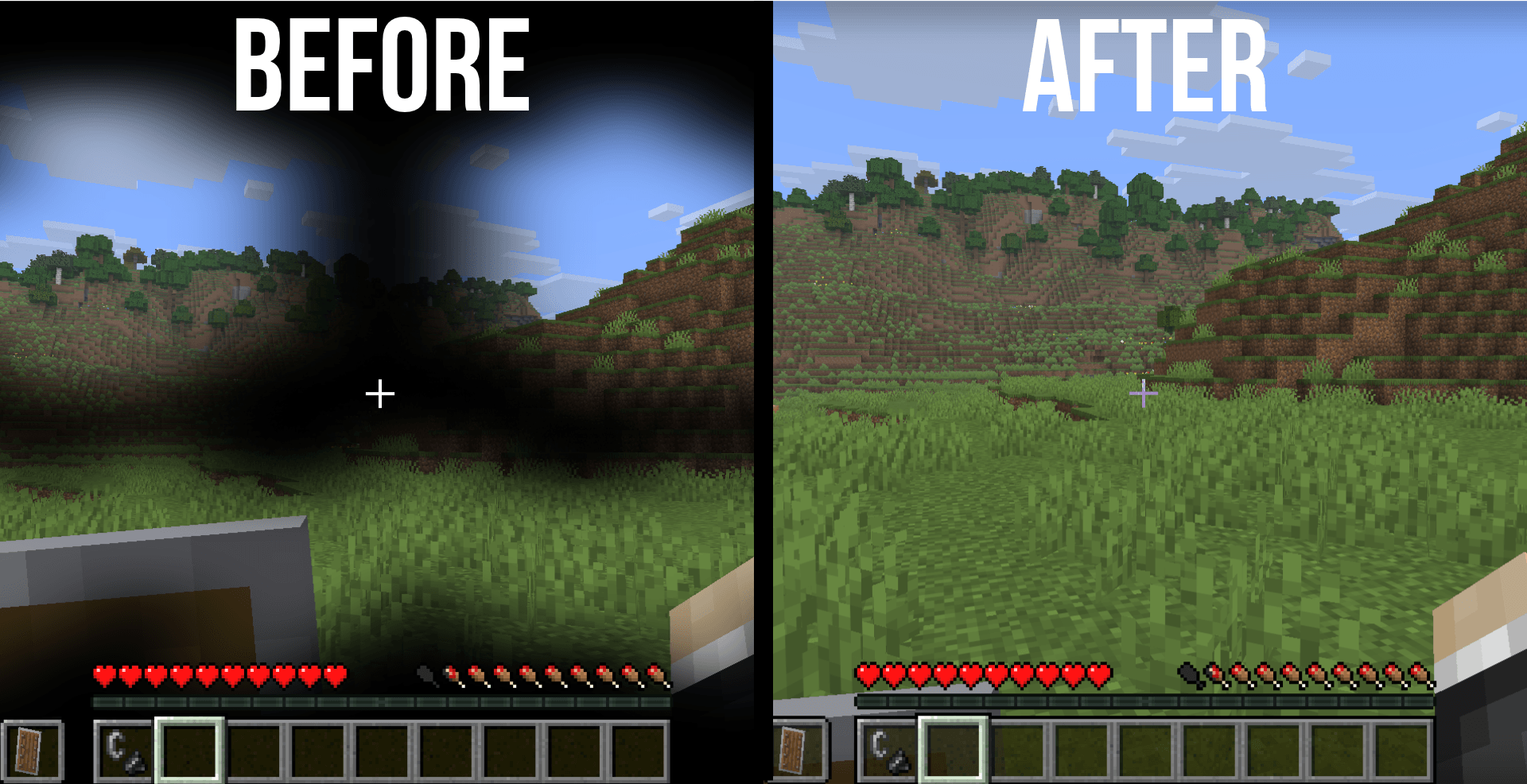
The problem: The dark carved pumpkin overlay can make it difficult to see while wearing a pumpkin, covering much of your view with a distracting border.
The solution: No Carved Pumpkin Blur removes the obstructive black overlay, leaving a clear view with only a faint edge.
Features:
-
Keeps the center of your view clear.
-
Carved pumpkins continue to work normally.
-
Only the overlay's appearance changes.
-
Provides a less obstructed view while wearing a carved pumpkin.
Important: Some servers and tournaments restrict clear pumpkin overlays. Check the rules before using this feature in competitive play.
Want only this feature? Get No Carved Pumpkin Blur By PeakMC6725, the standalone version.
💚 5. Smaller Totem Pops
<text>Available in: Minecraft Java Edition 1.21.11+ only</text>
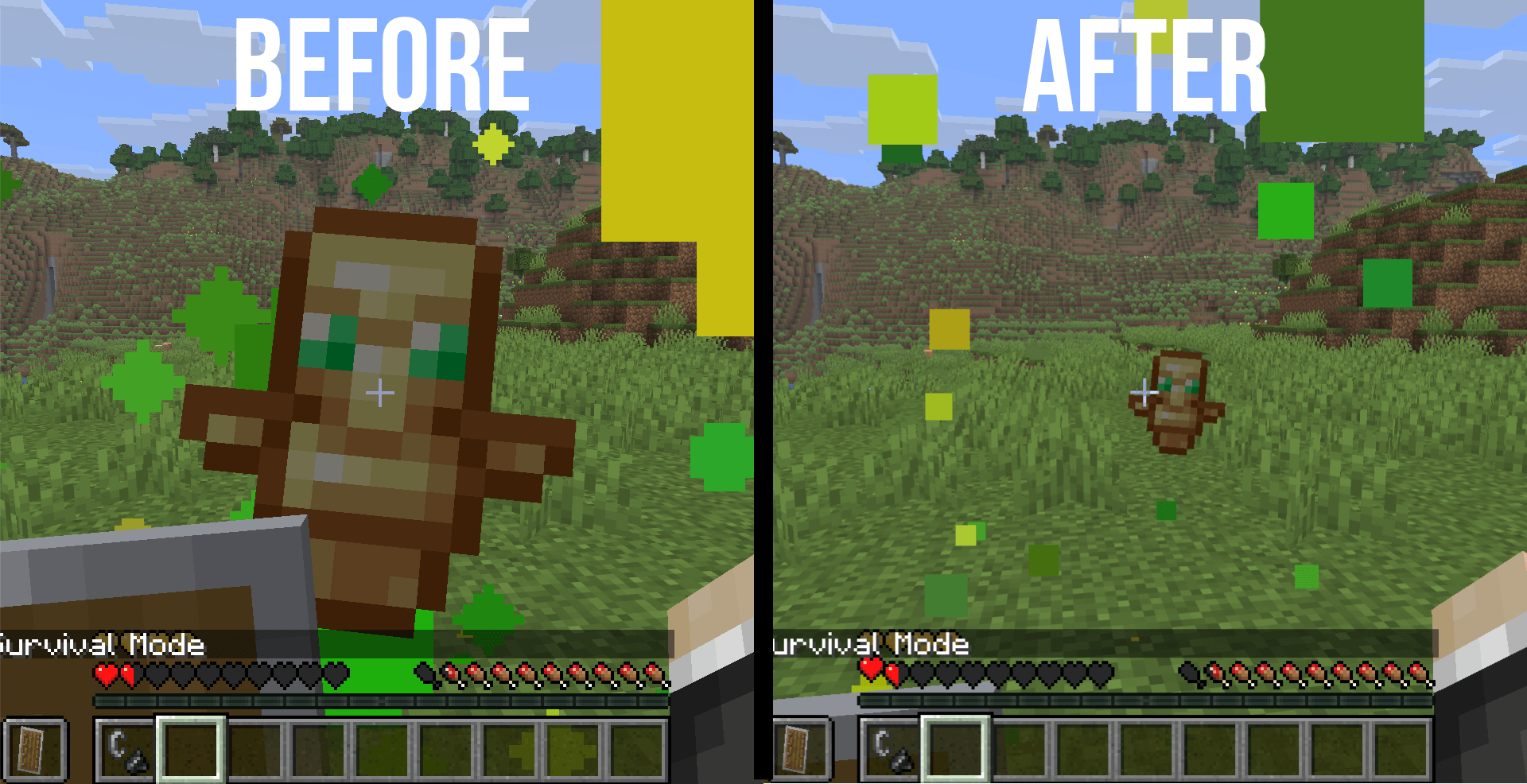
The problem: The large Totem of Undying activation animation and its particles can temporarily cover your view during an intense fight.
The solution: Smaller Totem Pops makes the totem pop smaller and its particles more compact, helping reduce the visual clutter around the activation animation.
Features:
-
Reduces the size of the floating totem animation.
-
Uses compact green and yellow particles.
-
Helps reduce visual clutter during combat.
-
Totems in item frames may also appear smaller because some display settings are shared.
Want only this feature? Get Smaller Totem Pops By PeakMC6725, the standalone version.
📦 WANT JUST ONE FEATURE?
You don't need the complete pack if you only want one specific change! Each feature has its own standalone project, so you can choose exactly what you need.
-
🔥 Low on Fire By PeakMC6725 — Lower first-person fire overlay.
-
🛡️ Lower Shields By PeakMC6725 — Lower first-person shield for Minecraft 1.21.11+.
-
⚔️ Lower Sword Blocks By PeakMC6725 — Lower first-person sword for Minecraft 1.8.9.
-
🎃 No Carved Pumpkin Blur By PeakMC6725 — Clear carved pumpkin overlay.
-
💚 Smaller Totem Pops By PeakMC6725 — Smaller totem activation animation and particles.
Search for these project names on my CurseForge profile to find their individual downloads.
One pack, multiple visual improvements — or just the feature you want. The choice is yours!
🎮 GAMEPLAY INFORMATION
PeakMC6725's Ultimate PvP Utilities focuses on visual changes rather than gameplay modifications.
-
Visual changes only: The pack changes selected textures and models, not the underlying game mechanics.
-
No gameplay-stat changes: Fire damage, blocking, pumpkin mechanics, and totem effects remain unchanged.
-
Client-side: Other players do not need to install the pack, and the server does not need to add it.
-
Lightweight design: Uses resource-pack changes and is intended to have minimal performance impact.
-
PvP and Survival: Intended for sword, axe, crystal and UHC-style PvP, mini-games, and everyday Survival.
-
FOV matters: The visible fire height depends on your field-of-view setting.
-
Server rules matter: Check the rules of competitive servers and tournaments before using visibility-changing features.
The goal is simple: keep the Minecraft experience familiar while making selected visual elements less distracting.
🎮 COMPATIBILITY
-
Edition: Minecraft Java Edition.
-
Supported versions: 1.21.11 and newer, and 1.8.9.
-
Pack type: Client-side resource pack.
-
Minecraft 1.21.11+: Includes Low Fire, Low Shield, No Carved Pumpkin Blur, and Smaller Totem Pops.
-
Minecraft 1.8.9: Includes Low Fire, Lower Sword Blocks, and No Carved Pumpkin Blur.
Other versions are not officially supported, and compatibility is not guaranteed. Make sure you select the correct download for your Minecraft version.
🛠️ INSTALLATION INSTRUCTIONS
Getting started is simple! Follow these steps to install the resource pack.
-
Download the correct file: Choose the .zip file that matches your Minecraft version.
-
Keep it zipped: Do not extract or unzip the downloaded file.
-
Open Minecraft: Launch Minecraft Java Edition.
-
Open Resource Packs: Navigate to Options → Resource Packs.
-
Open the pack folder: Click Open Pack Folder.
-
Install the pack: Place the downloaded .zip file inside the folder that opens.
-
Enable the pack: Return to Minecraft and move the pack from Available to Selected.
-
Apply the changes: Click Done and let Minecraft load the resources.
That's it! Your selected visual improvements should now be active.
🎨 Using Other Resource Packs?
If you're using multiple resource packs, their order can affect how the game looks.
-
Packs higher in the list override packs below them when they modify the same files.
-
Place this pack above other packs that modify the same textures or models.
-
If something doesn't look right after changing packs, press F3 + T to reload resources.
⚠️ Pack Not Showing or Showing a Warning?
Try these checks before reporting a problem:
-
Make sure the downloaded file is still a .zip and has not been unzipped.
-
Confirm that the file matches your Minecraft version: 1.21.11 or newer, or 1.8.9.
-
Check the resource-pack list to make sure the pack is enabled.
-
Move the pack above other packs that modify the same files.
-
Reload resources with F3 + T.
Compatibility warnings may appear on other Minecraft versions. Since those versions are not officially supported, compatibility is not guaranteed.
🔮 POSSIBLE FUTURE UPDATES
Have ideas for making the pack even better? Here are some features being considered for future versions!
These are ideas under consideration, not confirmed additions. Their implementation depends on technical feasibility and player feedback.
⚔️ Weapon Visibility
-
Smaller Sword Textures: Reduce how much of the screen the weapon occupies during close combat.
-
Smaller Bows and Crossbows: Make drawn bow and crossbow models smaller to help keep the crosshair and peripheral vision clear.
✨ Particle & Effect Reduction
-
Reduced Critical-Hit Particles: Reduce visual clutter from critical-hit effects.
-
Reduced Explosion Effects: Make explosions less visually distracting.
-
No Enchantment Glint: Reduce or remove the purple glint on enchanted items.
🖥️ Menu & GUI Transparency
-
Transparent Inventory: Make the inventory interface transparent.
-
Transparent Chest GUIs: Apply a transparent appearance to chest interfaces.
-
Transparent Shulker GUIs: Explore transparency options for shulker box interfaces.
Some GUI changes may have technical limitations and are not guaranteed to be possible.
Have an idea for a future feature? Share it in the comments! Your suggestions can help shape the direction of future updates.
🐞 BUGS & SUGGESTIONS
Found something that looks wrong, or is one of the features not behaving as expected?
Please leave a comment on the project page. To help identify the issue, include as much of the following information as possible:
-
Minecraft version: For example, 1.21.x or 1.8.9.
-
Affected feature: Fire, shield, sword, pumpkin, or totem.
-
Screenshot: Include one if possible.
-
FOV setting: Especially useful for fire-related issues.
-
Other resource packs or mods: Mention anything else you are using that could affect textures or models.
🔧 Things to Try First
Before reporting an issue, try the following:
-
Move this pack above other packs that modify the same files.
-
Press F3 + T to reload resources.
-
Confirm that you downloaded the correct file for your Minecraft version.
-
Check that the pack is enabled in the Resource Packs menu.
If the problem persists, leave a comment with the details above.
Feedback, bug reports, and suggestions are always welcome!
💬 QUESTIONS & FEEDBACK
Have a question about the pack? Want to suggest a feature? Simply want to share your experience?
-
Ask questions in the comments.
-
Leave a rating or comment if you enjoy the pack.
-
Tell me which feature you like the most.
-
Share suggestions for future improvements.
-
Let me know if you encounter any compatibility issues.
Every bit of feedback is appreciated and helps guide future improvements to the pack.
👤 CREATED BY
PeakMC6725
A Minecraft creator making resource packs and datapacks for the community.
Thanks for checking out PeakMC6725's Ultimate PvP Utilities!
Whether you're using the full pack or just one of its standalone features, I hope it makes your Minecraft experience a little cleaner and more enjoyable.
See more. React faster. Fight cleaner. ⚔️🔥