📍FOR VISUAL INFO PLEASE GO TO GALLERY.
🐾 Complete the look with the Panthera Pack.
This pack restyles the interface. Pair it with the Panthera Pack, which recolors your tools, weapons and armor, so your items match the jungle-explorer theme too.
They change different textures, so you can use both at the same time without conflicts. Just enable both in Options → Resource Packs.
🧱 Want More?
Try Jaguar Explorer UI – 3D. It has everything in this pack, but every work block and container becomes its own 3D scene.
🐆 Jungle Explorer UI
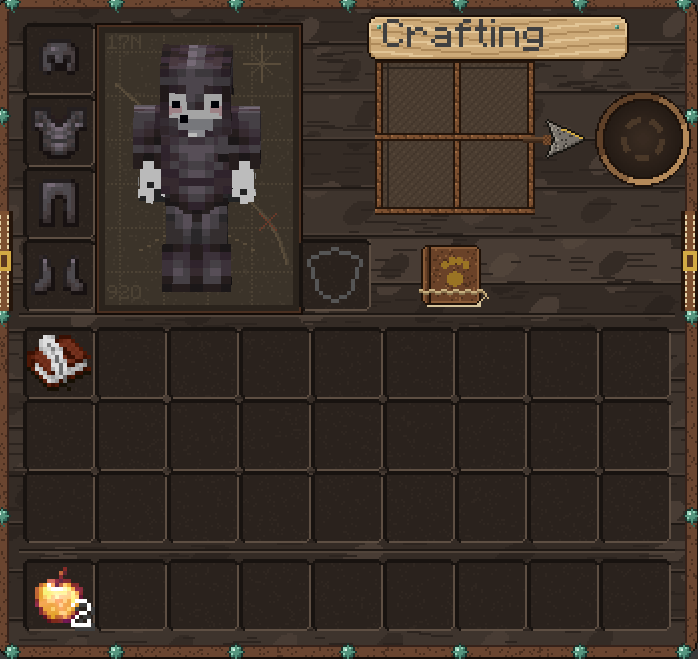
Jungle Explorer UI turns Minecraft's whole interface into a jungle explorer's kit. It uses dark matte tropical wood, carved wooden plaques, vines, paw prints and jaguar details everywhere. Everything is hand-made pixel art at 2× resolution (32×32 per GUI unit), so it stays sharp on any GUI scale.
The pack covers the HUD, every inventory and container, every work block, the recipe book, all buttons and widgets, and the menus, including multiplayer and Realms.
❤️ HUD
Health
- Hearts shaped like jaguar paw prints
- Hardcore hearts: darker paws with small claws and a three-line claw slash
- Every heart state is restyled: poisoned, withered, frozen, absorption (golden hearts) and their hardcore versions
- Blinking (damage) frames for every state
- Mount health hearts (horses and other rideable mobs)
Other bars
- Armor shown as skulls (full, half and empty)
- Hunger shown as meat chops, with a separate look for the Hunger effect
- Air shown as droplets, including the bursting animation
- Experience bar with a jaguar head on the right and its tail on the left
- Jump bar (horses) with tiger-stripe fill and cooldown state
- Locator bar with matching striped style
Hotbar
- Hotbar wrapped in jungle vines
- Selector shaped like a jaguar's open jaws
- Offhand slot (left and right)
- Attack indicator on the hotbar
🎒 Inventories & containers
- Player inventory: survival inventory with the 2×2 crafting grid
- Creative inventory: every tab (top and bottom, selected and unselected), the Survival Inventory tab, the Search tab, the item tabs and the scrollbar
- Chests: single chest, large chest, ender chest, barrel and minecart with chest (they all share the same screen)
- Shulker boxes (all colors)
- Hopper (and hopper minecart)
- Dispenser and dropper
- Horse, donkey, mule and llama inventory, including the chest slots
- Nautilus inventory
- Shared slot sprite used across containers
- Game mode switcher (F3 + F4)
🛠️ Work blocks
Each one has its own carved-wood design, with progress bars and buttons themed to match:
- Crafting Table: carved panther face and claw marks
- Furnace: three glowing claw slashes as the smelting progress, plus a themed fuel flame
- Blast Furnace: its own progress and fuel indicators
- Smoker: three cuts of meat on a rod that turn from raw to smoked as they cook
- Brewing Stand: themed brewing progress, bubbles and blaze-fuel bar
- Enchanting Table: restyled enchantment option buttons (normal, highlighted and disabled) and level 1/2/3 icons
- Anvil: themed rename text field (normal and disabled) and error mark
- Smithing Table: with its error mark
- Grindstone: with its error mark
- Stonecutter: restyled recipe buttons (normal, highlighted and selected) and scrollbar
- Loom: restyled pattern buttons, scrollbar and error mark
- Cartography Table
- Crafter
- Beacon: restyled power buttons (normal, highlighted, selected and disabled) plus confirm and cancel buttons
- Villager trading: restyled trade arrows (including out of stock), discount strikethrough, villager XP bar and scrollbar
📖 Recipe book
- Complete recipe book panel
- Category tabs (normal and selected)
- "Show craftable only" filter for the crafting table and the furnaces, with every state
- Page arrows
- Recipe slots in all four states: craftable, uncraftable, and multi-recipe versions of both
- Crafting and furnace overlays for alternative recipes
- Recipe book button (normal and highlighted)
🔘 Buttons & widgets
All in carved tropical wood, and they stretch to any size cleanly:
- Buttons: normal, highlighted and disabled
- Sliders and slider handles
- Checkboxes: every state
- Text fields: normal and highlighted, plus the text-input preview
- Tabs: normal, highlighted, selected and selected + highlighted
- Scrollbars and their track
- Lock / unlock buttons (difficulty lock)
- Close (X) buttons
- Page arrows for books and lists
- Popup windows background
🖥️ Menus
- List background: jungle soil with small paw prints and pebbles. It shows behind world, server, resource pack, language and option lists, both on the main menu and in-game.
- Header and footer separators, in the main menu and in-game
- Book screen: reading and writing books (book and quill, written books)
- Singleplayer world list: play buttons
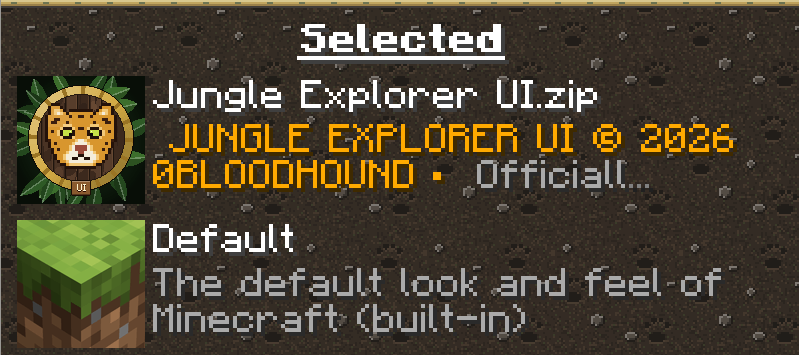
- Resource pack and data pack screen: select, unselect, move up and move down arrows
- Option, video, controls and other settings screens all use the new widgets and list background
🌐 Multiplayer & Realms
- Server list: join buttons, move up / move down arrows
- Connection strength icons and the pinging animation, plus the unreachable server icon
- Player list ping icons
- Social Interactions screen background
- Friends panel: background, buttons and accept / reject buttons
- Realms invitations: accept and reject buttons
🌍 Works in any language
Screen titles are drawn by the game itself on top of wooden plaques. This pack doesn't paint the text, so it works with every language.
🚫 Not included (stays vanilla)
- Title screen, panorama and logo
- Toasts (popups like "Recipe unlocked")
- Advancements screen
- Sign editing screen
- Boss bars
- Potion effect icons
- Crosshair
- Tooltips
- Bundles
- Ghost icons inside empty slots (armor, smithing template, etc.)
📦 Installation
- Download the .zip file. Don't unzip it.
- Put it in your .minecraft/resourcepacks folder.
- In game, go to Options → Resource Packs and move it to the right side.
Minecraft version: Java Edition 26.2+ (tested on 26.3) Mods required: none
⚠️ IMPORTANT:
DO NOT RE-UPLOAD, REDISTRIBUTE, MIRROR, REPACKAGE, OR CLAIM THIS RESOURCE PACK AS YOUR OWN.
You may use this resource pack for personal use, multiplayer servers, videos, streams, screenshots, and other content.
Content Creator Permission
Content creators are permitted to showcase, review, recommend, stream, or feature this resource pack in videos, livestreams, screenshots, social media posts, and other publicly shared content.
Creators may link to the official CurseForge project as the download source.
Creators may not re-upload, mirror, redistribute, or provide alternative download links for the resource pack or its original files.
The official CurseForge project should be used as the download source whenever possible.
Credit to 0BLOODHOUND is appreciated when featuring the resource pack.

Original distribution: CurseForge
Copyright © 2026 0BLOODHOUND. All rights reserved.
Original Hash for JUNGLE EXPLORER UI ZIP: 52B113CED29F65F5577F8822BF8327108AD7132ED680C9CE1B086651ECDD09DC