


Elil_pack
This modpack dramatically changes a lot of minecraft mechanics, spanning from character movements and fighting styles, to building expressivity and villagers mechanics. Experience points are overhauled and exploration is more interactive.
Physics mod pro needs to be downloaded manually by users, as per the mod's author will. It is free and you can find it here. I included in this modpack, just the configs I use.
Starter Kit
When you spawn in the world you'll have 4 torches, a bed, a toolbelt (you need to equip it in the belt slot of curios api) and a backpack (you need to press Ctrl+E to open the backpack menu). The toolbelt is filled with items I thought were important to interact with the mods I added: I suggest to look into them.
Important overhauls
- Check flowing fluids mod. In order to create long working aqueducts you need to load chunks: you can use create: power loader which interacts with create mod.
- When logging in a world for the first time, you need to fill some character information. They'll be only used by your offsprings, if you want to engage with the marriage feature of MCA: Reborn mod. I added this mod mainly for the village ruling and expansion features, which I suggest you to check.
- Parcool and Epic fight mod overhaul your movements and fight styles. Epic Fight: Skill Tree changes epic fight skills and makes them avaiable on a menu you can open by pressing L: Skills now consume skill points, which can be exchanged on the top right part of the menu, for experience points. You can see a fast rundown of parcool here. Parcool roll was disabled because you can do that as an epic fight skill.
- Food mechanics are overhauled in the following way:
- You permanently gain hearts if you eat a lot of different foods. In detail, you gain 1 heart for each milestone (10,20,40,80... different food eaten). Check the SOL: carrot edition book in the starting kit toolbelt.
- Each food has a different nutrition value (from about 0 to about 5). The game remembers the last 32 foods you ate, and sums the nutrition value of all the different foods (duplicates are not counted) in such a way that food closer to 5 are counted much more than the others. This incentivies players to prefer nutritious food to junk. This nutrition system has threshold that rewards you with benefits for as long as you reach an higher value. They are specified in the SOL: apple pie edition book in your starting kit toolbelt.
- In order to reduce this food system complexity, you may check the lunchbag in your starting kit toolbelt. You can eat directly from it by placing food inside. It will pick the best food - among the ones you placed in - to increase your nutrition value. There are several grades of lunchbag with different number of food slots: the one you start with is of the lowest grade.
Default keybinds
You can always change keybinds to your preferences, but I spent a lot of hours to make a sense out of all the different mods I introduced: even if you change somethings, you can always use this as a starting point.
Left Hand Keybinds
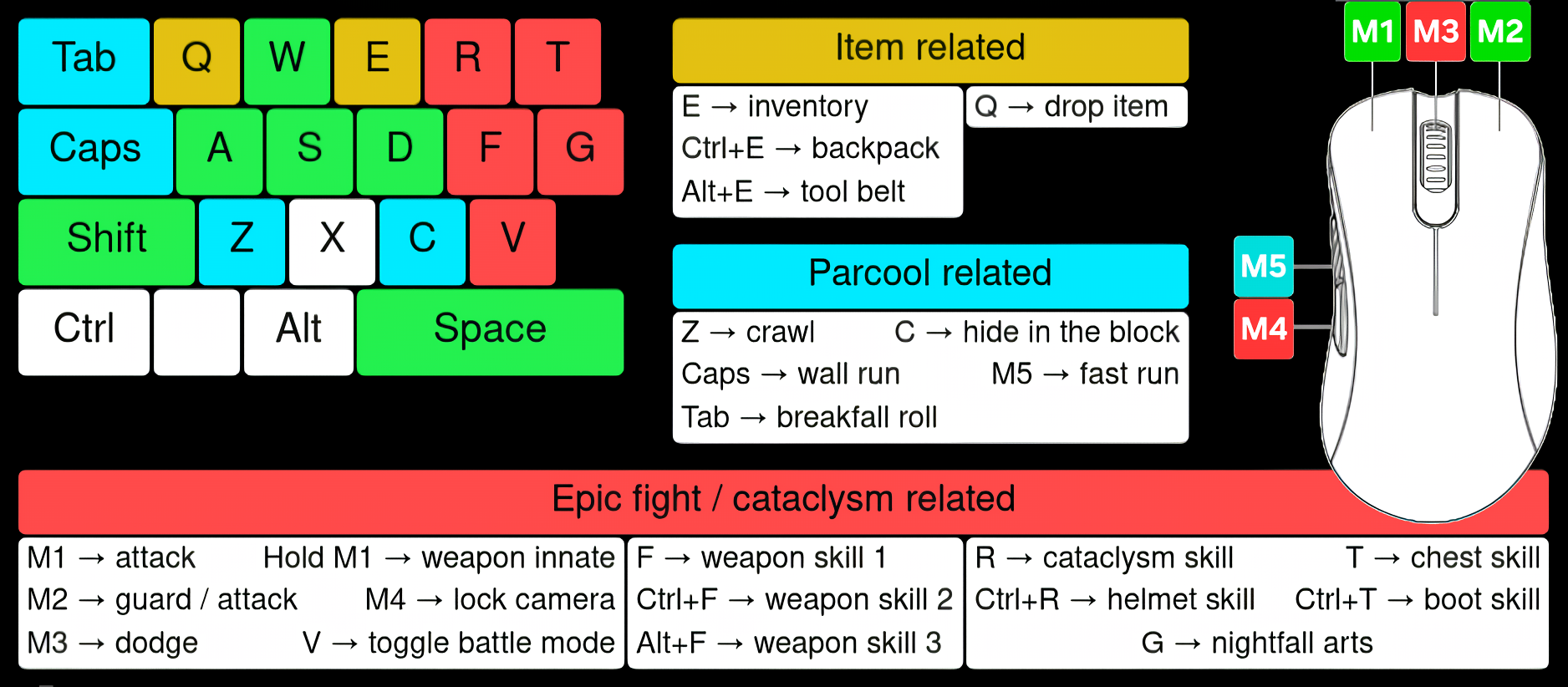
Right Hand Keybinds
Y: chat, L: epic fight skill tree, M: world map, K: advancements.
You can find the pondering feature of Create, which lets you see how to build contraptions, by pressing the goggles icon on the menu.
It's better to assign Effortless Building radial menu and modifier menu keybinds, to whatever key you have over Tab. This key depends on your language: I play with italians, so I assigned them to \ and |. You can change them by yourself: I expect americans would use ` and ~.
Other Important mods
Among over 250 mods, we can sum up the most important ones as it follows:
- Multiplayer:
• Essential - Fauna exploration:
• Araxer's Bestiary: this mod works by using the omonimous book in your toolbelt: it is a bestiary filled with informations about mobs you interacted with. Higher the grade of interaction, more information will show up. One way to interact is by using the binoculars, placed in your starting toolbelt.
• Starcatcher: this mod works by using the starcatcher fishing rod and the omonimous book, both in your starting toolbelt - Movement:
• Small Ships: https://youtu.be/5DC_QfUuB9I?si=zARTSsdZLWHpWPon
• Ornithopter glider (uses curios back slot. Press space when already in air)
• Aileron (changes elytra behaviour)
• Gravestone mod: https://www.curseforge.com/minecraft/mc-mods/gravestone-mod
• Xaero's World Map (open with M, you can add waypoints to annotate on the map points you want to see at a glance.)
• Waystones (teleportation "gates") - Building:
• Effortless building: https://youtu.be/NUuWzrFNrUo?si=mhyCkOdly_oQXYxt
• Building but better:https://youtu.be/obfbftBwscY?si=aSinqJBh0TeuhcKg
• Redstone pen
• Create
Some examples:
Tree farm (without sapling deployers):
https://youtu.be/sbFWYgmenXA?si=hPlCv_QQgTSctWv1
Iron farm:
https://youtu.be/t_bf0PjHIF0?si=ZHItAf_lShBlnLbZ
Drilling cart:
https://youtu.be/DLHWvjB_BFM?si=-kFyPcA9-jEs3G_X
If you want to use schematics, it is highly recommended to save schematics with Schematic And Quill, and easily previewing and building them through a schematicannon:
https://youtu.be/th-uSXuyD2Y?si=N3E-HsWFTG6ZYfPW
And if you want to place one schematic repeatedly, you actually can:
https://youtu.be/DSX_WnU0miE?si=G2kS7omx1R5AJCSj
- Storage:
• Tom's Simple Storage Mod: https://youtu.be/nW5ElcWiC3c?si=ILUFRiLYRg3saQrg
• Backpacked (backpacks do not use the curios back slot: they have their own)
• Storage Drawers: https://www.curseforge.com/minecraft/mc-mods/storage-drawers
• Tool Belt
- Quests:
• Realm RPG: Quests & Rewards (there is a chance for certain npcs to spawn in villages. You can ask them quests and they will reward you upon completion)
- Quality of Life:
• JEI + EMI (search symbols: ^ is color, % is creative tabs, @ mod name, $ ore dictionary, & resource ID, # tooltip)
• Mouse tweaks
• Crafting Tweaks
• Equipment compare (hold shift when hovering over the item)
• Tree harvester (hold shift when using an axe: https://www.curseforge.com/minecraft/mc-mods/tree-harvester. It works only for normal tree, not on the huge ones from tan's huge trees mod)
The mechanics that use experience points are epic fight skills (you convert experience points into skill points from the skill tree menu) and Backpacked features.
I suggest you to look a bit more in detail the mod you weapon comes from, because a lot of them have combos.
The Elil_pack Team
