ZoneInventory
- By
A complete inventory and survival overhaul featuring equipment slots, carry weight, backpacks, custom interfaces, thirst, stamina and exploration-focused gameplay.
2026-07-19_22.31.18.png
2026-07-19_22.31.51.png
2026-07-19_22.32.21.png
2026-07-20_04.53.45.png
2026-07-20_20.41.00.png
Description
⚠️ This is an early Alpha release. Features, mechanics and balancing are still under active development. Bugs and compatibility issues may occur. Feedback and bug reports are greatly appreciated.
💬 Official Discord Server
ZoneInventory has an official Discord server where you can:
- report bugs and crashes;
- attach logs, crash reports, screenshots, and videos;
- request compatibility with other mods;
- suggest new features;
- download intermediate development builds;
- follow announcements and known issues.
If you encounter a bug, please report it on the Discord server instead of sending a private message to the developer.
Before submitting a report, check the known issues channel and include your Minecraft, Forge, and ZoneInventory versions.
🔗 Join the Zone Mods Community Discord
ZoneInventory
ZoneInventory is a complete overhaul of Minecraft's inventory and survival systems, inspired by the atmosphere of the S.T.A.L.K.E.R. series, modern survival games, and exploration-focused shooters. The primary goal of the project is to make exploration more meaningful, turning every expedition into a unique adventure where preparation, equipment management, and resource planning are just as important as combat itself.
The mod completely replaces Minecraft's vanilla inventory with a custom equipment system built around carry weight, dedicated equipment and weapon slots, quick-access items, and redesigned interfaces for many of the game's core interactions. Every mechanic is designed to encourage thoughtful preparation while keeping the gameplay intuitive and enjoyable.
Although heavily inspired by the atmosphere of S.T.A.L.K.E.R., ZoneInventory is not intended to be a recreation of it. Many mechanics have been carefully redesigned to preserve Minecraft's identity while introducing a deeper, more immersive, and more rewarding survival experience.
The mod is primarily designed for players who enjoy zombie apocalypse, horror, and adventure modpacks, as well as custom maps featuring modern firearms, exploration, and scavenging. At the same time, every feature is designed to integrate naturally into vanilla-style survival, making ZoneInventory equally suitable for both immersive themed modpacks and traditional Minecraft gameplay.
The core philosophy behind the project is simple: not to make the game harder for the sake of difficulty, but to make every decision more meaningful. What should you bring on your next expedition? Is carrying an extra weapon worth sacrificing space for valuable loot? When is it time to return to your base? These small but constant decisions form the foundation of the gameplay experience, making every journey feel unique.
🔧Compatibility
Because ZoneInventory completely replaces Minecraft's inventory, HUD, and many vanilla interfaces, it is not compatible with mods that modify the same systems.
This includes, but is not limited to:
- Mods that replace or redesign the Inventory GUI.
- Mods that modify the HUD (health bars, hotbar, status overlays, etc.).
- Mods that replace vanilla workstation interfaces (crafting table, furnace, villager trading, and similar screens).
Mods that add new items, blocks, biomes, dimensions, mobs, or gameplay content are generally compatible, provided they do not replace the interfaces used by ZoneInventory.
Curent Compatibility
- Crafting Tweaks
- [TaCZ] Timeless and Classics Zero Guns (basic support)
- TaCZ Magazines
- LesRaisins Tactical Equipments
- Counter-Strike Grenades
- ParCool
- Flashier Flashlights
- First Aid
- Corpse
- Legendary Survival Overhaul (LSO)
If you experience graphical issues or missing interface elements, first check whether another installed mod modifies the game's inventory or HUD, as these are the most common sources of conflicts.
Note: ZoneInventory is currently in active development. Compatibility with additional mods will continue to improve in future updates.
⚠️ Warning
Uninstalling this mod may permanently delete items stored in player inventories.
Before removing the mod, transfer all your inventory items into chests or other storage.
Inventory Overhaul
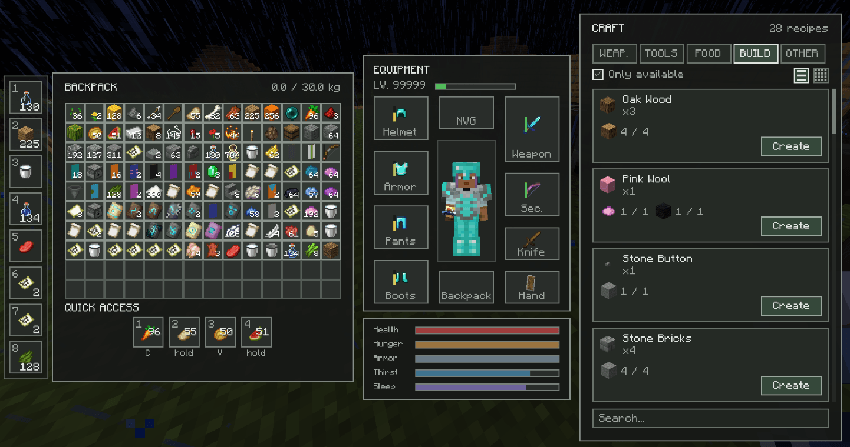
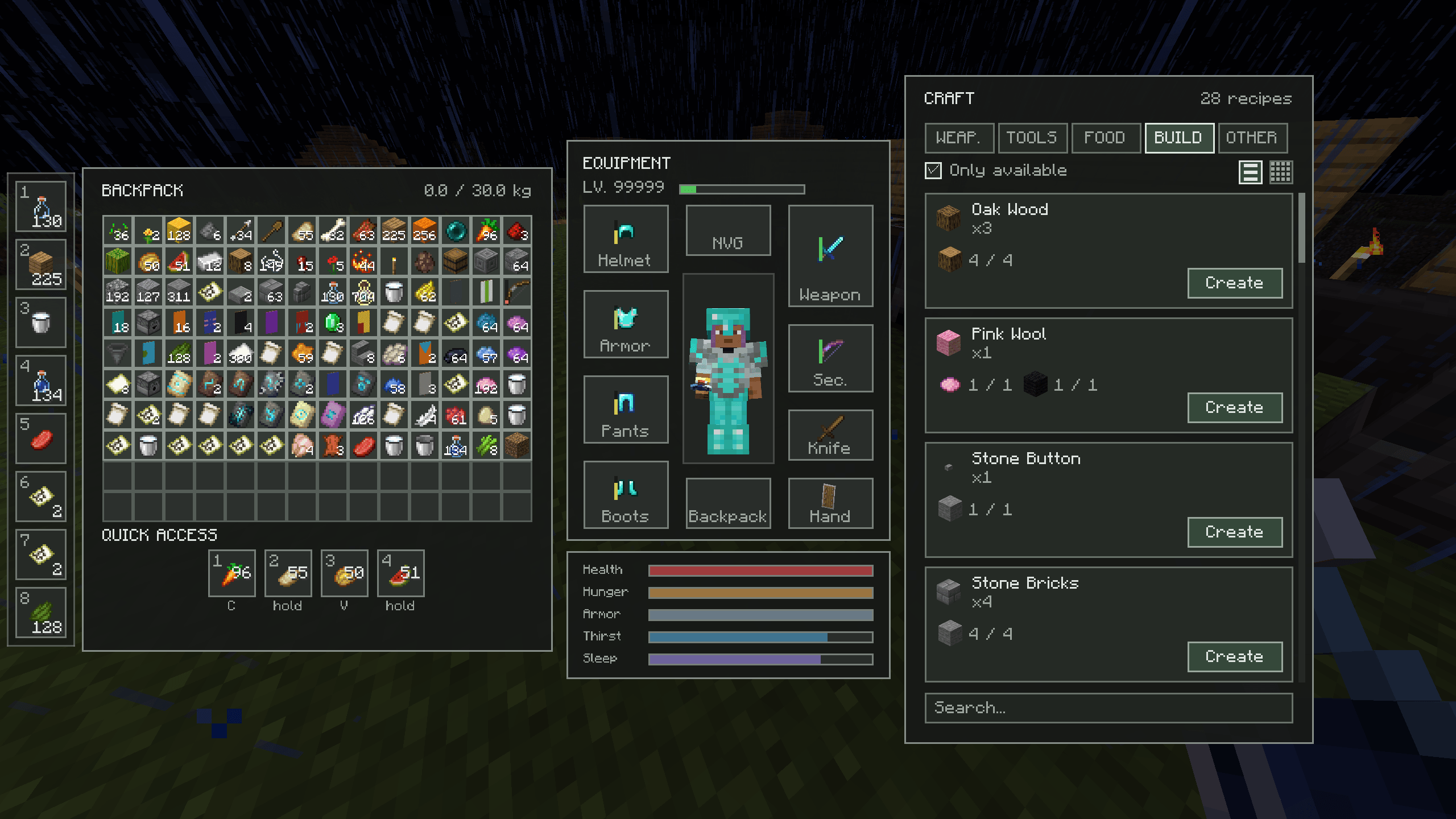
Completely replaces the vanilla inventory with a modern equipment system featuring backpacks, carry weight, dedicated weapon slots, quick access items and custom equipment.
Grid System
Unlike Minecraft's traditional slot-based inventory, ZoneInventory uses a grid-based storage system where every item occupies physical space inside your backpack.
Small items, such as food or crafting materials, only occupy a single cell, while larger equipment—including tools, weapons, armor, and backpacks—takes up multiple cells depending on its size.
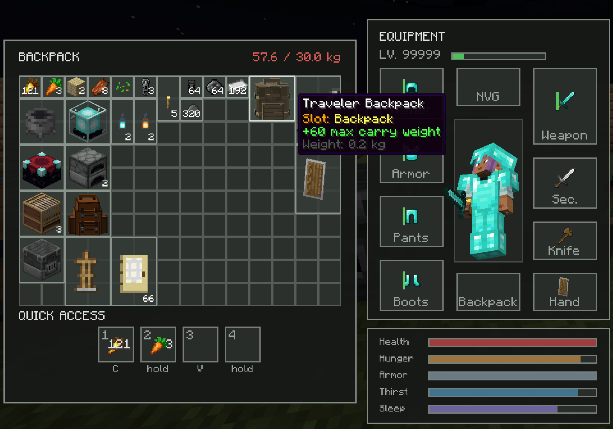
Carry Weight

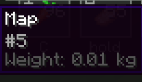
- every item has weight
- backpacks increase carrying capacity
- choose what to take
- prepare before expeditions
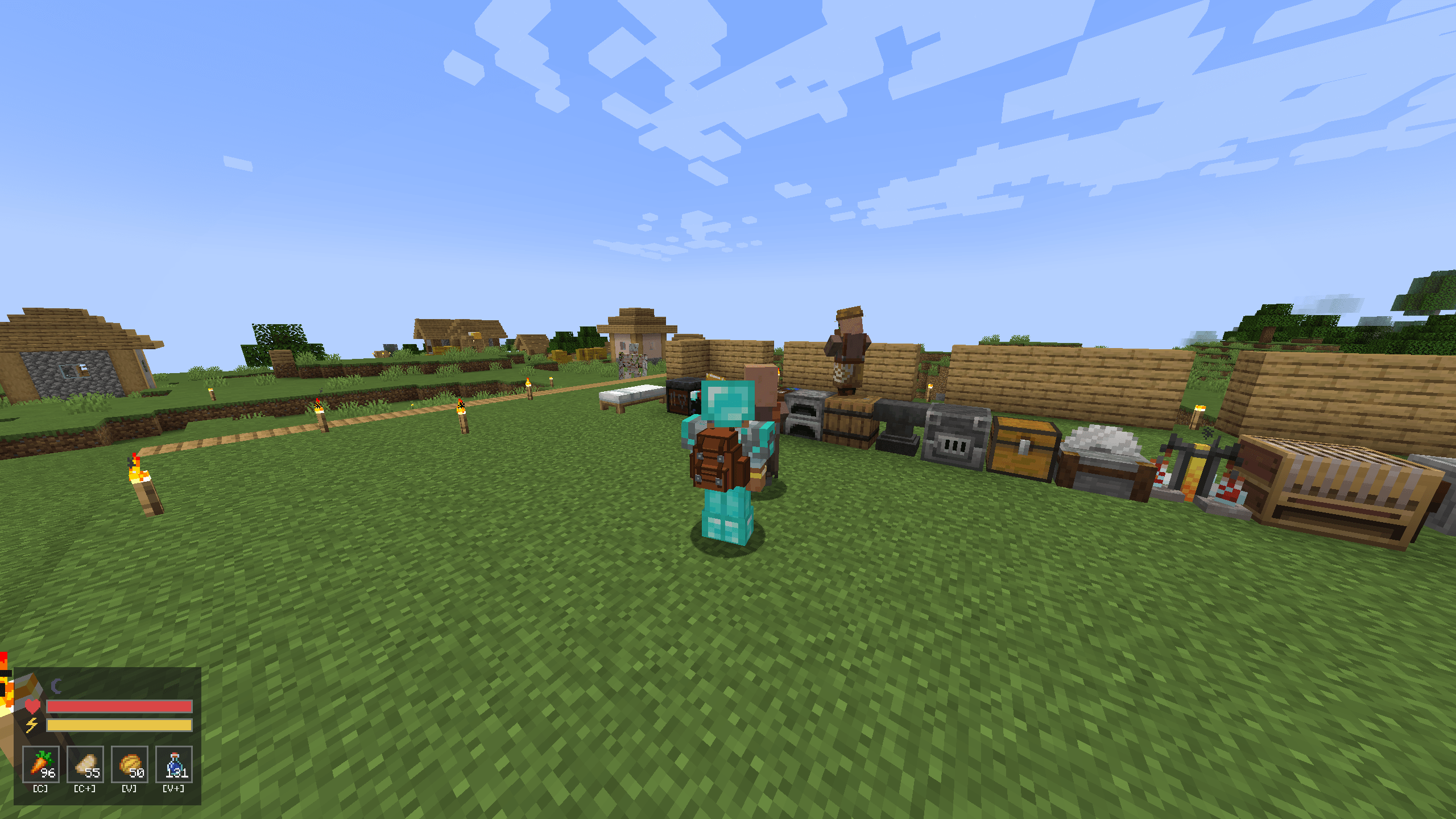
Backpacks
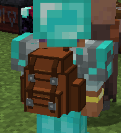
By default, the player has a 30 kg carry weight limit. Carrying too much equipment will exceed this limit, so choosing what to bring on each expedition becomes an important part of survival.
Backpacks increase your maximum carrying capacity:
Simple Backpack — +30 kg
Traveler Backpack — +60 kg
Military Backpack — +90 kg (Coming in a future update)
Each item in the game has its own weight, encouraging players to carefully manage their equipment instead of carrying everything at once. Whether you're preparing for a mining trip, a long expedition, or a dangerous adventure, choosing the right backpack can make all the difference.
- visible on player
- different capacities
- Curios integration
Crafting Catalog
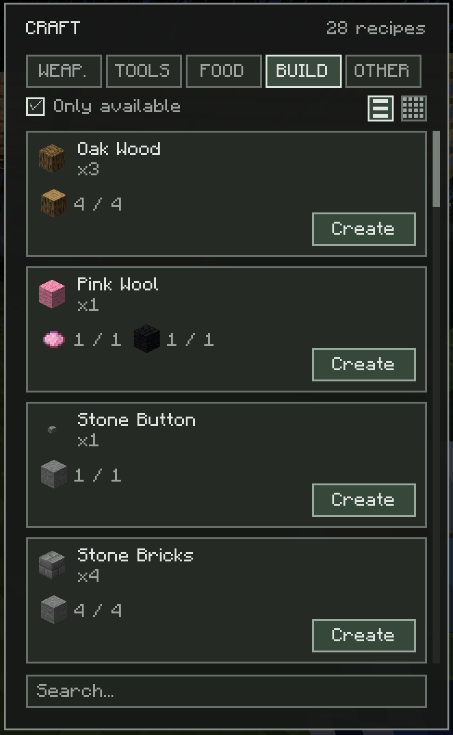
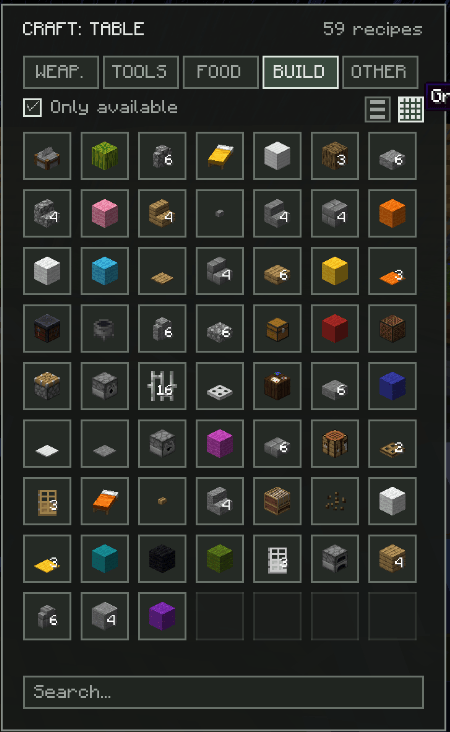
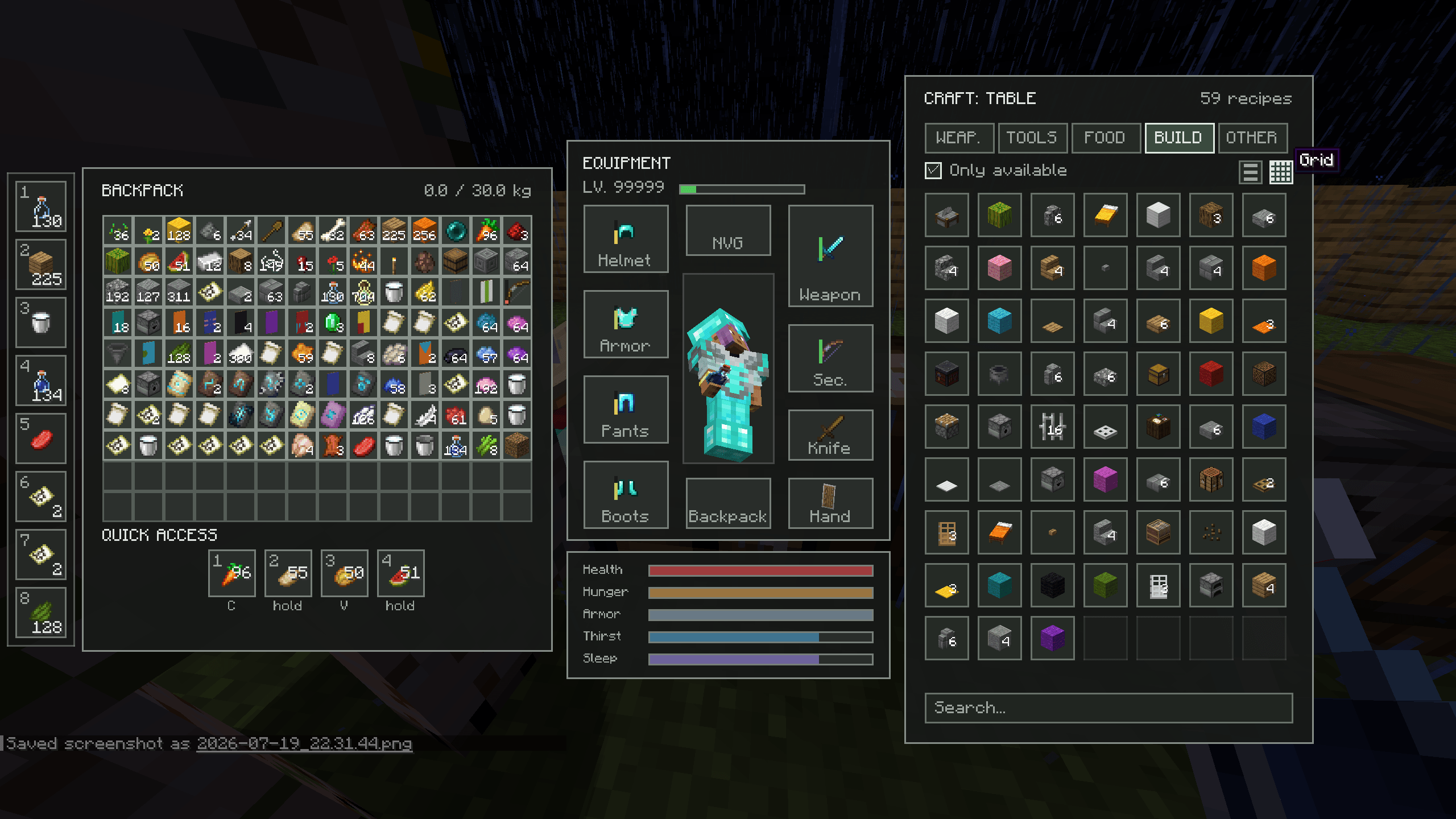
ZoneInventory completely replaces the traditional crafting process with a faster and more convenient recipe-based system.
Instead of manually placing every ingredient into a 3×3 crafting grid, you simply collect the required resources, select an available recipe, and press Create. The interface shows exactly which materials are needed and how many of each item you currently have before crafting.
Recipes can be displayed in two different modes:
- List View — shows detailed recipe cards with ingredients and crafting buttons.
- Grid View — provides a more compact layout for quickly browsing large numbers of recipes.
The Only Available filter displays recipes that can currently be crafted with the resources in your inventory. When this option is disabled, the interface shows every recipe from the selected category, including those for which you do not yet have the required materials.
Recipes are divided into convenient categories such as:
- Weapons
- Tools
- Food
- Building
- Other
The search bar works across all categories at once, so you do not need to manually switch between tabs when looking for a specific item.
The goal of this system is to remove repetitive inventory management while preserving the importance of gathering resources. You still need the correct materials, but crafting is now focused on choosing what to create rather than repeatedly arranging the same recipes by hand.
- search
- categories
- available recipes
- one-click crafting
Equipment
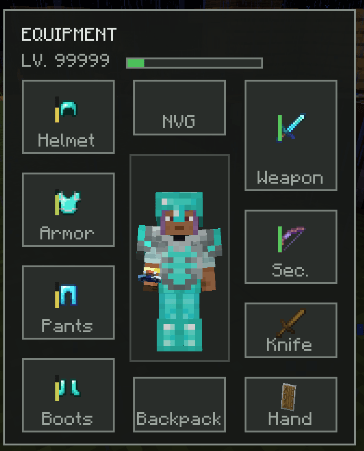
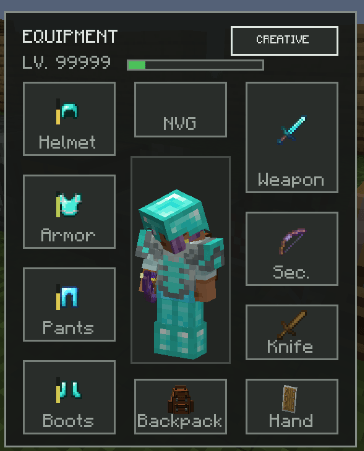
ZoneInventory introduces a completely redesigned equipment system, replacing Minecraft's traditional hotbar-based combat with dedicated equipment slots.
Weapon Slots
Weapons are no longer tied to the hotbar. Instead, they are equipped in dedicated slots and can be accessed instantly using their own hotkeys:
- 1 — Primary Weapon
- 2 — Secondary Weapon
- 3 — Knife
- 4 — Splash Potions/Grenades (used as throwable explosives)
- 5 — Hand Slot
- 6 — Spyglass/Binoculars (Coming in a future update)
- Q — Empty Hands
This allows your combat equipment to remain organized and always accessible, while keeping the backpack available for resources, loot, and supplies.
Hand Slot
The Hand slot is designed for everyday items that are not considered weapons.
Place any item into the Hand slot and press 5 to equip it instantly. This makes it easy to switch between tools, food, torches, medical supplies, or any other utility item without occupying a weapon slot.
Backpack Slot
Backpacks are equipped through their own dedicated slot.
Equipping a backpack increases your maximum carry weight depending on its tier, allowing you to bring more equipment and supplies on longer expeditions.
Additional backpack tiers will be added in future updates.
Night Vision Goggles (NVG)
A dedicated NVG slot has already been implemented and reserved for Night Vision Goggles.
Functionality is planned for a future update.
Context Menu
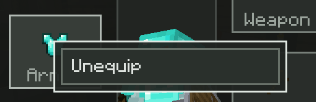
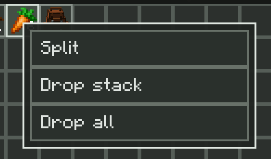
Right-clicking an item opens a context menu, providing quick access to common actions without unnecessary dragging or additional clicks.
Depending on the selected item, available actions may include:
- Unequip
- Split
- Drop Stack
- Drop All
The context menu automatically displays only the actions that are relevant for the selected item, making inventory management faster and more intuitive than the vanilla interface.
This system also provides a solid foundation for future features, allowing additional actions to be introduced without redesigning the inventory interface.
Quick Access Slots
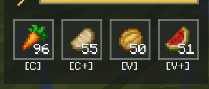
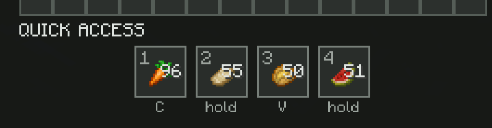
ZoneInventory replaces the vanilla hotbar with a dedicated Quick Access system, designed for consumables and utility items rather than weapons.
Each slot is bound to a dedicated key combination, allowing players to use important items instantly without opening their inventory or switching equipment.
The available shortcuts are:
- C — Quick Slot 1
- Hold C — Quick Slot 2
- V — Quick Slot 3
- Hold V — Quick Slot 4
Quick Access slots are ideal for frequently used items such as:
- Food
- Drinks
- Medical supplies (planned for future updates)
Unlike the vanilla hotbar, these slots are always reserved for quick-use items, while weapons are managed separately through the dedicated equipment system. This keeps combat equipment and survival supplies organized, allowing players to react quickly in dangerous situations without constantly rearranging their inventory.
The Quick Access bar is also integrated directly into the HUD, ensuring that your most important survival items are always visible and only a single key press away.
Survival
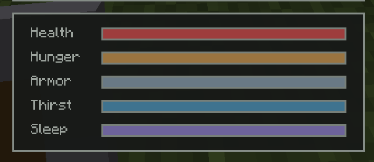
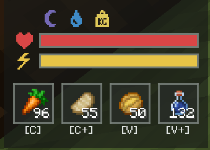
ZoneInventory expands Minecraft's survival mechanics by introducing new player needs and redesigning several existing ones. Instead of relying solely on hunger, survival now revolves around managing multiple interconnected systems that encourage preparation and long-term planning.
Thirst
Thirst is now a core survival mechanic.
Players must regularly drink water to stay hydrated during long expeditions. Running out of water can become just as dangerous as running out of food, making water an essential resource to carry while exploring.
Stamina
Sprint no longer consumes hunger.
Instead, physical activities such as sprinting rely on a dedicated Stamina bar. This separates short-term physical exhaustion from long-term survival, creating a more natural gameplay experience.
Sleep
The new Sleep system tracks how long the player has gone without rest.
Managing fatigue becomes another important part of survival, encouraging players to prepare safe places to rest before setting out on long journeys.
Health
Health regeneration has been completely redesigned.
Food no longer restores health through Minecraft's vanilla hunger regeneration. Instead, each food item restores a fixed amount of health, making healing more predictable and allowing every food type to have its own unique value.
Dedicated medical items are planned for future updates, providing more advanced ways to recover from injuries.
Redesigned Food System
The vanilla food system has been completely reworked.
Each survival mechanic now has a distinct purpose:
- Health — your physical condition. Restored by consuming food, with each item healing a fixed amount of health.
- Hunger — your long-term energy reserves.
- Thirst — hydration.
- Stamina — short-term physical endurance.
- Sleep — fatigue and the need for rest.
By separating these mechanics, survival becomes deeper and more immersive without adding unnecessary complexity. Instead of relying on a single hunger bar for every aspect of survival, players must balance multiple needs and prepare accordingly before every expedition. Future updates will expand these systems further with dedicated medical supplies and additional survival mechanics.
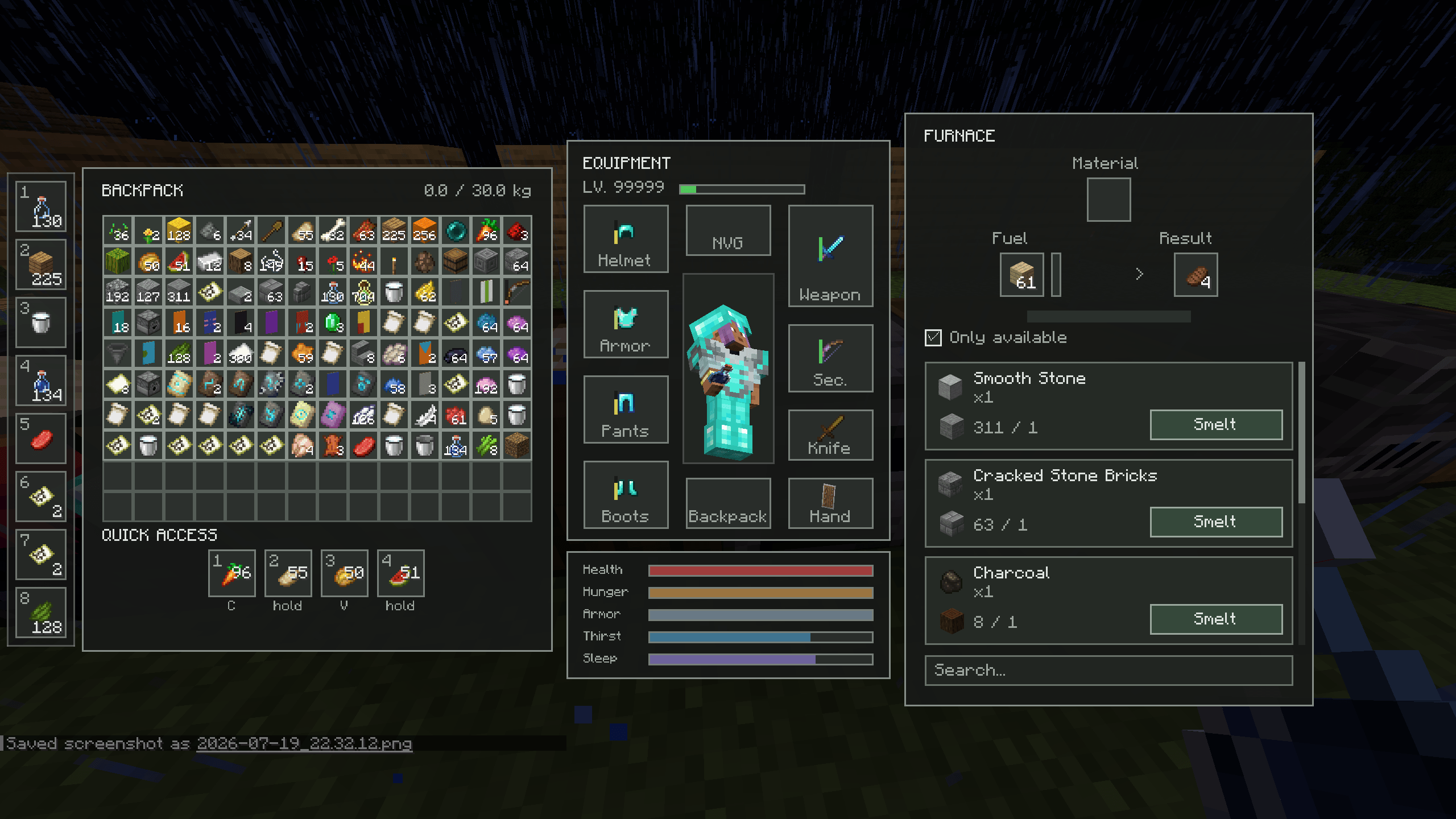
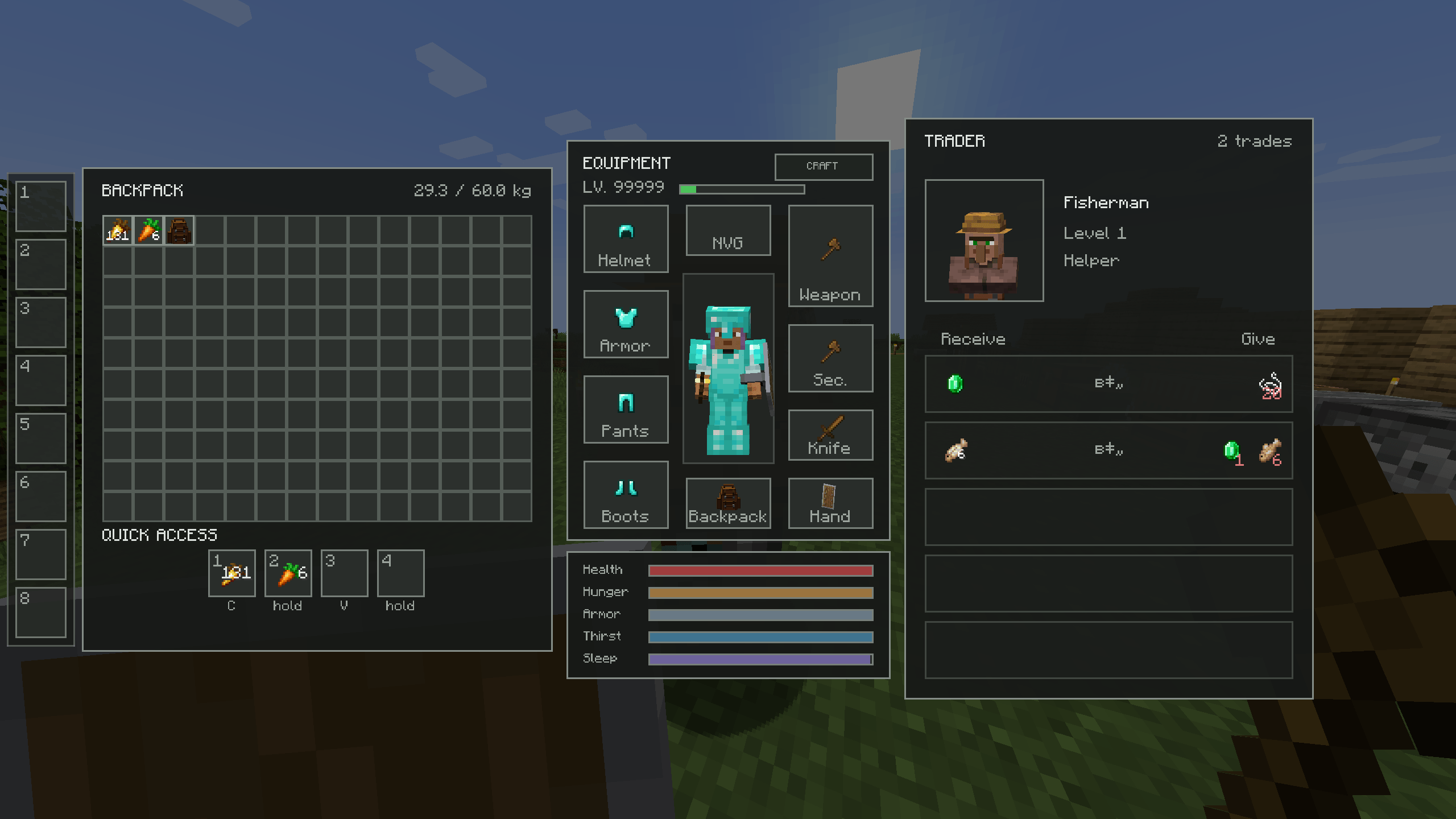
Redesigned Workstations
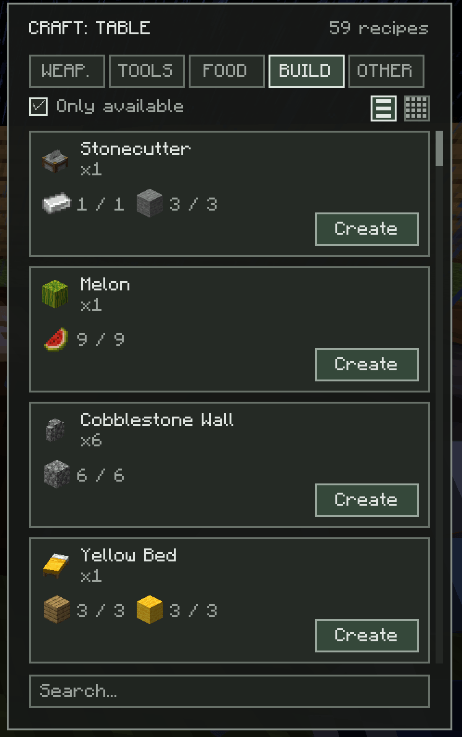
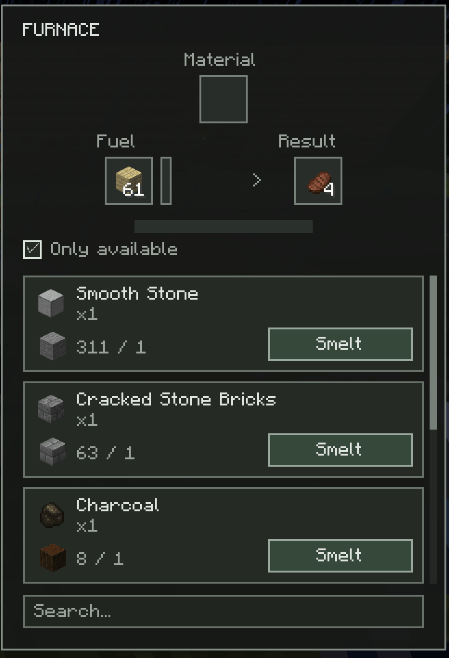
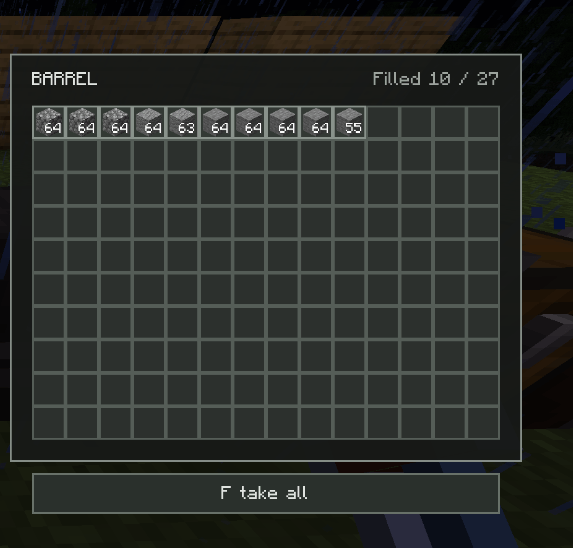
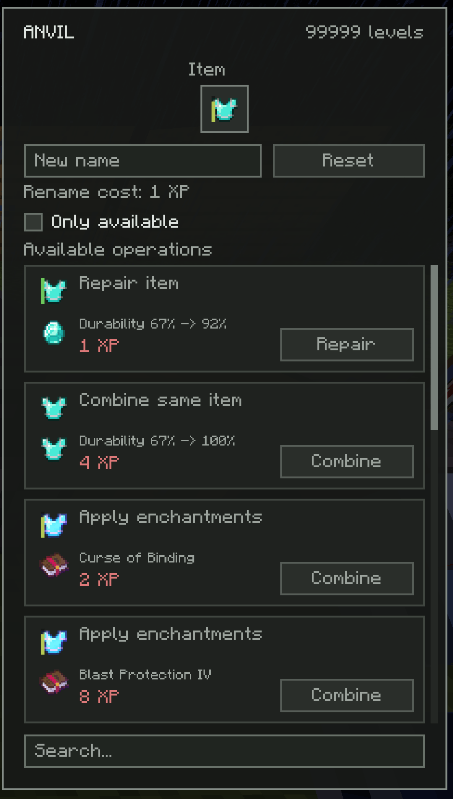
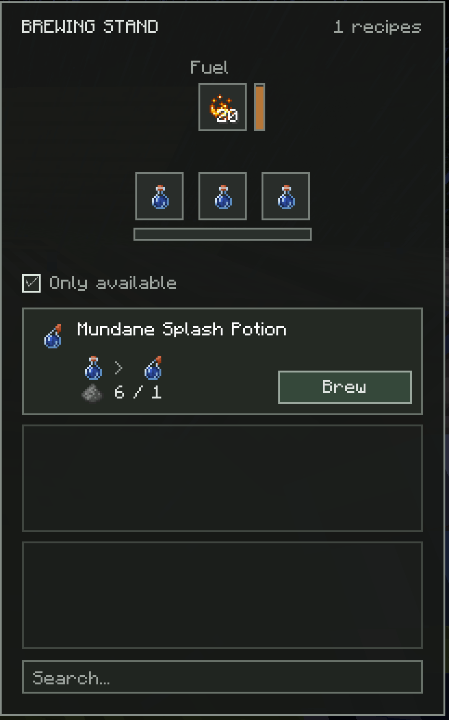
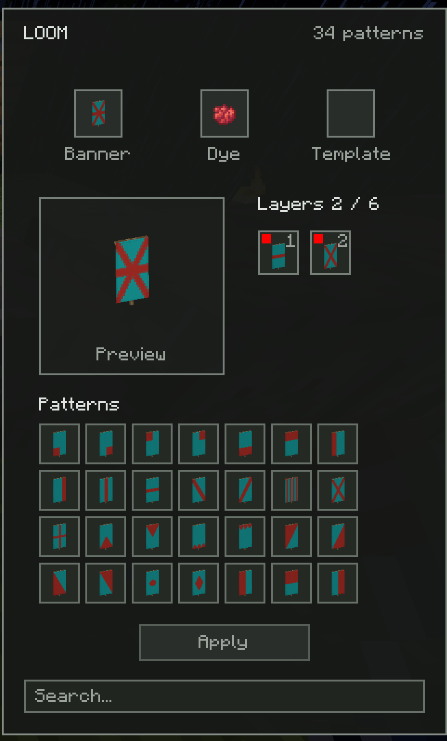
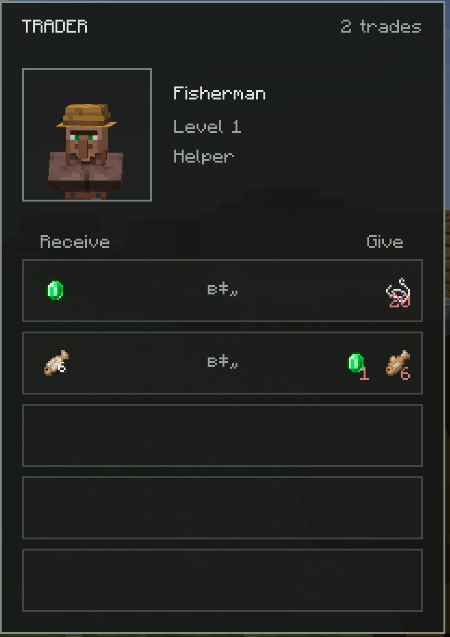
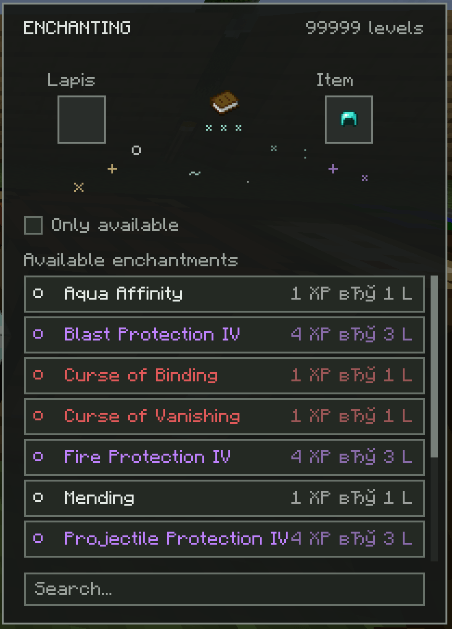
Every vanilla workstation has been redesigned with a consistent and modern interface, creating a unified experience throughout the entire mod.
The goal was not simply to change the appearance, but to improve usability while keeping every workstation familiar and easy to understand. Players should be able to interact with crafting tables, furnaces, villagers, and other workstations without having to relearn how they work.
Each interface has been carefully redesigned to provide:
- A clean and consistent visual style.
- Better organization of information.
- Faster access to frequently used actions.
- Improved readability.
- An interface that remains intuitive for both new and experienced Minecraft players.
While the visual design has changed significantly, the core functionality of Minecraft's workstations has been preserved wherever possible. This allows players to enjoy a modern, streamlined interface without sacrificing the simplicity and familiarity of the original game.
More workstation improvements and additional functionality will continue to be introduced throughout future updates.
❤️ Support the Project
ZoneInventory is developed in my free time, and every update, feature, and improvement is created with the goal of making Minecraft's survival experience more immersive and enjoyable.
If you enjoy the mod and would like to support its development, you can do so here:
☕ Ko-fi: https://ko-fi.com/pixelgamestudio
Every contribution helps support future updates, new features, bug fixes, and continued development.
Thank you for your support! ❤️
ZoneInventory Team

Owner