ZexiCore A
- By
Wheel tracks are the trails stories leave behind; the rift is the gap between trails — and that thin gap is the bond that ties every story back together. Scattered travelers meet again in the lamplight.
ZexiCore A · 辙隙核心A
车辙,是故事走过的轨迹;辙隙,是轨迹与轨迹之间的缝隙——那一线空隙,正是把每条故事重新牵到一起的纽带。散落的旅人,由此在灯火里重逢。
Wheel tracks are the trails stories leave behind; the rift is the gap between trails — and that thin gap is the bond that ties every story back together. Scattered travelers meet again in the lamplight.
Minecraft 26.1.2 · NeoForge 26.1.2.103 · Version v1.0 · English / 中文
English Version
✦ What Is This Mod?
ZexiCore A is a social mod that connects your "Hajimo" group community to a Minecraft server.
It lets in-world screens show live web pages, lets players open the chat page from a terminal item, pushes join/quit/chat/death/advancement events to your group automatically, and lets completed advancements be worn as titles before a player's name.
All sensitive settings stay on the server.
✦ Main Features
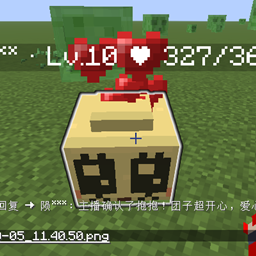
🖥 Hajimo Screen Block (zexi_core_a:hajimo_screen)
- A block that displays a live web page on its surface — great for a lobby or plaza screen.
- Put several screens side by side (same direction, same URL) and they merge into one big seamless display.
- Only renders when players are nearby (default 16 blocks), so it won't lag your server.
- Doesn't drop when broken. Admins give it with
/give. It auto-faces you when placed. 📟 Hajimo Terminal Item (
zexi_core_a:hajimo_terminal) - Right-click to open a web terminal (game doesn't pause).
- The panel auto-fits your screen. Press
Escor use/zexi closeto close it. - The URL only shows in the item tooltip.
 🌐 Built-in Browser (No Extra Mod Needed)
 - Comes with MCEF built in — you don't need to install MCEF separately.
- On first launch, it downloads the Chromium runtime in the background (about 100+ MB, one time only).
- Pages render like a real browser: clicks, typing, scrolling all work.
- Camera/microphone allowed by whitelist (for chat room voice/video).
 📨 Group Message Push
 - Player join, quit, chat, death, and advancement are auto-posted to your Hajimo group website.
- Each type has its own on/off switch.
- Advancement names are auto-translated by scanning all installed mods (including vanilla) — no config needed.
- Runs on a separate thread, never lags the server.
🏅 Advancement Titles
- Press
Lto open the advancement screen, click any completed advancement to wear it as a title. - The title keeps the advancement's original color.
- Shows in three places: chat prefix, TAB list, and the nameplate above your head.
/zexi titleto view,/zexi title offto remove. Saved in the world, survives restarts. ⚙️ Change Config Without Restarting
- Admins use
/zexi config set <key> <value>in-game. - Takes effect instantly, saves to file, and syncs to all clients — no restart needed.
✦ Installation
- Put the mod in
mods/on both server and client (clients without it can still join, but won't see web pages or nameplate titles). - Server needs NeoForge 26.1.2.103 (or newer on the same branch).
- On first client launch, Chromium downloads in the background. A status page shows until it's ready.
- Group push is off by default. Fill in
api_secret_key/group/senderin the server'sconfig/zexi_core_a/chat_bridge.propertiesto enable it (or run/zexi push reload).
✦ How to Use
| I want to… | How |
|---|---|
| Set up a lobby screen | /give <player> zexi_core_a:hajimo_screen then place it; /zexi screen <pos> <url> to set the page |
| Change a screen's page | Run /zexi screen <pos> <new-url> again |
| Open my web terminal | Right-click the Hajimo Terminal; or /zexi open [url] |
| Close the web terminal | Press Esc, or /zexi close |
| Show a page to everyone | /zexi broadcast <url> (OP2+) |
| Equip an advancement title | Press L, click a completed advancement |
| View / remove title | /zexi title, /zexi title off |
| Test a group push | /zexi push test <text> |
Access modes (access_mode):
ALL_PLAYERS (default) — everyone can open the terminal.
ADMIN_ONLY — only OP2+ can use commands and items.
✦ Commands (/zexi)
| Command | Description | Permission |
|---|---|---|
/zexi |
Show usage overview | Everyone |
/zexi open [url] |
Open the web terminal | Per access_mode |
/zexi close |
Close your web terminal | Per access_mode |
/zexi status |
View current access mode and default page | Everyone |
/zexi title [off] |
View / remove your title | Everyone |
/zexi broadcast <url> |
Force all players to open a page | OP2+ |
/zexi screen <pos> <url> |
Set a screen block's page | OP2+ |
/zexi config list |
List all hot-reloadable config keys | OP2+ |
/zexi config set <key> <value> |
Hot-change a config | OP2+ |
/zexi config reset <key> |
Reset a config to default | OP2+ |
/zexi push status |
Push status (never shows config values) | OP2+ |
/zexi push reload |
Re-read the push config | OP2+ |
/zexi push test <text> |
Push a test message to the group | OP2+ |
/zexi push set group <value> |
Override target group (cannot view) | OP2+ |
/zexi push set sender <value> |
Override sender (cannot view) | OP2+ |
✦ Config (Common Entries)
Server main config: config/zexi_core_a-server.toml
All 10 keys can be hot-changed with /zexi config set.
| Key | Default | Description |
|---|---|---|
default_page_url |
Hajimo chat page | Default embedded page |
allowed_hosts |
(empty) | Domain whitelist, comma-separated |
access_mode |
ALL_PLAYERS |
ALL_PLAYERS / ADMIN_ONLY |
enable_chromium |
true |
Turn off to skip kernel download |
allow_media |
true |
Allow camera/microphone (needs restart) |
page_width_px / page_height_px |
1280 / 720 | Page render resolution |
panel_width_pct / panel_height_pct |
96 / 92 | Terminal panel size (% of screen) |
screen_view_distance |
16 | Render distance for screens (4–64) |
Group push config (server-side only): config/zexi_core_a/chat_bridge.properties
Never sent to clients, never shows in /zexi config list. Run /zexi push reload after editing.
| Key | Default | Description |
|---|---|---|
api_secret_key |
(empty) | Group API key. Empty = bridge disabled |
group |
(empty) | Group ID or slug |
sender |
(empty) | Sender username/email |
api_base_url |
https://chat.dzwmhyk.top |
Group site URL (https only) |
push_join / push_quit / push_chat / push_death / push_advancement |
true |
Toggle each push type |
✦ Security
api_secret_keystays on the server only — never sent, never shown, redacted in logs.- Bridge config is not part of any network payload — clients can't see it.
/zexi push set group|senderis override-only, cannot view.- Domain whitelist limits where pages can go.
- All permission checks happen server-side.
- Chromium instance count, creation rate, and idle recycling all have hard caps.
✦ FAQ
| Symptom | Fix |
|---|---|
| Web page looks red / unreadable | Fixed in current version; check if a resource pack overrides hajimo_screen |
| Lag after placing many screens | Reduce screen_view_distance and page_width_px |
Advancement shows as advancements.xxx.yyy |
Run /zexi push reload after installing new advancement mods |
| Kernel download stuck | Check if antivirus blocks mods/mcef-libraries; or set enable_chromium=false |
| Players can't open the terminal | With ADMIN_ONLY, regular players are rejected — expected |
| Nothing in the group | /zexi push status to check config; make sure api_base_url is https |
| Title lost | Check if zexicore_titles.txt in the world folder is writable |
✦ Credits
- Author: @Dzwmhyk (陨莫) · Homepage · Bilibili
- MCEF — https://github.com/CinemaMod/mcef · LGPL-2.1
- JCEF — https://github.com/chromiumembedded/java-cef · BSD-3
- Chromium — https://www.chromium.org/ · BSD-3
- NeoForge — https://github.com/neoforged/NeoForge · LGPL-2.1
Scattered travelers, reunited in the lamplight.
中文版本
✦ 这是个什么模组?
ZexiCore A 是一个把「哈基莫之窝」群组社区接入 Minecraft 服务器的社交模组。
它能让世界里的屏幕实时显示网页,让玩家用终端随时打开聊天页,把玩家进出、聊天、死亡、成就自动推送到群组,还能把已完成的成就当作称号戴在名字前面。
所有敏感配置都只留在服务端。
✦ 主要功能
🖥 哈基莫屏幕方块(zexi_core_a:hajimo_screen)
- 方块表面实时显示网页,适合当大厅/广场的公共展示屏。
- 多块相邻、同朝向、同地址的屏幕会自动拼成一整块大屏,接缝不错位。
- 玩家靠近(默认 16 格)才开始渲染,离开就停,不拖累服务器。
- 破坏不掉落,由管理员
/give发放;放置时自动朝向玩家。
📟 哈基莫终端物品(zexi_core_a:hajimo_terminal) - 右键打开网页终端(游戏不暂停)。
- 界面自适应屏幕大小,按
Esc或/zexi close关闭。 - 页面地址只在物品 tooltip 里显示。
🌐 内置浏览器(不用另装模组)
- 模组自带 MCEF,不需要单独安装 MCEF 模组。
- 客户端首次启动后台自动下载 Chromium 运行库(约一百多兆,只装一次)。
- 网页像真浏览器一样:点击、打字、滚轮都能用。
- 摄像头/麦克风按白名单放行(聊天室语音/视频需要)。
📨 群组消息推送
- 玩家进入、退出、聊天、死亡、达成成就,自动发到哈基莫之窝群组网站。
- 五类消息各有一个独立开关。
- 成就名自动扫描全部已装模组(含原版)翻译,第三方成就模组无需配置。
- 独立线程运行,绝不卡服务器。
🏅 成就称号
- 按
L打开成就界面,点击任意一个已完成的成就,就能把它当称号戴上。 - 称号保留成就名自带的颜色。
- 显示在三处:聊天栏前缀、TAB 列表、头顶名牌。
/zexi title查看,/zexi title off卸下。记录存世界目录,重启不丢。
⚙️ 改配置不用重启- 管理员游戏内
/zexi config set <键> <值>。 - 立即生效、自动写回文件、同步全服客户端——不需要关服,不需要重启。
✦ 安装与启用
- 服务端与客户端都放入
mods/文件夹(客户端不装也能进服,只是看不到网页画面与头顶称号)。 - 服务端需要 NeoForge 26.1.2.103(或更高的同主线版本)。
- 客户端首次启动后台下载 Chromium,下载期间显示进度,完成前网页画面显示状态提示页。
- 群组推送默认关闭:在服务端
config/zexi_core_a/chat_bridge.properties里填好api_secret_key/group/sender三项后自动启用(或游戏内/zexi push reload)。
✦ 玩法与物品使用
| 想做什么 | 怎么做 |
|---|---|
| 给大厅装一块公共展示屏 | /give <玩家> zexi_core_a:hajimo_screen 后放置;/zexi screen <坐标> <网页地址> 指定页面 |
| 换某块屏幕的页面 | 再次执行 /zexi screen <坐标> <新地址> |
| 打开自己的网页终端 | 手持哈基莫终端右键;或 /zexi open [网页地址] |
| 关掉网页终端 | 按 Esc,或 /zexi close |
| 全服一起看某个页面 | /zexi broadcast <网页地址>(OP2+) |
| 装备成就称号 | 按 L,点击一个已完成的成就格子 |
| 查看/卸下称号 | /zexi title、/zexi title off |
| 试推一条群消息 | /zexi push test <文本> |
权限模式(配置项 access_mode):
ALL_PLAYERS(默认)所有玩家都能打开终端;ADMIN_ONLY 仅 OP2+ 可用命令与物品。
✦ 命令一览(/zexi)
| 命令 | 说明 | 权限 |
|---|---|---|
/zexi |
显示用法一览 | 所有人 |
/zexi open [url] |
打开网页终端 | 按 access_mode |
/zexi close |
关闭网页终端 | 按 access_mode |
/zexi status |
查看当前权限模式与默认页面 | 所有人 |
/zexi title [off] |
查看 / 卸下自己的称号 | 所有人 |
/zexi broadcast <url> |
强制全服玩家打开指定页面 | OP2+ |
/zexi screen <pos> <url> |
设置某个屏幕方块的显示页面 | OP2+ |
/zexi config list |
查看全部可热修改的配置项 | OP2+ |
/zexi config set <键> <值> |
热改一项配置 | OP2+ |
/zexi config reset <键> |
恢复某项配置默认值 | OP2+ |
/zexi push status |
推送状态(永不显示配置值) | OP2+ |
/zexi push reload |
重读推送配置文件 | OP2+ |
/zexi push test <文本> |
向群组推送一条测试消息 | OP2+ |
/zexi push set group <值> |
覆盖推送目标群组(不可查看) | OP2+ |
/zexi push set sender <值> |
覆盖推送发送者(不可查看) | OP2+ |
✦ 配置参考(常用项)
服务器主配置: config/zexi_core_a-server.toml
全部 10 个键都支持 /zexi config set 热改。
| 键 | 默认值 | 说明 |
|---|---|---|
default_page_url |
哈基莫之窝聊天页 | 默认内嵌页面 |
allowed_hosts |
(空) | 域名白名单,逗号分隔 |
access_mode |
ALL_PLAYERS |
ALL_PLAYERS / ADMIN_ONLY |
enable_chromium |
true |
关掉后不下载内核 |
allow_media |
true |
允许摄像头/麦克风(需重启) |
page_width_px / page_height_px |
1280 / 720 | 网页渲染分辨率 |
panel_width_pct / panel_height_pct |
96 / 92 | 终端界面占屏幕百分比 |
screen_view_distance |
16 | 屏幕渲染距离(4~64) |
群组推送配置(仅服务端): config/zexi_core_a/chat_bridge.properties
不下发客户端、不出现在 /zexi config list。改完执行 /zexi push reload 生效。
| 键 | 默认 | 说明 |
|---|---|---|
api_secret_key |
(空) | 群组 API 密钥。留空=桥接关闭 |
group |
(空) | 群组 ID 或 Slug |
sender |
(空) | 发送者用户名/邮箱 |
api_base_url |
https://chat.dzwmhyk.top |
群组站点地址(只放行 https) |
push_join / push_quit / push_chat / push_death / push_advancement |
true |
五类消息各自的开关 |
✦ 安全设计
api_secret_key只存在服务端;永不下发、永不回显、日志打码。- 桥接配置不在任何网络载荷里,客户端看不到。
/zexi push set group|sender只可覆盖不可查看。- 域名白名单约束页面跳转与新窗口。
- 所有权限判定都在服务端做。
- Chromium 实例数量、创建频率、闲置回收全部有硬上限。
✦ 常见问题排查
| 症状 | 处理 |
|---|---|
| 网页画面泛红/看不清 | 现版已修复;若仍异常,检查材质包是否覆盖了 hajimo_screen 模型 |
| 摆放大量屏幕后卡顿 | 调小 screen_view_distance 与 page_width_px |
群里成就名显示成 advancements.xxx.yyy |
装了新成就模组后执行 /zexi push reload |
| 终端下载内核卡住 | 检查杀毒软件是否拦截 mods/mcef-libraries;或临时 enable_chromium=false |
| 玩家打不开终端 | access_mode=ADMIN_ONLY 时普通玩家被拒,属预期 |
| 推送到群里没反应 | /zexi push status 看配置是否齐全;确认 api_base_url 是 https |
| 称号丢了 | 检查世界目录 zexicore_titles.txt 是否可写 |
✦ 鸣谢和参考
- 作者:@Dzwmhyk(陨莫) · 主页 · B 站
- MCEF — https://github.com/CinemaMod/mcef · LGPL-2.1
- JCEF — https://github.com/chromiumembedded/java-cef · BSD-3
- Chromium — https://www.chromium.org/ · BSD-3
- NeoForge — https://github.com/neoforged/NeoForge · LGPL-2.1
散落的旅人,由此在灯火里重逢。
ZexiCore A Team