🚨 The mod has been reset. Older versions are no longer supported.The backpack storage format has changed. Please empty your backpack before upgrading to the new version; otherwise, all items inside will be lost.
Introduction
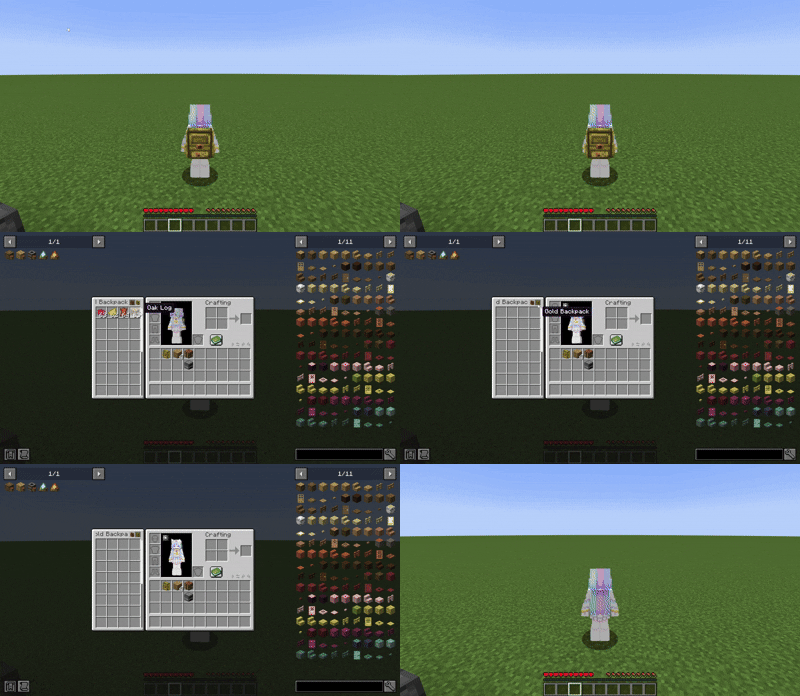
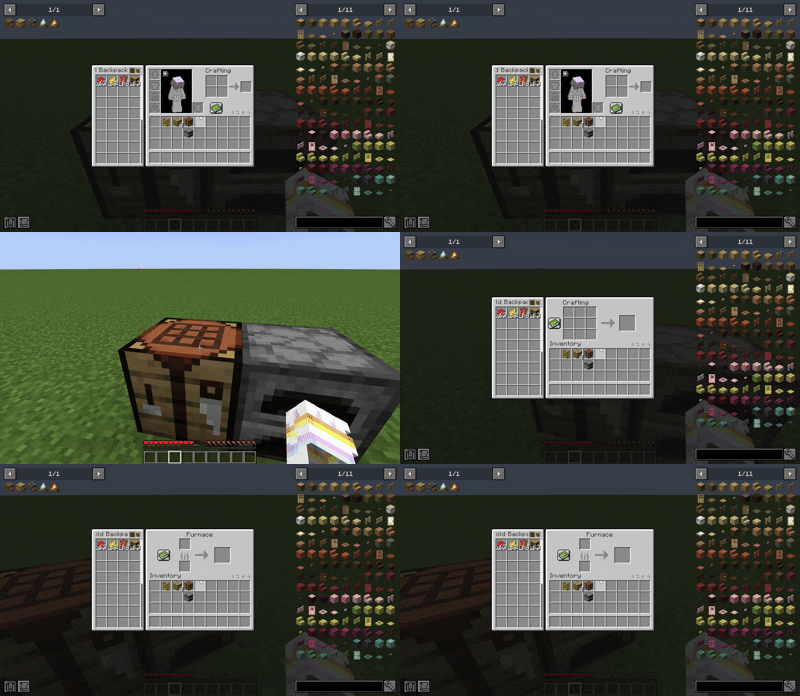
Yyz’s Backpack is a lightweight, convenient backpack mod designed to provide a more efficient item management experience without breaking the vanilla UI style. The backpack can be opened directly in various interfaces (such as crafting tables, chests, furnaces, etc.) and supports crafting, sorting, quick moving, and other operations.
✨ Features
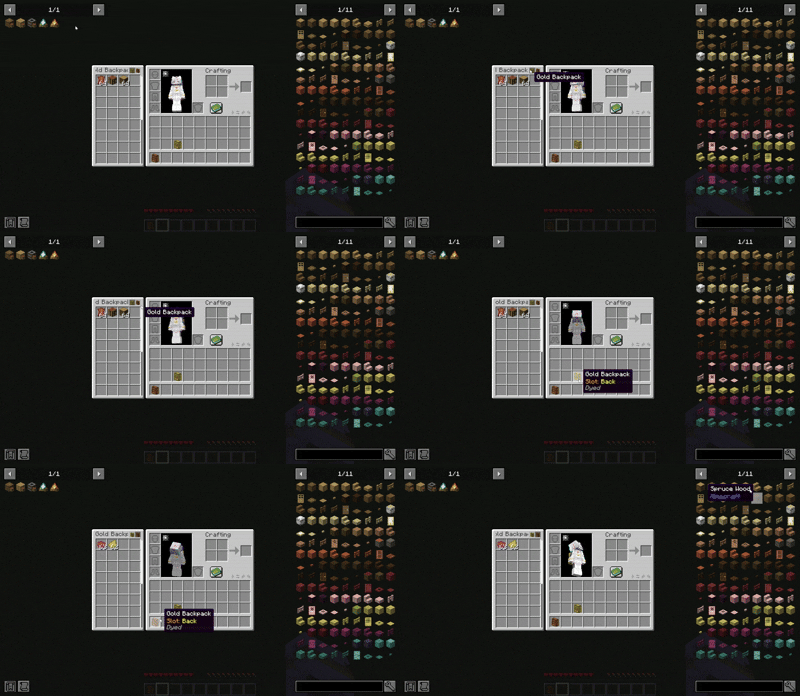
- Access Anywhere: The backpack UI is displayed directly on container screens, allowing you to take or put items without switching screens.
- Crafting Assistance: Supports crafting using items from the backpack, compatible with the recipe book and JEI, with click quick fill support.
- Dyeing System: The backpack can be dyed like leather armour, allowing you to personalise its appearance.
- Backpack Model: A 3D model is shown on the player when the backpack is equipped, which can be hidden via config.
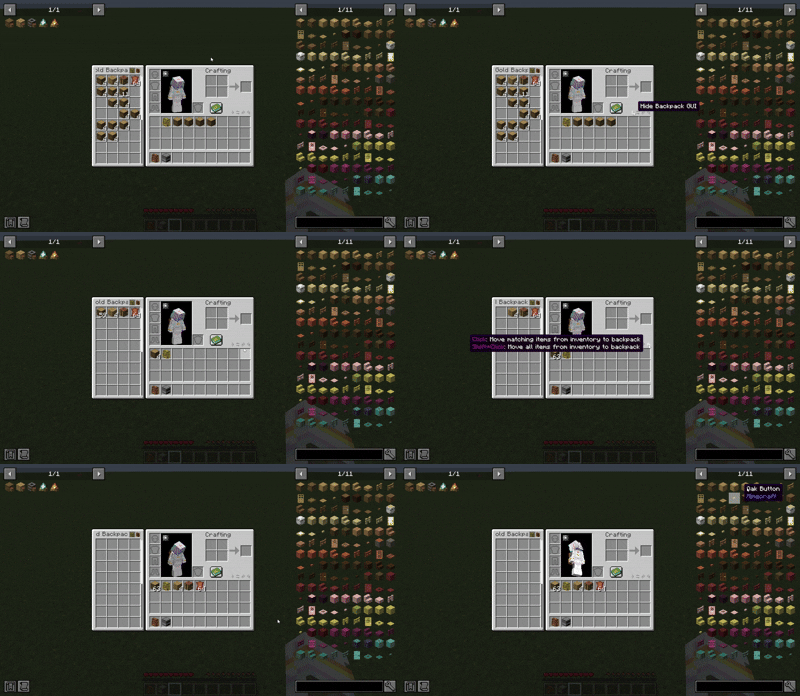
- Click Sorting: Built‑in item sorting. Click the sort button or press a custom key (unbound by default) to sort, with multiple sort modes (Creative inventory order, name, count, ID, etc.) switchable by scrolling on the sort button.
- Quick Move: Shift + right‑click to quickly deposit items into the backpack; Shift + click to take items out. Buttons are also available for bulk quick move, supporting moving matching items or moving all items.
- Quick Switch: Click tabs above the backpack to quickly switch between backpacks; tabs show the backpack’s name and appearance. You can also press the hotkey (default
B) to open the backpack currently under the mouse cursor. - Auto Collect: When your inventory is full, newly obtained items automatically go into the backpack.
- Encumbrance System: Carrying multiple backpacks (default 3 or more) applies an Heavy effect, reducing movement speed and jump height.
🎒 Backpack Tiers
| Backpack Type | Extra Slots | Special Ability |
|---|---|---|
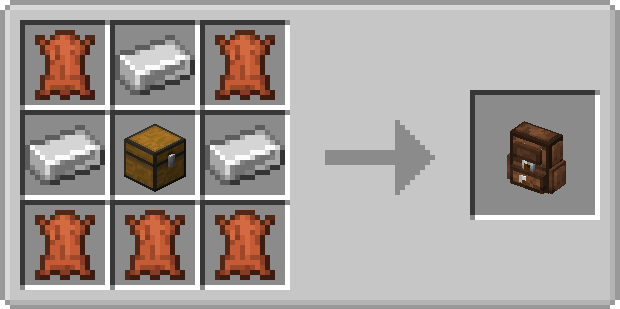
| Iron | +18 | Base capacity |
| Gold | +36 | Base capacity |
| Diamond | +54 | Base capacity |
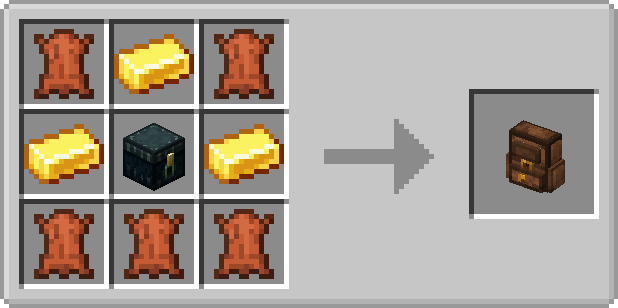
| Netherite | +54 | Immune to being destroyed by fire and lava |
🛠️ Crafting Recipes
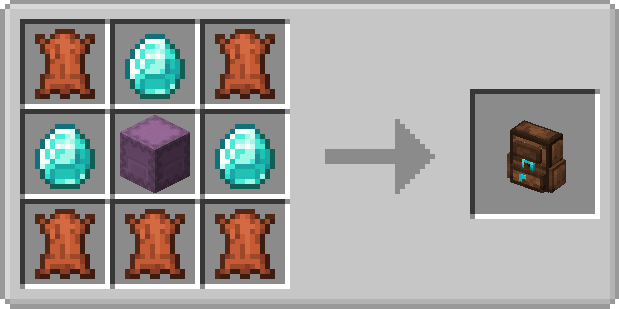
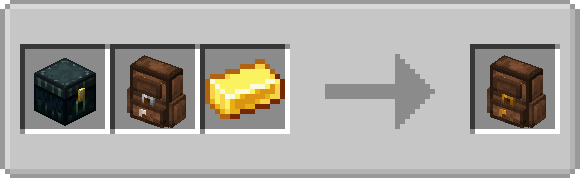
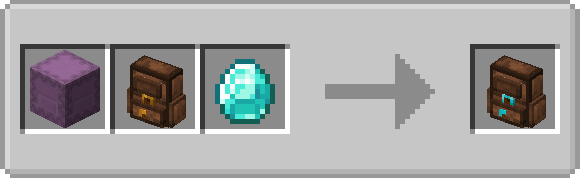
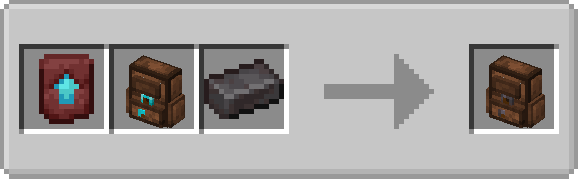
📦 Installation & Usage
- Install the appropriate mod loader (Fabric, Forge, or NeoForge) for your Minecraft version.
- Download the mod
.jarfile and place it into themodsfolder in your game directory. - Launch the game and place the backpack anywhere in your inventory. If you have the corresponding mod installed, you can also place it in the curio slot.
- Select the backpack to use via tabs or the hotkey.
🧩 Compatibility & Integration
🤝 Compatible & Integration
🔹1.20.1 Forge
- JEI
- Curios
- Applied Energistics 2
- Inventorio
🔹1.20.1 Fabric
- JEI
- Trinkets
- Applied Energistics 2
- Inventorio
🔹1.21.1 NeoForge
- JEI
- Curios
- Applied Energistics 2
- Applied Energistics 2 Wireless Terminals
- Inventorio
- Tom's Simple Storage Mod
🔹1.21.1 Fabric
- JEI
- Trinkets
- Inventorio
🔹26.2 NeoForge
- JEI
- Curios
🔹26.2 Fabric
- JEI
- Trinkets Updated
❌ Incompatible
- All inventory‑sorting mods (e.g., Inventory Tweaks, Mouse Tweaks, etc.):
- Symptoms: They only sort the vanilla inventory and ignore the backpack; or they mix the backpack and inventory together and sort them as one; or they fail completely, sometimes causing crashes.
- Reason: Due to the mod’s special implementation, it is not compatible with most sorting mods, and no universal fix has been found. As an alternative, the mod includes a full‑featured sorting system that meets daily needs.
- (More to be added)
🗺 Development
- Support more Minecraft versions
- Support more mod UI screens
🔗 Links
🛠 Customisation
Mod Configuration
Main Configuration /config/yyzsbackpack.json
| Config Key | Type | Description |
|---|---|---|
model |
boolean | Whether to show the backpack model on the player's back |
heavy |
int | How many backpacks carried before gaining the "encumbrance" effect |
Button Position Configuration /config/yyzsbackpack/control/default.json
| Config Key | Type | Description |
|---|---|---|
controlPoss |
object | Coordinates of sorting, quick-move and other buttons on various UI screens |
UI Offset Configuration /config/yyzsbackpack/ui/default.json
| Config Key | Type | Description |
|---|---|---|
uiOffsets |
object | Overall offset of the backpack UI on each container screen |
Backpack Customisation (Resource Packs & Data Packs)
You can completely redefine the backpack’s GUI layout, slot positions, and capacity. See the mod files or examples on GitHub for details.
- Resource pack path:
assets/yyzsbackpack/backpacks/<filename>.json - Data pack path:
data/yyzsbackpack/backpacks/<filename>.json
Common Properties
| Property | Description |
|---|---|
type |
Backpack material: iron, gold, diamond, netherite |
maxVisibleTabs |
Number of backpack switch tabs visible at once (excess can be scrolled) |
segments |
List of slot layout segments |
Segment Properties
| Property | Description |
|---|---|
startSlot, endSlot |
Slot index range for this segment |
order |
"DEFAULT" (grid layout, left‑to‑right, top‑to‑bottom) or "CUSTOM" (custom coordinates for each slot) |
startX, startY |
Starting coordinates (for DEFAULT mode) |
columns, rows |
Grid columns and rows (for DEFAULT mode). If slots exceed the grid, scrolling is supported. |
customPositions |
Array of {"x": number, "y": number} for each slot (for CUSTOM mode). Note: scrolling is not supported in CUSTOM mode. |
guiTexture |
Custom GUI texture path |
backgroundX, backgroundY |
Offset of the background relative to the top‑left of the original GUI |
Properties Available Only in Data Packs
| Property | Description |
|---|---|
size |
Sets the backpack size(max value is 256). In multiplayer, only the server setting takes effect. |
force_server |
If true, the server forces all clients to use this configuration. |
The yyzsbackpack Team


Owner