You Two Fight For Me
- By
You Two Fight For Me is a vanilla-style faction controller for Minecraft entity types. Assign vanilla or modded entity types to factions, then decide which factions are friendly, neutral, or hostile to each other.
Opening the Controller
Only players with operator permission level 2 or higher can open or edit the faction controller.
- Press **O** by default. The key can be changed in Minecraft's Controls menu.
- Or run `/ytffm open`.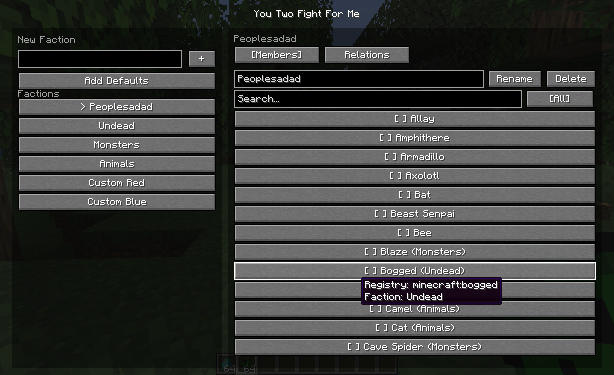
In multiplayer, all faction data is stored by the server. Changes are saved to the world and synchronized back to the editor.
Creating Factions
1. Type a faction name in **New Faction**.
2. Press **+** to create it.
3. Select the faction from the list on the left.
4. Use the name field and **Rename** to change its display name later.
Use **Add Defaults** to create the included starting factions:
- People
- Undead
- Monsters
- Animals
- Custom Red
- Custom Blue
The default template also assigns common vanilla entity types and creates a few sensible starting relationships. It does not remove factions or assignments you created yourself.
Assigning Entity Types
Open the **Members** tab for a selected faction.
- Click an entity row to add that entity type to the selected faction.
- Click a checked row to remove that entity type from the selected faction.
- Entity rows show a translated entity name when Minecraft has one. Otherwise, they show the registry name.
- Hover an entity row to see its full registry name and current faction.
The search field matches both translated names and registry names, so modded entity types can be found with names such as `modid:entity_name`.
The filter button cycles through these views:
- **All**: every eligible living entity type.
- **Current**: entity types assigned to the selected faction.
- **Free**: entity types not assigned to the selected faction. This includes unassigned types and types currently assigned to a different faction, making them easy to move.
Players are available as an entity type. Non-living utility entities, such as projectiles and item entities, are excluded from the list.
## Faction Relations
Open the **Relations** tab and click a faction row to cycle its relation with the selected faction. Relations are applied both ways.
| Relation | Behavior |
| --- | --- |
| Friendly | Members do not target or damage each other. |
| Neutral | Members do not actively seek each other, but a mob attacked by a neutral-faction member can retaliate. |
| Hostile | Nearby members actively seek each other as targets and fight. |
Members of the same faction are always friendly.
Notes
- Entity types with no faction assignment keep their normal vanilla or mod behavior.
- The mod works by managing targets and preventing friendly damage. It does not replace an entity's AI.
- Hostile target acquisition is limited to nearby entities, so assigning large numbers of entity types does not require a full-world scan every tick.
- Existing mobs react to the current faction rules; you do not need to spawn new ones after changing a relation.
Quick Example
1. Create factions named `Red` and `Blue`.
2. Assign zombies and skeletons to Red.
3. Assign villagers and iron golems to Blue.
4. In the Relations tab, set Red and Blue to **Hostile**.
5. Place members of both factions near each other and they will fight.
The You Two Fight For Me Team


Owner