What Are You Doing? Your Body Acts Out Your Menus (Player Animations)
- By
Player animations for every open screen: your body acts out the chest, furnace, crafting table, anvil, inventory, books, chat and AFK for everyone around you. Live mirror in the corner, and a mouth that moves with your voice (Simple Voice Chat).
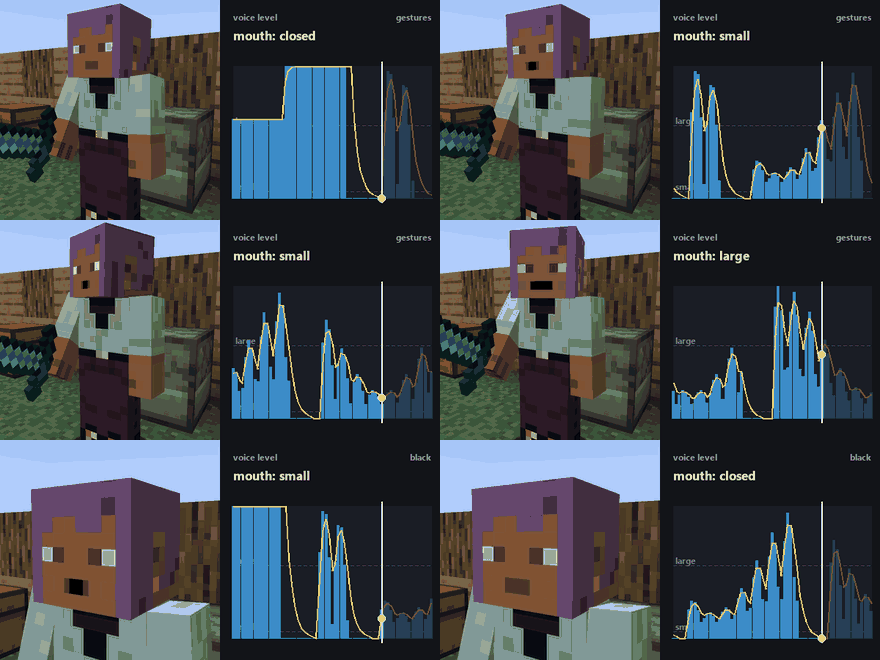
The mouth follows the voice level: closed in the pauses, small for a quiet voice, wide for a louder one, with small talking gestures. Simulated voice.
Description
What Are You Doing? Your Body Acts Out Your Menus
Player animations for every open screen: your body acts out the chest, furnace, crafting table, anvil, inventory, books, chat and AFK for everyone around you. Live mirror in the corner, and a mouth that moves with your voice (Simple Voice Chat).
What the players around you see, one screen at a time (survival, real speed). Every part has its own switch.
Chest
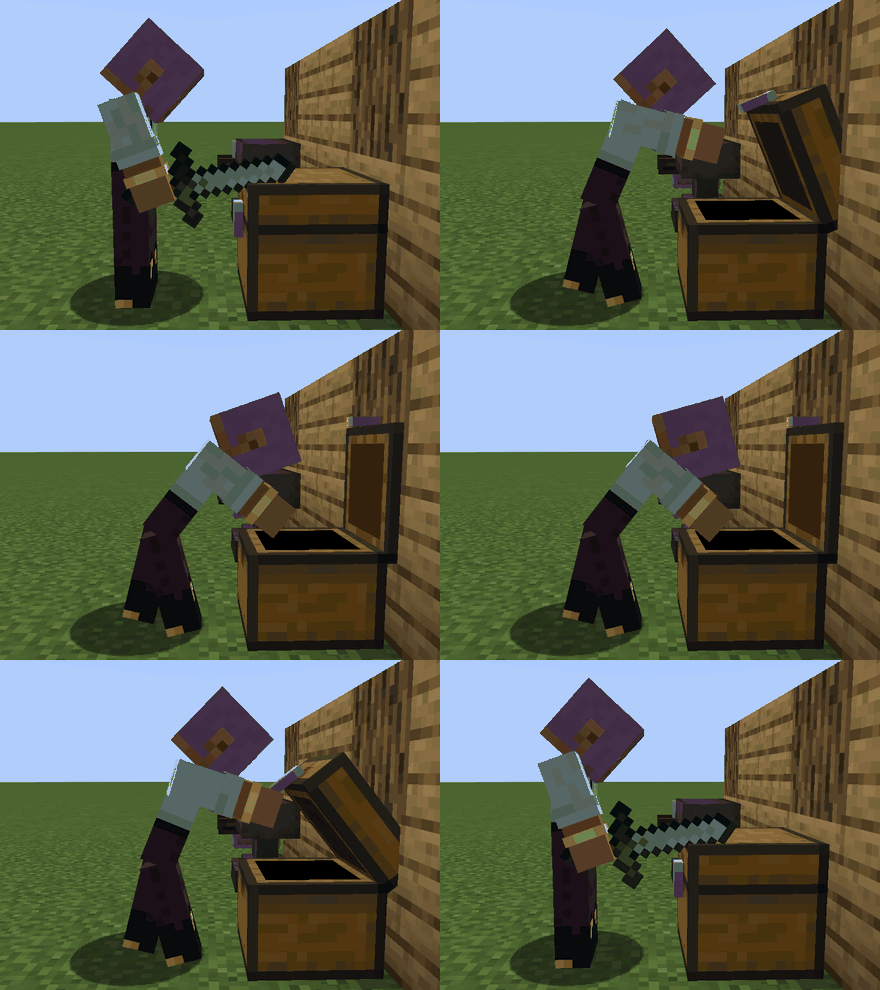
- A short step, both hands lift the lid with it, you lean in and rummage inside, then bring the lid down. Barrels, shulker boxes and other mods' chests get a plain reach-in, unless listed below.
- Options: container (the animation), chest_lid_follows_hands, chest_step, chest_lean_degrees.
Sophisticated Storage and Sophisticated Backpacks
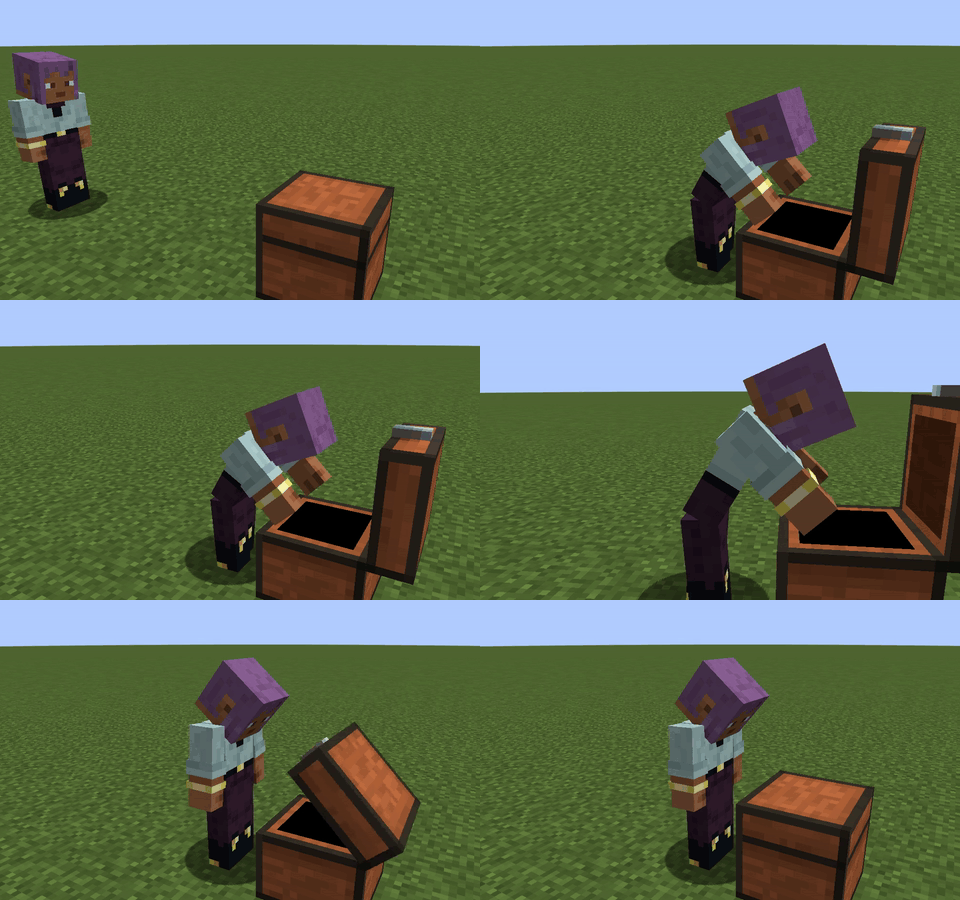
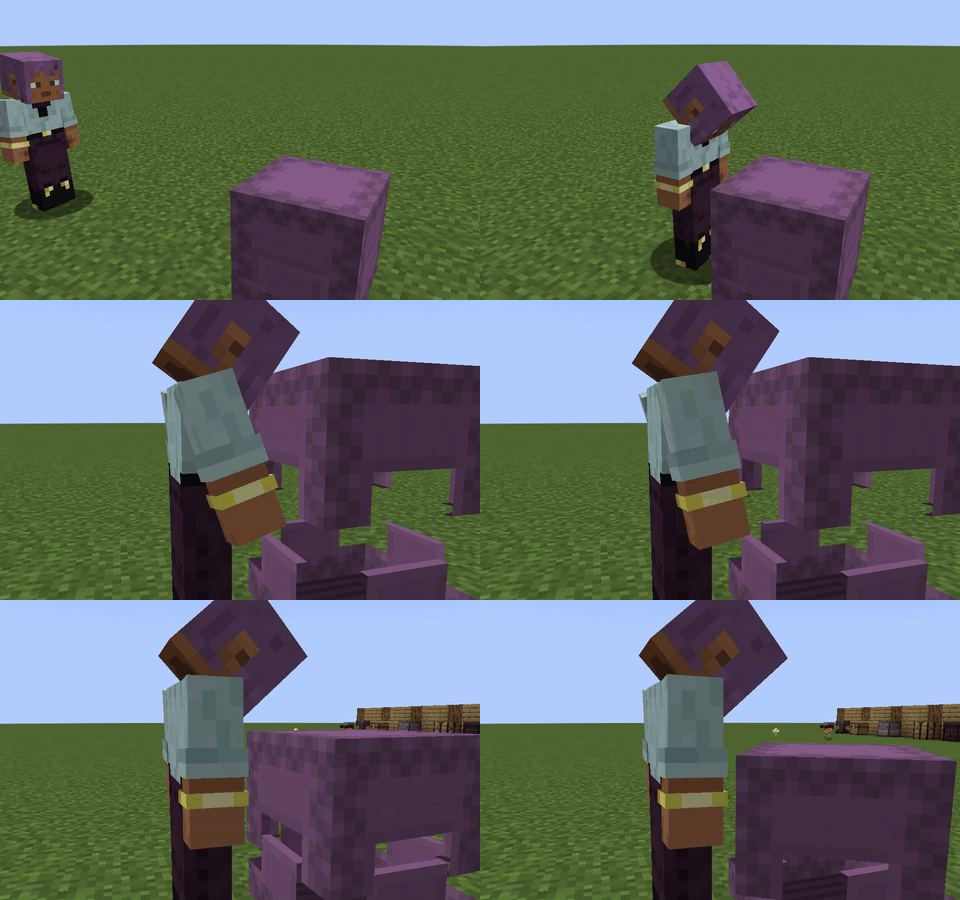
- Chests and barrels: you lean over them, each fitted to its height. The lid is the other mod's own.
- Shulker boxes (upright): you stay standing and, once the lid is up, your hands rummage low toward the opening.
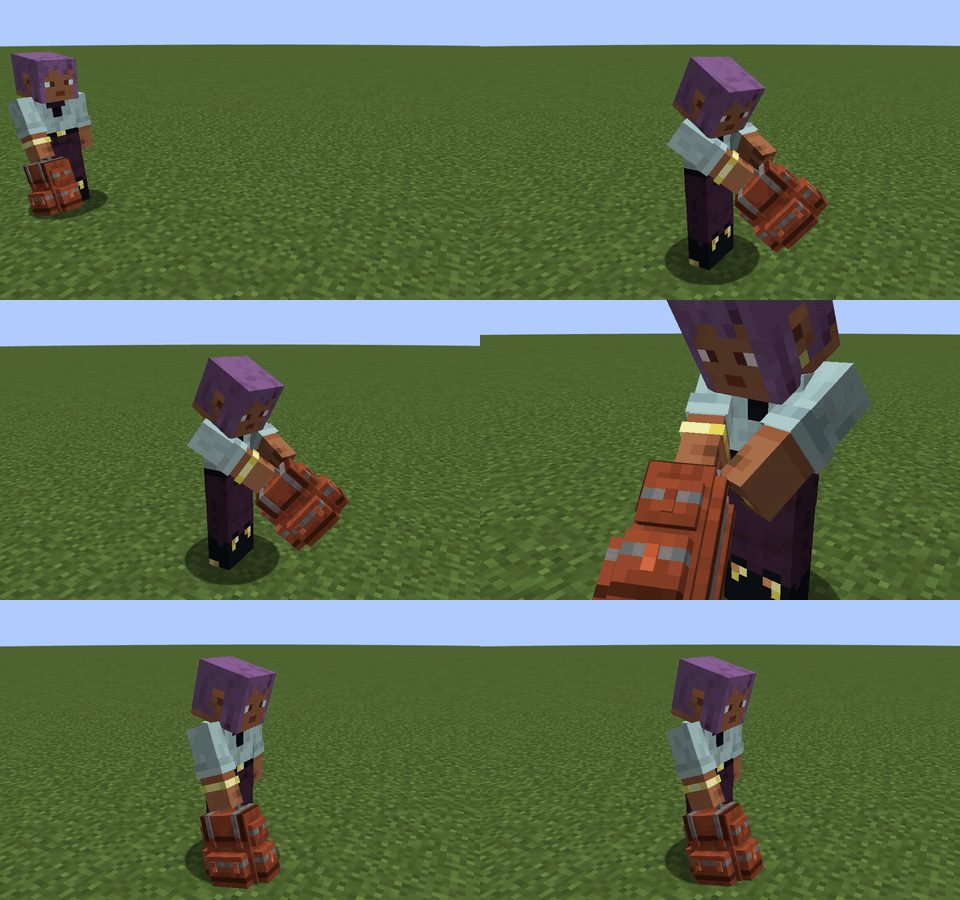
- Backpacks: opened from your hand (either hand, left-handed too), the backpack stays there, lifted a little, while the other hand digs in it. Worn on your back and opened with its key, it plays the pocket rummage.
Anvil, smithing table, grindstone
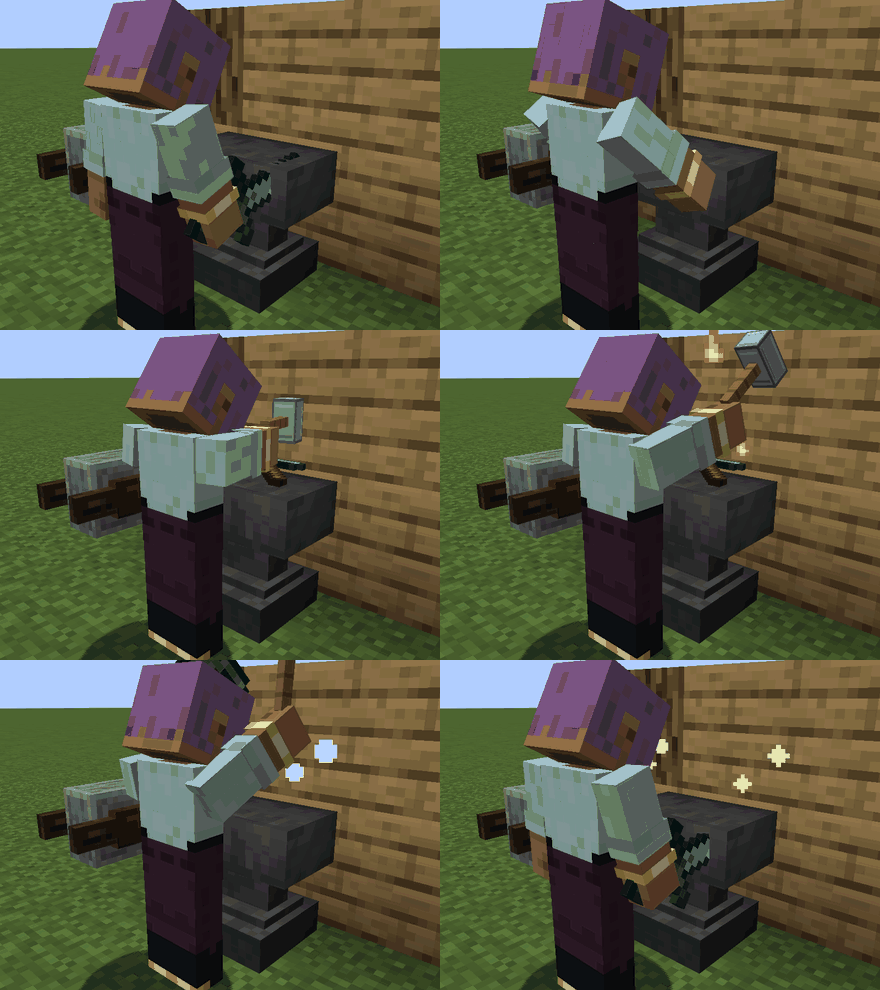
- The real item lies on the anvil; three hammer blows, face down, with sparks and the anvil sound in sync, and a soft glow over the item when the work is done.
- Options: anvil, smithing, grindstone, anvil_hammer, anvil_item_on_top, anvil_sparks, anvil_sound, anvil_flash.
Furnace
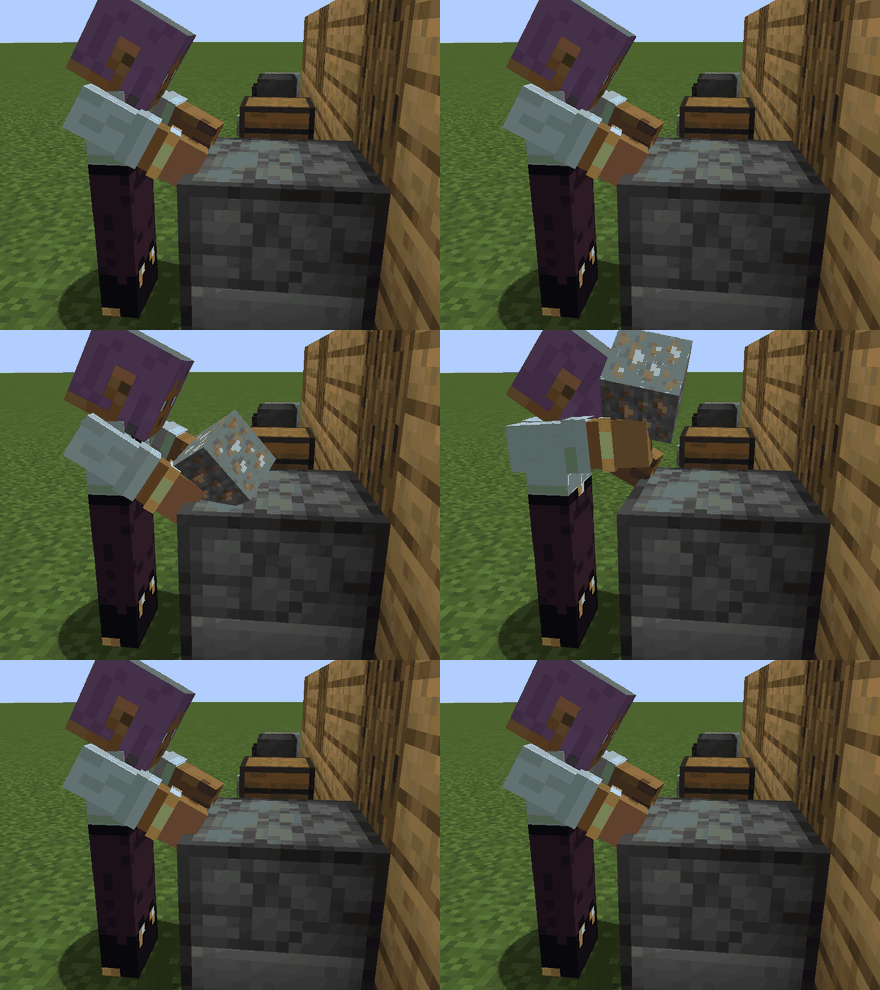
- You stand watching the fire; put something in and your hand carries the real item to the furnace (also blast furnace and smoker).
- Option: furnace.
Crafting table
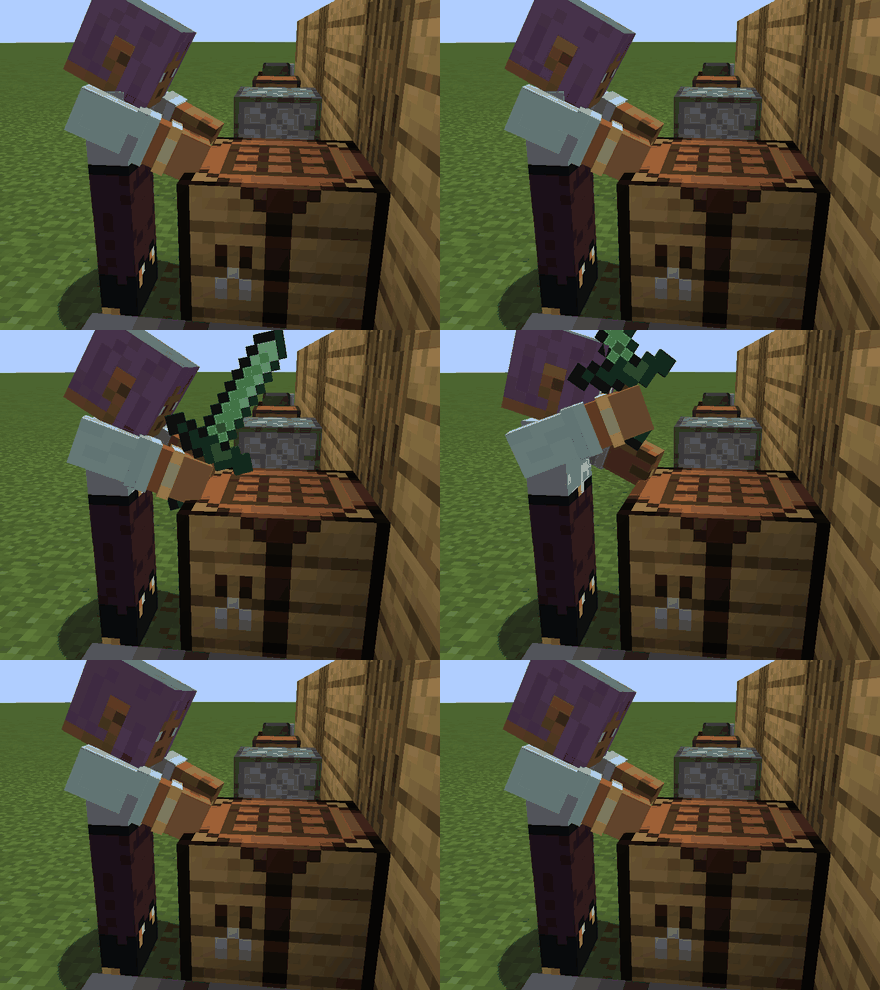
- Hands on the table; take the result and you build it and lift the crafted item.
- Option: crafting.
Inventory
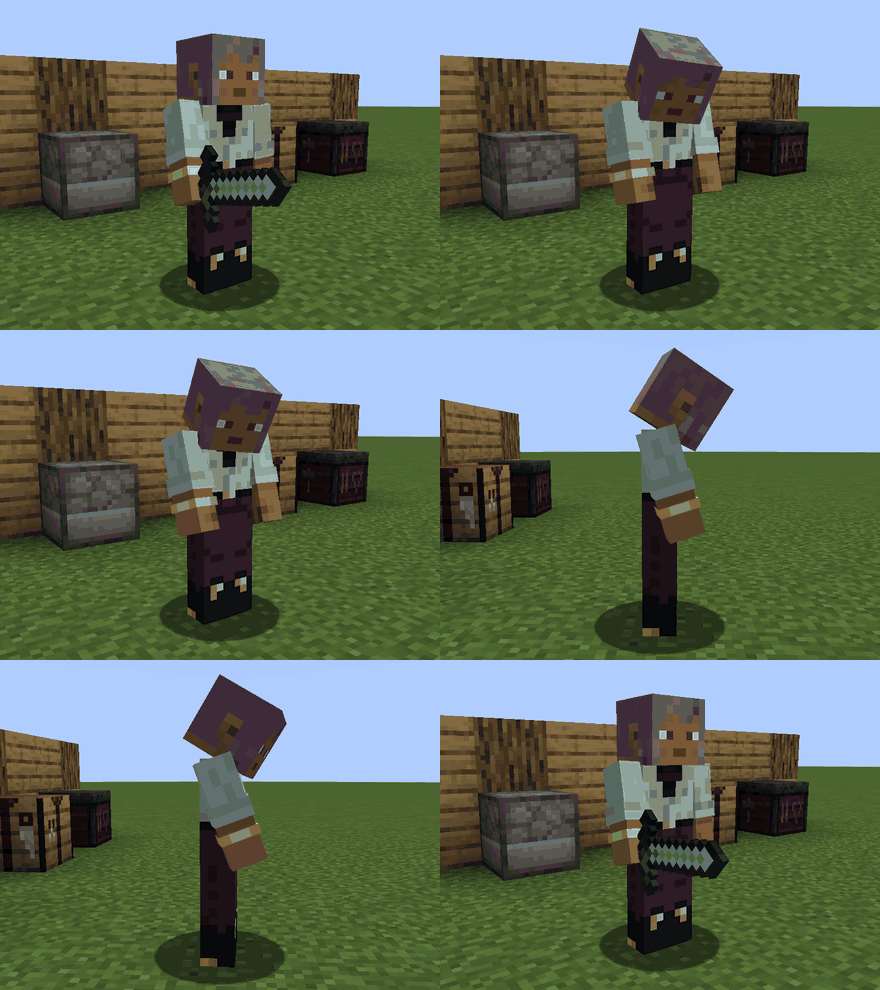
- The item in your hand is put away, hands go into the side pockets, head down, rummaging left and right.
- Options: inventory, hide_held_items.
Recipe book, quest book, maps
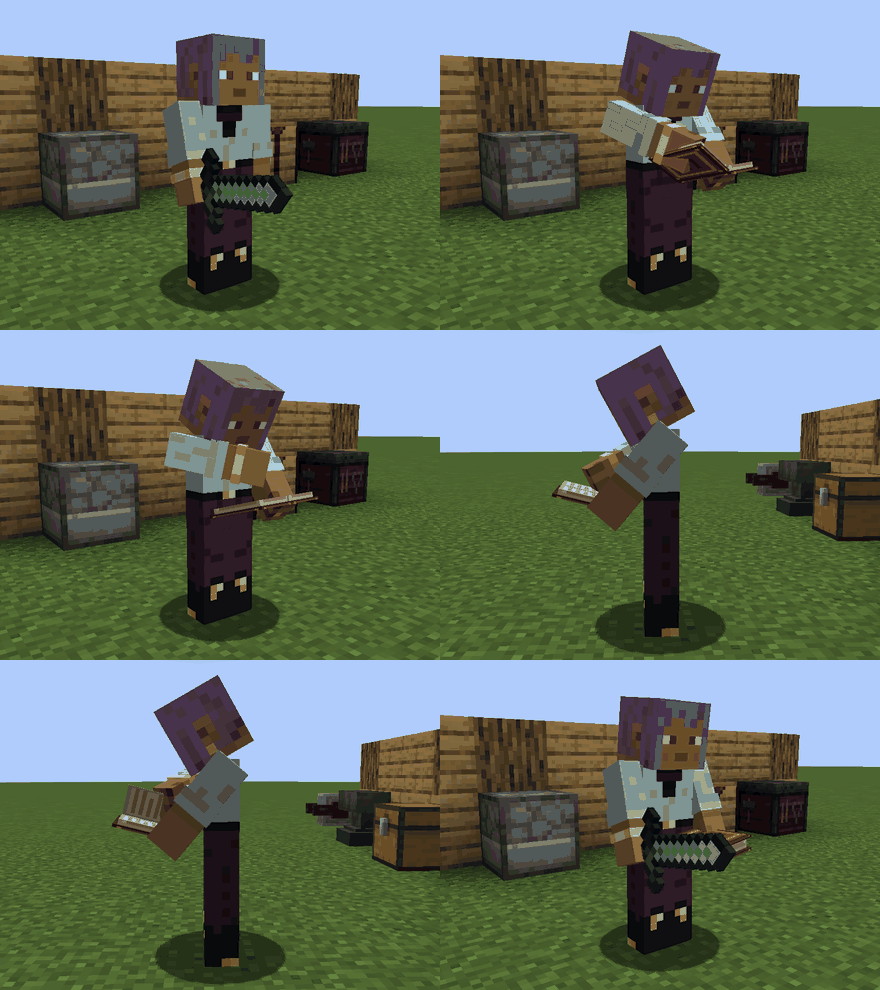
- JEI, EMI, FTB Quests and Questlog: you hold an open book in front of you, pages facing you; it opens, its pages turn and it closes when you leave the screen, all smoothly. Map screens (Xaero's World Map, JourneyMap, FTB Chunks): a paper map held open.
- Options: recipes, quests, map, show_props.
Chat
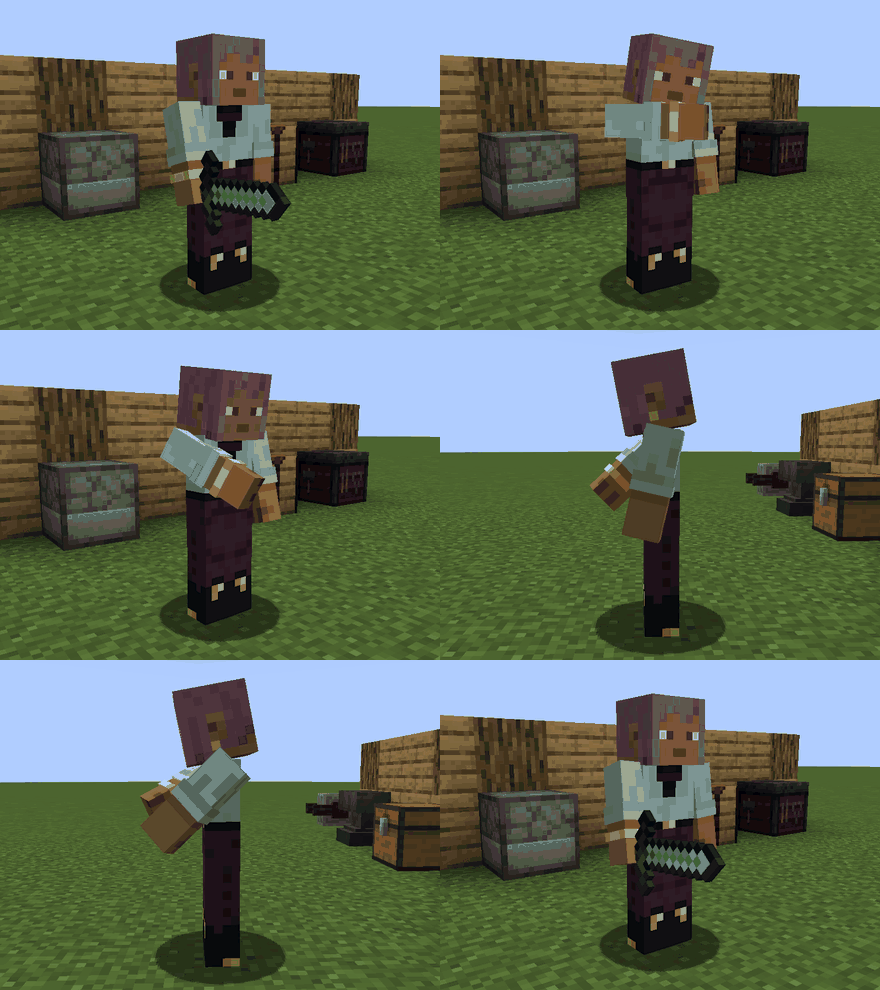
- Hand on the chin while you think, talking with the hands while you type.
- Options: chat, typing_seconds.
Pause and AFK
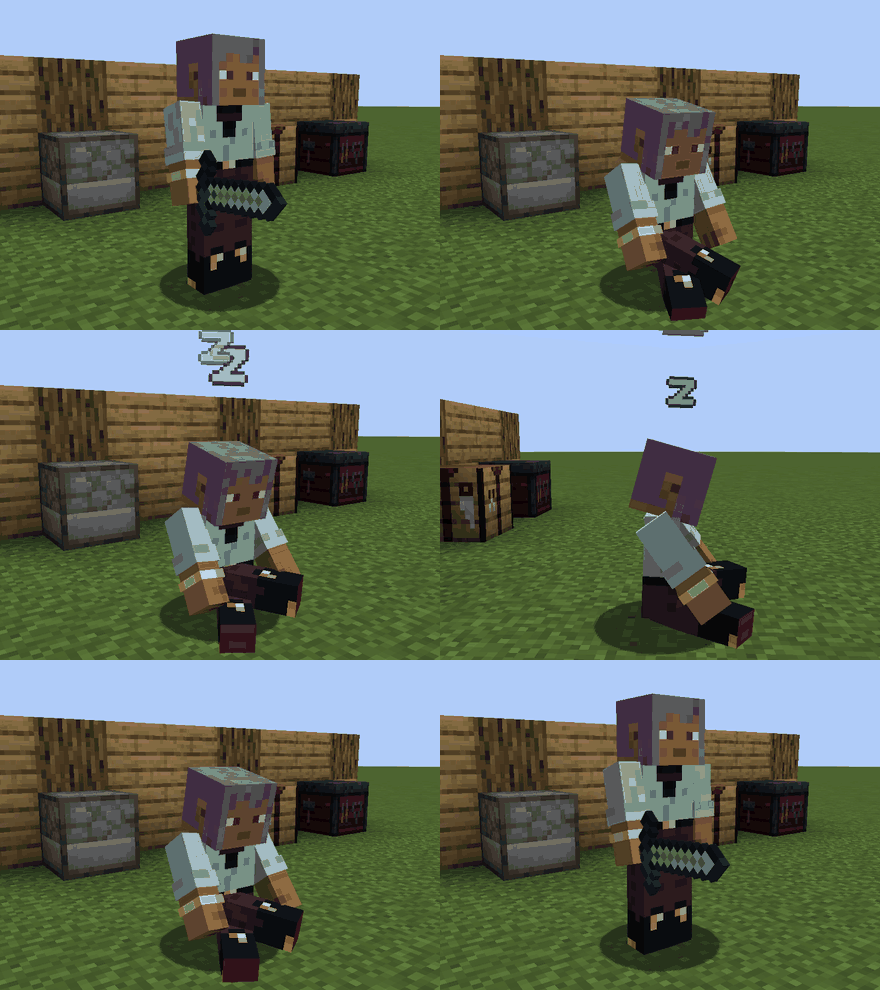
- You sit down cross-legged and meditate, with floating Zs, when the game is paused or after a while without input. In singleplayer the pause menu freezes the world, so there you watch it in the mirror; on a server (or a world open to LAN) your body does it for everyone to see.
- Options: pause, afk, afk_seconds, afk_z.
Every animation turns to face the block you really opened, and blends in and out smoothly.
The voice mouth and talking gestures (Simple Voice Chat)
The voice mouth is off by default (since 0.1.2): turn on mouth_enabled in the options.
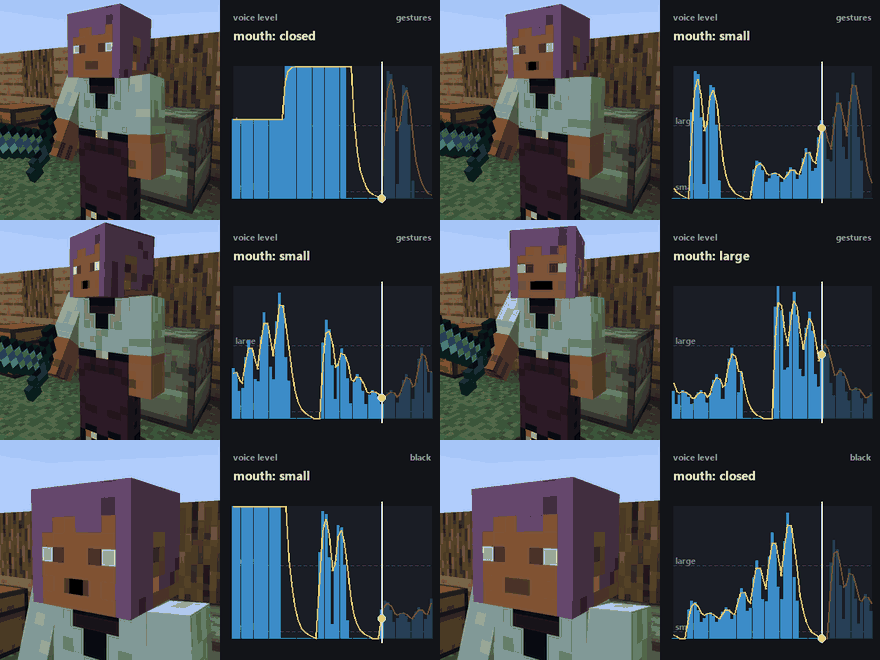
- With Simple Voice Chat installed, every player's mouth moves with their voice: resting when silent, small for a quiet voice, large for a normal or raised voice. A loud voice parts the lips a little more, smoothly.
- Subtle and pixel style: one skin pixel tall, centred, always inside the face. A small opening, a wide opening.
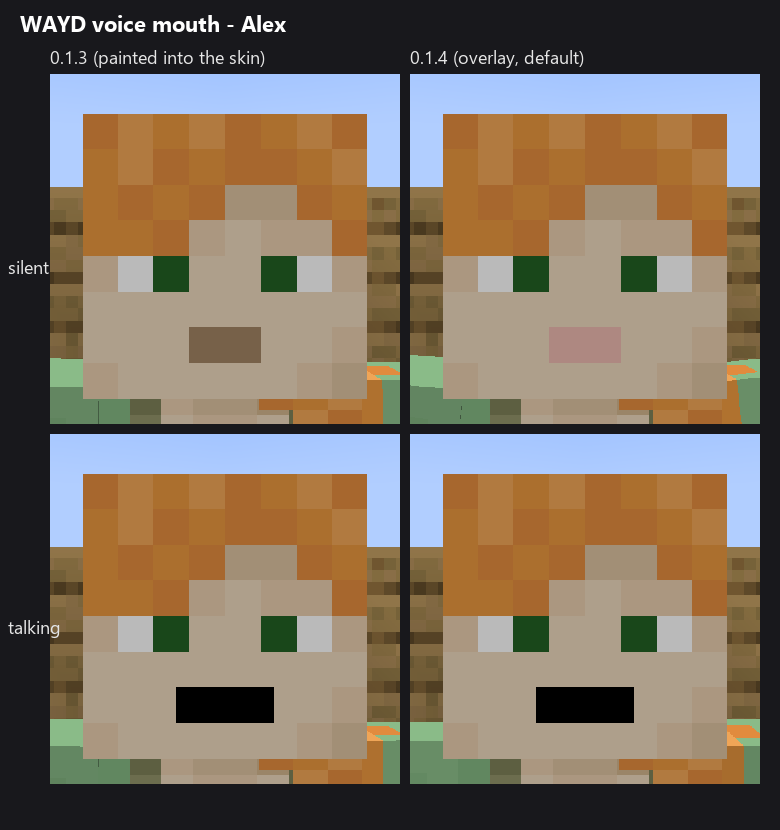
- Your skin is never changed (since 0.1.4): when silent you see the skin's own face exactly as drawn, and while talking only the opening is drawn over it. It follows the head from every angle and the hat layer stays in front of it. Every skin's own mouth is found by itself.
- Mark your mouth (Config > Voice mouth): if it is found in the wrong place on your skin, click your mouth pixels or pick a preset (thin, wide, two rows, left, right, no mouth). Saved per skin, on your computer only: it changes how you see yourself, and nothing is sent.
- The earlier look, with the mouth painted into the skin, is still there: mouth_mode = PAINTED.
- Steady: it changes at a natural pace and never flickers.
- Your own mouth shows in the mirror and in F5.
- Client side only: each player's game works it out from the voice it hears. Nothing is sent, the server needs nothing for it.
- Talking gestures: while a player talks, their body talks too, with small hand gestures like talking with the hands in the chat, a little wider the louder the voice. Whatever is in their hands stays there and simply moves with the hand. They ease out shortly after the voice stops.
- Gestures pause during combat and actions: a blow taken or dealt in the last 5 seconds, a hostile mob after the player, attacking, mining or placing, a bow, crossbow or shield, eating or drinking, sprinting, swimming, flying, riding, sleeping, climbing, sneaking, another mod's animation, or any screen animation of this mod. They come back a second after. The mouth always works.
- Others see your gestures, and you see them in F5; your first person hands never change. Switch: voice_gestures (on by default), also on the Voice mouth page of the options screen. They work with the mouth turned off too (since 0.1.4).
- Without Simple Voice Chat this part simply does nothing.
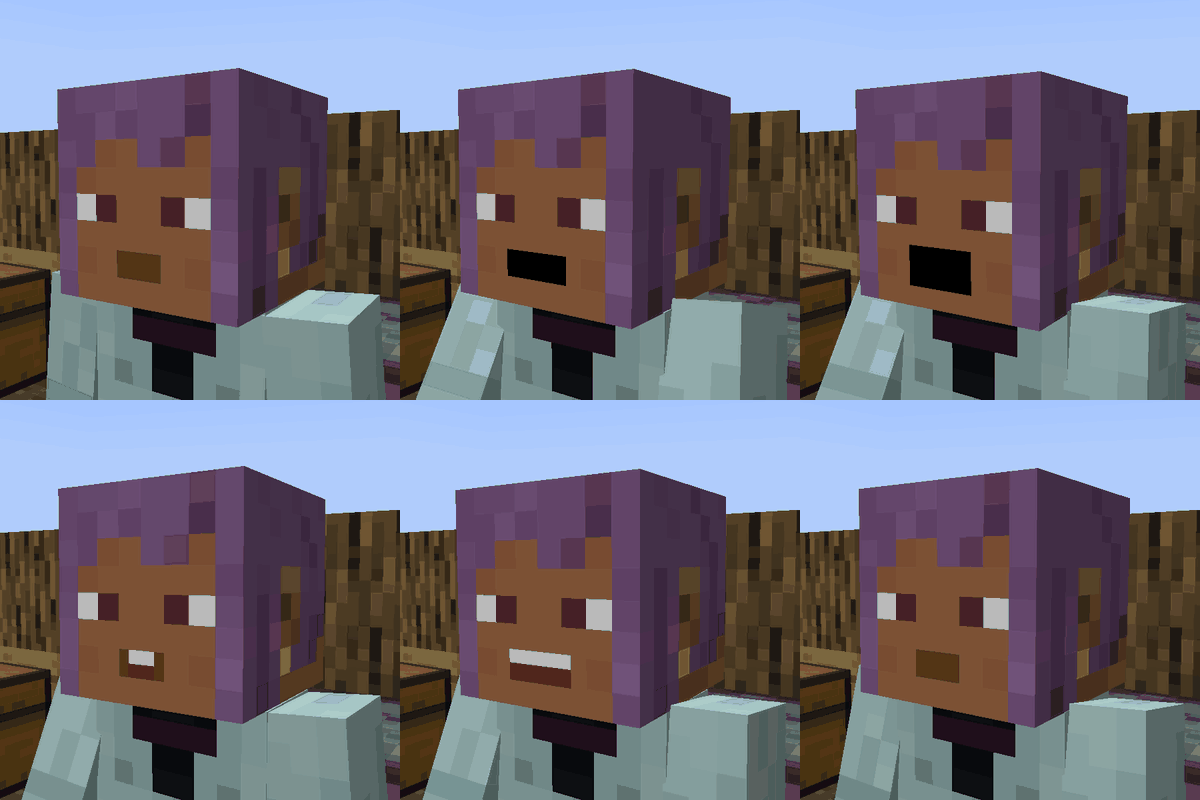
- Two styles for the opening: black, or teeth (white with a dark line under it).
- Options: mouth_enabled, mouth_mode, style, mouth_closed_visible, closed_darkness, closed_color, lips_part, lips_max, sensitivity, threshold, offset_x / offset_y, mouth_self_in_mirror, voice_gestures (the body gestures while talking, on by default).
- The textures can be replaced by a resource pack.
The mirror
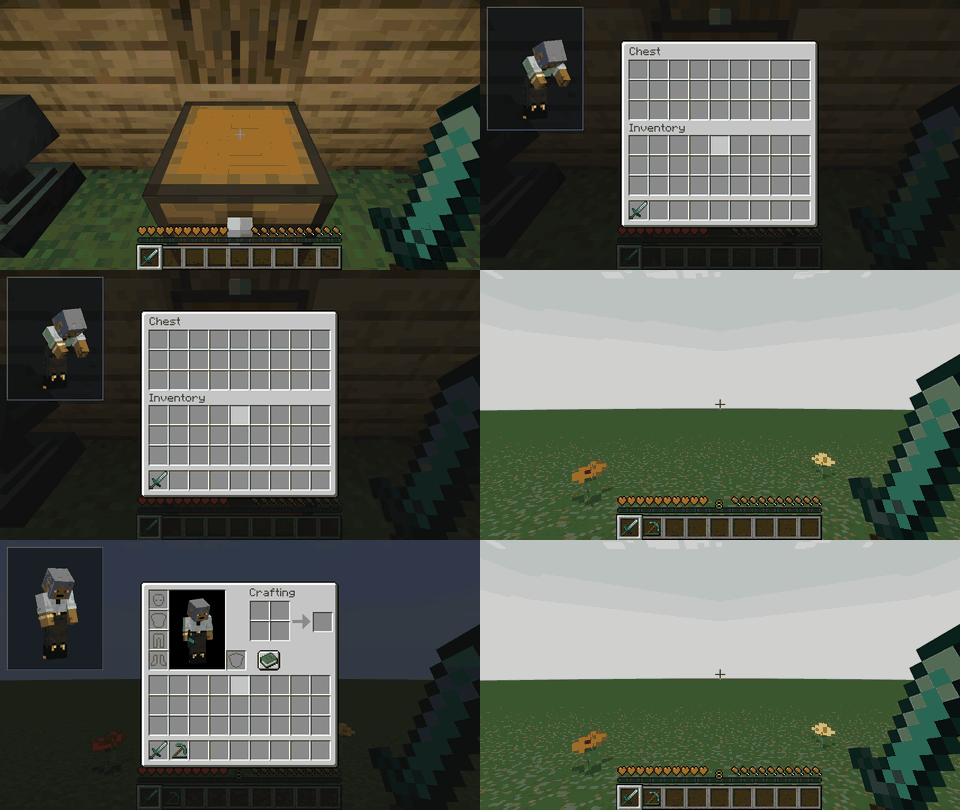
- While an in-game screen is open (chests, furnace, inventory, books...), a small window shows you, live, with the animation playing: the same body the others see. It stays out of menus like the mods list, options or key binds.
- It never covers the slots: it steps to the free side of the chest, anvil or inventory window (and the recipe book), and gets smaller when there is no room.
- Front, 3/4 or side view; transparent (default) or on a dark panel; small to large.
- Move and resize it with Edit mirror position in the options screen: drag it, scroll or pull a corner to resize, it snaps to the screen edges.
- Turn it off, or show it only while an animation plays. A "Toggle mirror" key exists in Controls, unbound by default.
- Drawn only on your screen while a screen is open: nothing is sent or spawned.
Options
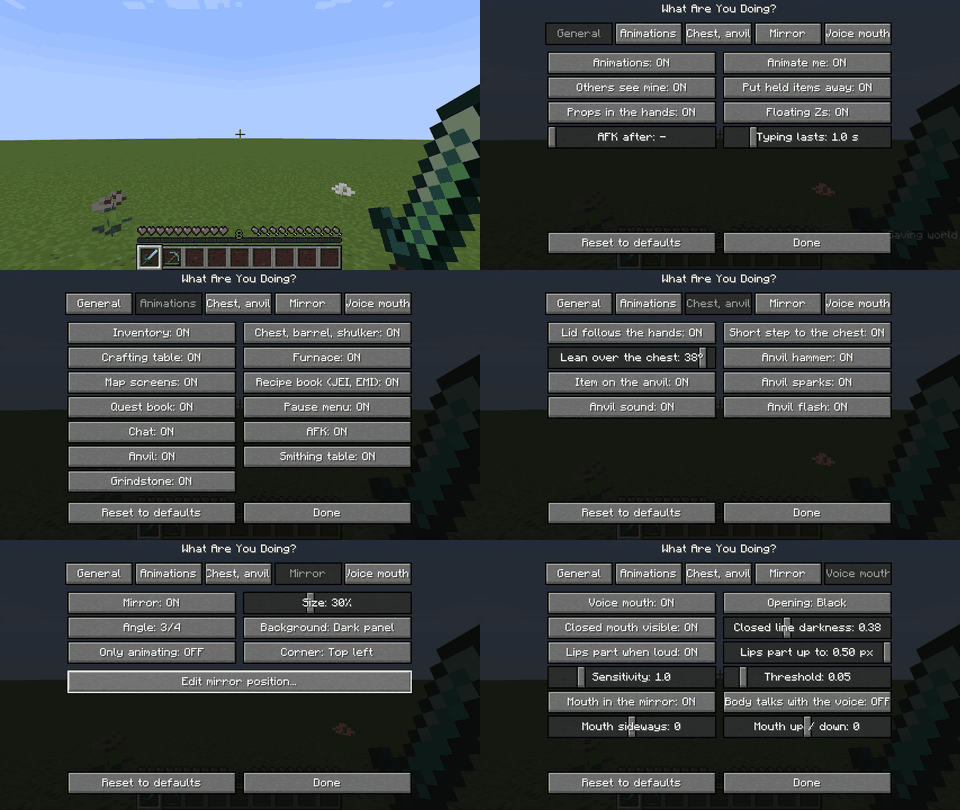
Everything can be switched. In game: Mods > What Are You Doing? > Config, or type /wayd config: five pages and a Reset to defaults button, in English and Brazilian Portuguese. Or in the config files.
Yours (config/wayd-client.toml):
- enabled (default true): Play screen animations at all, on you and on other players
- animate_self (default true): Animate your own player too (seen in F5)
- send_my_screen (default true): Privacy: off and nobody else learns what kind of screen you have open
- hide_held_items (default true): Put away what is in the hands while an animation plays
- show_props (default true): The book, map, hammer and real items in the hands
- afk_seconds (default 120): Seconds without input before you sit down to meditate (0 = never)
- afk_z (default true): Floating Zs over a paused or AFK player
- typing_seconds (default 1.0): How long the talking-with-hands pose lasts after the last key in chat
- categories (default true each): inventory, container, crafting, furnace, map, recipes, quests, pause, chat, afk, anvil, smithing, grindstone
- chest_lid_follows_hands (default true): The chest lid rises and falls with the hands
- chest_step (default true): The short step toward a chest from a block away
- chest_lean_degrees (default 38): How far the torso leans over an open chest (0 to 40)
- anvil_hammer / anvil_item_on_top / anvil_sparks / anvil_sound / anvil_flash (default true): The hammer, the real item on the anvil, sparks, sound and flash of each blow
- mirror_enabled (default true), size_percent (30), anchor, angle, background (TRANSPARENT; DARK_PANEL draws a panel behind you), only_when_animating (false): The mirror
- mouth_enabled (default false): The voice mouth. Off by default since 0.1.2: turn it on; it finds your skin's mouth by itself
- style (default BAR; or TEETH): The opening, for every player you see
- mouth_mode (default OVERLAY; or PAINTED): Draw only the opening over the untouched skin, or paint the mouth into the skin
- mouth_closed_visible (default true): Silent players show the closed mouth (PAINTED only)
- closed_darkness (default 0.38), closed_color (default empty): How dark the closed line is, or one fixed colour for everybody
- lips_part (default true), lips_max (default 0.5): A loud voice parts the lips a little, up to this many skin pixels
- sensitivity (default 1.0), threshold (default 0.05): How easily the mouth opens, and how quiet stays closed
- offset_x / offset_y (default 0): Place of the mouth on the face, in skin pixels
- mouth_self_in_mirror (default true): Your own mouth in the mirror
- voice_gestures (default true): The body gestures while the player talks; gestures pause during combat and actions
- layer_priority (default 20): Spell casting and combat animations of other mods stay above ours
Server (serverconfig/wayd-server.toml):
- relay (default true): Pass each player's kind of screen on to the players around them
- max_distance (default 32): Only players within this many blocks receive it
- stations (furnace, crafting, anvil, smithing, grindstone; default true): The real-item actions, one switch each
Make it yours
- Every animation, prop and screen-to-animation rule can be replaced or added by a resource pack (Blockbench animations, plain item models, small JSON rules). A guide, the Blockbench base model and an example pack come with the source.
/wayd inspecttells you which screen is open and which rule matched, so you can map any mod's screen.- Press F3+T to reload your pack and see the change at once.
Multiplayer and privacy
- With the mod on the server, the players around you see your animation. Only a short "which kind of screen" id travels, and for a station action the id of the item used: never what you type or carry.
- Without it on the server you still see yourself in F5 and in the mirror.
- The voice mouth needs nothing on the server.
- The dedicated server does not need playerAnimator.
Compatibility
- playerAnimator: required on the client.
- Simple Voice Chat (optional): the voice mouth.
- Spooky Doors addon (optional), "lift to open chests": the addon's hands lift the lid, then this mod takes over for the rummage, without a second lift (the clip at the top of this page).
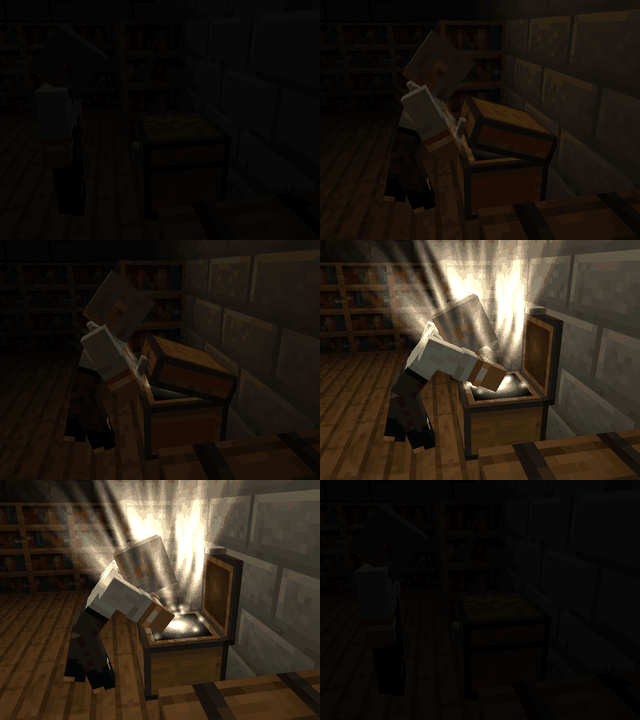
- Juicy Chests (optional): the springy lid and the light out of the gap play together with the hands (the clip at the top of this page).
- JEI, EMI, FTB Quests, Questlog, Xaero's World Map, JourneyMap, FTB Chunks: their screens have their own animation.
- Sophisticated Storage and Sophisticated Backpacks (optional, since 0.1.4): their chests, barrels, shulker boxes and backpacks have their own animation.
- Apotheosis: the enchanting, reforging, salvaging, gem cutting, augmenting and library screens were checked; they open normally and the body stays still, like at the vanilla enchanting table.
- Spell casting and combat animations of other mods stay on top.
Versions
- Minecraft 1.21.1 - NeoForge (21.1.x), with playerAnimator 2.0.4+1.21.1 on the client.
- Minecraft 1.20.1 - Forge (47.x), with playerAnimator 1.0.2-rc1+1.20 on the client.
Tested in game on both: every animation and station action, the options, the mirror at every GUI scale, the voice mouth with and without Simple Voice Chat installed, and the release files themselves in a clean game folder. A dedicated server with a second client was tested on 1.21.1.
Known limits
- The mouth style is your own choice for everybody you see: players do not pick their own mouth yet.
- A mouth that is not clear (a beard, a skin without a mouth) gets the opening at the usual place; a mask on the hat layer covers it. In PAINTED, a mouth two rows tall keeps its second row.
- Plasmo Voice is not supported yet.
- Your own paper doll in the inventory never animates (on purpose: it would be in the way); the mirror is there to see yourself.
- A modpack that adds its own rules or animations should ship its resource pack to every player: each client plays the animation from its own packs.
- Screens of mods not listed above get no animation until a rule is added (
/wayd inspectshows what to match).
More from Vitral
If you like What Are You Doing?, these go well with it:
- Juicy Chests: springy lids, light and sparkles when chests open.
- Juicy Enchanting: a livelier enchanting table.
- Spooky Trapdoors & Double Doors: drag trapdoors open slowly and your arm reaches for the handle.
Modpacks
Feel free to include it in any modpack, no need to ask!
playerAnimator is made by KosmX and is installed separately. All animations, props and the icon are made for this mod.
Made by an indie dev with help from AI tools; every version is tested in game.

Like the mod? You can support future updates and new mods on Ko-fi. Totally optional, everything stays free.
What Are You Doing? Your Body Acts Out Your Menus (Player Animations) Team

Owner