Description
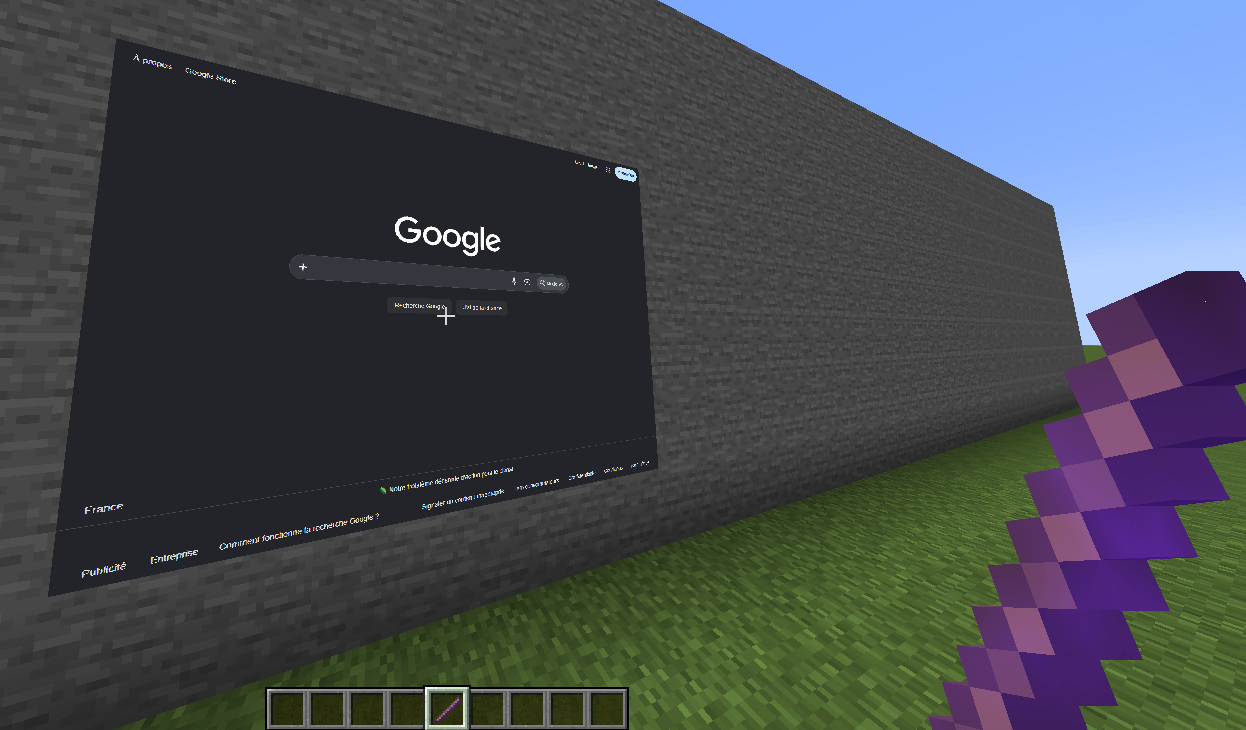
Watch YouTube, browse the web and display images or GIFs on screens you place anywhere in your Minecraft world.
WebDisplays Improved adds in-game screens powered by a real, up-to-date Chromium web browser (the engine of Google Chrome). Build a TV in your house, a giant cinema screen in your town, a billboard in your spawn, or keep Discord open on your base wall. No MCEF or other library to install: just drop the mod in your mods folder.
✨ What you can do
- 📺 Watch YouTube in Minecraft: videos and music play right on your screens, with sound.
- 🌐 Browse any website: a full in-game web browser with modern web apps (Discord, dashboards, maps, wikis…). Your logins are remembered.
- 🖼️ Images and animated GIFs: posters, paintings, photo frames, signs and billboards (PNG, JPEG, WebP, GIF). They are displayed without any browser, so they are almost free.
- 🖱️ Fully interactive: click directly on a screen, or press R to use your mouse and keyboard on the page (type, scroll, back/forward buttons).
- 📐 Any size: from a small monitor to a huge cinema screen up to 64 blocks wide, on walls, floors and ceilings.
- 🔊 Positional volume: each screen has its own volume, fading with distance.
- 🌍 Your language: websites receive your game language, so YouTube subtitles and auto-dubbing match it.
⚡ Built for performance
Web screens are famous for eating RAM. This mod is designed not to:
- only a few pages are active at the same time (adjustable);
- screens you are not looking at slow down, far screens are paused then closed;
- images and GIFs never start a browser;
- Chromium only starts when you actually use web pages.
👥 Multiplayer ready
- Every player with the mod sees the screens; install it on the server and on the clients.
- Only the owner of a screen and server operators can edit or remove it.
- The server checks every address and refuses dangerous ones (local files, internal browser pages, scripts).
- Each player loads the page on their own computer: nothing heavy runs on the server.
🎮 How to use
- Take the Screen Placer from the Tools creative tab (or use /give).
- Right-click a block face, then the opposite corner on the same face. A red outline shows the area and the screen appears.
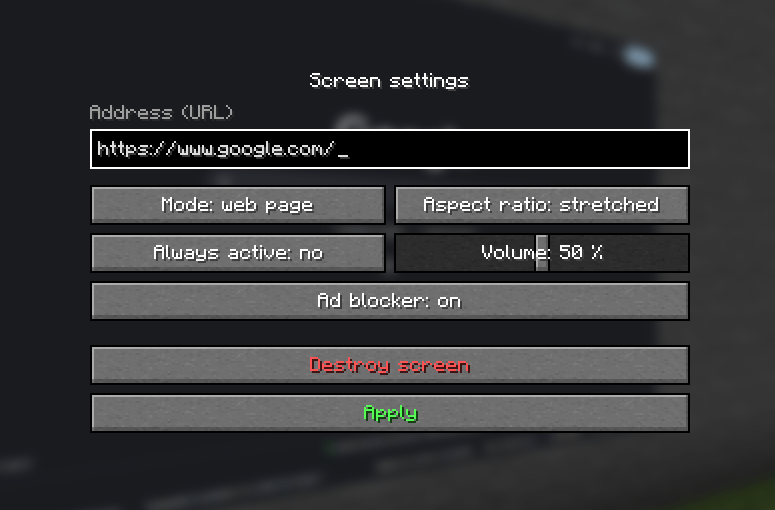
- Right-click the screen with the Screen Placer: enter a website or image address, choose web page or image/GIF mode, aspect ratio, volume and "Always active".
- Look at a web screen and press R to interact, Esc to come back.
- Left-click the screen with the Screen Placer to remove it.
📥 About the Chromium download
Web pages need Chromium (about 176 MB), which is too big to be included in the mod file. To keep things clear and safe:
- it is downloaded only after you agree, in a window shown in game. Nothing is downloaded without your consent;
- it comes from the official GitHub page of this project: github.com/NumekPerso/WebDisplayImproved-Public;
- its integrity is verified (SHA-256) before use;
- it is installed once, in the
webdisplaysfolder of your game directory (delete the folder to remove it); - if you decline, images and GIFs still work, and you can enable web pages later in the settings.
✅ Versions and systems
- Forge 1.12.2, 1.16.5, 1.20.1
- NeoForge 1.21.1
- Fabric 1.21.1 (requires Fabric API; Mod Menu optional)
- Web pages: Windows 64-bit for now. On Linux and macOS, images and GIFs work; web support is planned.
❓ FAQ
Do I need MCEF?
No. Everything is included; Chromium is downloaded by the mod itself after you agree.
Can I use it with MCEF, WebDisplays or another browser mod?
Only one Chromium can run in a game. If another mod embeds one, web pages are disabled to avoid a crash; images and GIFs keep working.
Does Twitch, Netflix or Spotify work?
Not yet: Twitch live streams use a video format missing from open-source Chromium, and Netflix, Disney+ or Spotify require copy protection (DRM) that only official browsers have. YouTube and most websites work.
Can I make it lighter?
Yes: lower the number of active pages and the display distance in the settings.
⚙️ Settings
Click Config in the mod list (Mod Menu on Fabric) or edit config/webdisplayimproved-client.properties: web pages on/off, active pages, display distance, frame rate of pages you are not looking at, sound distance.
Credits
Web pages are rendered with the Chromium Embedded Framework and java-cef (BSD licenses, included in the Chromium download).
⚠️ Any redistribution of this mod without my prior consent is strictly prohibited. ⚠️
Suggestions and bug reports are welcome in the comments.
For anything else, join the Discord:
WebDisplay Improved Team