Wave Matrix
- By
In game music player. Full control over the Minecraft OST or your own music files. (ogg)
catastrophic_impact | Wave Matrix
Create your game server with 

Wave Matrix
(Fabric)
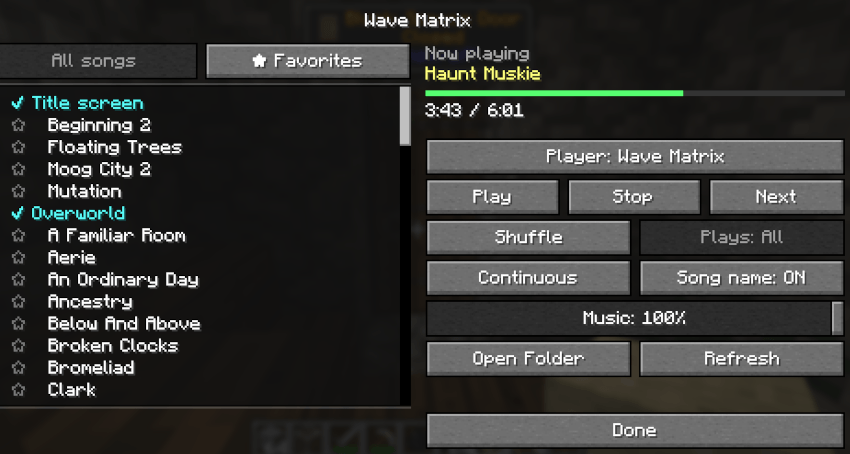
Your own Minecraft music player. Pick any song from the game's whole soundtrack, the music discs or your own music, shuffle or play in order, and choose whether songs come with natural pauses or back to back.
FEATURES
Every song in the game
- All of Minecraft's music is listed by name, grouped: Title screen, Overworld, Creative, Underwater, Nether, The End.
- All the music discs, with their full names (for example
"C418 - cat"). - Music from resource packs and other mods shows up too.
Your own music
- Put
.oggfiles in the music folder (.minecraft/wavematrix/) and they appear under"Your music".Open Folderopens it;Refreshpicks up new files. - Only
.ogg(Ogg Vorbis) files can be played; convert MP3s first.
The music player
- Double-click a song to play it.
Play,StopandNextbuttons. - Player:
Wave MatrixorMinecraft. With Minecraft, the game plays its own music as if Wave Matrix weren't there, and the other buttons are off (the Music volume still works). Switching back stops the game's song and Wave Matrix starts a new one. - Now playing: the song's name, a progress bar and its time (
1:23 / 4:05). - Mode:
Shuffle,In orderorLoopdecides what comes after a song. - Immersion:
Natural(a random 3-8 minute pause between songs, like the game's own music) orContinuous(back to back). - Click a group's title to put it in or take it out of Shuffle and In order (music discs start out left out; any song can still be played by clicking it).
- The Music volume slider is Minecraft's own, so both always match.
Favorites
- Click the ☆ in front of a song to make it a favorite (★); click again to take it off.
- The ★ Favorites tab lists your favorites alphabetically (All songs lists everything).
- Plays:
AllorFavoritesdecides what Shuffle and In order pick from. It's greyed out until you have a favorite, and goes back to All when you take off the last one. - Favorites play even from a group you took out of Shuffle and In order.
- Your own songs are remembered by file name. A favorite whose song is gone (a deleted file, a removed resource pack or mod) is taken off the list.
- Show song name:
♪ Swedenabove the hotbar when a song starts.
Wave Matrix plays all the music
It replaces the game's own background music, following vanilla's rhythm:
- Title screen and menus: the title-screen music, with short pauses.
- Loading, creating or joining a world: no music.
- In a world: your playlist and mode, starting a few seconds after you arrive. Stop keeps the world quiet until you press Play again.
Opening it
- With HQ installed: a
"WM"mini button above your inventory (HQ draws it and turns it on from the start; you can turn it off, or limit how many mini buttons show, in the HQ screen). /wm, or a key you can set under Options > Controls > Key Binds > Wave Matrix (none by default).
COMMANDS
/wm— Open the music player.
SETTINGS
Changed in the music player. Saved in config/wavematrix.json (just for you).
player              wave_matrix     wave_matrix, minecraft: who plays the music.
mode                shuffle         shuffle, in_order, loop
continuous          false           Immersion. false: natural pause between songs;
                                    true: back to back.
favorites           []              Your favorites (song ids, or file:<name> for your
                                    own songs).
favorites_only      false           Plays: Favorites.
show_song_name      true            Song name above the hotbar when a song starts.
skipped_groups      [DISCS]         Groups left out of Shuffle and In order.
music_folder        .minecraft/wavematrix   Where your .ogg files go.
HQ COMPATIBILITY
With HQ installed, a "Wave Matrix" button in the HQ list opens /wm, and a "WM" mini button (a note block) shows above your inventory next to HQ's. Without HQ the mod works exactly the same (use /wm or the key).
COMPATIBILITY & NOTES
- Client only: it doesn't need to be on the server.
- If the Music volume is at 0, nothing plays; music starts again within a few seconds of turning it up.
Wave Matrix Team