Skindependence
- By
Change your skin and cape to any local skin file on your system with official capes included.
catastrophic_impact | Any Skins
Create your game server with 

Skindependence
(Fabric)
Notice: Any Skins has been renamed to Skindependence.
Wear any skin from a folder on your computer, and any cape from a built-in list of more than 80 (or your own), with no account changes and no uploading to websites. Friends with the mod see your skin and cape too.
FEATURES
The screen
- Press
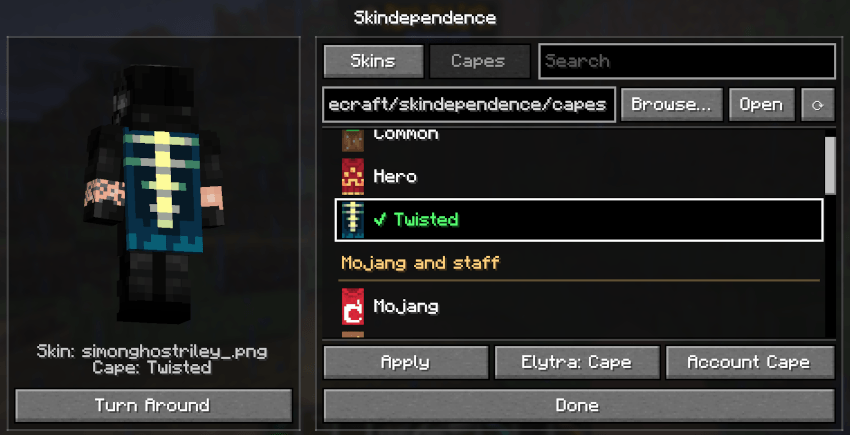
K(rebindable under Controls > Skindependence) or type/skindependence. - Left: You, in 3D, wearing whatever skin and cape you have picked. Drag to turn, or press Turn Around. It opens from the front on the Skins tab and from the back on the Capes tab so the cape shows.
- Right: The Skins and Capes tabs, a search box, the folder row, the list and the buttons. The picture changes as soon as you click something; nothing is worn until you press Apply (or double-click).
- Folder row: Type or paste a path, Browse... picks a folder, Open shows it in your file manager, the arrow button reads the folder again.
Pick a skin (Skins tab)
- Drop
.pngskins into the skins folder (default:.minecraft/skindependence/). - Arms switches between Wide (Steve) and Slim (Alex). It's guessed automatically for each skin.
- Account Skin goes back to your normal skin.
Pick a cape (Capes tab)
- Every cape in the list has a small picture. They are grouped: Everyone, Mojang and staff, Events, Personal, Competitions and volunteers, Temporary and console, Testing and jokes, and Never released.
- Your own capes: Drop 64x32
.pngfiles into the capes folder (default:.minecraft/skindependence/capes/). They show at the top as "Your capes". HD capes (128x64 and up) work too. - Elytra: Matches Cape (the default) gives your elytra the cape's design, like the real capes. Account's keeps your account's elytra.
- Account Cape goes back to your normal cape.
- Skin and cape are chosen separately: any cape goes with any skin.
Skin formats
- 64x64 skins, HD skins (128x128 and up) and old 64x32 skins (converted automatically).
Sharing
- Players who also have Skindependence see each other's custom skins and capes.
- Players without the mod see your normal account skin and cape.
- Other players' skins and capes are only kept in memory, never saved to disk, and dropped when they leave.
COMMANDS
/skindependence— Open the skin screen (same as theKkey).
SETTINGS
Saved in config/skindependence.json:
{
  "skinsFolder": ".minecraft/skindependence/",
  "capesFolder": ".minecraft/skindependence/capes/",
  "chosenSkin": "skin.png",
  "chosenCape": "cape.png",
  "armStyle": "Wide / Slim",
  "elytraSetting": "Matches Cape / Account's"
}
All set from the screen.
HQ COMPATIBILITY
With HQ installed, an "Skindependence" button in the HQ list opens /skindependence. Without HQ the mod works exactly the same.
COMPATIBILITY & NOTES
- Dedicated servers: Put the jar in the server's mods folder so players can see each other's skins.
Skindependence Team