WatcherHUDJEI
- By
Adds Just Enough Items integration to WatcherHUD — press KP_3 for recipes and KP_4 for uses on any targeted block.
# WatcherHUDJEI
**Just Enough Items integration for WatcherHUD.**
WatcherHUDJEI is the official companion addon for **WatcherHUD**. It connects the WatcherHUD overlay to **Just Enough Items (JEI)**, letting you open recipes and uses for the block you're looking at — with a single keypress, without ever leaving the overlay.
---
## ✨ What it does
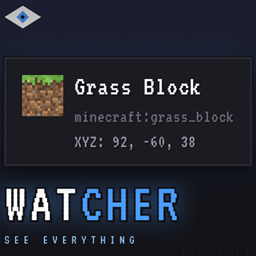
When you look at a block with WatcherHUD installed, the overlay shows you its name, coordinates and other info. With this addon, you can now **jump straight into JEI** to see:
- **Recipes** — how to craft this block (press **KP_3**)
- **Uses** — what recipes this block is used in (press **KP_4**)
No need to open JEI manually, type in the search bar, or hover over items in your inventory. Just **look at a block** and press the key.
---
## 🎮 Keybinds
| Key | Action |
|---|---|
| **KP_3** | Open JEI recipes for the targeted block |
| **KP_4** | Open JEI uses for the targeted block |
*You can rebind these in `Options → Controls → WatcherHUDJEI`.*
The keybinds live in their **own category** in the controls menu, separate from WatcherHUD's own keys. They are automatically disabled when the addon is turned off in the WatcherHUD config screen.
---
## 🔧 Installation
**Required:**
- Minecraft **1.20.1**
- Forge **47.4.10** or later
- **WatcherHUD** (this addon will not load without it)
- **Just Enough Items** (JEI) 15.x
**Steps:**
1. Make sure Forge is installed
2. Put **WatcherHUD** in your `mods/` folder
3. Put **Just Enough Items** in your `mods/` folder
4. Put **WatcherHUDJEI** in your `mods/` folder
5. Launch the game
That's it. The addon registers itself automatically.
---
## 🧩 How it works
WatcherHUDJEI is a **plugin for WatcherHUD**. It uses the public WatcherHUD Plugin API to:
1. Register itself as a WatcherHUD plugin
2. Declare two keybinds (recipes and uses)
3. Show a small hint line in the tooltip, telling you which keys to press
WatcherHUD handles the display; WatcherHUDJEI handles the JEI part. They are completely independent — WatcherHUD works fine without this addon.
---
## 🎛️ Plugin toggle
In the WatcherHUD config screen (**KP_0** → **Plugins**), you'll find **WatcherHUDJEI** listed with two options:
| Toggle | What it does |
|---|---|
| **Show recipe hint** | Shows the "KP_3: recipes · KP_4: uses" line in the tooltip |
| **Show 'not installed' message** | Shows a warning if JEI is missing |
You can enable or disable the addon itself, or just hide the hint line if you don't want it.
---
## 🧩 Compatibility
- **Client-side only** — this addon does not need to be installed on the server
- Works with **JEI** 15.x on Forge 47+
- Compatible with other WatcherHUD addons
- No conflict with Jade, WTHIT or TOP
### Requires WatcherHUD
If WatcherHUD is not installed, this addon will **not load**. Forge will refuse to start with a clear error message telling you that WatcherHUD is missing.
---
## 🐛 Bug Reports
When reporting an issue, please include:
- Your **Minecraft version** and **Forge version**
- Your **WatcherHUD version** and **WatcherHUDJEI version**
- Your **JEI version**
- The **full log** (`logs/latest.log`)
- The **exact block** you were looking at
- A list of **other mods** installed
---
## 📋 Technical Details
| | |
|---|---|
| **Minecraft** | 1.20.1 |
| **Mod Loader** | Forge 47+ |
| **Java** | 17 |
| **License** | All Rights Reserved |
| **Requires** | WatcherHUD, Just Enough Items |
| **Side** | Client only |
---
## 📄 License
All Rights Reserved. See the `LICENSE` file included in the jar for details.
**© 2026 DiumStream** — Reproduction, redistribution or modification without prior written permission is prohibited.
WatcherHUDJEI Team