


About
VoxelLink connects external code editors like VS Code, Neovim, or any tool that speaks WebSocket to in-game scripting targets while you play Minecraft. Instead of writing and debugging scripts on an in-game terminal, you can use a full editor with syntax highlighting, search, and your usual workflow, then save changes directly back to the game.
Supported backends include CC: Tweaked computers (multi-file Lua projects) and Super Factory Manager manager disks (a single program.sfml file per manager). Install whichever backends you use; VoxelLink enables features for the mods present in your pack.
The mod adds a client-side WebSocket server on your machine. Your editor connects locally, the mod forwards file operations to the Minecraft server through custom packets, and each backend handles the actual storage access using its normal permission rules. Nothing is exposed to the wider network. The bridge binds to 127.0.0.1 only.
editor <-> client (WebSocket) <-> server (packets) <-> script backends (CC, SFM, ...)This works in single-player and multiplayer. On a dedicated server, each player's client runs its own localhost bridge. Your editor always connects to the client on your PC, not to the server or other players.
Requirements: Minecraft 1.21.1 and NeoForge. At least one supported backend is needed for file editing: CC: Tweaked and/or Super Factory Manager. VoxelLink is not affiliated with these mods.
Features
External editor integration
- Localhost WebSocket server on your Minecraft client (default port
8765) - JSON-over-WebSocket protocol for editor plugins, scripts, and tooling
- Optional token authentication so only your tools can connect
- Configurable rate limiting to prevent accidental request flooding
File operations
- List, read, write, and delete files on supported targets (capabilities vary by backend)
- Real-time
file_eventnotifications pushed to editors when files change in-game - Target discovery lets you query accessible computers and managers from your editor
- Path traversal (
..) is rejected and backend permission rules still apply
Target identification
Identify targets with namespaced ids:
| Backend | Format | Example | Notes |
|---|---|---|---|
| CC (position) | cc:pos:... |
cc:pos:minecraft:overworld:10:64:-5 |
Reliable for any placed computer |
| CC (label) | cc:label:... |
cc:label:my-controller |
Uses os.setComputerLabel() in CC |
| SFM (manager) | sfm:pos:... |
sfm:pos:minecraft:overworld:12:64:-3 |
Single virtual file program.sfml |
Use /voxellink id in-game while looking at a CC computer or SFM manager with a disk inserted to see available ids.
In-game tools
vledit, a ROM program on CC computers that opens a file in your connected editor from inside a CC terminal/voxellinkcommands for status, self-test, config reload, target lookup, and file listing
| Command | Description |
|---|---|
/voxellink status |
Bridge status and connection info |
/voxellink test |
Self-test WebSocket and packet path |
/voxellink reload |
Reload client config from disk |
/voxellink id |
Show ids for the block you're looking at |
/voxellink list [target] |
List files on a target |
From a CC terminal, run vledit startup.lua to request that file open in your editor (your editor must already be connected).
Getting Started
Install VoxelLink with NeoForge for Minecraft 1.21.1, plus CC: Tweaked and/or Super Factory Manager if you use those mods.
Enable the bridge. The link is off by default — turn it on in-game or edit the config file.
Enable in-game
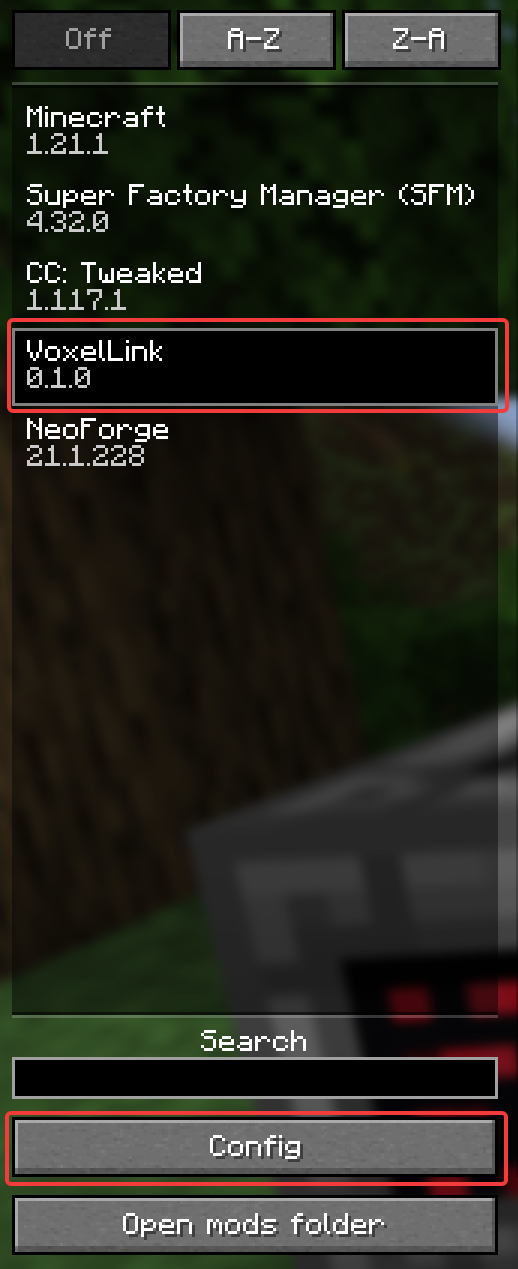
- Open the pause menu and click Mods.

- Select VoxelLink in the mod list, then click Config.
- Set Enable Editor Bridge to ON. Optionally set a WebSocket Port (default
8765) and Auth Token, then save.
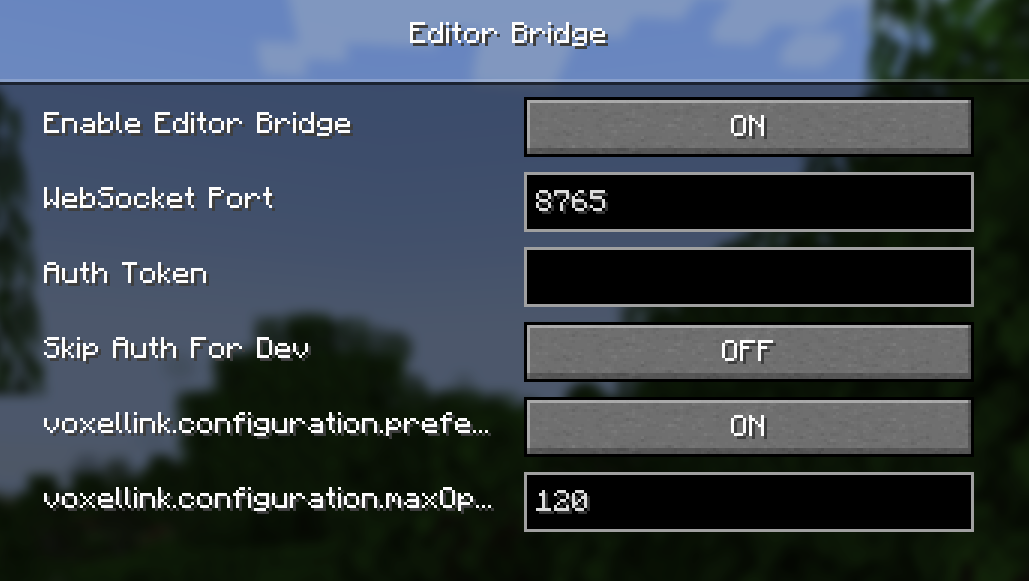
| Setting | Description |
|---|---|
| Enable Editor Bridge | Turns the localhost WebSocket server on or off |
| WebSocket Port | Port your editor connects to (default 8765) |
| Auth Token | Optional secret; editors must send this to connect |
| Skip Auth For Dev | Dev-only bypass for local testing |
| Prefer Label IDs | Prefer CC label ids over position ids when both exist |
| Max Operations Per Minute | Rate limit for editor requests (0 = unlimited) |
Enable via config file
Alternatively, edit config/voxellink-client.toml:
enabled = true
socketPort = 8765
authToken = "your-secret-token"
preferLabelIds = true
maxOperationsPerMinute = 120
Use /voxellink reload in-game after editing the file, or restart the client.
Find a target id by looking at a CC computer or SFM manager in-game and running
/voxellink id.Connect your editor to
ws://127.0.0.1:8765/. Authenticate with your token if you set one, then use the protocol to read and write files on the target.Verify it works with
/voxellink testin-game orvledit <file>from a CC terminal.
The mod ships with an editor protocol spec and an example Python client for building your own integration.
Links
Report bugs and request features on GitHub Issues.
VoxelLink Team
