🛡️ Village Ward
Claim a Ward Statue, fund its power with emeralds, and protect the surrounding area.
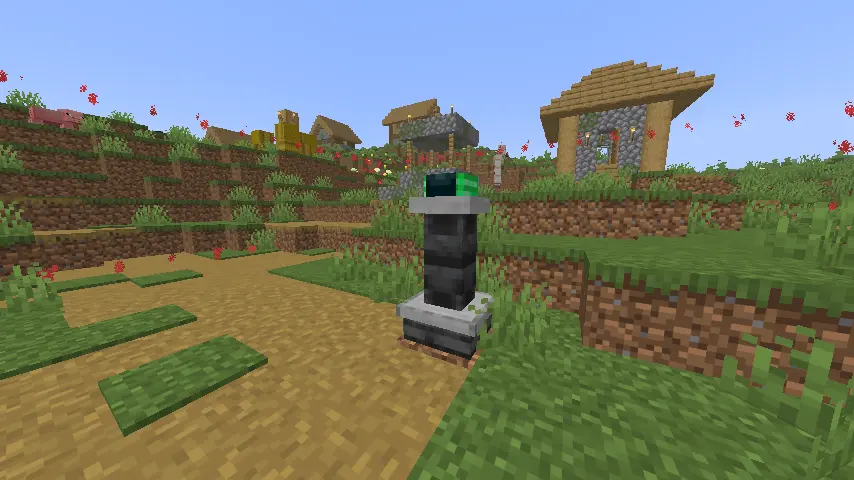
Village Ward introduces a configurable protection system built around two-block-tall Ward Statues. Discover them naturally in newly generated villages or craft your own, claim ownership, and purchase protection time using emeralds.
🏘️ Find or Craft a Ward Statue
Ward Statues can appear naturally in newly generated villages. The first player to interact with an unclaimed natural statue becomes its owner and gains access to its protection settings.
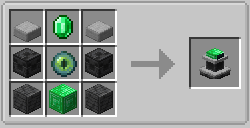
Statues can also be crafted and placed anywhere suitable for creating a protected home, settlement, or base.
💚 Emerald-Funded Protection
Protection is purchased with emeralds and operates using Minecraft time:
- 5 emeralds provide 1 Minecraft day
- Protection can be funded for up to 15 days
- Reaching the maximum costs 75 emeralds
- Emeralds can be supplied through multiple payments
- Additional payments extend the remaining protection time
- Ownership, settings, and paid time are saved persistently
A master ON/OFF control allows the owner to pause the protection system. Turning protection off also freezes the remaining paid time, so no purchased time is wasted while the statue is disabled.
⚙️ Configurable Protection
Right-click your claimed Ward Statue to open its management interface.
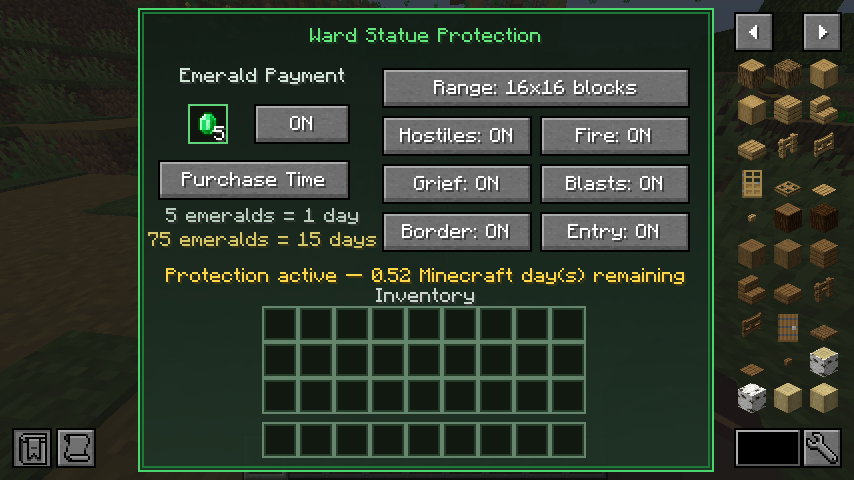
Each protection feature can be controlled individually:
- Hostile Protection: Prevents hostile mobs from causing damage inside the protected area
- Fire Protection: Prevents fire from spreading through the protected area
- Grief Protection: Prevents protected blocks from being damaged through mob griefing
- Blast Protection: Prevents explosions from damaging the protected area
- Border Display: Shows or hides the protection boundary
- Entry Notifications: Enables or disables area entry and exit messages
- Master Protection Control: Pauses or resumes every protection feature and the paid timer
📐 Selectable Protection Ranges
Choose the area size that best suits your village or base:
- 16×16 blocks
- 32×32 blocks
- 50×50 blocks
- 74×74 blocks
- 125×125 blocks
The selected area is centered around the Ward Statue.
✨ Visual Protection Border
An optional particle border clearly marks the edges of the protected area.
Its color changes according to the statue’s status:
- Green: Protection is active and funded
- Yellow: Protection is approaching expiration
- Red: Protection is inactive or unpaid
The border can be disabled at any time from the management interface.
🚩 Area Notifications
When entry notifications are enabled:
- Entering the protected area displays a bold green message
- Leaving the protected area displays a bold red message
- Owners receive notifications when protection starts
- Owners receive a warning when protection is close to expiring
- Owners are notified when protection expires
🏆 Custom Advancements
Village Ward includes several custom advancements:
- Craft your first Ward Statue and receive a special firework celebration
- Find and claim a naturally generated Ward Statue
- Fund a Ward Statue to its maximum 15 days of protection
The claiming and maximum-payment advancements do not launch fireworks.
📦 Requirements
Village Ward supports Minecraft 26.2 on:
- Fabric
- Quilt
- NeoForge
- Forge
Fabric and Quilt
- Fabric Loader or Quilt Loader is required
- Fabric API is required
NeoForge and Forge
- No additional API dependency is required
Village Ward must be installed on both the client and server. Singleplayer is fully supported because Minecraft runs an integrated server internally.
Make sure you download the file created for your chosen mod loader.
License
All Rights Reserved.