Portable Vintage Radio
Bring real internet radio into Minecraft with a portable, placeable radio built for both solo worlds and multiplayer servers. Discover stations without copying stream URLs, save favorites, carry your music while exploring, or place the radio down and share its positional audio with nearby players.
Features
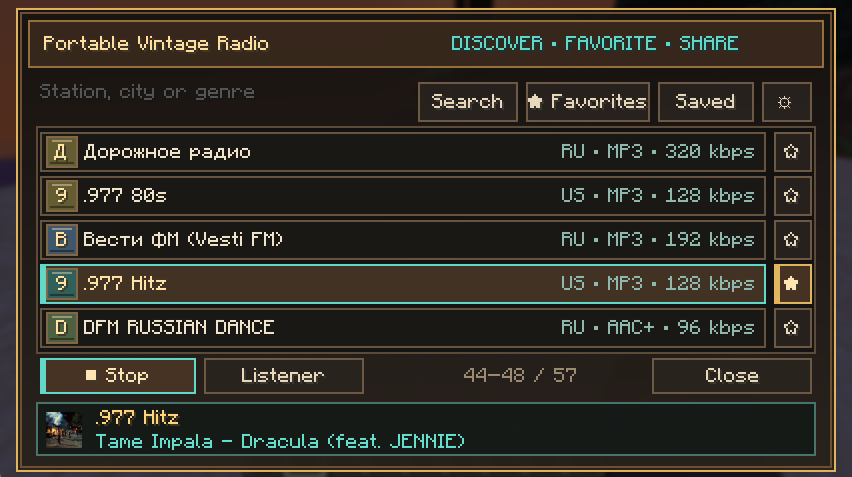
- Search a worldwide station directory from a clean vintage-style interface.
- Save favorite stations and keep a personal station memory.
- Play MP3, AAC-LC, HE-AAC/AAC+, Ogg Vorbis, Ogg Opus, and supported HLS radio streams.
- Show station icons with an automatic vintage fallback badge when a station has no usable image.
- Display live artist and song metadata, including smoothly scrolling long titles.
- Look up matching album artwork while a song is playing, with the station icon used as a fallback.
- Place the radio in the world or carry it in either hand.
- Set an accurate broadcast radius from 8 to 64 blocks and adjust the radio's own volume.
- Hear positional multiplayer audio that fades naturally with distance.
- Prevent overlapping broadcasts from becoming a wall of sound: the first active radio in an area receives priority, with clear entering and leaving notices.
- Emit colorful music-note particles from the radio while it plays.
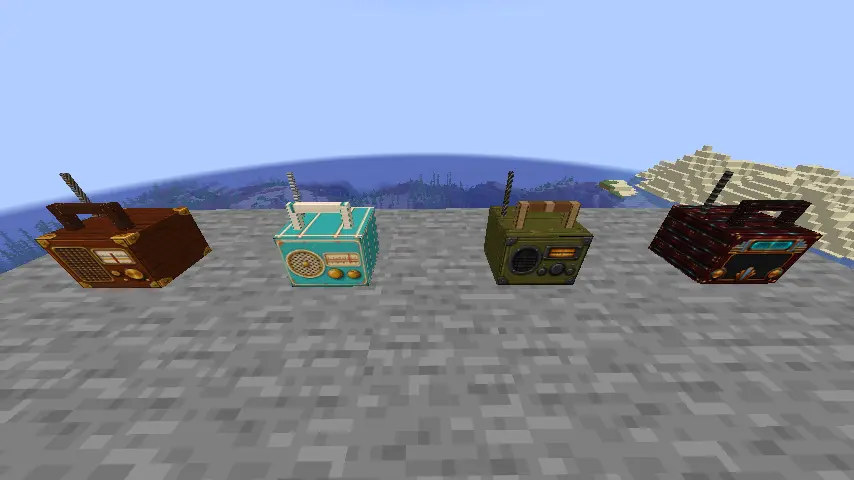
- Choose from four casing styles: Heritage, Riviera, Field, and Midnight Deco.
- Control the volume of other players' radios, mute them completely, or disable note particles.
- Open listener controls at any time with
/pvr listener, even when you do not own a radio.
- Preserve station settings when a placed radio is picked up again.
- Handle international station and song names with UTF-8 text.
Getting started
- Craft a Portable Vintage Radio.
- Right-click while holding it, or right-click a placed radio, to open the station browser.
- Search for a station, select it, and press Play.
- Use the settings button to adjust radio volume, broadcast range, and casing style.
- Sneak-use a placed radio to return it to your inventory without losing its settings.
- Run
/pvr listener to change how you hear other players' radios and toggle music-note particles.
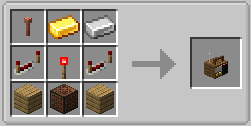
The crafting recipe uses a lightning rod, gold ingot, iron ingot, two repeaters, one redstone torch, two oak planks, and one note block.
Multiplayer behavior
Portable Vintage Radio is designed for nearby shared listening. When broadcast areas overlap, the radio that began broadcasting first has priority in that area. A player's own radio fades out while they are inside the earlier broadcaster's range and returns after they leave. Listeners receive small vintage-styled notices explaining which radio they are hearing.
Each listener can independently lower or mute other players' radios. These settings affect only that listener.
Compatibility and requirements
- Minecraft: Java Edition 26.2
- Java 25 or newer
- Fabric Loader 0.19.3 or newer, with Fabric API required
- Quilt: use the Fabric file with Fabric API
- Forge 65.1.2 or newer
- NeoForge 26.2.0.66 or newer
- Install the mod on both the client and server for multiplayer use
MP3, AAC, and Opus decoder libraries are included in the mod files; they do not need to be installed separately.
Optional HD resource pack
The separately available Portable Vintage Radio HD resource pack gives all four casing styles detailed vintage textures across the complete model, including the body, sides, top, handle, trim, corners, and antenna. The mod works without it, but the HD pack provides the intended high-detail appearance.
https://www.curseforge.com/minecraft/texture-packs/portable-vintage-radio-hd
Stream compatibility
Internet stations vary greatly in reliability and encoding. The mod supports direct streams, common playlist links, redirects, station webpages containing playable links, and supported HLS playlists. Encrypted HLS, byte-range HLS, and fragmented-MP4 HLS are not currently supported. A station may temporarily fail because its server is offline, slow, geographically restricted, or has changed its stream URL.
Station logos and album artwork are optional. If an image is missing, blocked, malformed, too large, or unavailable, the interface uses a generated station badge instead. Album artwork is only shown when the station supplies usable artist/title metadata and Apple returns a sufficiently close match.
Internet access and privacy
This mod needs an internet connection to play online radio. It makes the following requests:
- Station searches are sent to the community-operated Radio Browser API.
- Selecting a directory station sends its public station ID to Radio Browser's click-count endpoint.
- Audio is requested directly from the selected station's stream server.
- Station icons may be requested from Radio Browser, the station's icon URL, or the station's public homepage.
- When usable artist/title metadata is available, that text may be sent to Apple's public iTunes Search API to find matching artwork.
The mod has no account system, advertising, or developer analytics. It does not bundle, redistribute, record, or upload radio audio.
Credits and licenses
- Created by Chiilax.
- Station directory data: Radio Browser.
- Optional album-art lookup: Apple iTunes Search API.
- MP3 decoding: JLayer 1.0.1.4, LGPL-2.1-or-later.
- AAC/AAC+ decoding: Tianscar JAAD 0.9.4, Apache-2.0.
- Opus decoding: Concentus 1.0.2, BSD-3-Clause.
- CtrlAltDe1ete / Discord - ctrlaltde1ete: provided material assistance with implementation, debugging, testing support, and documentation under the author's direction and play-testing.
The full third-party notices and decoder licenses are included inside every mod JAR. Portable Vintage Radio's original code and assets are distributed as All Rights Reserved unless the author publishes a different license.
Portable Vintage Radio is not affiliated with or endorsed by Radio Browser, Apple, the listed stations, Mojang Studios, or Microsoft. Station names, icons, metadata, and audio remain the property of their respective owners.