Upgrade Templates
- By
⚒️ Upgrade Templates
Upgrade Templates expands Minecraft’s smithing progression by bridging the gap between gear tiers[cite: 1, 2]! Upgrade your equipment step-by-step from Gold to Iron, and from Iron to Diamond using brand-new, vanilla-friendly Smithing Templates[cite: 1, 2].
📌 Requirements & Compatibility
- Minecraft Version: 1.21.1 (1.21.x)
- Mod Loader: Fabric
- Dependencies: [Fabric API](https://www.curseforge.com/minecraft/mc-mods/fabric-api) (Required)
🗺️ World Loot & Exploration
Templates cannot be crafted from scratch — they must be discovered through exploration, just like vanilla Netherite templates[cite: 1, 2]!
🛡️ Iron Upgrade Template
- Usage: Applied exclusively to Copper and Gold gear to upgrade them into Iron[cite: 1, 2].
- Where to Find: Has a 15% chance to generate in loot chests across all Overworld structures (excluding Ruined Portals)[cite: 1, 2].
💎 Diamond Upgrade Template
- Usage: Applied exclusively to Iron gear to upgrade it into Diamond[cite: 1, 2].
- High-Tier Structures (35% Drop Chance):
Ancient Cities[cite: 1, 2]
End Strongholds[cite: 1, 2]
Trial Chambers[cite: 1, 2]
Woodland Mansions[cite: 1, 2] - Mid-Tier Structures (20% Drop Chance):
Shipwrecks[cite: 1, 2]
Desert Pyramids[cite: 1, 2]
Buried Treasure[cite: 1, 2]
🔨 Duplication & Crafting
Once you find a template, you can duplicate it on a crafting table using specialized recipes tailored to each tier!
🛡️ Iron Upgrade Template Duplication
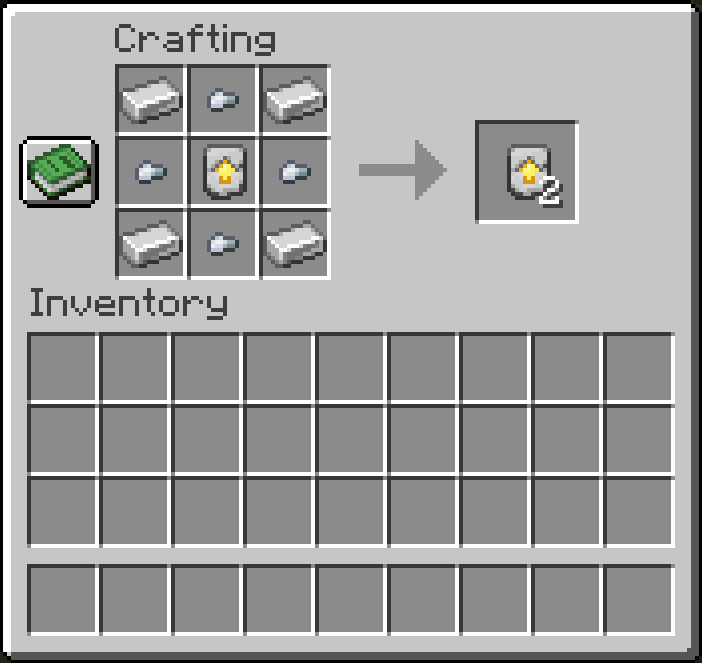
- Top Row: Iron Ingot | Iron Nugget | Iron Ingot
- Middle Row: Iron Nugget | Iron Upgrade Template | Iron Nugget
- Bottom Row: Iron Ingot | Iron Nugget | Iron Ingot
💎 Diamond Upgrade Template Duplication
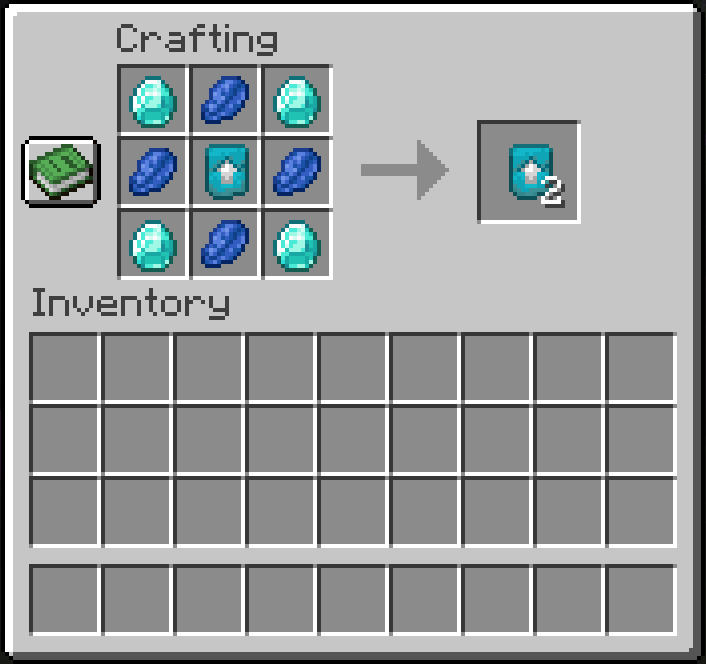
- Top Row: Diamond | Lapis Lazuli | Diamond
- Middle Row: Lapis Lazuli | Diamond Upgrade Template | Lapis Lazuli
- Bottom Row: Diamond | Lapis Lazuli | Diamond
⚙️ How to Upgrade Gear
- Open a Smithing Table.
- Place your Upgrade Template in the first slot.
- Place your Base Gear (Copper/Gold for Iron, or Iron for Diamond) in the second slot.
- Place the Ingot/Gem (Iron Ingot or Diamond) in the third slot.
- Collect your upgraded equipment!
❓ Frequently Asked Questions (FAQ)
Q: Can I include this mod in my modpack?
A: Yes! Feel free to include Upgrade Templates in any public or private modpack.
Q: Does it work with modded tools or armor?
A: The templates support all standard vanilla equipment types. Custom modded items tagged properly within vanilla tool tags will also work seamlessly.
Q: Will there be a Forge or NeoForge port?
A: Currently, the mod is developed specifically for Fabric (1.21.1). Ports to other loaders may be considered in future releases.
Designed with a "Material-to-Material" visual philosophy for a seamless Vanilla+ experience.
Upgrade Templates Team