Description
Freerunning and parkour inspired by Assassins Creed, built for Minecraft.
Features
* Freerunning (default: “left alt”) - hold it with W to auto-sprint, climb, vault and leap without stopping
* Freerun sprint - a proper parkour running animation in place of vanilla’s while freerunning
* Skid turns - turn round mid-sprint to skid, pivot and push off the other way
* Speed vaults - run over low obstacles 1 to 1.5 blocks tall with varied vault animations
* Running slides - slide feet first under low gaps, slowing into a crawl under long ceilings
* Handhold climbing - climb only where a hand could grip, moving hold to hold like Assassin’s Creed
* Hops - jump to a handhold further away in any direction
* Ledge shimmying - shimmy along ledges and round corners onto the next face
* Braced and free hangs - feet planted on the wall when there’s wall below, legs hanging free when there isn’t
* Climb-ups - pull yourself up over any ledge or chest-high wall
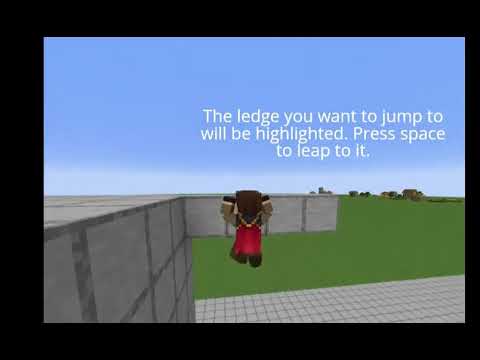
* Aimed ledge leaps - look at a nearby ledge to light it up, then leap across and grab it
* Overhang push-offs - push off the wall to get round a ledge that sticks out overhead
* Wall kick-offs (default: “s” + “space”) - kick backward off a wall into a leap
* Drop downs (default: “z”) - step off an edge, turn round and catch it, or back off and catch it without turning
* Wall catches - grab a handhold when you leap or fall into a wall
* Pole climbing - climb lone fence posts, wall posts, chains and iron bars from any side
* Pole shimmying - shimmy all the way round a pole
* Perching - crouch on top of fences, walls, panes, bars, chains and end rods
* Balance walking - walk along thin blocks with your arms out, kept centered so you don’t slip
* Leap snapping - leaps lock onto the nearest platform in your path
* Leap combos - chain leap after leap across rooftops, finishing in a shoulder roll
* Swinging - catch chains, lanterns, bells, leaves and more overhead and swing from them
* Swing launches - pump the swing and launch off it into the next grab or landing
* Corner swings - swing round a building’s corner from a lantern or bell onto a platform to the side
* Ziplines - slide down hanging chains and string
* Leap of faith - swan dive into hay, hay bales, sawdust, wool, leaves, snow, beds or moss from any height without damage
* Safe landings - take no fall damage from up to 12 blocks while holding a parkour key
* Landing rolls - roll out of big drops and leap combos
* Viewpoint beams - place a beam jutting off any tower wall in 11 woods, stone, sandstone or blackstone
* Synchronizing (default: “left alt”) - perch on a beam’s tip and tap to sync as the camera circles the tower
* Parchment map (default: “m”) - your character’s hand-drawn map with watercolour biomes, calligraphy names and structure icons
* Map reveals - syncing a viewpoint reveals the land around it, inking itself in as the map opens
* Explored areas - the map draws itself in around you as you walk and remembers everywhere you’ve been
* Map legend (default: “l”) - turn structure types on and off, with modded structures grouped by mod
* Viewpoint towers - 18 biome-themed towers generate near villages, temples and other landmarks
* Viewpoint pins - towers show red on the map and turn green once you’ve synced them
* Fast travel - click a synced viewpoint on the map for a GTA V-style camera trip onto its beam
* Tower loot - tower chests hold regional supplies, with the best loot in the chest at the top
* Hanging chains and string - tie chain or string between posts in a real sagging curve, no other mod needed
* Chain wrench - tighten, loosen or unhook a hanging chain
* Round hay bales and sawdust - new soft blocks to land a leap of faith in
* Copper handholds - every copper block can be climbed
* Block tags - datapacks can add your own handholds, soft landings, chain posts and hidden map structures
* Configurable - tune climb speed, leap distance, safe fall height, viewpoint rules, map reveal size, fast travel and more
* Strict or free climbing - switch off strict handholds to climb any wall
* Rebindable keys - change every parkour key in the controls menu
* Tower command - ops can build any viewpoint tower with /unityparkour tower <name> (or all)
Controls
| Left Alt (hold) | Freerun: sprint, climb, vault, slide, leap, swing, zipline |
| Left Alt (tap, perched on a beam) | Synchronize the viewpoint |
| Z (hold) | Drop down and catch the edge when stepping or backing off a ledge |
| W / A / S / D | Climb, descend and shimmy on walls, ledges and poles |
| Space | Hop to a handhold, leap to a lit ledge, hop off a zipline |
| S + Space | Kick off a wall |
| W (hold, swinging) | Pump the swing and launch |
| A / D (swinging) | Pick a side for a corner swing |
| Sneak | Let go |
| M | Open the map |
| L (on the map) | Show or hide the legend |
| Click a green pin (on the map) | Fast travel there |
| Right-click two posts (holding chain or string) | Hang a chain or string between them |
| Left / right click (chain wrench) | Tighten / loosen a hanging chain |
| Sneak + left click (chain wrench) | Unhook a hanging chain |
All keys can be rebound under Options → Controls → Unity Parkour.
Compatibility: Fabric 1.20.1, requires Fabric API - Works with Sodium and Iris shaders
Optional: Reconnectible Chains for curved ziplines
Reconnectible Chains no longer necessary, as curved chains are now built-in.
Full third-person animations (F5), no animation library needed
Settings in `config/unityparkour.properties`
*Unity Parkour is a fan-made mod and is not affiliated with or endorsed by Ubisoft or Mojang.*
Unity Parkour Team