Traceable Print
- By
Added interactive footprints that allow you to track the mob that left them.
Description
Traceable Print
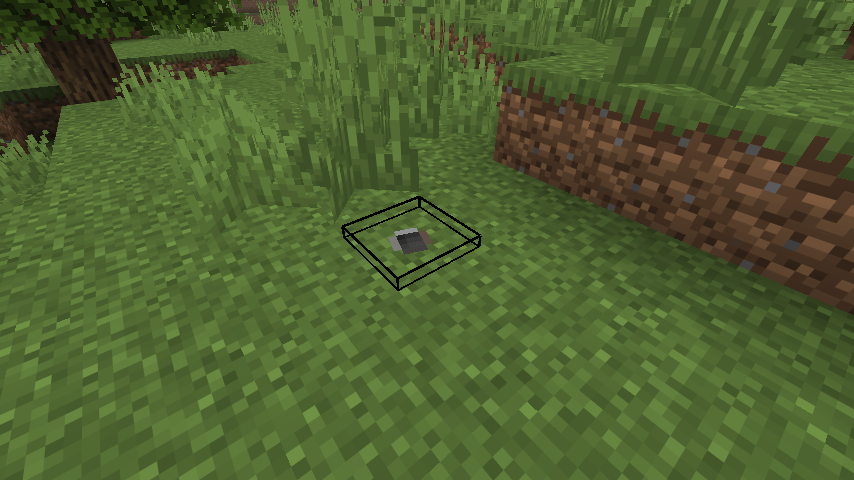
A multi-platform Minecraft mod that adds interactable footprint entities: living entities leave traceable footprints on the ground as they walk, and other players can right-click a footprint to follow the trail step by step until it leads to the creature (or player) that made it.
Notes:
This mod is a ground-up rework of the author's earlier particle-based mod FootprintParticle ⬅️Check it if you want a pure particle, visual, client-only footprint.
This mod is made by vibe coding, then reviewed / tested by human.
How It Works
Footprint generation
- Entities leave footprints while walking on the ground and at the moment of landing — whether from an active jump, tumbling off a ledge, or being knocked back. Both triggers run on the server side; footprints are real entities that are synced and saved with the world.
- To keep walking trails readable and cheap, periodic ground prints are rate-limited: they are only attempted at a fixed interval, and a new footprint is skipped if it spawns too close to the previous one — so creeping in place never floods the ground. Landing, by contrast, is detected every tick and ignores that interval, so holding jump while bunny-hopping still leaves a print on every landing (still subject to the minimum-distance gate).
- While sprinting, both the spawn interval and the minimum-distance gate shrink to two-thirds, so the trail keeps up with the faster pace instead of thinning out.
- Sneaking entities never leave footprints. Invisible entities (Invisibility potion / invisible flag) can be configured either way.
- Footprints only form on blocks you would plausibly sink a print into: soft ground (low mining hardness) qualifies by default, and any block or block tag can be whitelisted to force-enable prints regardless of hardness.
- Each footprint remembers its parent entity and the next footprint in its chain, forming one linked trail per creature. The chain pointer is persisted in the entity's NBT, so trails survive unloads, reloads and server restarts.
- Footprints age out on their own after a configurable lifetime — no external cleanup manager is needed. Near the end of their life they visibly fade out and sink into the ground.
- Footprints are pure markers: invulnerable, silent, unpushable, and unaffected by gravity. They never physically collide with you (you walk right over them) and explosions do destroy them, which cleanly "breaks" a trail segment.
- A footprint disappears if the ground beneath it is dug away or the block it stands on becomes a full cube (e.g. someone places a block over it).
Tracing a trail
- Right-click a footprint with an empty main hand to highlight the next one in the chain. Repeatedly clicking walks you along the trail; when the last footprint is reached, the parent entity itself is highlighted with an outline that only you can see — the tracer's client resolves everything locally, so highlighting never touches the network and other players are unaffected.
- Never in the way when you're working: a footprint only reacts to your crosshair while your main hand is empty and you are not sneaking. Hold any item (or hold sneak) and it becomes fully transparent to the ray — you can break, place, or attack right through the block it sits on, as if the print weren't there. When it is clickable, a faint outline in the same style as vanilla's block-selection box marks the footprint under your cursor.
- Only one target is highlighted at a time per player; clicking a new trail silently clears the previous highlight. Clicking the same footprint again just extends the duration.
- While you are tracing, the footprint you clicked emits a slow particle (the same visual as END_ROD) drifting toward the next target once per second, so the direction of the trail stays obvious even when the next footprint is small or hard to spot. This is client-side only and particles cannot pass through blocks.
- A highlighted entity that starts sneaking has its highlight cancelled.
- When a trail is followed all the way to a player, that player receives an action-bar warning ("Someone is tracing your footsteps…") without revealing who the tracer is (can be disabled). Tracing your own trail gives you a distinct hint instead. Both hints are throttled against spam.
- Broken links are handled gracefully: if the next footprint no longer exists mid-chain (expired / blown up), clicking does nothing misleading — only the true tail of a chain can lead to the parent entity.
Per-mob appearance
Footprints are not one-size-fits-all. Per entity type you can configure:
- Side / forward offset — tune where the print lands relative to the walker (e.g. wide lateral spacing for spiders, forward-reaching prints for horses), so prints match each creature's gait instead of being pinned to a single global offset.
- Size — scale the footprint texture per mob (slimes get big prints, cats get small ones). Baby mobs and an entity's own scale multiply on top.
- Texture — override the footprint texture per mob, with multiple candidate textures per entry; the server picks one at random when spawning, so left/right feet and different mobs visibly differ. See the texture tutorial below.
- Block height — raise prints on blocks whose visual surface sits above their hitbox (snow layers, soul sand, mud…) so they don't get buried.
All of these ship with sensible per-mob defaults out of the box and can be edited in the config GUI or directly in the JSON file.
Filtering
- Global mode: footprints for all mobs, players only, or disabled entirely.
- Entity list: a per-entity allow/deny list supporting both
namespace:pathIDs and#namespace:tagtags, switchable between blacklist and whitelist semantics. - Block list: a whitelist of blocks/tags that always accept footprints, bypassing the hardness gate.
Custom Footprint Textures
The default print texture lives at traceableprint:textures/entity/footprint.png. To give specific mobs their own footprints:
- Drop your PNGs anywhere a resource pack can reach — either into a pack under
assets/traceableprint/textures/entity/(e.g.assets/traceableprint/textures/entity/animals/paw.png), or under your own namespace for pack authors (e.g.assets/mypack/textures/entity/ender.png). - Add entries to the
textureListconfig (GUI orconfig/traceableprint.json), format:
modid:mobid, textureName1, textureName2, ...minecraft:cat,paw→ usestraceableprint:textures/entity/paw.pngminecraft:enderman,mypack:entity/ender→ fullnamespace:pathform; apathnot starting withtextures/is completed astextures/entity/..., and.pngmay be omitted- Multiple candidate names = one is picked at random per spawned footprint (a mob can also have several entries to grow the pool)
- On a server, the server's
textureListdecides which texture is used (the chosen name is synced with the entity). If the synced texture doesn't exist in your client's packs, you quietly fall back to the default footprint — never a missing-texture block. In singleplayer both sides read the same file, so there is nothing extra to do.
Names are case-insensitive and whitespace-tolerant; typos are logged once and retried after resource pack reloads (F3+T) without restarting the game.
Configuration
Everything is tweaked in an easy in-game config screen and saved as plain JSON at config/traceableprint.json.
Open the config screen from the mod list (Mod Menu on Fabric, the mod's Config button on NeoForge), or from anywhere in-game by typing /traceableprintconfig in chat — that command works on every platform, including singleplayer. If the config library the screen is built on (Cloth Config) isn't installed, the mod shows a friendly screen telling you so instead of erroring out.
On dedicated servers, two commands are available (op level 2 required):
/traceableprint setEnable off|player|all— switch the global mode./traceableprint upload— pull the executing player's client config and apply it to the server.
The Traceable Print Team


Owner