Threadmark
- By
"A client-side project journal with next-step notes, location checkpoints, and live carried-item checklists.
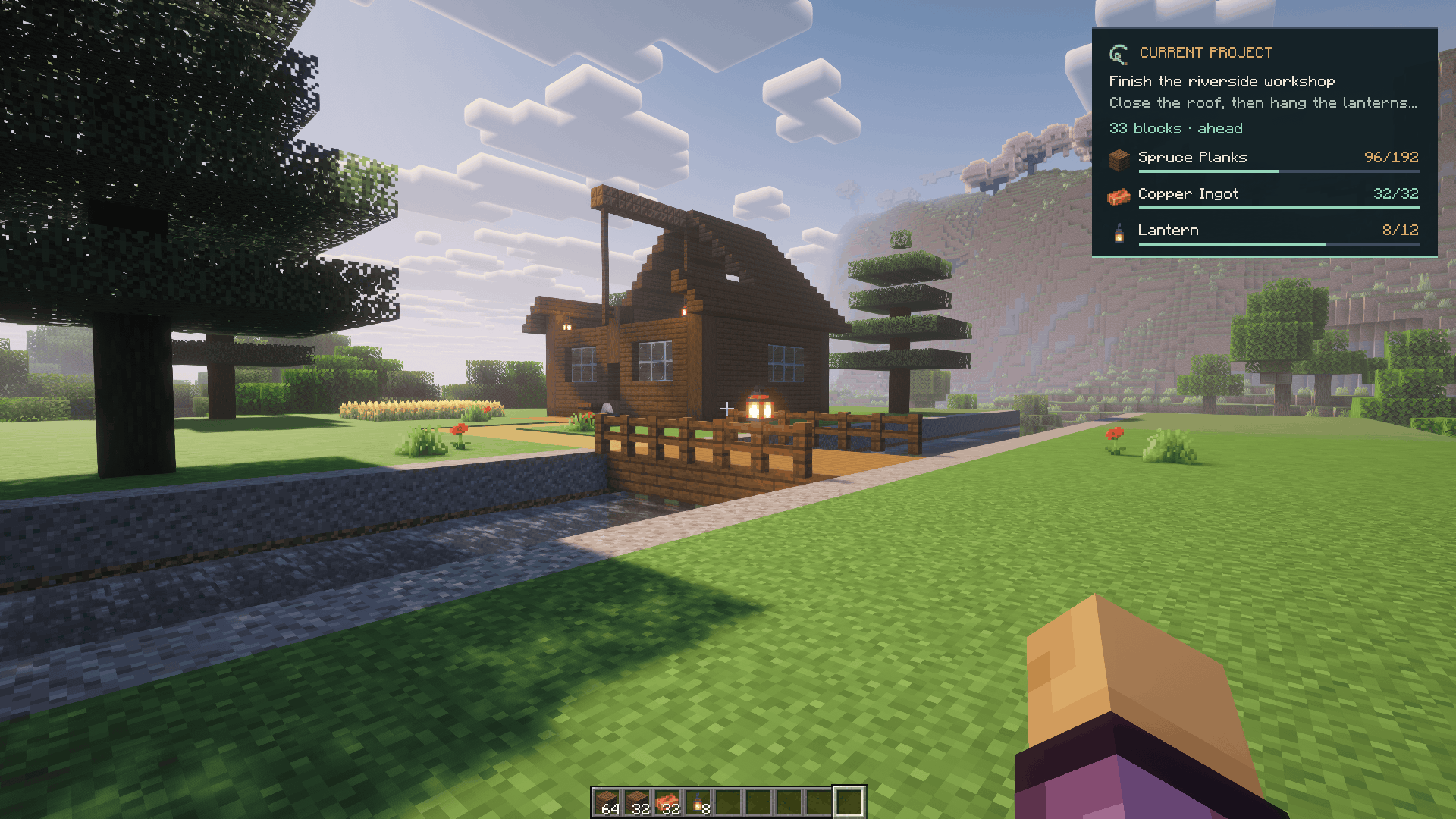
Keep your next step beside the build. The focused workshop project shows a checkpoint 33 blocks ahead and live targets for spruce planks, copper ingots and lanterns. World lighting: Complementary Reimagined r5.9.3.
Description
Keep a thread through unfinished builds
You log back in, look at a half-built base, and wonder what you meant to do next. Threadmark keeps that next step inside Minecraft.
Create a project, write a short note, mark its location, and add the materials you want to carry. Focus one project to see your next step and direction while you play.
Minecraft Java 1.20.1 / 1.21.1 / 1.21.4 / 1.21.11 / 26.2 · Fabric · Client-side only
A journal for the work you want to finish
- Project checkpoints: keep a title, next-step note, and optional location together.
- A focused HUD: see the selected project while playing, with direction and distance to an anchor in your current dimension.
- Live supply lists: set target quantities and compare them with the items you currently carry.
- A tidy project list: search titles and notes, complete finished projects, and reopen them when plans change.
- Separate worlds and servers: each world or server keeps its own local journal.
- Your preferred display: change HUD visibility, side, and motion settings through the built-in settings screen or optional Mod Menu integration.
Your first project
- Join a world or server and open the Threadmark journal with J. You can rebind it in Minecraft's Controls.
- Create a project such as “Finish the greenhouse.”
- Write a concrete next step: “Build the roof frame, then add glass.”
- Keep or update its location anchor, or remove the anchor. A checkpoint uses the block you are looking at, falling back to your position.
- Add the materials you need and their target quantities.
- Focus the project. Your next step stays close while you work; a reminder helps you pick it up when you return.
What the material counts mean
A supply target is a carried-stock check, not a record of delivered or consumed materials. Counts reflect matching items in your player inventory and offhand. Contents inside shulker boxes, bundles, chests, and other containers are not included.
Placing or spending items changes the amount you carry, so the displayed count can decrease. Threadmark does not craft, move items, inspect remote storage, or work through a schematic.
Installation
- Select your exact Minecraft version from the table below and install its Fabric Loader profile with the corresponding Java runtime.
- Put one matching
threadmark-1.1.0-fabric-<minecraft-version>.jarand the matching Fabric API JAR in that instance'smodsfolder. Remove any older Threadmark JAR when updating. - Optional: add the Mod Menu build for the same Minecraft version.
- Launch the Fabric profile, join a world and press J, or enter the client command /threadmark.
| Minecraft | Java | Fabric Loader minimum | Fabric API | Optional Mod Menu |
|---|---|---|---|---|
| 1.20.1 | 17 | 0.16.14 | 0.92.12+1.20.1 | 7.2.2 |
| 1.21.1 | 21 | 0.16.14 | 0.116.17+1.21.1 | 11.0.4 |
| 1.21.4 | 21 | 0.16.14 | 0.119.4+1.21.4 | 13.0.4 |
| 1.21.11 | 21 | 0.20.1 | 0.141.6+1.21.11 | 17.0.1 |
| 26.2 | 25 | 0.20.1 | 0.161.0+26.2 | 20.0.3 |
These are the pinned dependency builds for the five separate targets. Choose dependencies for the same Minecraft version; the five Threadmark variants are alternatives, so install one. Fabric Loader · Fabric API · Mod Menu.
Install Threadmark on your client. No server installation is needed. Server rules still apply.
Questions
Does this add blocks, items, mobs, or a minimap?
Threadmark adds a project journal and HUD. Project supplies use the icons of the Minecraft or modded items they represent.
Can it guide me through caves or between dimensions?
The HUD points toward an anchor in the same dimension. It does not calculate a traversable route or convert portal coordinates.
Can other players see my projects?
Projects are local to your client. There is no automatic sharing or server synchronization.
Where is my journal stored?
Under your Minecraft instance's config/threadmark/ folder. Keep a copy when moving instances or backing up your journal.
Can I use modded materials?
Supply goals identify items by registry ID. The item must exist in your running client.
Release information
Version 1.1.0, with separate Fabric downloads for 1.20.1, 1.21.1, 1.21.4, 1.21.11 and 26.2. Fabric API is required; Mod Menu is optional. Licensed under MIT. See the version changelog for release details.
Gallery visuals
Screenshots show Threadmark 1.0.0 on Minecraft 1.21.1 in a staged Creative workshop with default Minecraft textures and Complementary Reimagined r5.9.3 by Complementary Development, loaded through Iris 1.8.8 and Sodium 0.6.13. Threadmark supplies the journal and HUD; the external shader pack supplies the lighting. These showcase additions are optional for Threadmark.
Threadmark Team