The ambience Minecraft was missing.
Birdsong in the forest, fireflies over the swamp, footprints in the snow, rain rings on the lake, grass that bends as you walk.
Tactile adds 100 small sights and sounds that bring your world to life, and every one has its own on/off switch.
Minecraft 26.3 • Fabric and Forge • Client-side only • Press K for the menu
What It Adds
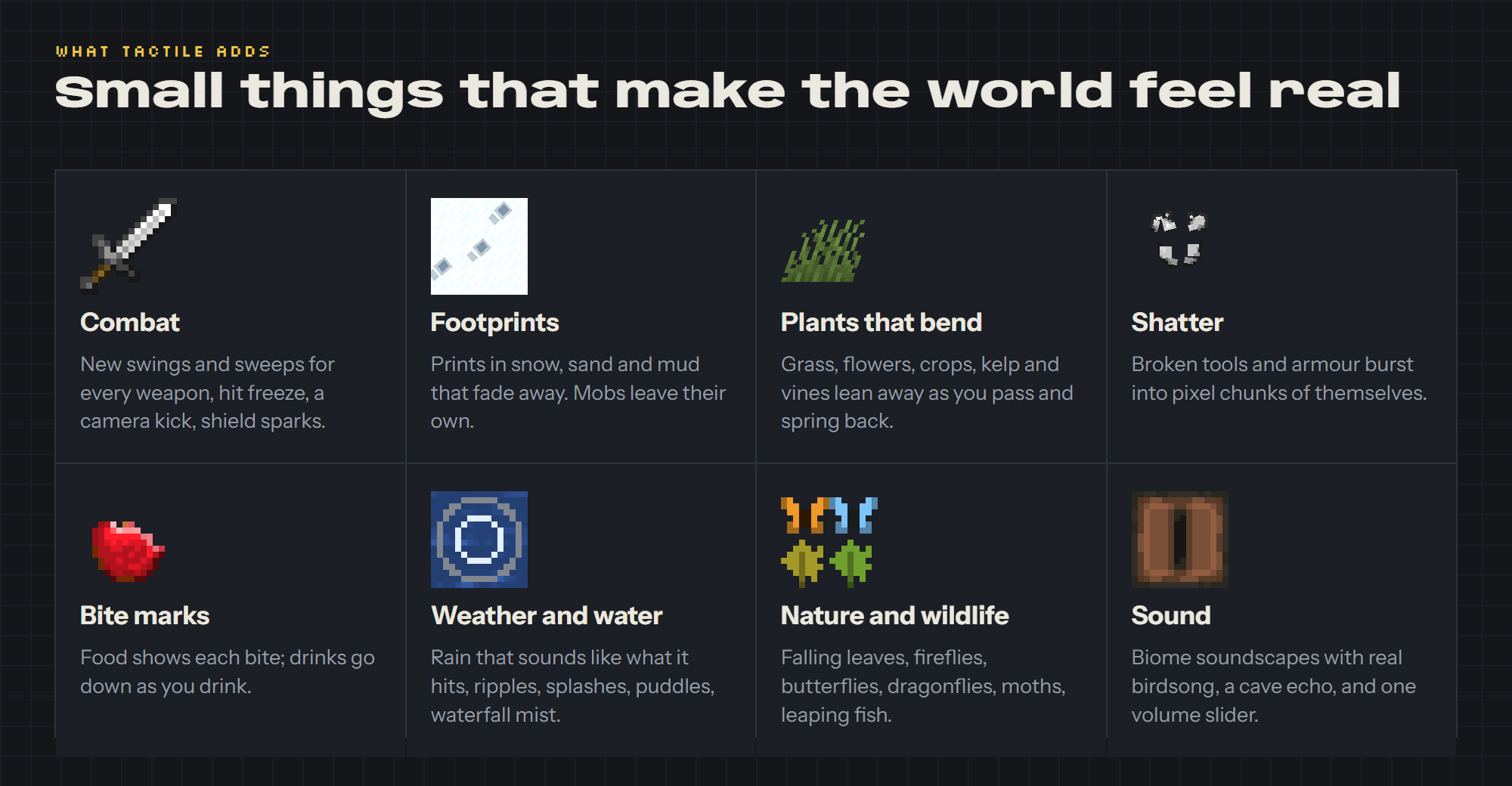

- New first-person weapon swings and a pixel sweep for every weapon.
- Broken tools and armour shatter into pieces of themselves.
- Food shows bite marks as you eat, and potions go down as you drink.
Weather and Water
- Footprints in snow, sand and mud, from you and from mobs.
- Ripples where rain lands, puddles that fill and dry, foam at the beach.
- Rain that sounds like what it hits: metal, glass, wood, leaves.
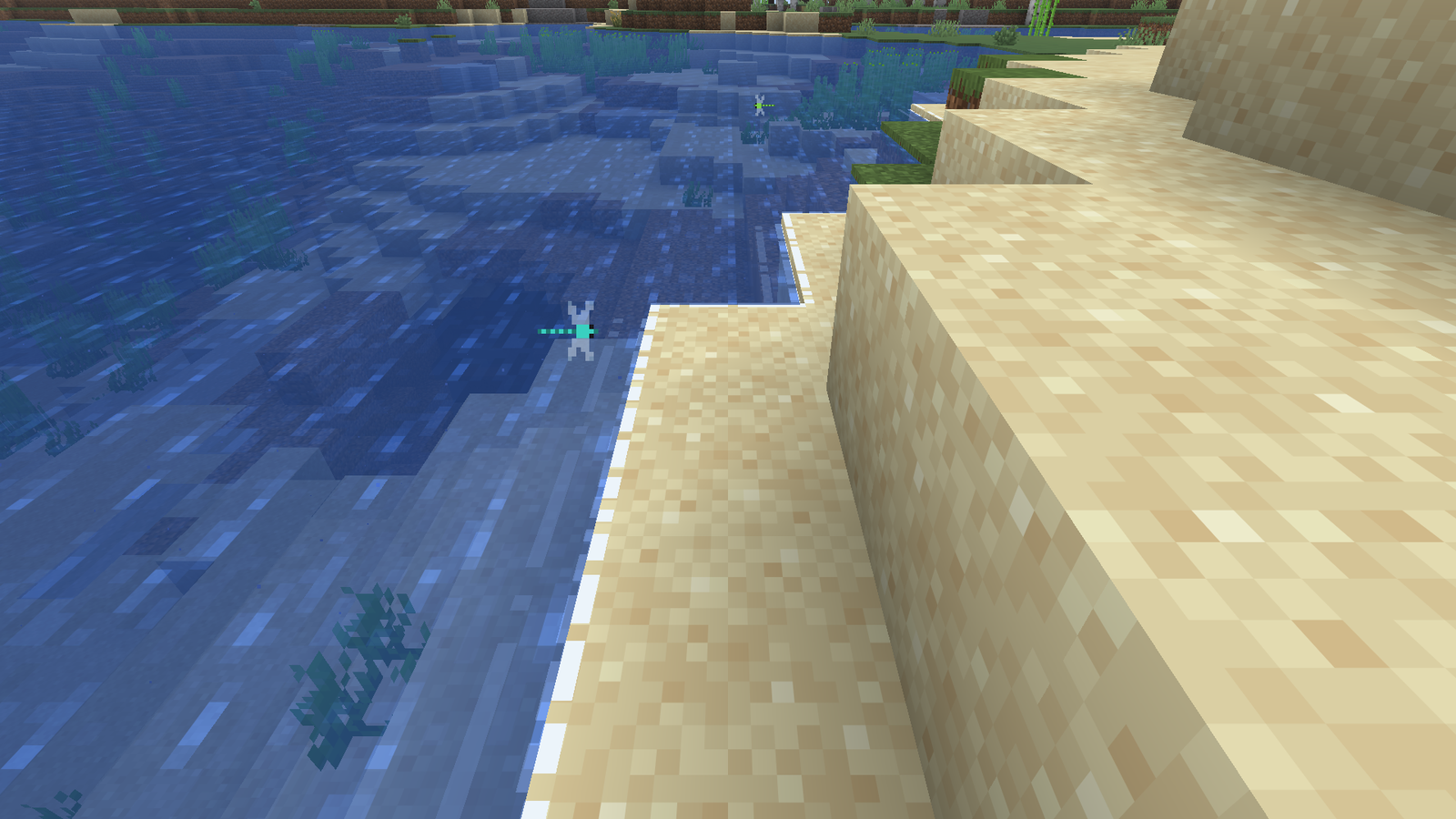
Foam laps at the water's edge on a beach, and a dragonfly hovers over the shallows. |
Nature and Wildlife
- Grass, flowers, crops and kelp bend as you walk through them.
- Butterflies and dragonflies by day, fireflies and moths at night, leaves falling from every tree.
- Farm animals with character: cows, pigs and chickens with 14 extra looks each, and a rare one in 2,000.
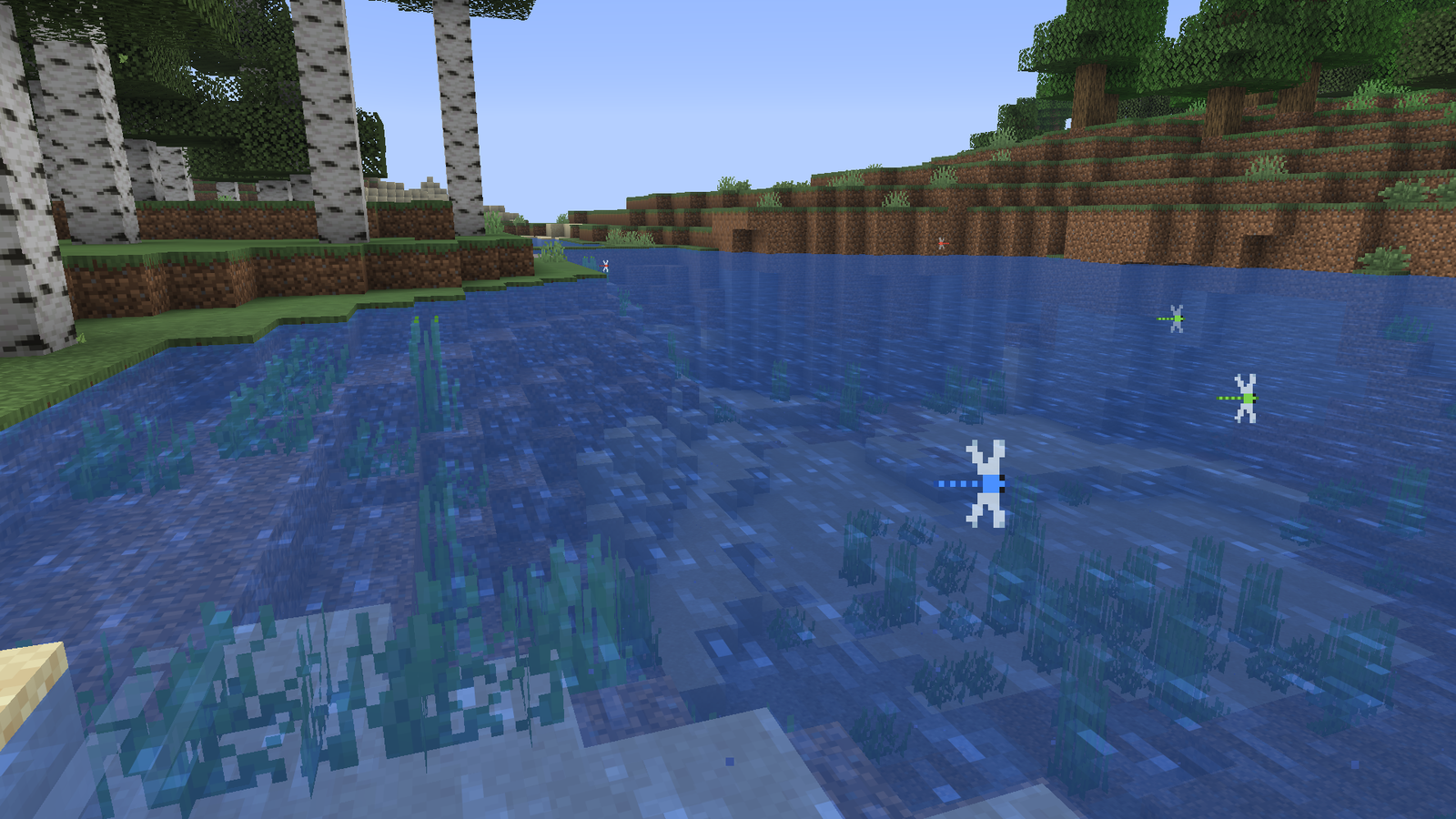
Dragonflies over a river by day. |
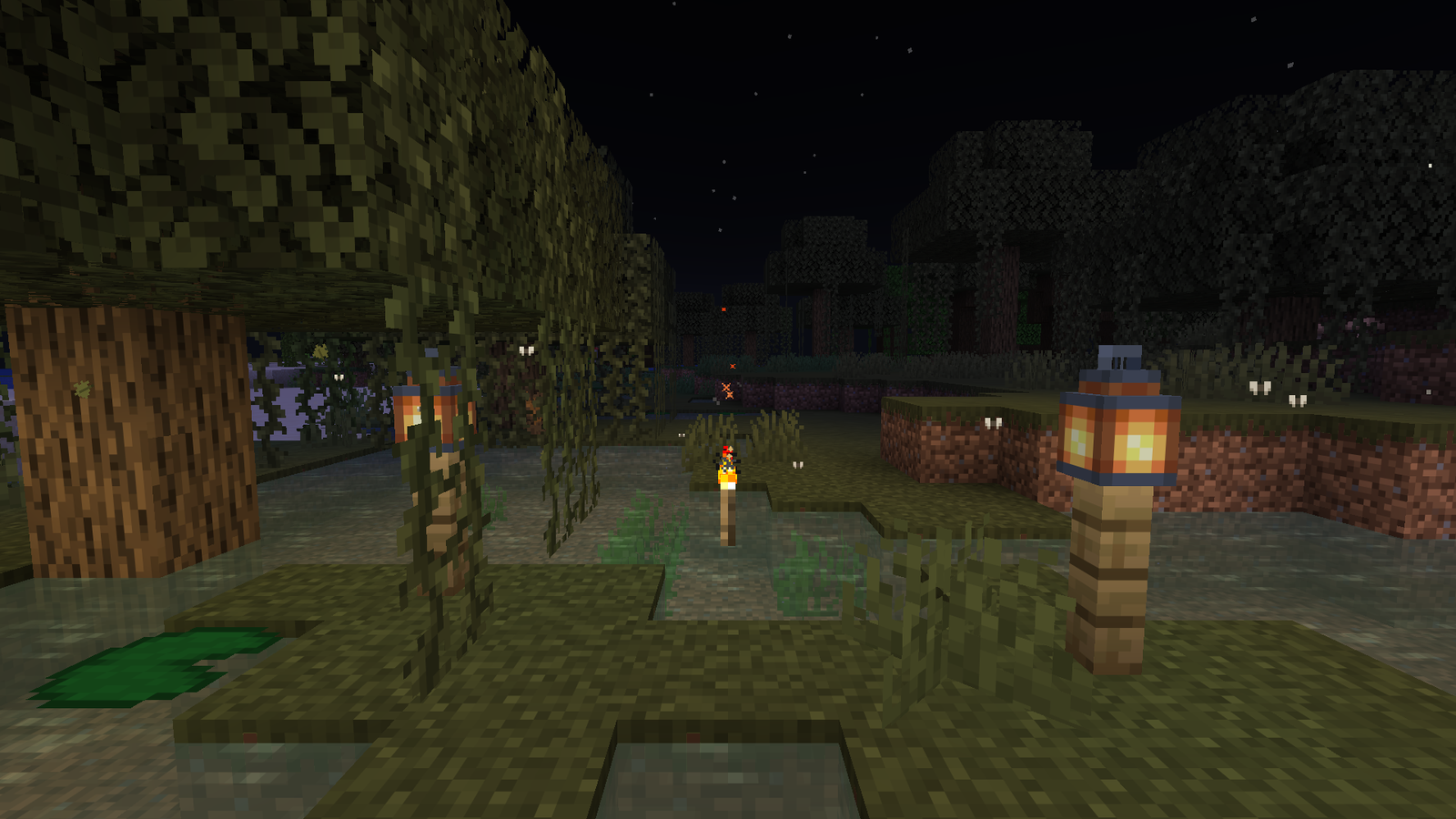
A swamp at night: moths around the torch and lanterns. |
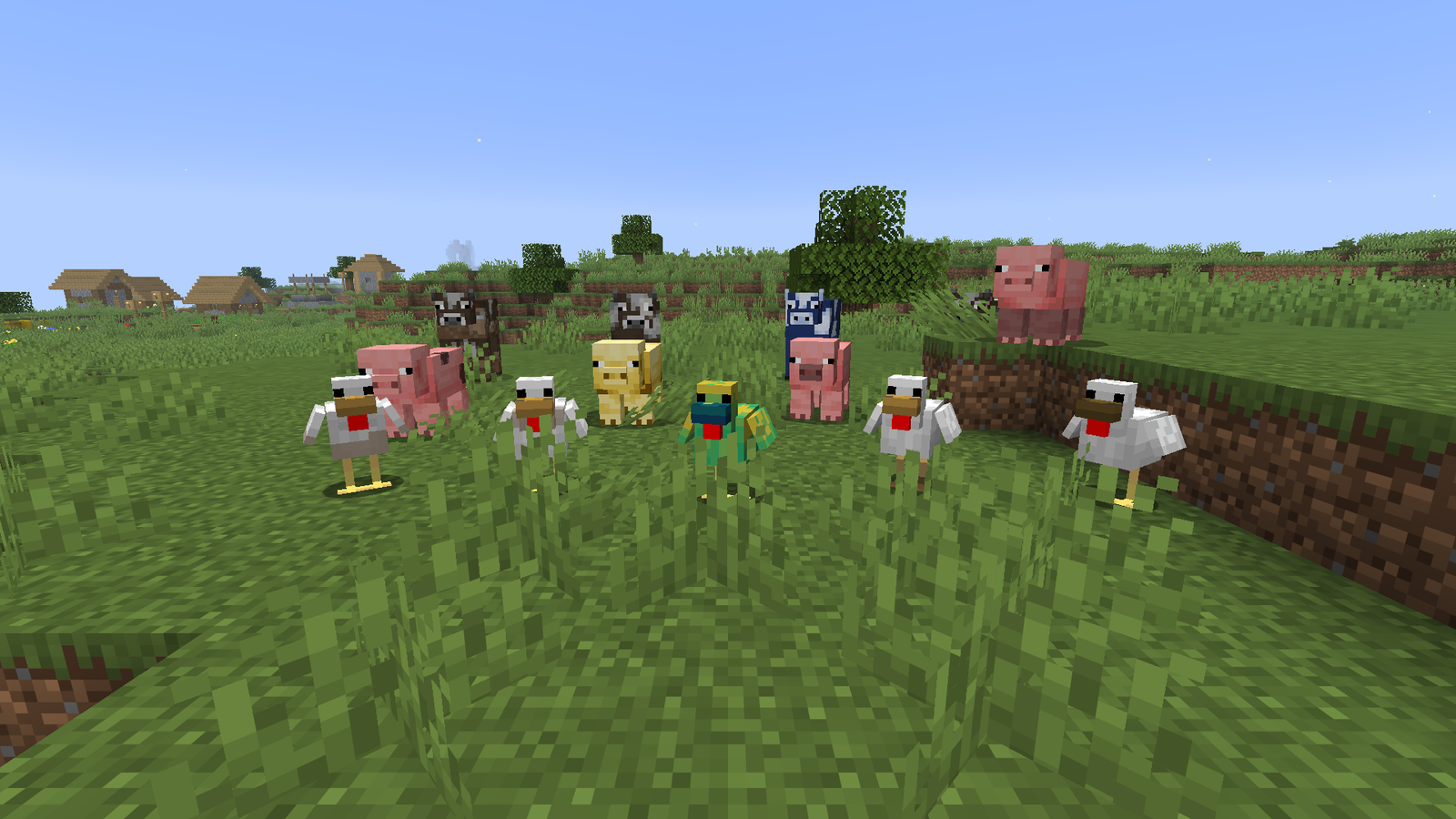
Farm animals with their own looks, including a rare blue cow. |
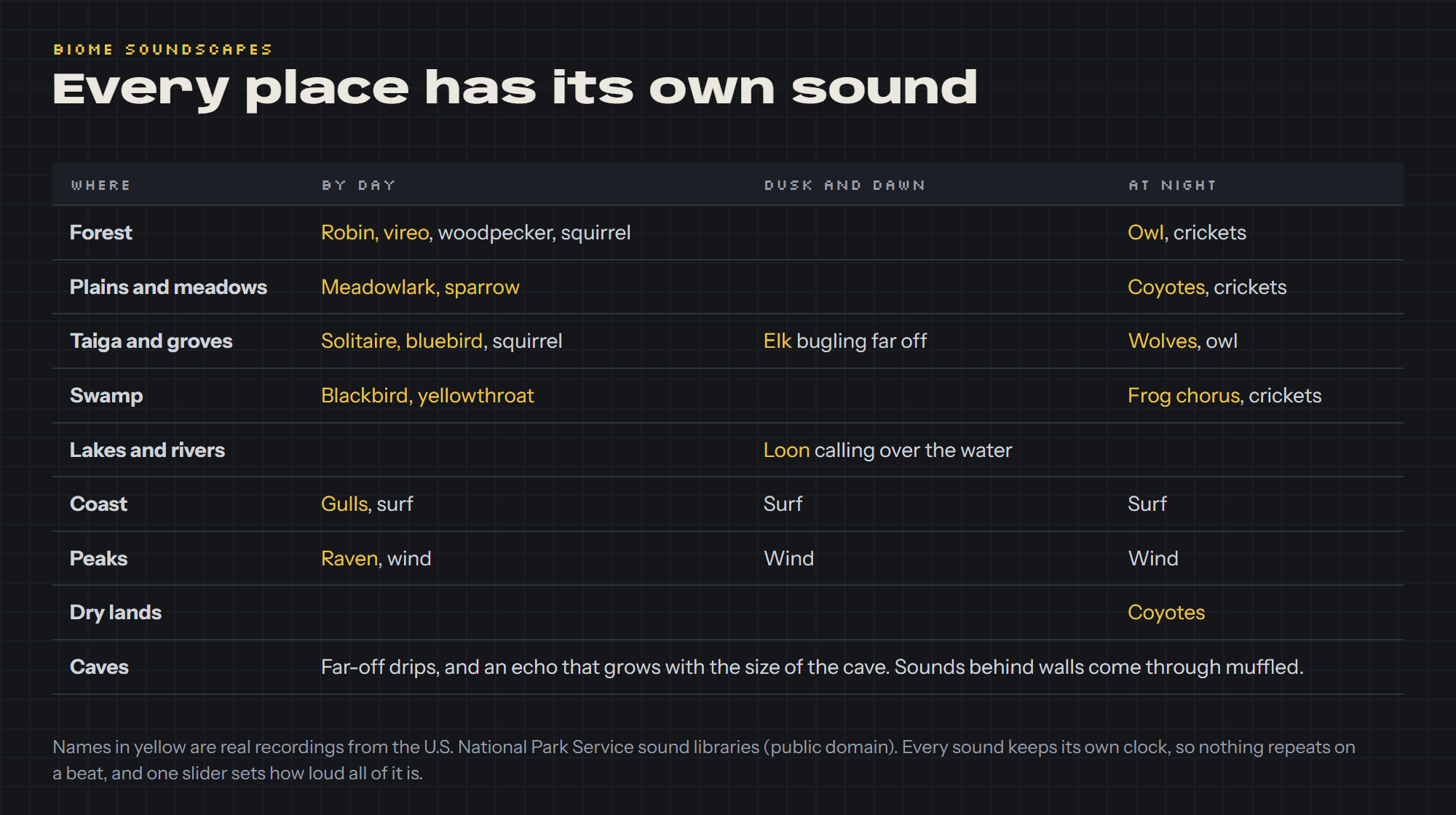
- Real birdsong and animal calls for each biome, from the U.S. National Park Service sound libraries.
- Cave echo, and sounds behind walls come through muffled.
- Quiet by design, with one volume slider for everything Tactile adds.
One Menu for Everything
- Press K in a world. Every effect has a switch and a one-line description.
- Pick a preset in one click: Subtle, Full (the default) or Cinematic.
- Search for any effect, and slide the effect strength and sound volume to taste.
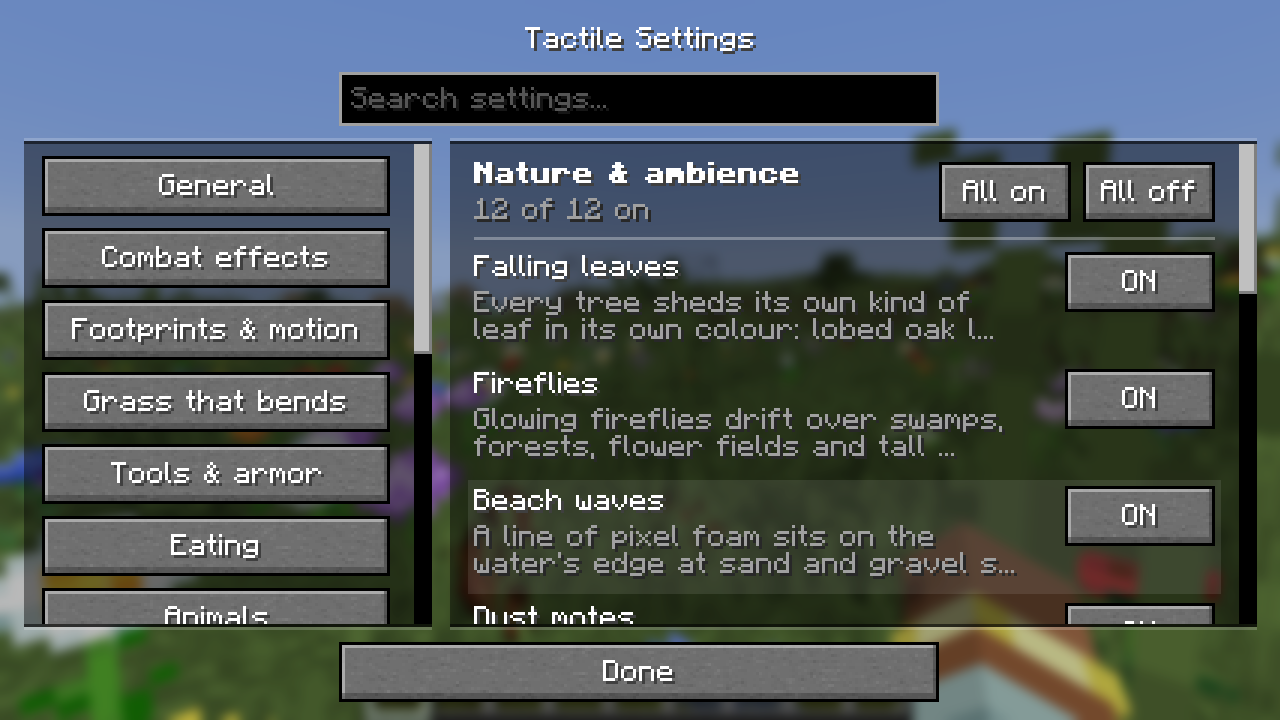
The Tactile menu: press K in any world. |
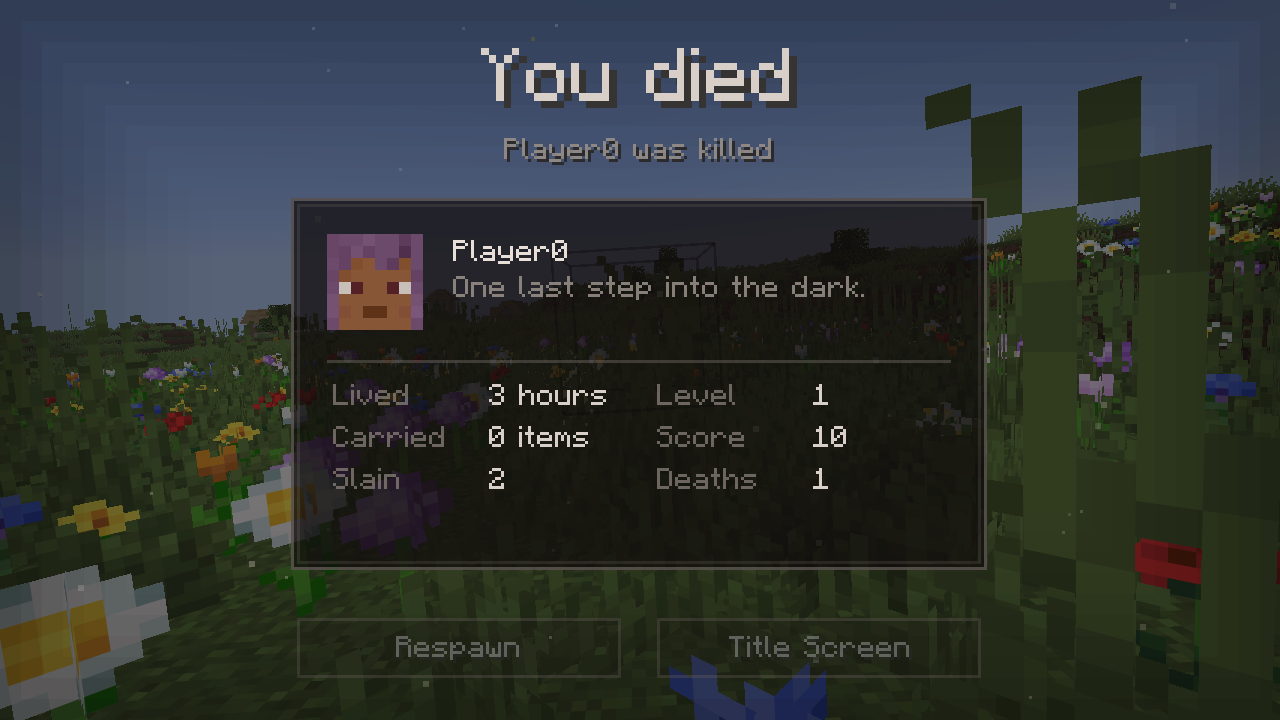
The quieter death screen. |
All 100 Switches
Every effect, page by page, as it appears in the menu.
General (basic settings)
| All Tactile effects |
Turns the whole mod on or off at once. Your switches on the other pages are kept for when you turn it back on. |
| Preset |
One click sets every switch and the effect strength. Subtle: gentler, fewer effects. Full: everything. Cinematic: everything, stronger. Flipping a switch yourself makes it Custom. Animal looks and screens are left as you set them. |
| Effect strength |
How strong the visual effects are. It changes camera kicks and dips, how many particles burst out, how far grass bends and how much held lanterns sway. 100% is the normal amount. |
| Sound volume |
How loud the sounds Tactile adds are. It covers rain drops, drips, birdsong and animal calls, wind, surf, steps and the rest. The game's own sounds are not changed. 0% is silent. |
| Menu key |
The key that opens this menu. Click the button to change it in the game's Key Binds, under Tactile. |
Combat effects (6 switches)
| Weapon animations |
Smoother, weightier first-person swings for every melee weapon, with stronger critical hits. |
| Weapon sweeps |
A vanilla-style sweep that follows each weapon's swing, with its own critical-hit finish. Replaces vanilla's sweep particle. |
| Hit freeze |
A split-second pause when a hit lands. Visual only, never delays your input. |
| Camera kick |
A tiny camera nudge when you land a hit, slightly stronger on critical hits. |
| Shield reaction |
A blocked hit knocks your raised shield back and throws sparks and splinters (harder when an axe breaks through). |
| Trident spiral |
A thrown trident spirals as it flies and leaves a thin corkscrew of wind behind it. |
Footprints & motion (8 switches)
| Snow |
Footprints in snow that fade over time. |
| Sand |
Footprints in sand that fade over time. |
| Mud |
Footprints in mud that fade over time. |
| Mobs leave prints |
Mobs leave footprints too, not just players. |
| Lantern and torch sway |
A held lantern swings as you turn, walk and jump, then settles. A torch leans a little. |
| Landing dip |
After a big fall your view dips and springs back. |
| Tucked into bed |
Lying down plays out getting into bed in third person, a different way each time: sitting on the edge and swinging your legs in, a big stretch first, flopping back onto it from the foot, or crawling up it and rolling over. Then the blanket comes up. The chat stays hidden (the Leave Bed button stays). Other players get tucked in too. |
| Ice cracks underfoot |
Walking on ice, faint cracks spread under your feet now and then with a quiet creak, and fade after a few seconds. Only for show: the ice never breaks. |
Grass that bends (5 switches)
| Grass |
Grass bends as you walk through it. |
| Flowers |
Flowers bend as you walk through them. |
| Crops |
Crops bend as you walk through them. |
| Seagrass and kelp |
Seagrass and kelp lean away from you as you swim through them and sway back after. |
| Vines and sugar cane |
Vines, hanging roots, cave vines, weeping and twisting vines and sugar cane lean as you push past or climb, and sway back after. |
Tools & armor (2 switches)
| Armor shatter |
When armor breaks, its icon bursts into pixel chunks that tumble to the ground. |
| Tool shatter |
When a held tool, weapon or shield breaks, it bursts into pixel chunks of itself. |
Eating (2 switches)
| Bite marks |
Bites appear in food as you eat. Works with modded food and texture packs. |
| Drinks go down |
The level in a potion drops as you drink it, and a milk bucket or honey bottle empties from the top. |
Animals (5 switches)
| Cow variety |
Some cows get one of 14 features: muddy legs, a blaze, a star, socks, an eye patch, a belt, brindle stripes, roan, a scar and more. 1 in 2,000 is a blue Bluebell. |
| Pig variety |
Some pigs get one of 14 features: muddy, spotted, a saddleback band, a dark snout, freckles, sunburn, a scar, hay in their bristles and more. 1 in 2,000 is golden. |
| Chicken variety |
Some chickens get one of 14 features: speckled, barred, laced wings, dark hackles, brown wings, muddy feet, a dark beak, sooty and more. 1 in 2,000 is a Paradise chicken. |
| Cats jam |
Cats near a playing jukebox nod their heads to the beat of the disc and sway their tails. Each vanilla disc has its own tempo. |
| Animals fidget |
Standing still, animals fidget now and then: chickens peck at the ground, pigs nose about, cows, sheep, goats and llamas shake their heads, and horses toss their heads and swish their tails. |
World & weather (10 switches)
| Breath in the cold |
Players, villagers and animals breathe out small puffs in snowy places. |
| Wet drips |
Water drips off players for a few seconds after they leave the water. |
| Delayed thunder |
Thunder arrives after the flash, later the further away the strike: about a second and a half for a strike 150 blocks away. |
| Fishing ripples |
Pixel rings spread on the water where your bobber lands, now and then as it floats, and when a fish bites. |
| Wakes and splashes |
Players and animals leave a trail of ripples moving through water, and dropped items ripple where they fall in. |
| Dynamic rain |
Rain sounds like what it lands on (metal pings, glass tinks, wood taps, leaves patter, water plinks with ripples), softer when you are under a roof, and leaves and roof edges drip. |
| Splashes |
Anything falling into water throws up a crown of spray and spreading rings, bigger for a harder or heavier landing. |
| Waterfall mist |
Where a waterfall lands in a pool: drifting mist, spray, rings and a low rumble. |
| Glow squid glow |
Glow squids shed faint sparkles, and staring at one up close slowly hypnotizes you: a teal glow pulses in from the edges of the screen. |
| Sculk dust |
Dark teal specks float slowly up off sculk, now and then a bright one. |
Nature & ambience (12 switches)
| Falling leaves |
Every tree sheds its own kind of leaf in its own colour: lobed oak leaves, pointed birch, spruce needles, long jungle leaves, acacia fronds, mangrove ovals, azalea leaves and pink petals. As often as the game's own falling leaves. They lie on the ground for a few seconds before they go. |
| Fireflies |
Glowing fireflies drift over swamps, forests, flower fields and tall grass at night. They hide in rain. |
| Beach waves |
A line of pixel foam sits on the water's edge at sand and gravel shores and laps: back a few pixels, in again, and just onto the block. A quiet wash of surf as each wave comes in. |
| Dust motes |
Tiny specks of dust float in the air in caves, mineshafts and dim rooms, and glow warm near torches. |
| Embers |
Sparks rise off fires, campfires, torches, candles and lava, drift up and go out. |
| Popping bubbles |
Underwater bubbles float all the way up and pop at the surface, instead of vanishing halfway. |
| Colour variation |
Grass, leaves and water shift very slightly in colour from place to place, so big fields and forests stop looking flat. |
| Soul wisps |
Pale blue will-o'-wisps float and bob over soul sand and soul soil. |
| Pollen and seed fluff |
On clear days, slow pale specks and the odd dandelion seed drift on the wind over meadows, flower fields and plains. |
| Cave dust falls |
Deep underground, once in a while a little dust and grit trickles off a stone ceiling, with a faint crumble. |
| Chopping shakes the tree |
Chopping at a log knocks a leaf or two loose from the tree above, and felling it shakes out a handful. |
| Mushroom spores |
Pale spores sift down from under the caps of giant mushrooms and lift off small ones, drifting on the wind. |
Sky & weather (8 switches)
| Shooting stars |
Now and then a little pixel streak shoots across the clear night sky. |
| Puddles |
Here and there, flat pixel puddles slowly fill up on open ground over a couple of minutes of rain, ripple as drops hit them, and dry up quickly after. Puddles that meet become one. Walk through one and you leave wet footprints for a few steps. |
| Lightning scorch |
Lightning leaves a dark scorched patch where it hits the ground, smoking for a while, fading after a minute. |
| Smoke in the wind |
Campfire smoke out in the open leans and drifts with the wind (it turns slowly over a few minutes), more in storms. |
| Snow drops from trees |
Where snow lies on a tree, now and then a clump slides off the leaves and lands with a puff and a soft thud. |
| After-rain drips |
For two minutes after rain stops, leaves and roof edges keep dripping, slower and slower. |
| Morning mist |
A thin low mist hangs over water and swamps from just before sunrise and clears soon after. |
| Raindrops on windows |
In rain, drops form on the side of glass blocks and panes that the rain falls against and run down to the bottom of the window. |
Wildlife & rides (8 switches)
| Butterflies |
Little pixel butterflies flutter over flowers by day. They hide in rain. |
| Leaping fish |
Now and then a small fish jumps out of the water near you and splashes back in. Only for show. |
| Boat splashes |
Each paddle stroke splashes and rings the water, and a moving boat leaves a wake of ripples. |
| Minecart sparks |
Fast minecarts throw sparks off the rails and screech faintly going round bends. |
| Moths at lights |
At night, a few small pale moths circle torches and lanterns out in the open. They leave in rain and at dawn. |
| Dragonflies |
By day, pixel dragonflies hang and dart over ponds, rivers and swamps. They hide in rain. |
| Fishing |
The rod whips forward and springs back as you cast, the bobber lands with a small plop and rocks on the water, nibbles before the bite, then goes under with a splash and a jerk of the rod. Reeling in pulls the rod back and the hook skims home across the water, and a catch bursts out dripping. The bubbles around the bobber are thinned out. |
| Tumbleweeds |
Now and then a tumbleweed rolls past with the wind in deserts and badlands. |
Everyday effects (12 switches)
| Placing dust |
A puff of dust along the bottom of a block you place. |
| Tool particles |
Earth flies when you till or make a path, bark flakes when you strip a log, and wool tufts when you shear a sheep. |
| Sparks |
Pixel-star sparks, like firework sparks, from flint and steel, anvils and grindstones. |
| Bucket splashes |
A splash when you fill or empty a bucket (lava and powder snow too). |
| Level-up sparkle |
Golden sparks rise around you whenever you gain a level. |
| Enchanting swirl |
Glyphs swirl into the table when you enchant something. |
| Despawn blink |
Dropped items blink when they have about 20 seconds left before they despawn, faster as time runs out. Items already on the ground when you arrive are timed from when you first saw them. |
| Bigger explosions |
Explosions flash, send a ring of smoke rolling out along the ground, throw out chunks of the blocks they destroyed and shake the screen a little when you are close. |
| Totem pop |
A totem of undying spins up bigger on your screen and bursts in a ring of its own green and gold. |
| Petals kicked up |
Walking into a flower throws up a few petals in its colour, and into grass or ferns, a few bits of grass. |
| Arrow whistle and impact |
An arrow that flies close past you whistles by, and arrows knock a few bits out of the block they stick in. |
| Villagers at work |
When a villager works at its workstation, something small comes off it: sparks from the grindstone, smithing table and blast furnace, chips from the fletching table and stonecutter, glyphs off the lectern, a splash from the barrel, smoke from the smoker, and so on. |
Mobs & players (6 switches)
| Running dust |
Sprinting kicks up little puffs of dust in the colour of the ground, and a hard landing puffs dust out around the feet. |
| Burning smoke |
Anything on fire trails smoke and embers, not just the flames. |
| Sleepy Zs |
Sleeping villagers, foxes and players let out little pixel Zs, and villagers and players a soft snore. |
| Silt on the sea floor |
Walking or landing on the bottom underwater stirs up a slow cloud of silt in the colour of the bed. |
| Loose feathers |
Chickens and parrots lose a feather or two when they are hit, and now and then as they flap down. |
| Animals drip |
Animals and mobs drip for a few seconds after they climb out of water, as players do. |
Screens & chat (4 switches)
| Death screen |
A quieter death screen: the world dims, a heartbeat fades, and a memorial card remembers who died, how long they lived and what they carried. |
| Chat heads |
In chat, a player's head appears instead of their name, like a dialogue portrait. Hover the head to see their username. |
| Names beside heads |
Keeps each player's name after their head in chat, with its rank prefix and team colour. Off: the head alone, with the name on hover. Off by default. |
| Hide my death message |
While the death screen is up, your own death message is kept out of chat (the death screen already tells you). With no death screen, as with immediate respawn, it shows as usual. |
Sounds (12 switches)
| Drip sounds |
Water and lava drips make a sound when they land. |
| Rustling |
Leaves and bushes rustle as you push through them. |
| Wading steps |
A soft slosh with each step through shallow water. |
| Bowstring creak |
A creak that rises as you draw a bow or load a crossbow. |
| Heavy landing thud |
A heavy thud when you land after a long fall. |
| Pickup by material |
Picking up items sounds like what they are made of: metal clink, wood knock, soft cloth. |
| Cushion and straw bed flop |
A soft flop when you land on a bed, wool, carpet, hay or a straw bed, or lie down in bed. |
| Biome soundscapes |
The sounds of where you are, each on its own clock: birdsong by day (the birds of that kind of country), crickets at night, frogs in swamps, surf at the coast, wind on the peaks and far-off drips in caves. |
| Cave echo |
Sounds echo in big caves and large enclosed spaces, clear but not overpowering, and sounds behind walls come through muffled. |
| Night animal calls |
Rare and far away at night: an owl in forests, a wolf howl in taiga, coyotes on plains, savanna and desert. Real recordings from the US National Park Service. |
| Grass rustle |
A very quiet swish as you walk through tall grass, ferns, flowers and crops. |
| Animal calls |
Rare, faint, real recordings: a woodpecker drumming and a squirrel chattering in forests, a raven on the peaks, gulls over the sea, an elk bugling in mountain forests and a loon calling over lakes at dusk and dawn, and a frog chorus in swamps at night. |
How to Install
Fabric: install Fabric Loader for 26.3, then put Fabric API and the Tactile Fabric file in your mods folder.
Forge: install Forge 66 or newer for 26.3, then put the Tactile Forge file in your mods folder.
CurseForge app: just click Install; it adds Fabric API for you.
Needs Java 25. On Fabric, Sodium and Mod Menu are supported (optional). Client only: do not install it on a server.
FAQ
Does the server need it?
No. Tactile runs only in your game, so you can join any server with it. It only changes what you see and hear, never how you move, fight or build. As with any client mod, check a server's rules first.
Will it slow my game down?
It follows your Particles setting (Decreased thins its particles out, Minimal removes them). If your game feels heavy, pick the Subtle preset or switch off the effects you care least about.
I use another mod that does the same thing. What now?
If you also run a mod for falling leaves, splashes, chat heads, sound physics or footstep sounds, switch the matching Tactile effect off so the two do not double up. Shader packs are not tested yet; ground effects like ripples and footprints may look different under them.
Can I put it in a modpack?
Yes. Tactile is MIT licensed.
Something looks wrong?
If an effect ever breaks, Tactile switches that one effect off and writes the error to the log instead of crashing your game. Leave a comment with what you saw and your logs/latest.log.
Birdsong and animal calls are public-domain recordings from the U.S. National Park Service sound libraries; the full list is in credits.txt inside the jar. Every other sound is one of Minecraft's own.
Enjoying Tactile?
Found a bug or have an idea? Leave a comment. Feedback shapes the next update.
Sponsored by MineBlocks

A friendly Minecraft Skyblock server: start with one tree and a chest, and grow the greatest island in the sky.
mineblocks.net | Join the Discord