Structure Spawn Point
- By
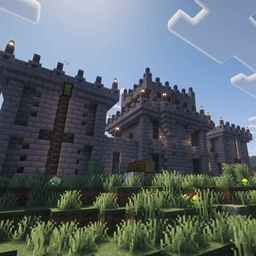
Get the perfect start you are always looking for. You decide the structure to spawn in and the surrounding biomes.
Structure Spawn Point
Get that perfect start you are always looking for.
Start anywhere; a witch hut, a village, an ocean monument, whatever you feel like.
There are multiple ways the perfect structure is evaluated, most importantly it checks the biome the structure is in, as well as the percentage of the surrounding area that is in your preferred biomes.
This mod also supports custom mob spawns inside your spawn structure, more info further down.
How it works
On server start, it looks for the configured structure. The search starts at 0,0 and searches outward from there. Every candidate is evaluated against your biome preferences and terrain requirements. When the perfect location is found, the world spawn is set there and any players already waiting are teleported. Players who join later are teleported on join.
If your requirements are simple the search will be fast and might even finish before the loading screen is over. If you have some very strict requirements the search could take up to a few minutes. Expect some significant lag spikes while the search is ongoing, but don't worry, as soon as the search is done, that is it, no more performance impact.
Getting started
- Install the mod in your Fabric 1.21.1 modpack alongside Fabric API.
- Start the game once — the mod generates a default config at
config/structure-spawn-point.json. - Set
target_structureto the structure you want players to spawn in. - Start the server or join a world. The search runs automatically on every fresh world and will read config on server start or reset command, no need to relaunch the entire game to update the config.
Want different starts in different worlds?
For world-specific configurations, create a file at config/structure-spawn-point/<world-name>.json. World-specific configs take priority over the global config.
Finding your structure ID
Use the /locate structure command in game to find structure IDs (e.g. minecraft:village). This is what you put in target_structure. The mod supports both specific structure IDs and structure tags — just enter either format and the mod tries both automatically. The # prefix used in commands is not required, but including it doesn't break anything.
"target_structure": "minecraft:village"Examples of valid values:
nova_structures:stray_fort— a specific structure added by a modminecraft:village_plains— a specific vanilla village variant (plains only)minecraft:village— any village variant, resolved via structure tag
Structure locating configurations
These settings control how the mod searches for and evaluates candidate structures.
preferred_biomes (default: forest, plains, meadow) Biomes the structure should ideally be in. Use namespace:biome_id for a specific biome or namespace:biome_tag for a category. The # prefix is optional. Leave the list empty to accept any biome.
"preferred_biomes": ["minecraft:is_forest", "minecraft:plains", "minecraft:meadow"]avoided_biomes (default: badlands, beach, jungle, mountain, ocean, swamp) Biomes to avoid. Same format as preferred_biomes.
"avoided_biomes": ["minecraft:is_ocean", "minecraft:is_badlands"]min_preferred_area_percentage (default: 60, range: 0–100) The minimum quality score for the area surrounding the structure (384×384 blocks). The score is based on how much of the surrounding area is in preferred or neutral biomes, with preferred biomes counting double and avoided biomes penalizing heavily. Set to 0 to skip the area check and only consider the structure's immediate biome.
terrain_flatness_check_radius (default: 48, range: 0–128) Radius in blocks to check for terrain flatness around the structure. The mod measures the height difference between the highest and lowest surface blocks in this area and rejects candidates that exceed max_terrain_height_difference. Set to 0 to disable the terrain check.
max_terrain_height_difference (default: 16, range: 0–100) Maximum allowed height difference in blocks within the terrain check radius. 16 accepts gentle hills; lower values require flatter ground.
max_search_attempts (default: 10, range: 1–50) How many structures to evaluate before giving up and using the best found so far. Each attempt takes roughly 1–4 seconds depending on the structure type. The search spirals outward from world center so increasing this covers a larger area. If the search consistently exhausts all attempts, increase this value or relax biome/terrain constraints — the status command will tell you which checks are failing most. If the perfect candidate is not found the structure it falls back to will be as close to perfect as possible by scoring the biome the structure itself is in, the surrounding biome percentage and the flatness checks.
Player teleportation and messages
These settings control how and when players are teleported, and what messages they see.
teleport_creative_and_spectator (default: true) Decides if players that are in creative or spectator modes get teleported. Players that don't get teleported will be sent a message in chat with the teleport command so that they can still easily teleport to the structure later if they so choose.
teleport_delay_ticks (default: 100) How long to wait before teleporting a player after they join or after the structure is found, in ticks (20 ticks = 1 second). A warning is shown during the delay. Set to 0 for an instant teleport with no warning.
spawn_proximity_radius (default: 128) Players already within this many blocks of the structure skip the teleport and receive the welcome message instead. This handles the common case where a player naturally spawns at world spawn after the structure has already been found.
kill_nearby_hostiles_radius (default: 64) Radius in blocks around the structure to clear hostile mobs when the first player arrives. Mobs are only cleared once. Set to 0 to disable.
send_popup_messages (default: true) Enables or disables all popup messages. Individual messages can also be disabled by leaving them empty.
send_chat_messages (default: true) Enables or disables all chat messages. Individual messages can also be disabled by leaving them empty.
structure_found_message (default: "Structure found") Message shown when a player is about to be teleported.
welcome_message (default: "Welcome home.") Message shown after a successful teleport.
search_in_progress_title (default: "Searching…") Message shown periodically to players who join while the search is still running.
search_in_progress_subtitle (default: "The server may be slow. Please wait.") Message shown alongside search_in_progress_title.
failure_message (default: "No structure found.") Message shown to players if the search completes without finding any candidate.
teleport_warning_message_override (default: "") Overrides the automatic "Teleporting in X seconds…" countdown message. Useful for translating the message or changing its wording. Leave empty to use the default countdown.
Leaving any message field empty disables that specific message entirely.
Custom mob spawns
New feature added in version 1.2.
Add NBT data to any marker entity in your spawn structure to spawn in a specified amount of that entity type. Mob entities are marked as persistent when they are spawned in, meaning they won't despawn even if all players leave the area.
When the spawn point structure is located it will spawn the desired mobs in that specific structure. No custom mobs will be spawned in any other structures. But if the structure spawn point is reset mobs will spawn in the new spawn structure.
These mobs are immune to the hostile mobs clear that happens when the first player gets teleported to the spawn structure.
To use this feature you need a structure NBT file that contains some entities, placing down armor stands in your structure as entity markers is perfect. Keep in mind that the marker gets deleted when it has been read by the mod.
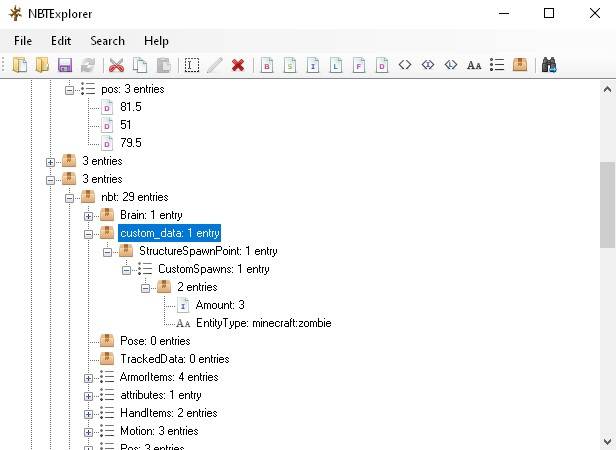
Once the entities exist, use a NBT editor like NBTExplorer to open up the NBT file, locate the marker entity and add the custom NBT data exactly in this format. Note that setting the existing Invisible boolean to 1 is also advisable so that the markers are not actually visible in the structure if this mod does not end up deleting them.
"custom_data":
{
    "StructureSpawnPoint":
    {
        "CustomSpawns":
        [
            {
                "EntityType": "minecraft:zombie",
                "Amount": 10
            },
            {
                "EntityType": "minecraft:skeleton",
                "Amount": 3
            }
        ]
    }
}
When adding these NBTElements to the structure NBT: custom_data and StructureSpawnPoint are Compounds. CustomSpawns is a List containing Compounds. EntityType is a String and Amount is an Int.
Here is what a valid NBT tag setup might look like:
Known limitation: if the structure spawn point is reset to a structure that has been visited previously the mobs might not get spawned. If this happens you can reset the structure spawn point again and blacklist the current structure using the command "/structurespawnpoint reset blacklist".
Performance
The search is intentionally run on the server thread and will cause server lag while active. This is expected behavior and temporary. Every time the server is overloaded the search pauses, this makes sure that the server will never crash because of tick lag. Players who join during the search are informed via the search_in_progress_title and search_in_progress_subtitle messages. The server becomes fully responsive again as soon as a suitable location is found.
Commands
All commands require operator level 2.
/structurespawnpoint status If a search is in progress it will display its status. When the search completes it will display the found position and structure ID, and a diagnostic report with actionable suggestions if the search struggled to find a good match.
/structurespawnpoint reset Clears the saved spawn point and triggers a new search. All online players are notified and will be teleported when the new location is found. The config is reloaded on reset so config changes take effect without a full server restart.
/structurespawnpoint reset blacklist Blacklists the current spawn point to ensure that it will not be picked as the spawn point again. Also triggers a new search.
Compatibility
- Terrain overhaul mods (tested with Terralith) — fully compatible
- Structure placement mods (tested with Improved Village Placement) — fully compatible
- Other spawn point mods — compatible; Structure Spawn Point will typically override others since its validation checks take longer to complete, causing it to set the world spawn last
- Replay mods (tested with Flashback) — fully compatible; observer joins during replays do not trigger teleportation
- Nether and End dimensions — not supported; the mod searches the overworld only
Notes
- The mod can be added and removed at any time. It works the same on new and old worlds, the structure location search will run on the first server start after the mod was added. When the mod is removed it will just leave behind some persistent state, new players joining will join at the new structure because it is set as world spawn. Re-adding the mod later will not automatically redo the search - use the reset command to search again.
- Players may briefly appear to fall through the world during teleportation while destination chunks load. This is a visual artifact caused by the client receiving the teleport before chunk data arrives, and causes no damage.
- Underwater structures are supported but can spawn the player underwater.
- Underground structures are supported but the players will still be teleported to the surface. All biome checks are also done at surface level so detecting the correct underground biomes is not possible.
- The search only runs one time. Once a spawn point is saved it persists across server restarts. Use
/structurespawnpoint resetto force a new search. - Players that are dead when the teleport happens will get teleported when they respawn instead.
- Singleplayer and dedicated server are both supported.
GitHub
https://github.com/AndartaMC/structure-spawn-point
License
MIT — feel free to include this mod in modpacks.
Structure Spawn Point Team