


Soundtrack Shuffle
- By
A mod that shuffles all in-game soundtracks regardless of your environment.
1-settings.png
Description
Vanilla Minecraft only plays the songs that belong to the biome, dimension and game mode you happen to be in, and then leaves you in silence for ten to twenty minutes.
Soundtrack Shuffle plays the whole soundtrack instead: every background song, in random order, wherever you are, at a configurable interval.
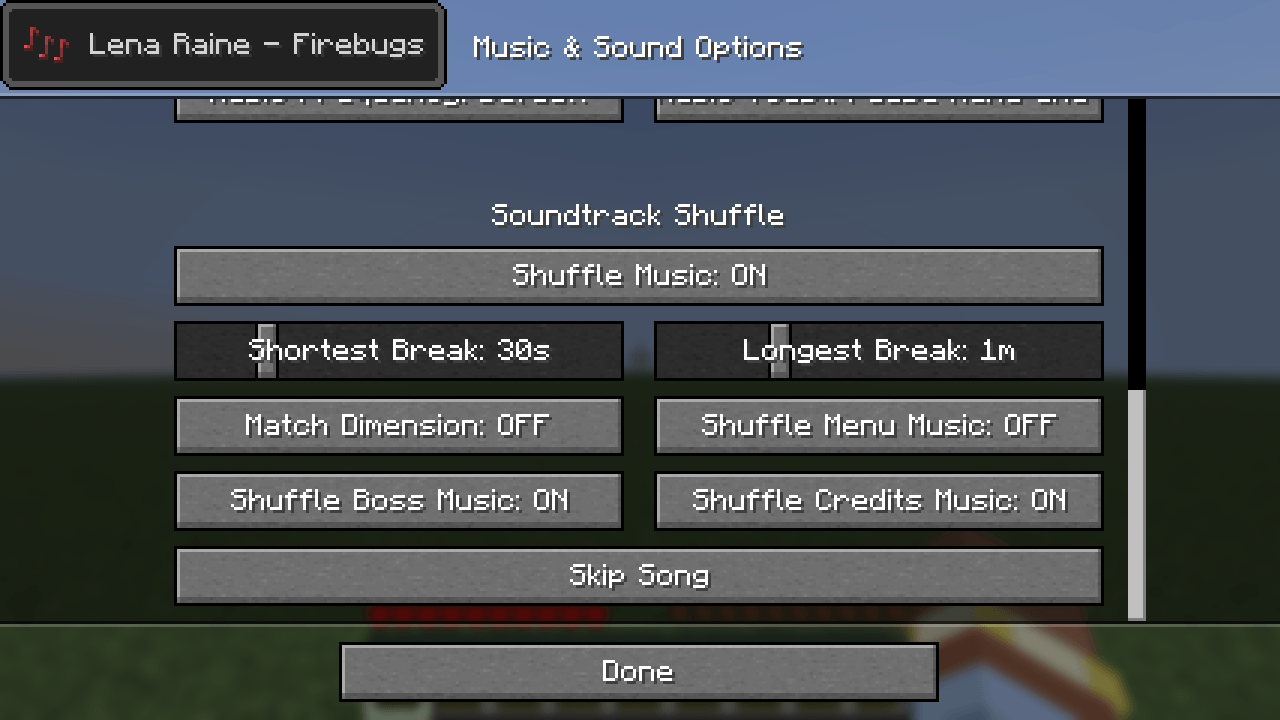
The settings sit in the Music & Sounds options.
What it does
- Shuffles every background song while you are in a world, ignoring biome, dimension and game mode.
- No repeats until everything has played. Each song plays once per round, and a new round never starts with the song that just ended.
- You choose the silence. Set the shortest and the longest break between songs, from none at all up to the vanilla 20 minutes.
- Skip Song key (`N` by default) jumps to the next song right away.
- Music survives portals. A song keeps playing when you change dimension, instead of being cut off as in vanilla.
- Match Dimension (optional). A toggleable option that keeps Overworld songs in the Overworld, Nether songs in the Nether and End songs in the End. With it on, a song that belongs to the dimension you left stops after entering the portal.
- Music discs are left alone. Only background music is shuffled. Music disc songs are not included.
- Extras (optional). A toggleable option to include the title screen, boss, and the end credits music.
Settings
Everything is under Options > Music & Sounds, in the *Soundtrack Shuffle* section at the bottom of the list.
- Shuffle Music turns the mod on or off. When off, music behaves exactly as in vanilla.
- Shortest Break / Longest Break set the silence between two songs. Each break is picked at random between the two. Set both to *None* for music that never stops.
- Match Dimension only shuffles the songs of the dimension you are in.
- Shuffle Menu Music adds the title screen songs.
- Shuffle Boss Musi* adds the Ender Dragon fight song.
- Shuffle Credits Music adds the song from the end credits.
- Skip Song does the same as the key, for when a menu is open.
The Skip Song key can be changed under Options > Controls > Key Binds.
Good to know
- Client side only. It works in singleplayer and on any server, and the server does not need it.
- Resource packs are picked up automatically. Songs that a resource pack adds to or removes from the game's music are shuffled, or left out, without any setup.
- While shuffling, the break settings replace the vanilla *Music Frequency* option.
- Settings are saved in `config/soundtrackshuffle.json`.
Requirements
- Minecraft 26.3
- Fabric Loader 0.19.5 or newer
You are welcome to include this mod in modpacks.
AI disclaimer
This mod's code was created with the use of AI. The logo is human-made.
Soundtrack Shuffle Team
