


Solid Self
- By
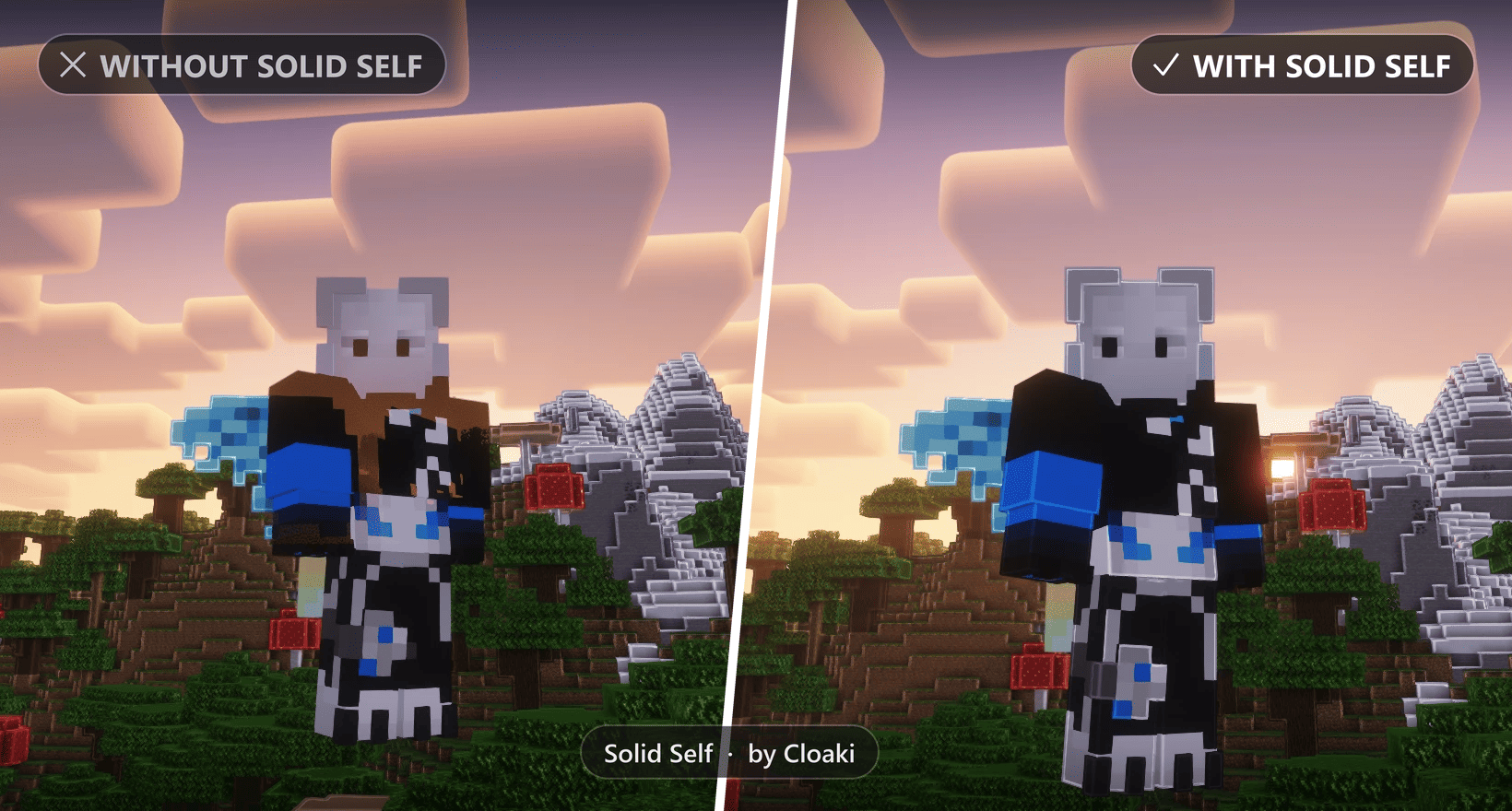
Left: without Solid Self, the player is see-through and has no outlines. Right: with Solid Self, the player is solid and outlined. Shader: Complementary Reimagined with world outlines.
Description
Solid Self
Solid Self fixes players rendering see-through and being ignored by shader effects when using Iris shaders. (and does nothing more!)





 The bug
Since Minecraft 26.x, players rendered with Iris shaders can behave strangely:
- Players turn semi-transparent from certain camera angles, most noticeable in third person when looking towards the sky or a bright light source
- Shader effects skip players entirely, for example world outlines, which outline every block, mob and cosmetic, but not the player standing right in front of you
- It doesn't matter which shader: the issue has been reported across different shader packs
The cause isn't a broken shader, resource pack or skin. It's how players end up in the rendering pipeline. You can find the open report here: Iris issue #3105.
 The fix
Solid Self makes sure players are rendered as solid entities, just like mobs, so shaders treat them like everything else in the world.
- Players are no longer see-through
- Shader effects like world outlines apply to players again
- Works for your own player and other players, in singleplayer and on servers
- Player heads are solid too: placed, held, in item frames and worn
- Toggle it in-game with a key of your choice
 Toggle in-game
Want to compare, take screenshots or just switch back to vanilla for a moment? Solid Self can be turned on and off at any time, without a restart.
- Open Options → Controls → Key Binds
- Scroll down to the Solid Self category
- Bind Toggle Solid Self to any key you like
Press the key in-game and a short message shows you whether Solid Self is enabled or disabled. Your choice is saved and kept after restarting the game.
The key is unbound by default, so it never conflicts with your other controls.
 What it doesn't touch
- Invisibility & spectator mode: the vanilla "ghost" look is left exactly as it is
- The first-person hand: unchanged
- All other entities: mobs, armor stands, items and other blocks stay vanilla
- Your shader settings: nothing is changed or overwritten
 Known limitation
Semi-transparent pixels in skins are rendered either fully visible or fully invisible. Fully transparent pixels, like empty areas in the hat layer, keep working as before.
For most skins this makes no visible difference. Semi-transparent skin pixels are already displayed incorrectly by most shaders anyway (see Iris issue #3135).
 How it works
Vanilla Minecraft renders players with the translucent entity render type. With Iris, translucent entities are drawn after the shader's deferred passes. Every effect that reads the depth buffer in those passes, such as world outlines, can't see the player, and the player can get blended with whatever is behind it.
Solid Self switches players to the cutout render type, which most mobs already use. Players are drawn together with all other solid entities, so the shader picks them up correctly. Player heads are drawn translucent by vanilla too, so Solid Self switches them to the cutout type that every other mob head already uses.
The whole fix is two small mixins. The mod is only a few kilobytes in size.
 FAQ
FAQ
Do I need this without shaders? No. Without shaders players already look correct. Solid Self doesn't change anything visible there.
Does it work on servers? Yes. It's purely client-side, so it works on any server and nobody else needs to install it.
Do I need Fabric API? Yes, Fabric API is needed for the toggle keybind.
Will this be needed forever? Hopefully not! Once the issue is fixed in Iris itself, you can remove Solid Self.
Something looks wrong with another mod? Please report it. Incompatibilities will be looked at and fixed where possible. You can reach me by email at support@cloaki.de or on my Discord server.
 Compatibility
Tested and working with:
- Iris + Sodium
- Complementary Reimagined (including world outlines)
- 3D Skin Layers
- Entity Model Features & Entity Texture Features
- Player animation resource packs (e.g. Fresh Moves)
 Installation
- Install Fabric Loader
- Put Fabric API and Solid Self into your
modsfolder - For shaders, also install Iris (recommended together with Sodium) and a shader pack of your choice
- Start the game. That's it!
Without Iris, Solid Self loads fine but has nothing to fix.
 Links
Links
- Website: cloaki.de
- Source code: GitHub
- Wiki: Installation, usage and troubleshooting
- Support & bug reports: support@cloaki.de · Discord server
Made by Cloaki · Licensed under MIT
Legal (German): Impressum · Datenschutzerklärung (privacy policy) · Haftungsausschluss (disclaimer)
NOT AN OFFICIAL MINECRAFT PRODUCT. NOT APPROVED BY OR ASSOCIATED WITH MOJANG OR MICROSOFT.
Solid Self Team
