Singleplayer Command GUI
- By
An organized singleplayer command GUI with shortcuts, searchable categories, and Minecraft-native command input, suggestions, and Tab completion. Fabric 1.21.11.
Singleplayer Command GUI
Version: 1.4.0
Platform: Minecraft Java Edition 1.21.11 | Fabric (client-side)
Mod ID: singlecommandgui
Release file: Singleplayer-Command-GUI-1.4.0-Fabric-1.21.11.jar
Author / Publisher: Ruochen Liu
DESCRIPTION
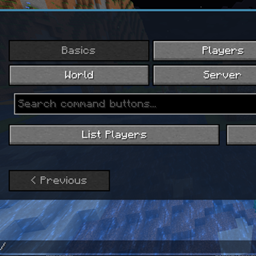
Singleplayer Command GUI turns frequently used Minecraft commands into a convenient, organized in-game control panel. Instead of memorizing long syntax or repeatedly opening the standard chat interface, browse shortcuts by category, choose an action, and use the built-in command entry to adjust any parameters.
The command entry retains Minecraft's native command experience, including context-aware suggestions and Tab completion. Commands are submitted through the game's normal command system: this mod does not create a replacement command protocol, grant extra permissions, or override the world's rules.
FEATURES
- Dedicated singleplayer interface, separate from the server administrator edition.
- Command shortcuts grouped into World, Gamemode, Gamerules, Entities, and Build.
- Fast access to common time, weather, difficulty, game mode, teleportation, effects, entity, item, and construction commands.
- Expanded game rule shortcuts for common world settings, including inventory retention, mob spawning, world updates, and related controls.
- Searchable command shortcuts and editable command templates.
- Native-style command input, suggestions, and Tab completion; press Enter or use the Run control.
- Complete shortcuts can run immediately; templates that require coordinates, a target, or another argument remain editable before execution.
- Default shortcut: F8.
HOW TO USE
1. Install Fabric Loader and Fabric API for Minecraft Java 1.21.11.
2. Place this mod's JAR in the client's mods folder. Do not place the distribution ZIP itself in mods.
3. Enter a singleplayer world and press F8 to open the interface.
4. Choose a shortcut or type a command, complete its parameters, and execute it through Minecraft's normal command mechanism.
REQUIREMENTS AND NOTES
- Minecraft Java Edition 1.21.11, Fabric Loader 0.17.0 or newer, Fabric API, and Java 21 or newer.
- Client-side mod; no dedicated server installation is required.
- Commands requiring cheats or elevated permissions still require those permissions.
- The GUI does not guarantee that commands restricted by account settings or server policy will be permitted.
- This version targets Minecraft 1.21.11. Other versions have not been established as compatible.
SEVEN MONTHS IN AN EMPTY AUCTION HOUSE — WHY I MADE THIS MOD
I didn't make this mod because Minecraft needed yet another fancy menu. I made it because my Microsoft account decided to have a moment. 🤣
My account's chat restrictions left me unable to use the T input box. The problem? Minecraft puts commands in that very same box. So while everyone else could type a command and get on with their day, I found myself stuck in a practically deserted auction house on a server.
For seven months.
SEVEN. MONTHS. IN AN AUCTION HOUSE WITH NOBODY AROUND. 🤣
I could join the server. I could look around. But the one thing I needed—a simple way to enter a command—was trapped behind an input box I couldn't use. At some point, the auction house stopped feeling like a location and started feeling like a very boring prison.
That's where Server Command GUI came from: a separate place to type commands, discover the commands a server makes available, and use convenient shortcuts. It doesn't invent a new command system or hand out extra permissions. It uses Minecraft's existing command pathway, just with a different entrance.
I can't promise it will override every account or server restriction. But I can say exactly why I wanted to build it.
Because seven months in an empty auction house is more than enough time to start designing your own exit. 🤣
A LITTLE SIDE NOTE FROM NEXT DOOR 🤣
One thing I didn't quite explain about our little neighbor next door, Server Command GUI: most of its interface is actually designed to help server owners and admins get things done quickly. 🤣
Especially when it comes to kicking someone out, adjusting server settings on the spot, or handling common admin tasks without having to type out a full command every single time. It's still Minecraft's normal command system — just with the useful controls right at your fingertips. 🤣
Singleplayer Command GUI Team