Server Command GUI
- By
A server-focused command GUI with admin shortcuts, automatic discovery of advertised server commands, and Minecraft-native input and autocomplete. Client-side Fabric 1.21.11.
Server Command GUI
Version: 1.4.0
Platform: Minecraft Java Edition 1.21.11 | Fabric (client-side)
Mod ID: admincommandgui
Release file: Server-Command-GUI-1.4.0-Fabric-1.21.11.jar
Author / Publisher: Ruochen Liu
DESCRIPTION
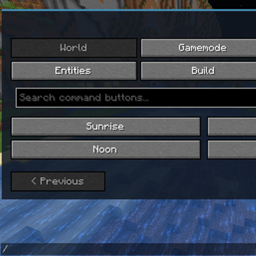
Server Command GUI provides a practical in-game command panel for multiplayer players and server administrators. It organizes common administrative actions into clear categories while preserving Minecraft's existing command input and execution pathway.
Unlike server-side plugins, this edition runs on the player's Fabric client. A compatible multiplayer server does not need this mod installed. The GUI can also open in singleplayer for testing, although server-only actions and permission-restricted commands may not be available there.
FEATURES
- Dedicated server-oriented interface, separate from the singleplayer edition.
- Organized categories: Players, Operator, World, Server, and Detected.
- Shortcuts for common player management, operator tasks, whitelist and ban administration, weather, time, game rules, world borders, saves, and server messaging.
- Detected command category uses the commands advertised by the connected server, including available plugin or custom command entries when exposed to the client.
- Searchable shortcuts and editable templates for names, coordinates, durations, and other command arguments.
- Command entry preserves Minecraft-native suggestions and Tab completion and submits commands by the game's normal mechanism.
- Useful on servers running different server software, provided the client and server can connect normally; features depend on each server's advertised commands and permission rules.
- Opens in singleplayer as well as multiplayer, with command availability determined by the current environment.
- Default shortcut: F9.
HOW TO USE
1. Install Fabric Loader and Fabric API for Minecraft Java 1.21.11.
2. Place this mod's JAR in the client's mods folder. The server does not need this client-side mod.
3. Join a compatible server (or open a singleplayer world to test the GUI) and press F9.
4. Select a shortcut or enter a full command. Edit required parameters and execute through Minecraft's standard command system.
REQUIREMENTS AND NOTES
- Minecraft Java Edition 1.21.11, Fabric Loader 0.17.0 or newer, Fabric API, and Java 21 or newer.
- Client-side utility. No added operator privileges, no bypass of restrictions, and no custom network command protocol.
- Server-defined commands are discoverable only when the server exposes them to the client; hidden commands may still be typed manually if supported.
- Plugin-specific commands are available only on servers that supply them, and execution always depends on permissions and server configuration.
- Account-level chat or command restrictions may still apply even when a separate GUI is used.
- This version targets Minecraft 1.21.11. Other versions have not been established as compatible.
SEVEN MONTHS IN AN EMPTY AUCTION HOUSE — WHY I MADE THIS MOD
I didn't make this mod because Minecraft needed yet another fancy menu. I made it because my Microsoft account decided to have a moment. 🤣
My account's chat restrictions left me unable to use the T input box. The problem? Minecraft puts commands in that very same box. So while everyone else could type a command and get on with their day, I found myself stuck in a practically deserted auction house on a server.
For seven months.
SEVEN. MONTHS. IN AN AUCTION HOUSE WITH NOBODY AROUND. 🤣
I could join the server. I could look around. But the one thing I needed—a simple way to enter a command—was trapped behind an input box I couldn't use. At some point, the auction house stopped feeling like a location and started feeling like a very boring prison.
That's where Server Command GUI came from: a separate place to type commands, discover the commands a server makes available, and use convenient shortcuts. It doesn't invent a new command system or hand out extra permissions. It uses Minecraft's existing command pathway, just with a different entrance.
I can't promise it will override every account or server restriction. But I can say exactly why I wanted to build it.
Because seven months in an empty auction house is more than enough time to start designing your own exit. 🤣
Server Command GUI Team