Description
Description:
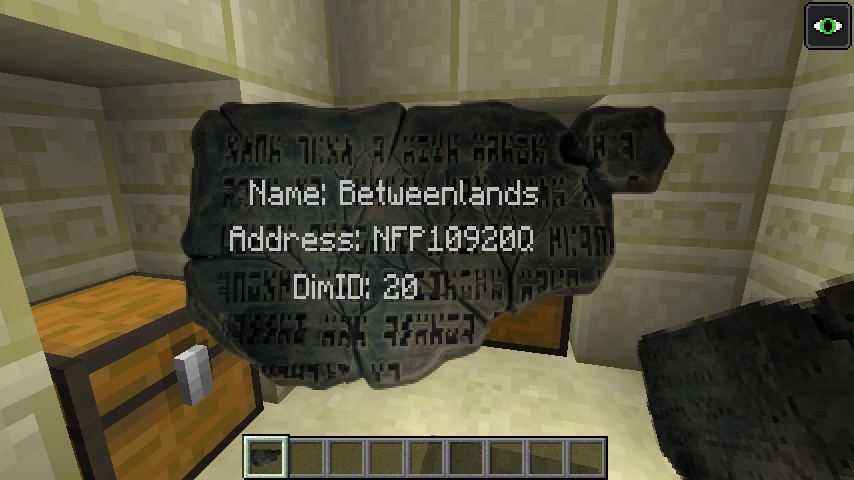
Adds in commands that can be used in conjunction with World Primer & Just Enough Dimensions to pre-generate Stargates in specified dimensions along with being to obtain these Stargate addresses as loot or via command.
Will create a json file in world-save\sgextras called SGGateAddress.json
{
  "SGAddress": [
    {
      "CustomName": "Earth",
      "Address": "RFR2Z70RO",
      "DimID": 0,
      "AllowAsLoot": false,
      "AllowProtection": false,
      "BlockPos": [
        {
          "X": -12,
          "Y": 65,
          "Z": 255
        }
      ],
      "Orientation": 1,
      "Facing": 0
    },
    {
      "CustomName": "Abydos",
      "Address": "S56UCXTUB",
      "DimID": 8,
      "AllowAsLoot": true,
      "AllowProtection": true,
      "BlockPos": [
        {
          "X": 706,
          "Y": 65,
          "Z": -18
        }
      ],
      "Orientation": 2,
      "Facing": 0
    },
    {
      "CustomName": "Netu",
      "Address": "LJ292GYAY",
      "DimID": 10,
      "AllowAsLoot": true,
      "AllowProtection": true,
      "BlockPos": [
        {
          "X": -1057,
          "Y": 94,
          "Z": -2055
        }
      ],
      "Orientation": 1,
      "Facing": 0
    },
    {
      "CustomName": "End",
      "Address": "O1LASQ4YS",
      "DimID": 11,
      "AllowAsLoot": false,
      "AllowProtection": true,
      "BlockPos": [
        {
          "X": -10000,
          "Y": 64,
          "Z": -3870
        }
      ],
      "Orientation": 1,
      "Facing": 0
    },
    {
      "CustomName": "MiningDim",
      "Address": "RFR2Z7008",
      "DimID": -9999,
      "AllowAsLoot": true,
      "AllowProtection": true,
      "BlockPos": [
        {
          "X": -12,
          "Y": 66,
          "Z": 255
        }
      ],
      "Orientation": 1,
      "Facing": 0
    },
    {
      "CustomName": "Moon",
      "Address": "RFR2Z70FX",
      "DimID": -28,
      "AllowAsLoot": true,
      "AllowProtection": true,
      "BlockPos": [
        {
          "X": -12,
          "Y": 65,
          "Z": 255
        }
      ],
      "Orientation": 1,
      "Facing": 0
    },
    {
      "CustomName": "TwilightForest",
      "Address": "RFR2Z706E",
      "DimID": 7,
      "AllowAsLoot": true,
      "AllowProtection": true,
      "BlockPos": [
        {
          "X": -12,
          "Y": 65,
          "Z": 255
        }
      ],
      "Orientation": 1,
      "Facing": 0
    },
    {
      "CustomName": "Betweenlands",
      "Address": "RFR2Z70WU",
      "DimID": 20,
      "AllowAsLoot": true,
      "AllowProtection": true,
      "BlockPos": [
        {
          "X": -12,
          "Y": 65,
          "Z": 255
        }
      ],
      "Orientation": 1,
      "Facing": 0
    }
  ]
}
Currently only working with forge SP/MP & forge server, not working yet with Spongeforge.
Items Added:
- Ancient Tablet
- Activator Block
-
- This block is just a fake player that right-clicks on loop, was using to activate chunkloader (The Weirding Gadget) when chunk loader is placed using the setblock command.
- The activator block is not required for small structures but may be useful for large structures if the structure is not being completed by the time the chunk unloads.
- see example worldprimer.cfg dim 9
-
Commands:
- sgloaddim <dimid>
- used to load dimension to allow dimension loading commands in World Primer to run.
- sgunloaddim <dimid>
- used to add the dimension to the unload queue.
- sgaddress <customname> <dimid> <allowasloot> <allowProtection> <x> <y> <z> {}
- used to add the given gate address & info to the SGGateAddress.json file.
- sgtablet <player> <item> <dimid> <customname>
- used to give player an Ancient Tablet with gate address for the specified gate.
- useful for progression based pack, IE can use with something like better questing to give player specific address for completing task.
- sgsetrandomspawn <dimid> <type> <containsliquid>
- sets a new spawn point.
- type can be OVERWORLD, NETHER, END.
- containsliquid is weather spawn-point pos can contain liquid, checks a 7x7 area with the spawn-point at the center.
- sgdelete <address>
- will remove the given entry from the SGGateAddress.json file.
- this will not remove the structure or loot already generated with this address.
- sggetworldprovider <id>
- added this so I could get the full name of world provider to use with JED dimensions.json
- sggetdata <x> <y> <z> {}
- added this to get all nbt data from SG base Block, useful to see any other nbt tags you may want to change.
Config Options:
- allowBreakGate
- true/false – false by default, if false only players with OP can break gates added in the SGGateAddress.json that have allowProtection set to true.
- allowExplodeGate
- true/false – false by default, if false explosions cannot destroy gates added in the SGGateAddress.json that have allowProtection set to true.
- allowBelowGate
- true/false – true by default, if true 1 block down directly below the bottom of the gate will also be protected by breaking/explosions if those options are set to true.
- allowAccessBelowGate
- true/false – false by default, if false only players with OP can access the right-click gui of blocks 1 block below the gate.
- allowControllerAccess
- true/false – false by default, if false only players with OP can access the fuel panel part of the linked controller.
- allowLoot
- true/false – true by default, if true gate entry's in the SGGateAddress.json will be added as loot to the specified loot tables if the entry's allowasloot is set to true.
- lootTables
- a list of loot tables to add ancient tablets to as loot.
- use string name of the registered loot table, IE minecraft:chests/desert_pyramid
- randomChance
- random change for an Ancient Tablet to spawn as loot, 50% by default.
Note on loot:
Loot will not generate on first world load as it is created from the entry's in the SGGateAddress.json which is created on first world/server load.
So once all pre-gen commands have completed you will need to re-start world/server for loot to generate.
Method to pre-generate Stargates:
Create an instance of MC and run once to generate the config files for the mods below.
Mods used:
- Stargate Network - version 2.0.0+
- World Primer - version worldprimer-1.12.2-0.6.0-dev.20190309.202458
- Just Enough Dimensions - version justenoughdimensions-1.12.2-1.6.0-dev.20190319.214431
- SG Extras
In the below examples I am also creating Stargates in Galacticraft, Betweenlands, TwilightForest & ExtraUtilities dimensions.
You should be able to use any mod you prefer to create your structures but in this example I am using World Primer and creating a schematic file.
Create a structure:
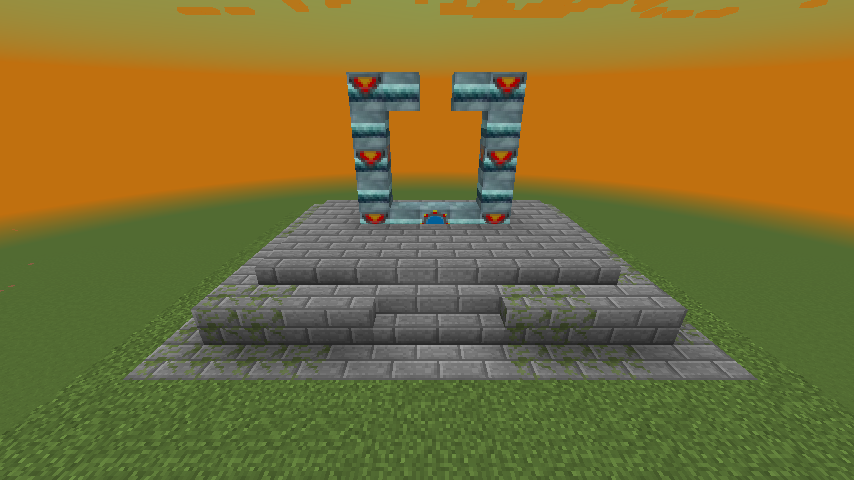
- The stargate must not be complete in the structure or all will have the same address and not work, so leave 1 block out when creating your structure - make this a ring or chevron block not the base block or it will also not work. - see images
Structures can be created with the following command:
- worldprimer create-structure <x1> <y1> <z1> <x2> <y2> <z2> schematic <structurenamehere>
this will create the a structure file in config\worldprimer\structures
Once you have created your structures for each dimension you will need to work out x,y,z offsets accordingly, I suggest using the place structure command to figure out the offsets needed to get the positions of
- the offset for sg base block.
- the offset for the missing chevron/ring block.
- the offset of where you want the controller to go.
- worldprimer place-structure <x> <y> <z> <structurename> <rotation> <mirror> <centered>
Structures used in examples:
World primer config:
We be using DimensionLoadingCommands, postWorldCreationCommands & TimedCommands to pre-gen the structures.
So set the following to true in the config file.
- enableDimensionLoadingCommands=true
- enablePostWorldCreationCommands=true
- enableTimedCommands=true
Create and save your dimensions.json to config\justenoughdimensions folder. You can use the example one below to test.
Example dimensions.json
Next is adding all commands needed to the worldprimer.cfg
-
Commands are run over a number of dimensions loads
-
IE, dim loads 1st time and 1st load cmds are run then unloads, dim gets reloaded then 2nd load cmds are run.
-
Copy the DimensionLoadingCommands, postWorldCreationCommands & TimedCommands from below example to your worldprimer.cfg
Example worldprimer.cfg
Run MC and create a new world
-
wait for all commands to complete, if using the example wait for "Loading Dims Third Time!" to display as this is last set of timed commands in worldprimer.cfg
-
check the SGGateAddress.json to confirm all gate entry's have been added ok.
Example of generated SGGateAddress.json
Explanation of commands used:
worldprimer place-structure {SPAWN_POINT_X} {SPAWN_POINT_Y}-1 {SPAWN_POINT_Z} stargate none none centered
- this command is used to place the structure at spawn-point
- I minus 1 on the y pos to set the structure at ground level
setblock {SPAWN_POINT_X} {SPAWN_POINT_Y}+5 {SPAWN_POINT_Z}-1 sgcraft:stargatering
- I am placing the structure centered with no rotation or mirror - in my structures case the centre pos is 1 block off on the z-axis from the sg base block and I've added 5 to the y as I minused 1 when placing the structure, this is now the pos of the missing chevron block in the structure, so this command adds the top chevron block to complete the gate.
blockdata {SPAWN_POINT_X} {SPAWN_POINT_Y}+1 {SPAWN_POINT_Z}-1 {hasChevronUpgrade:1b}
- so again we need the pos of the base block, 1 off from the placment pos on the z and 1 up on the y to get the sg base pos in this case and modify the nbt.
blockdata {SPAWN_POINT_X} {SPAWN_POINT_Y}+1 {SPAWN_POINT_Z}-1 {inventory:[{slot:0,id:"minecraft:stone_slab",Count:1b,Damage:5s},{slot:1,id:"minecraft:stone_slab",Count:1b,Damage:5s},{slot:2,id:"minecraft:stone_slab",Count:1b,Damage:5s},{slot:3,id:"minecraft:stone_slab",Count:1b,Damage:5s},{slot:4,id:"minecraft:stone_slab",Count:1b,Damage:5s}]}
- adding the chamoflage to sg base block.
setblock {SPAWN_POINT_X}-3 {SPAWN_POINT_Y} {SPAWN_POINT_Z}+5 sgcraft:stargatecontroller 3
- then adding the controller, you just need work out your x,y,z offsets and facing direction depending on your structure placment
Note:
- commands used & order may be slightly different depending on weather the dim is set to keep spwan loaded/keep dim loaded.
- Some dims may/will require the default/initial spawn-point to be changed so that the structure don’t spawn underground as I found with GC dims.
- it is just a bit of trial and error depending on the dim, so suggest just testing with each dim you want to pregen a gate in.
- you can check if a dims loaded status with below commands and check lagest.log
- jed list-loaded-dimensions
- jed list-registered-dimensions
Once all commands have completed I would check the SGGateAddress.json to confirm all Stargate entry's have been added.
SG Extras Team

Owner

![Thirsty Water [Forge] project image](https://media.forgecdn.net/avatars/thumbnails/397/589/256/256/637598797915212260.png)
![Potion Stacker [Forge] project image](https://media.forgecdn.net/avatars/thumbnails/388/454/256/256/637580519078104469.png)