ServerEcoMod
- By
A lightweight, pure server-side economy mod with fully customizable currencies and an intuitive in-game chest GUI.
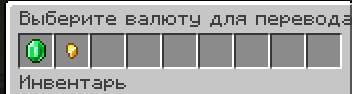
Currency selection menu
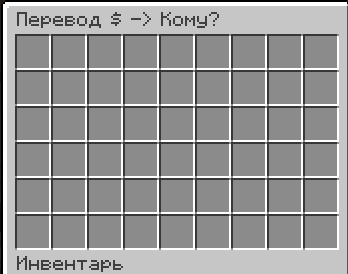
Money transfer menu
Description
ServerEcoMod — Pure Server-Side Economy
ServerEcoMod is a lightweight, Server-Side Only economy mod for Fabric 1.20.1. It is designed specifically for server administrators who want to introduce a flexible currency system and easy player-to-player transfers without forcing users to download any client-side mods!
Players using vanilla clients, Forge (via proxies), or even Bedrock Edition (via Geyser) can fully enjoy all the features of this mod.
✨ Features
- 🔌 100% Server-Side: Installed strictly on the server. No client-side downloads required.
- 📦 Intuitive GUI: Bank menus open seamlessly via vanilla chest inventories directly in-game.
- ⚙️ Easy Configuration: Add, remove, and customize any currency within seconds using a simple JSON file.
- 💬 Secure Chat Input: Enter the exact transaction amount via chat safely (the numbers you type are intercepted and hidden from the global chat).
- 💾 Reliable Data Saving: All player balances are bound to their UUIDs and automatically saved within the world files, preventing any data loss.
🎮 Commands
👤 For Players:
/bank— Opens the graphical menu to select a currency and choose an online player for the transfer./balance— Displays your current balance for all available currencies in the chat.
👑 For Administrators (Requires OP 2+):
/moneyadmin give <amount>— Grants the specified amount of the primary currency to your balance for testing or events.
⚙️ Configuration
Upon the first server startup, a configuration file will be automatically generated at config/server_economy.json. You can modify it to match your server's theme:
{
  "currencies": [
    {
      "id": "usd",
      "displayName": "Dollar",
      "symbol": "\$",
      "itemMaterial": "minecraft:emerald"
    },
    {
      "id": "coin",
      "displayName": "Coin",
      "symbol": "⛃",
      "itemMaterial": "minecraft:gold_nugget"
    }
  ]
}
id— Unique identifier for the currency in the system.displayName— The name displayed in chat and menus.symbol— The icon or currency sign.itemMaterial— The ID of the vanilla item used as the icon in the GUI.
🚀 Installation
- Download the latest version of the mod.
- Drop the
.jarfile into themodsfolder of your Fabric 1.20.1 server. - Ensure that Fabric API is installed on the server.
- Restart the server, adjust the config file, and you are good to go!
The ServerEcoMod Team