Sappy's Compass
A compass bar for the Minecraft HUD It scrolls smoothly with the direction you are facing and displays nearby points of interest framed with customizable UI borders.
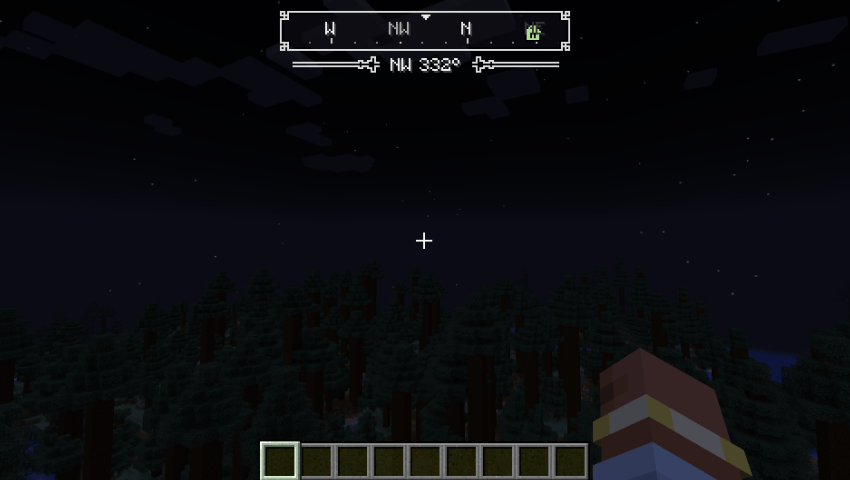
What It Shows
Each source can be toggled in the configuration. If an integration mod is not installed, its source simply remains inactive.
| Source | Information Displayed | Detection Method |
|---|---|---|
| Vanilla | World spawn (Overworld), last death location | Built-in game data |
| Xaero's Minimap | Waypoints (also shown on Xaero's World Map) | Xaero's in-world renderer collector |
| JourneyMap | Waypoints (including those added by other mods) | JourneyMap public client API |
| Waystones | Activated waystones | Waystones client events (via Balm) |
| Wastelander's Map | Waypoints and discovered structures (? until found) |
Direct class integration with custom map colors |
Marker Appearance
- Design: Plain, frameless icons with thin dark outlines for high visibility across all bar colors.
- Waypoints: Rendered as their initial in their assigned color.
- Icons: Distinct small icons for waystones, death locations, and world spawn.
- Direct Ahead: The marker directly ahead glows lighter and displays its name, distance, and an elevation arrow (indicating if it is significantly above or below your current level) underneath the compass bar.
Creature Tracking
Creatures display as small colored dots along the lower edge of the compass bar:
- Red: Hostile mobs
- Orange: Neutral mobs
- Green: Passive mobs
- Purple: Bosses
- Blue: Other players
- Teal: Tamed pets
Note: A dot representing an attacking creature grows larger with a bright core. Dots naturally fade with distance.
Radar Modes
Cycle through target display modes via a keybind (Cycle Creatures Shown, unbound by default under Controls):
| Mode | Target Mobs Displayed |
|---|---|
| Off | Disables all creature indicators |
| Attacking Mobs | Mobs currently in attack mode |
| Hostile Mobs (Default) | All hostile mobs and bosses |
| All Mobs | Every mob regardless of hostility |
| Mobs & Players | All mobs plus other players |
| Players Only | Only other players |
Radar Configuration Settings
- Range: Maximum distance for dots to register.
- Dot Cap: Limit the total number of simultaneous dots on the bar.
- Pet Visibility: Toggle display for your own pets.
- Filter List: Specify entity types to ignore (e.g., bats by default).
- Hide Behind Terrain: (Default: On) Prevents creatures behind solid blocks from displaying, maintaining fair gameplay and server compliance.
Customization & Visual Style
Choose from various frame and flourish styles:
| Style Option | Available Choices |
|---|---|
| Bar Frame | Ornate (Default), Studded, Plain, Double, Rail, Step, Octagon, Crest, Scroll, Bevel |
| Label Flourish | Pip (Default), Bracket, Post, Thin, Cross, Gem, None |
Live Preview & Color Picker
- Real-Time Preview: The configuration screen includes a top preview bar displaying simulated locations and moving targets to visualize changes instantly (even from the main menu).
- Color Wheel & Controls: Customize Frame, Background, and Text colors using a color wheel (Hue/Saturation/Brightness slider) or direct Hex codes. Includes live swatches, undo support, and default reset buttons. (Defaults: Very light grey)
Display & Compatibility
Display Modes
- When To Show: Always active, only when holding a compass (main or off-hand), carrying a compass anywhere in inventory, or never.
- Item Filter: Customizable list of qualifying items (
minecraft:compassandminecraft:recovery_compassby default). - Coordinates: Toggle coordinate readout and adjust font scale directly below the label.
- Marker Scaling: Scale marker icons and text size dynamically (the bar adjusts size to fit).
Mod Compatibility
- Boss Bars: The compass automatically shifts down to clear vanilla boss health bars.
- HUD Position: Adjust
Distance From ToporHorizontal Offsetin config to prevent overlaps with minimaps or HUD overlays. - Xaero's World Map: Fully compatible without extra configuration (draws from Xaero's Minimap data).
- GUI Toast Overlaps: Toast notifications (advancements/recipes) render top-right. Default bar width is optimized for GUI Scale 4 to prevent overlapping active markers.
Configuration File & Controls
Access settings via Mods > Sappy's Compass > Config or edit config/sappyscompass-client.toml. All changes apply immediately in-game.
Available Keybinds (Unbound by default under Controls):
Toggle CompassCycle Creatures ShownOpen Compass Settings
The Sappy's Compass Team

Owner