


Rift Gun
- By

Curse Maven Snippet
What's new
Rift Gun 0.2.0-rc.1 for Minecraft 1.21.1
Rift Gun 0.2.0-rc.1 is a feature release centered on direct portal pairing, more precise placement controls, cross-dimensional navigation, coordinate sharing, map-waypoint integration, and a broader public Addon API. It also adds shader-aware Endframe rendering for Complementary, replaces the old RyoamicLights integration with LambDynamicLights, and includes substantial GUI, rendering, and server-authority hardening.
This is a much larger update than 0.1.1-r1. Back up worlds before upgrading.
Highlights
- Added the Portal Pairing Module for placing and replacing both endpoints of a linked portal pair.
- Added the Remote Module with fixed-distance floating placement, preview, SMART fallback, scroll adjustment, and radial distance controls.
- Added the Precision Placement Module for choosing an exact surface face or floating portal orientation before opening.
- Added a Portal Gun mode radial: tap the default
Vbinding to cycle placement modes, or hold it to open the radial for direct selection. - Added the Dimensional Traversal Module with exact-coordinate and automatic safe-search workflows.
- Added coordinate sharing through chat and physical Coordinate Note items.
- Added read-only JourneyMap and Xaero's Minimap waypoint sections to the destination GUI.
- Added new public Addon API seams for portal opening, coordinate notes, dimension labels, portal-open policies, and transit authorization.
- Added shader-pack registration and a native central End-portal surface for Complementary Reimagined and Complementary Unbound Endframe visuals.
- Migrated optional dynamic lighting from RyoamicLights to LambDynamicLights v4.
- Added Create Mechanical Mixer recipes for all three Rift Gun portal fluids.
- Allowed repeatable modules to stack inside the gun's module bay.
- Reworked shared GUI and placement-preview state to keep the 1.21.1 and 26.1.2 implementations behaviorally aligned.
Portal Pairing
The new Portal Pairing Module adds a second Portal Gun function for placing both ends of a normal linked pair directly.
- Right-click places or replaces endpoint B.
- Sneak-right-click places or replaces endpoint A.
- Either endpoint may be placed first.
- The selected function is stored on each Portal Gun.
- A dedicated function switch is available from the mode radial; its keybind is unbound by default.
- The endpoint-operation key is also unbound by default and follows the configured shortcut gun-lookup policy.
- Completing a pair consumes one ordinary pair charge. Replacing a connected endpoint rebuilds the pair, consumes one charge, and resets the shared duration.
- A single pending A/B endpoint does not use Portal Duration. It remains on the owning gun until it is replaced, connected, or explicitly cleared.
- Pairing reuses ordinary portal fuel, aperture, privacy, crisis, transit, chunk-readiness, sound, and visual rules.
- Pairing and Coordinate Travel share the owner's one-normal-pair lifecycle: successfully opening one replaces the other.
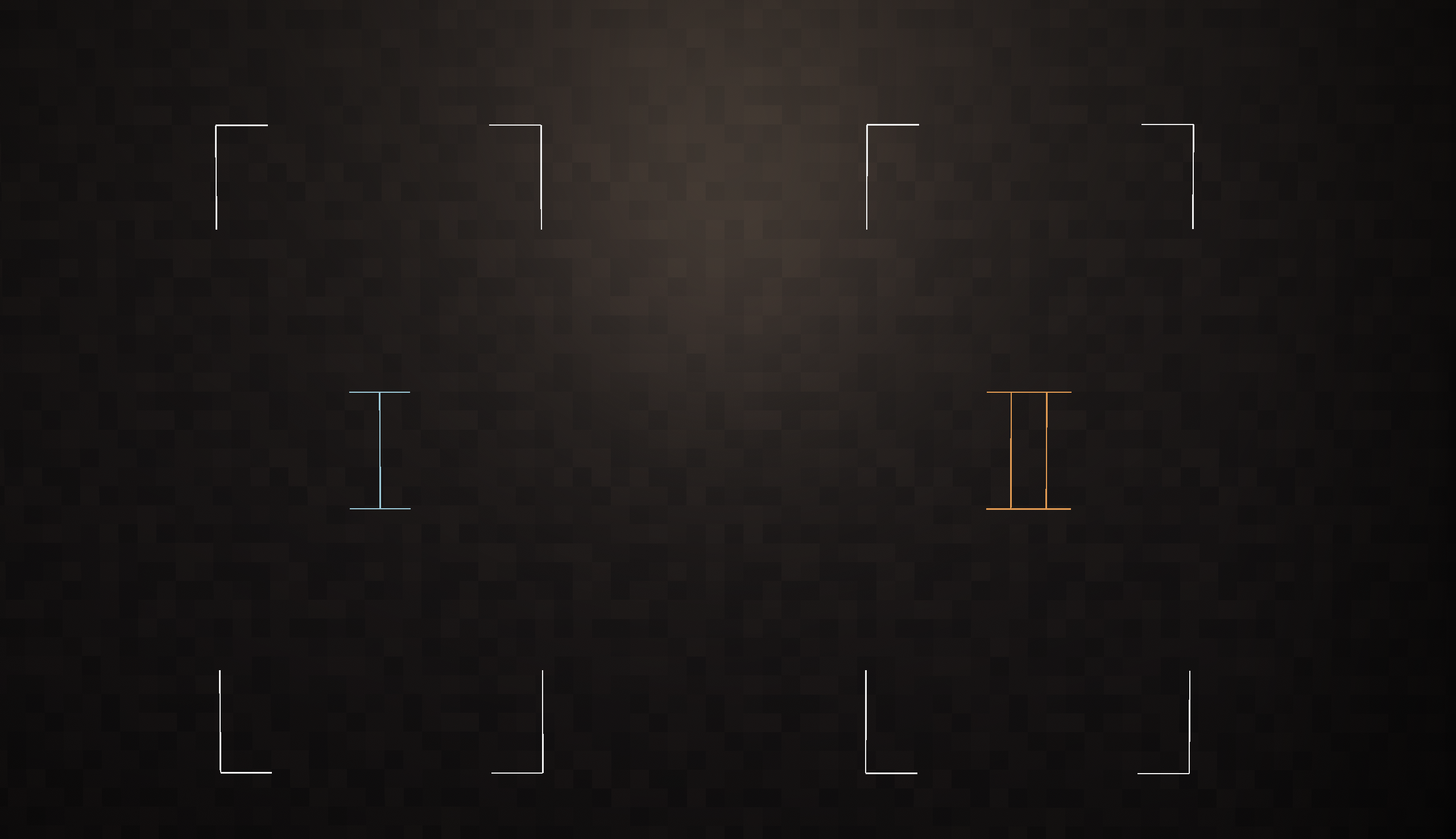
Pending endpoint previews use a white frame with a blue Roman numeral I for
endpoint A and an orange II for endpoint B. Entity Relocation pairing targets
use only the centered numeral. These markers are opaque, world-oriented
client-rendered wireframes that preserve the original portal orientation and
respect world depth, so blocks occlude them. They are batched without marker
entities or per-marker buffer flushes and do not emit dynamic light.
Remote and Precision Placement
Remote Module
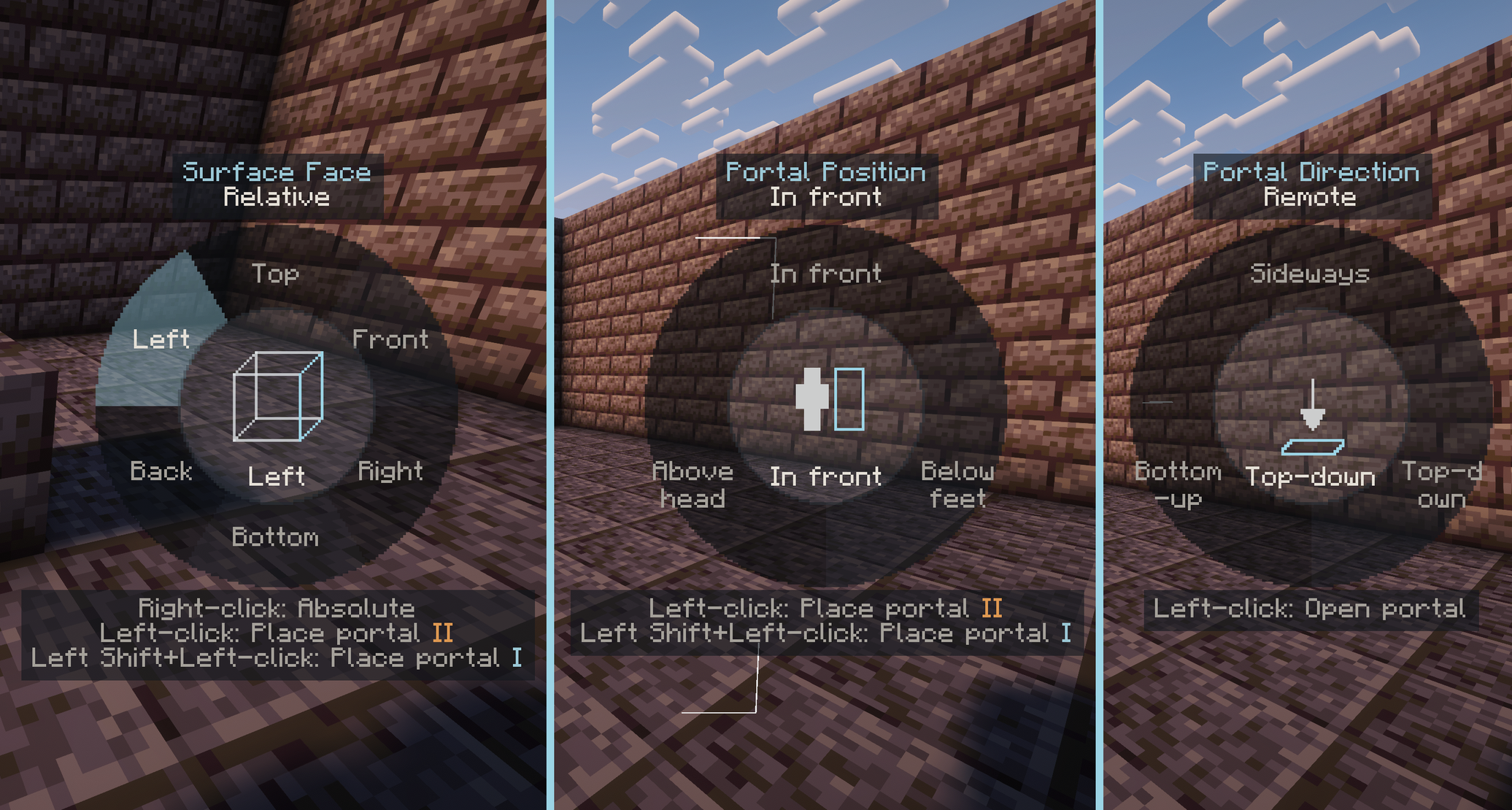
The new Remote Module unlocks REMOTE, a floating placement mode projected
along the player's view ray.
- Remote placement uses a configurable per-gun distance, limited by the gun's maximum range.
- If the preferred point is obstructed, Rift Gun searches back toward the player for a valid placement instead of modifying blocks.
- Looking steeply down or up produces horizontal top or bottom portals; otherwise the portal faces the player vertically.
- Remote Distance can be adjusted from the gun settings, by a configurable modifier plus mouse wheel, or by the radial slider when those controls are enabled.
- The placement preview can be enabled or disabled per gun.
SMARTcan use eitherFRONTorREMOTEas its floating fallback, with independent saved choices for Coordinate Travel and Portal Pairing.REMOTEbelongs to the independent Remote Module. Portal Pairing alone does not unlock it; Pairing SMART uses its savedREMOTEfallback only while both modules are installed, otherwise resolving toFRONTwithout erasing it.
Precision Placement Module
The new Precision Placement Module opens a dedicated precision radial.
- Surface placement can target one exact valid face.
- Floating placement can select an exact vertical, top, or bottom orientation.
- Hovered precision choices are previewed before the request is committed.
- The server recomputes and validates every final placement; the client preview is never treated as authority.
- Cancelling the radial leaves the world and the current portal pair unchanged.
Dimensional Navigation
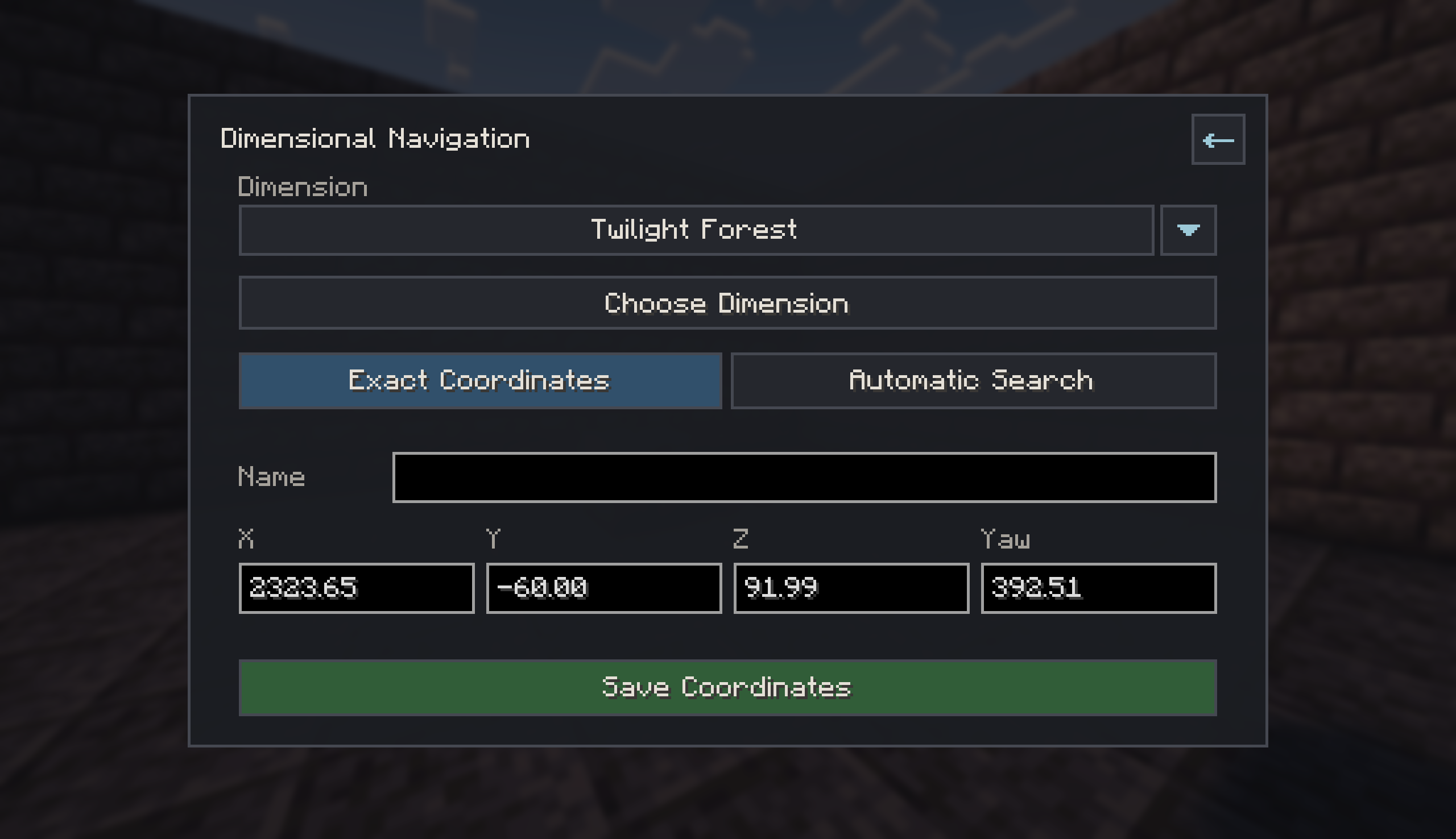
The new Dimensional Traversal Module adds a Dimensional Navigation entry to the Portal Gun GUI. The entire feature can be disabled by the server.
Two workflows are available:
- Exact Coordinates saves a destination in a selected server dimension.
Initial X/Z values account for source and target coordinate scales. Blank or
~fields retain the corresponding mapped/current value. - Automatic Search searches for a temporary safe destination in the selected dimension and opens an in-front portal when preparation succeeds. It reuses the existing bounded random-rift search, cooldown, world-border, chunk-readiness, and fuel rules.
The selected target dimension and mode are stored per gun. Removed or invalid dimensions fall back safely instead of generating arbitrary worlds or chunks. All dimensional requests are authorized and resolved on the server.
Coordinate entry now accepts large finite values and clamps them when the server commits the destination:
- X/Z are clamped to Minecraft's horizontal world bounds.
- Y is clamped to the selected dimension's build height.
NaN, infinity, malformed values, and unknown dimensions remain invalid.
Coordinate Sharing and Map Waypoints
Saved coordinates can now be shared without granting edit access to the original destination.
- Send a temporary coordinate action to chat.
- Create a physical Coordinate Note item by consuming Paper.
- Import a shared coordinate into the receiver's own destination data.
- Shared entries retain dimension, coordinates, yaw, source, and display name.
- Expiration and cooldown checks are enforced by the server.
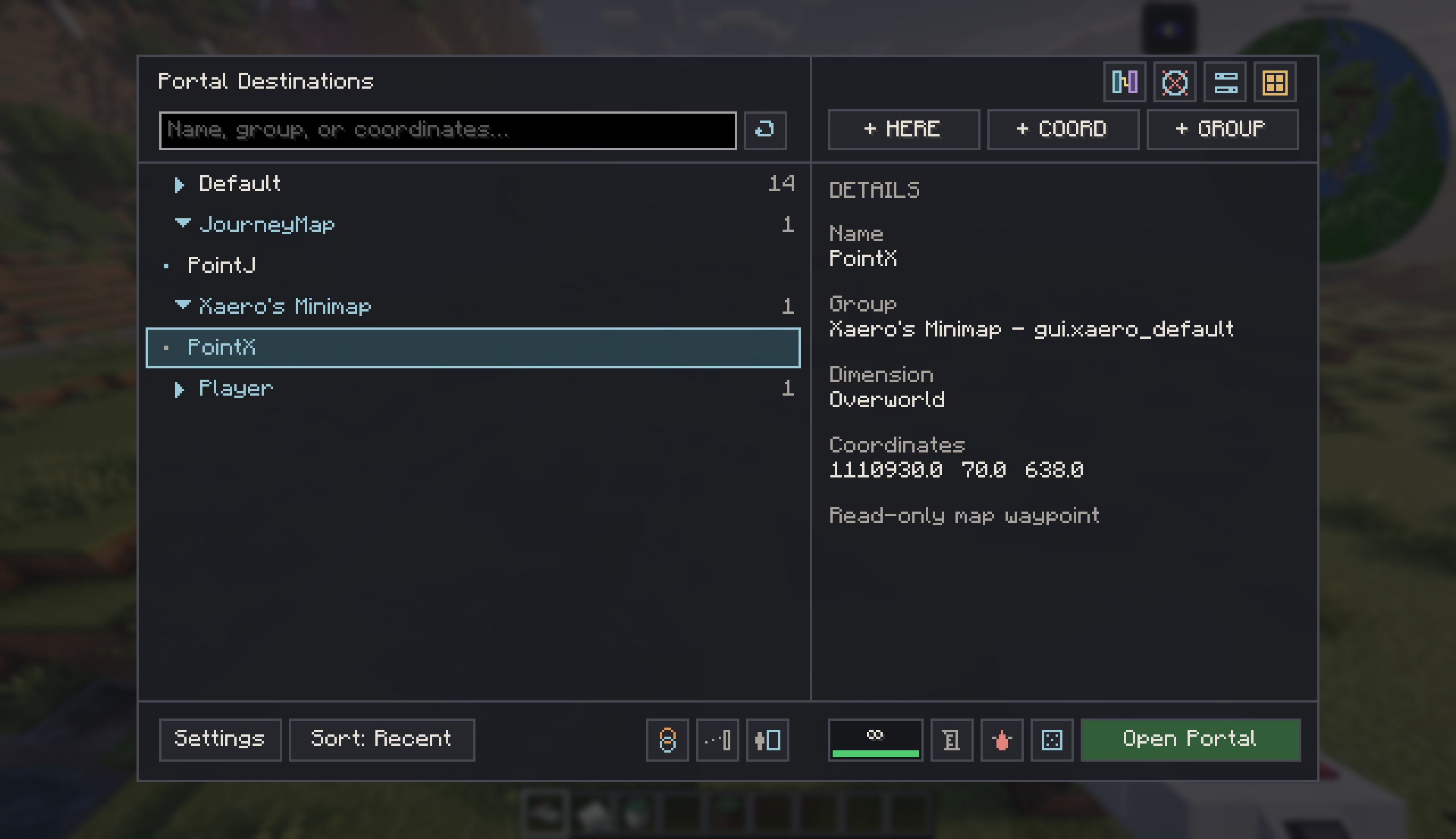
JourneyMap and Xaero's Minimap can appear as read-only virtual sections in the destination list when their client mods are installed.
- Opening the GUI or pressing refresh rebuilds the client snapshot.
- Selecting a map waypoint does not modify the waypoint in its source mod.
- The selected external target is session-only and is cleared when the player disconnects or changes servers.
- Before opening, the server validates the source, text lengths, finite coordinates, known dimension, server feature switch, gun, modules, fuel, and final placement.
- Both map sources may be installed together and remain in separate sections.
Module Bay and Recipes
- Reservoir Expansion, Surface Range Amplifier, Module Bay Expansion, and Duration modules can now stack in one compatible module-bay slot.
- Counts, capacity, surface range, duration limits, slot unlocking, removal safety, and saved gun state now respect the full stack count.
- Moving modules between inventory and gun prefers growing a compatible stack before occupying another slot.
- Module recipes were rebalanced and synchronized between both Minecraft nodes.
- Recipe and module tags were refreshed for recipe-book, JEI, and modpack discovery.
Minecraft 1.21.1 additionally supports optional Create 6.0.7+ Mechanical
Mixer recipes for Portal Fluid, Unstable Portal Fluid, and Dimensional Portal
Fluid. They are enabled by default when Create is installed and can be disabled
with config/riftgun-common.toml under
integrations.createMixingRecipes. Changing this option requires a game
restart.
GUI and Input Improvements
- The default Placement Mode binding (
V) now supports tap/hold input. Tap it to cycle placement modes; hold it for about 0.3 seconds to open the Portal Gun radial, then release to confirm the current selection. - The radial provides direct access to placement and prediction choices, Coordinate Travel and Portal Pairing functions, and the Remote distance control when those capabilities are available.
- A separate Open Portal Gun Radial binding is available for players who do not want to use the shared tap/hold key; it is unbound by default.
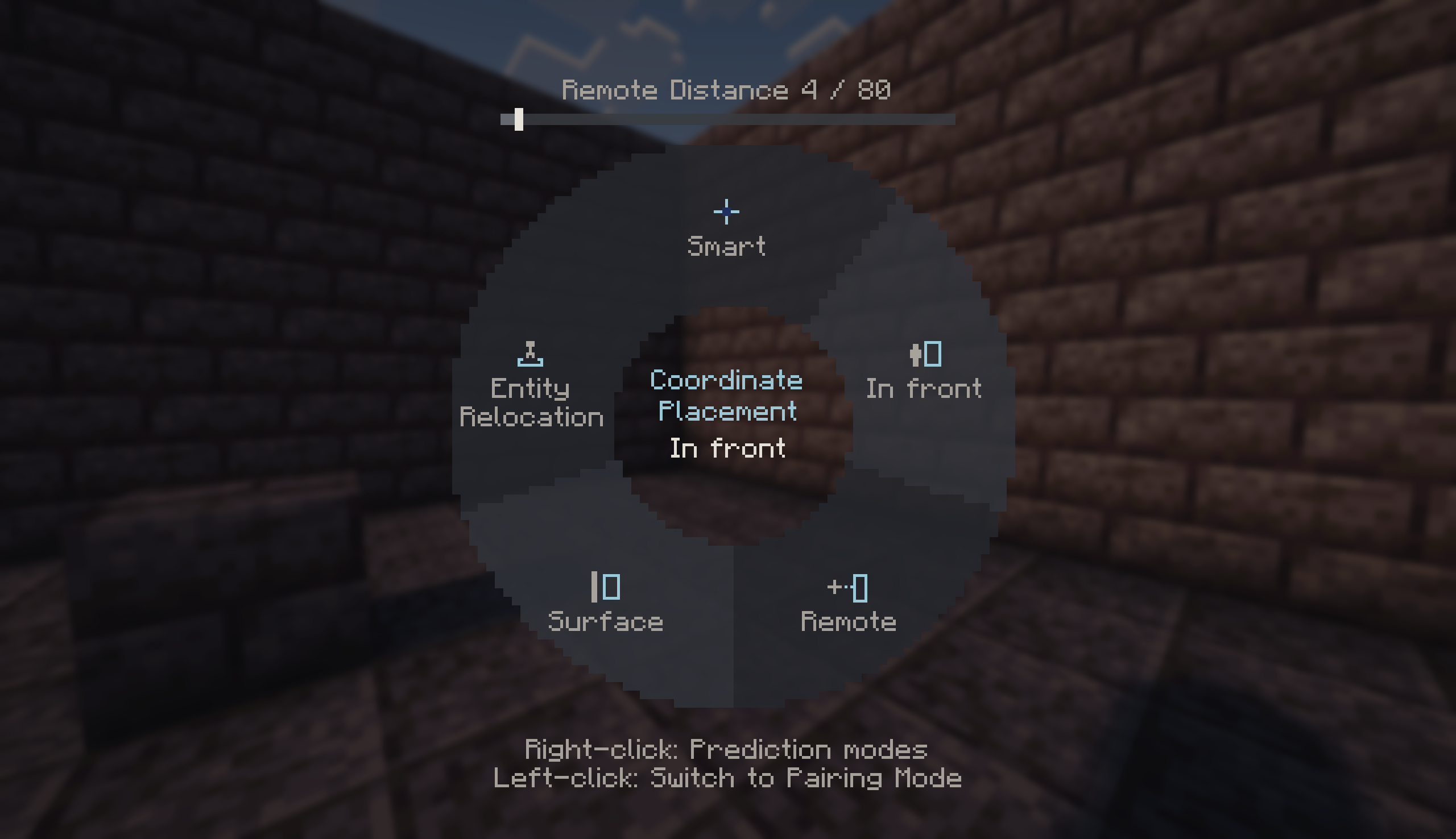
- Reworked destination, group, player, map, gun-settings, and modal state so the two supported Minecraft nodes share one behavior model.
- Retained list scroll and local GUI state more consistently across snapshots.
- Added dedicated pages for Remote, Pairing, Dimensional Navigation, and other per-gun settings.
- Improved bilingual labels, tooltips, marquee text, shortcut descriptions, and empty/error states.
- Sneak-related help now follows the player's configured Sneak key instead of assuming the default key.
- Refreshed item and GUI artwork and normalized 16×16 button-icon alignment.
- The former “close portal” GUI action now describes its actual behavior as Clear Portals.
Rendering and Shader Compatibility
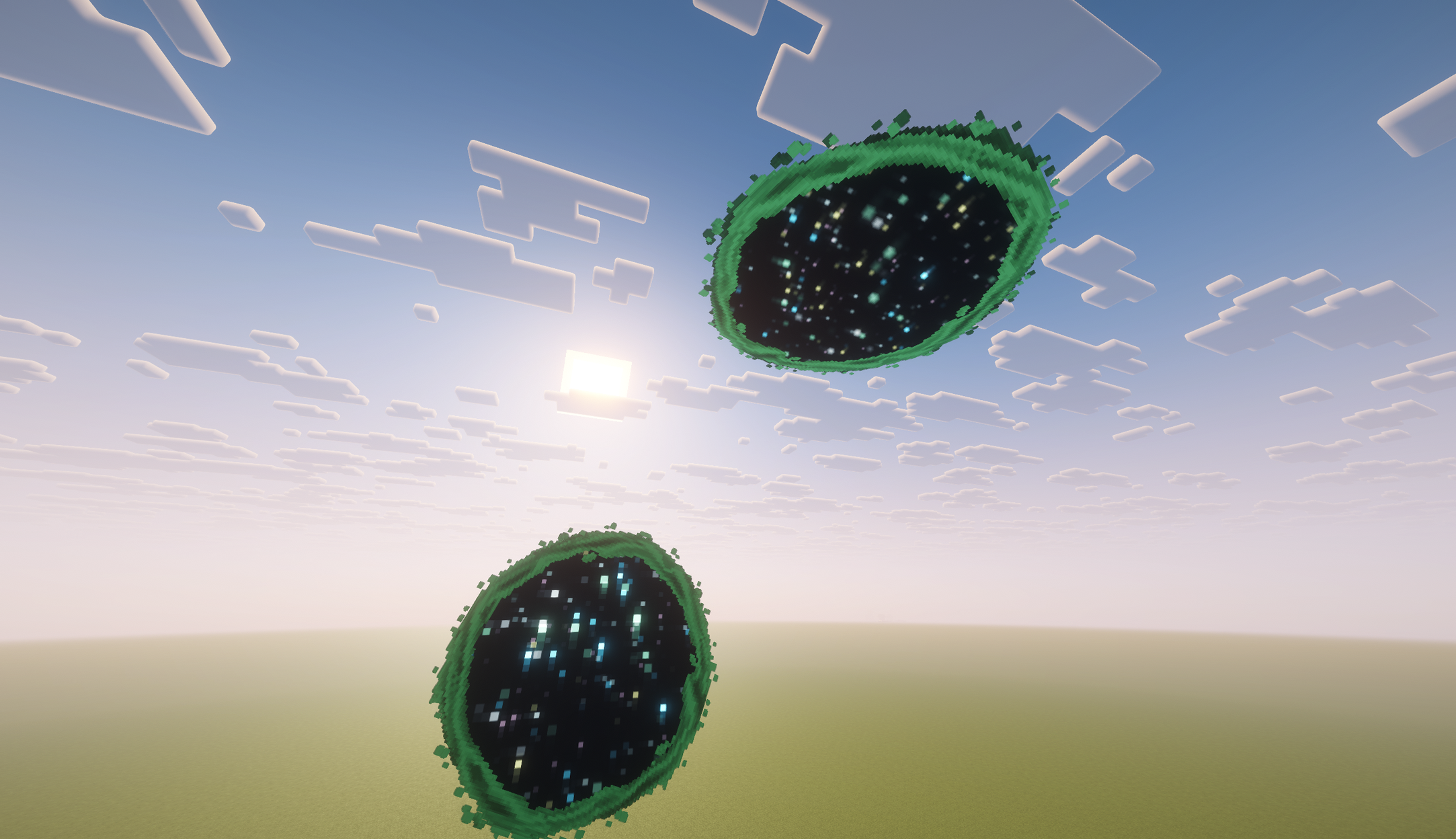
Rift Gun now has a small shader-pack profile registry. Registered shader packs can select a specialized visual path while unregistered packs keep the conservative default fallback.
For Complementary Reimagined r5.x and Complementary Unbound r5.x:
- Endframe portals render a native central End-portal surface.
- The outer animated ring correctly occludes the central surface.
- Shadow passes skip the inappropriate portal surface.
Other shader packs continue to use the default Endframe shape with an empty center. This avoids applying a Complementary-specific material path to unknown pipelines.
The 1.21.1 pairing preview renderer was also corrected so I/II markers remain stable while the player moves, do not flicker against shared buffers, do not periodically jump back to an earlier position, and preserve precision far from the world origin.
Portal Gun item rendering on 1.21.1 now switches to a shader-safe layered path while a shader pack is active:
- The gun body renders separately from the translucent zero-point module core, liquid, and glass.
- Core, liquid, and glass use a stable fixed order, preventing the gun body from disappearing through the glass housing and avoiding transparency flicker as the player or camera moves.
- Without shaders, the Portal Gun keeps its original single-pass translucent appearance.
- Both paths use baked model caches; shader detection is sampled once per frame rather than queried separately for every rendered gun.
Dynamic Lighting
Rift Gun now uses the official LambDynamicLights v4 API for optional portal lighting.
- Minimum supported 1.21.1 version:
4.8.10. - LambDynamicLights remains optional and client-only.
- Without it, portals render and function normally but do not illuminate nearby blocks.
- The provider reuses Rift Gun's existing portal lifecycle brightness, including opening and closing transitions.
- Preview markers, coordinate markers, and pending I/II markers never register as dynamic-light sources.
- LambDynamicLights is a compile-only integration and is not bundled inside the Rift Gun JAR.
RyoamicLights is no longer used by Rift Gun. If it was installed only to provide Rift Gun portal lighting, replace it with LambDynamicLights.
Public Addon API 1.2.0
The public Addon API is included in the normal Rift Gun mod JAR; no separate API download is required.
The API exposes typed IDs and results for:
- requesting Rift Gun portal opens;
- creating Coordinate Notes from external coordinates;
- registering server-side dimension display labels;
- registering source-side portal-open policies;
- attaching explicit transit authorization to Addon-initiated opens.
The API version is independent from the mod version and is currently 1.2.0.
Rift Gun remains pre-1.0 software; source and binary API stability is not
guaranteed until the mod reaches 1.0.0. Addons should check
RiftGunApi.VERSION and compile against the matching Rift Gun mod JAR rather
than copying Rift Gun implementation classes.
The mod JAR includes the complete Rift Gun API runtime bridge required by
RiftGunTransitContext; artifact-level tests verify the bridge and license
entries for both supported Minecraft builds.
Third-party callbacks are isolated by provider ID. A failing dimension-label provider is skipped so later providers or the built-in label can answer; a failing portal-open policy denies the request. Each failing provider warns only once per process. The unused destination-provider draft types are not published.
Stability and Performance
- Consolidated Portal Gun view state into one explicit wire codec.
- Hardened gun lookup, request authorization, missing-gun feedback, portal lifecycle cleanup, cross-version NBT defaults, and invalid dimension handling.
- Bounded placement-preview work and moved shared preview tick/cache logic out of version-specific render adapters.
- Kept I/II marker rendering in a shared batch without per-marker buffer flushes or marker entities.
- Preserved double-precision camera-relative subtraction before converting preview vertices to float.
- Removed shader-development log noise; remaining compatibility warnings are failure-gated rather than emitted every frame.
- Added and expanded tests for GUI state seams, placement previews, pairing, coordinate bounds, external requests, module stacking, and view-state codecs.
Configuration Changes
NeoForge may create the following files:
config/riftgun-client.toml: client-local visuals, sounds, preview choices, and optional dynamic-light brightness.config/riftgun-common.toml: 1.21.1 Create recipe integration. The current option requires a game restart.<world>/serverconfig/riftgun-server.toml: server-authoritative gameplay, module, fuel, dimensional traversal, map-waypoint integration, privacy, placement, readiness, and diagnostics settings.
New server options use safe defaults when loading an older configuration. Administrators should nevertheless compare the regenerated file with their existing policy before reopening a public server.
Requirements
| Component | Requirement | Side | Required |
|---|---|---|---|
| Minecraft | 1.21.1 |
Client and server | Yes |
| NeoForge | 21.1.140+ |
Client and server | Yes |
| Java | 21 |
Client and server | Yes |
| Rift Gun | Exact same 0.2.0-rc.1 build |
Client and server | Yes |
| LambDynamicLights | 4.8.10+, below 5.0 |
Client | No |
| JEI | 19.21.1.248+ |
Client | No |
| JourneyMap | 1.21.1-6.0.0-beta.1+ |
Client | No |
| Xaero's Minimap | 26.4.2 compatible range |
Client | No |
| Immersive Portals | 6.0.7+ |
Client and server | No |
| Create | 6.0.7+ |
Client and server | No |
Rift Gun has no required runtime dependency besides NeoForge. Optional dependencies are not bundled in the release JAR.
Upgrading from 0.1.1-r1
- Back up the world, player data, and configuration files.
- Stop the server and all clients.
- Remove the old Rift Gun JAR before copying the new artifact; do not keep two
Rift Gun versions in
mods. - Install the exact same Rift Gun version on the server and every client.
- If Rift Gun portal lighting was provided by RyoamicLights, install
LambDynamicLights
4.8.10+instead. - Start once to generate new configuration fields, stop again, then review the server and common config before opening the server to players.
- Verify existing destinations, privacy settings, Portal Guns, installed modules, fluid contents, and selected visual/sound themes.
Existing destinations and older Portal Gun data are read with backward-safe defaults for newly added settings. The network snapshot format changed in this release, so mixed 0.1.1-r1/0.2.0-rc.1 multiplayer installations are unsupported.
Known Limitations
- Unregistered shader packs use a conservative fallback and may display portal brightness or transparency differently.
- The specialized Complementary central surface is registered for verified r5.x pack names; renamed or other major pack versions may use the empty-center fallback.
- Xaero's Minimap integration targets a verified implementation range rather than a stable independent waypoint API. An incompatible Xaero version hides the section instead of modifying its files.
- Portal placement remains non-destructive. Cramped or obstructed destinations may fail instead of moving or breaking blocks.
- Cross-dimensional exits may be deferred until the destination becomes ready.
- Public Addon API stability is not guaranteed before Rift Gun 1.0.0.
This mod has no additional files