ReverseConnect
- By
Preface
I had a sudden inspiration while playing a large modpack with friends, and designed this mod.
This is a mod that allows the host to connect to the guests for the purpose of playing together online.
Yes, you heard that right! The host doesn't need to set up intranet penetration — let the guest do it! Then the host uses this mod to connect to the guest, and the guest can enter the host's world!
Note: This is meant for client/modpack multiplayer, do NOT use it on a dedicated server!!!
It is recommended to use this mod together with mods like [LSP] Lan Server Properties that adjust multiplayer parameters. This mod does not have features like toggling online mode.
For version 1.16.x, non-premium players will need [MOF] Offline Multiplayer Fix to enable multiplayer.
1.12.x requires the following prerequisite: MixinBooter
What's the use?
For two-player multiplayer:
You don't want to be the host and open a map, but you do have a public IP / intranet penetration. In this case, you can let your friend be the host and open the map, use this mod to connect to your client, and then you can join your friend's world! Plus, your friend (the host) doesn't need any public IP or intranet penetration.
For multiplayer with more than two players:
In large modpacks (e.g., tech modpacks,ic2 ...), machines updating generate a lot of data, and bandwidth consumption increases with each additional player. Therefore, the host needs intranet penetration with higher bandwidth to ensure smooth gameplay for guests.
This mod allows each guest to set up their own intranet penetration for multiplayer, thus reducing the host's reliance on intranet penetration and lowering the bandwidth requirement for a single intranet penetration. Whoever connects consumes their own public bandwidth:)
Configuration File
None. (Configuration is handled with JSON, no line breaks or indentation ><, saved under config. Normally there's no need to manually edit the config file, as an in-game page is provided for adjustments.)
How to Use
Step 1
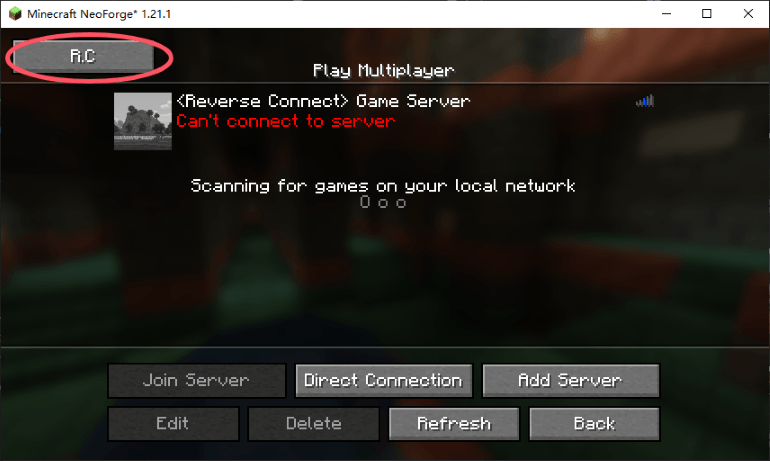
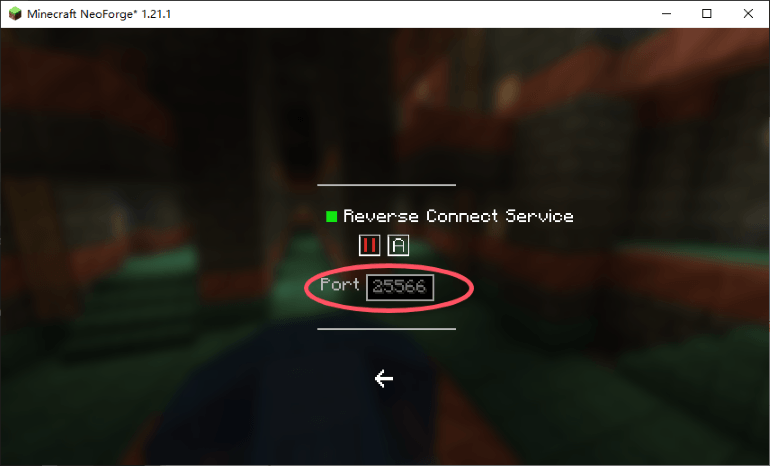
The guest starts the game and enters the Multiplayer screen. A "R.C" button will appear in the top-left corner. Click it to open the configuration page. (the reverse connection service is set to auto-start by default; you can also change it to manual mode. If set to manual, you'll need to start it manually next time, otherwise the host won't be able to connect).
The port number (default: 25566) is the port that needs to be forwarded via intranet penetration. Set up your intranet penetration to forward this port and wait for the host to connect.
Step 2
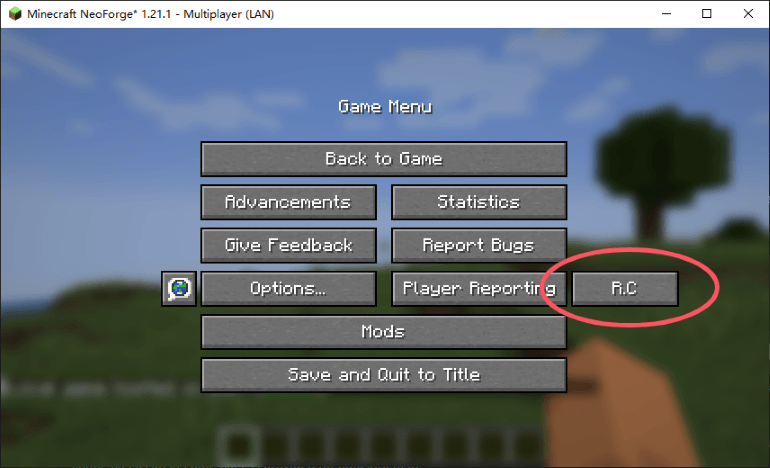
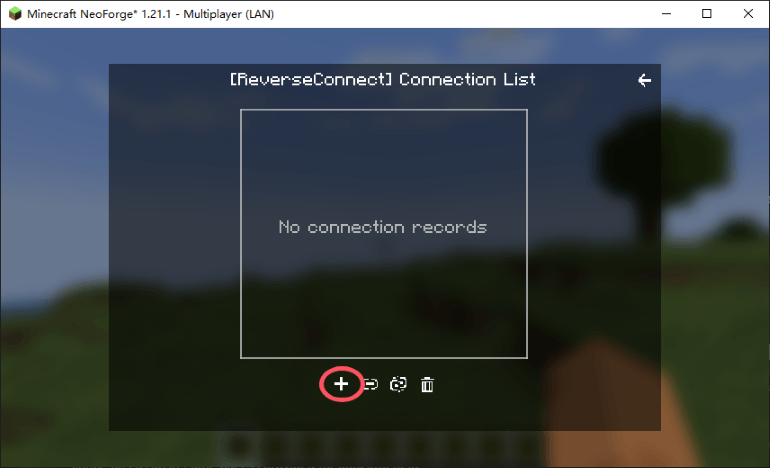
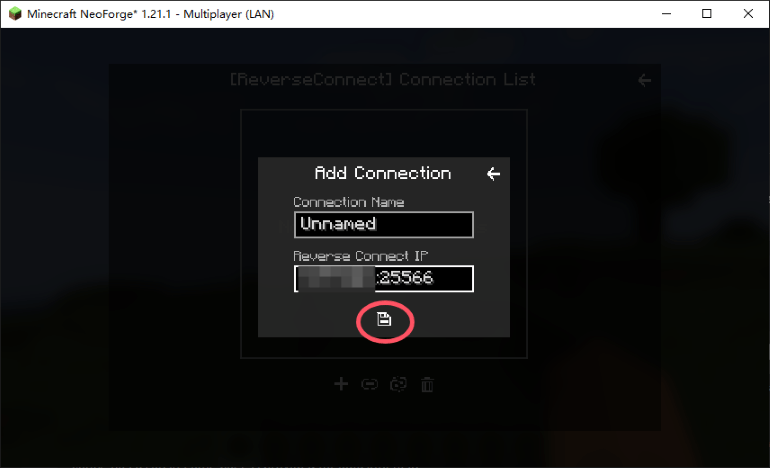
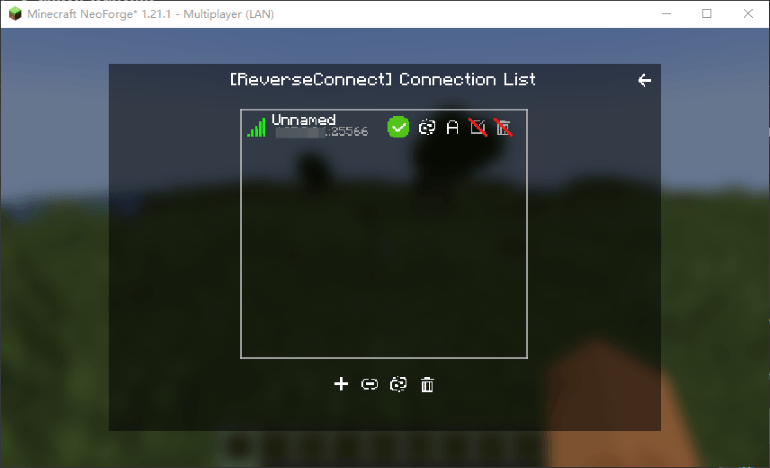
The host enters their world and opens it to LAN. Then, when you open the ESC menu, you'll see an additional "R.C" button. Click it to open the Reverse Connection page. Click the "+" at the bottom left to add a new connection, enter the guest's IP (intranet penetration IP / public IP), save it, and the mod will automatically connect to the guest.
Step 3
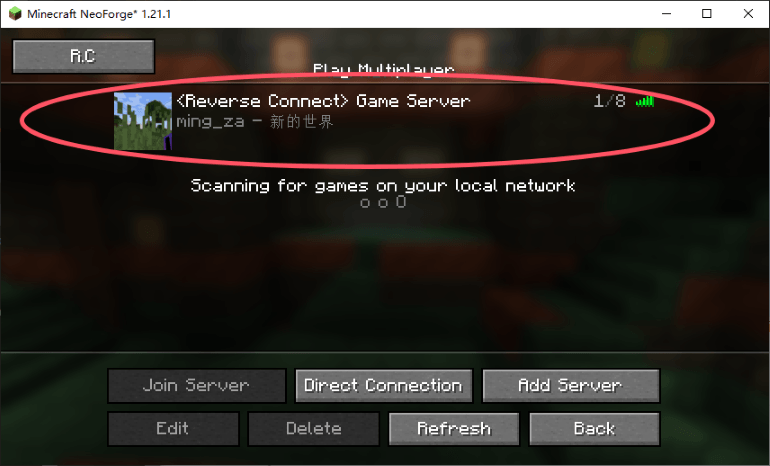
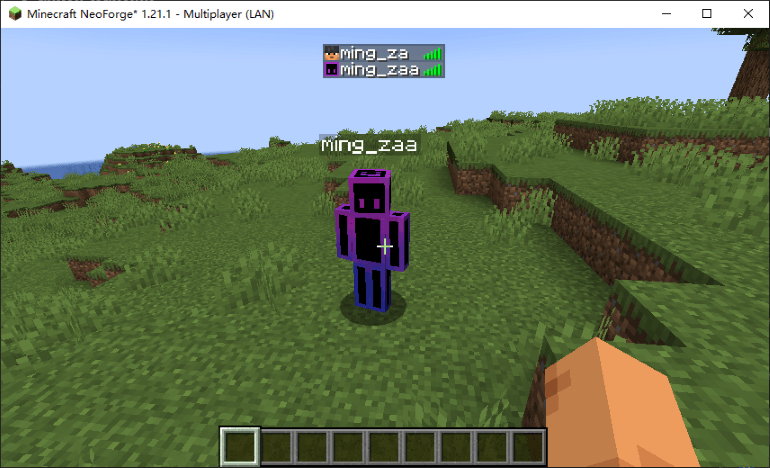
After the host successfully connects, the guest can click "Refresh" on the Multiplayer screen to see the reverse connection's built-in server, which should now appear as joinable! This server cannot be deleted, but its port can be modified. Changing the port will break the connection, so please don't change it unless necessary:) .
Q&A
Can the host also set up intranet penetration at the same time?
Of course! The host can also set up intranet penetration to allow some players to join the world through the host's penetration; it does not conflict with this mod.
What's the difference between the host and the guest using intranet penetration?
For two-player multiplayer, there's no difference in bandwidth.
For multiplayer (three or more players), each player can help share the host's public bandwidth.
To my knowledge, a single player only receives their own data, and this amount of data does not increase significantly with more players (though a tiny increase is still there).
As long as the guest's intranet penetration is sufficient to transmit their own data, gameplay will be smooth! (I'm not sure if there are any other special cases).
Precautions
When using this mod for multiplayer, it is recommended not to exceed ten players.
The technology used by this mod is similar to P2P; each guest will occupy two ports on the host's system.
Even when using this mod, it still consumes the host's upload bandwidth, just like direct connection. It only shifts the consumption from public bandwidth to home bandwidth. Generally, household upload bandwidth is around 30-50 Mbps; if it gets maxed out, lag will occur.
Remarks
Regarding other versions
Feel free to request updates! Currently, I've only released versions that I think are relatively popular.
If you think this mod is pretty good, please leave a comment to show your support! I will work on making it compatible with all versions and all mod loaders!
ReverseConnect Team