Resource Nodes
- By
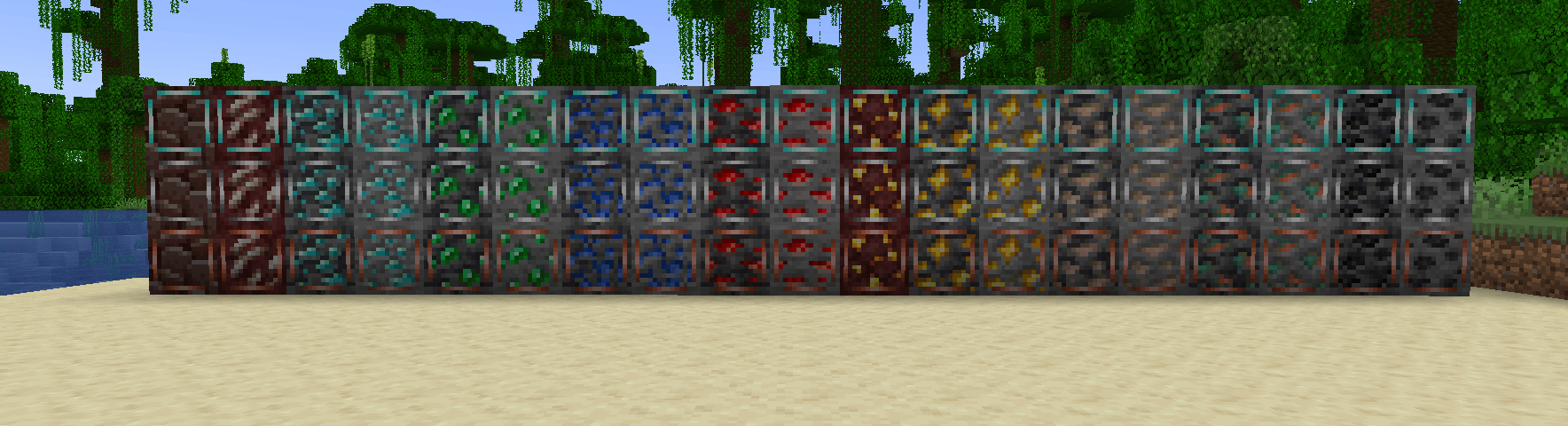
Resource Nodes adds renewable versions of every vanilla ore to Minecraft.
2025-11-28_12.09.27.png
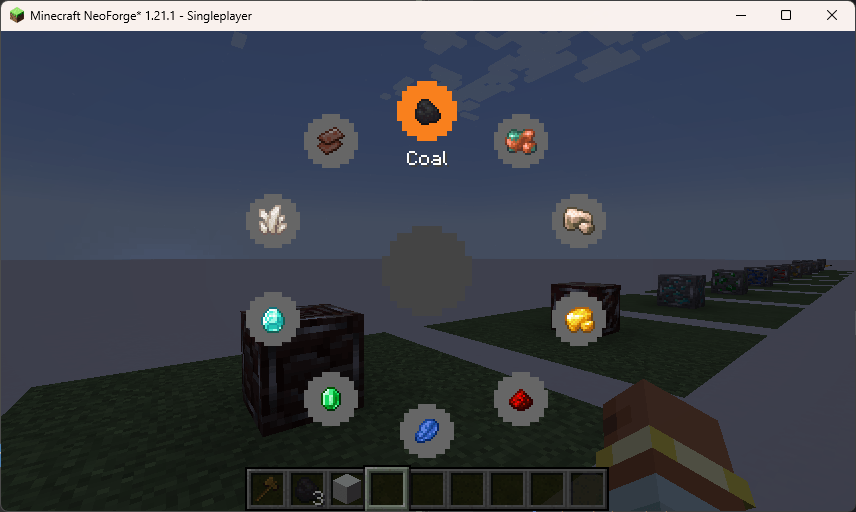
image.png
Description
JD Resource Nodes





JD Resource Nodes adds renewable versions of every vanilla ore to Minecraft. Instead of disappearing when mined, these nodes deplete into their base block (Stone, Deepslate, or Netherrack) and regenerate over time, making them perfect for static mining setups and automation.

Build your base around a resource node, connect it to automation, or use the included scanner to track down valuable resources.
Features
- Renewable Resources — Mine a node for its normal resource drops, then wait for it to regenerate.
- Natural Generation — Resource Nodes can naturally replace vanilla ores in newly generated chunks.
- All Vanilla Ores — Supports Coal, Iron, Copper, Gold, Redstone, Lapis Lazuli, Emerald, Diamond, Nether Quartz, and Ancient Debris.
- Overworld & Nether — Nodes work with both regular and deepslate ores, as well as Nether resources.
- Three Purities — Impure, Normal, and Pure nodes provide different amounts of resources.
- Automation Friendly — Nodes are designed to work with automated mining systems and mods such as Create.
- Resource Scanner — Find specific resource nodes through walls using the built-in scanner.
- Configurable Generation — Control how often nodes generate and how common each purity is.
- Silk Touch Support — Pick up nodes with Silk Touch and relocate them to wherever you need them.
- Map & Modpack Friendly — Natural generation, scanner progression, and node behaviour can all be configured.
How Resource Nodes Work
Resource Nodes replace a small number of vanilla ore blocks when new chunks are generated.
By default, approximately 1 in every 1,000 ores is replaced by a Resource Node. This can be changed in the configuration.
When mined, a node:
- Drops its resource.
- Temporarily becomes its underlying block, such as Stone, Deepslate, or Netherrack.
- Regenerates back into the ore after the configured regeneration time.
The node itself is never consumed by normal mining, making it a renewable resource source.
Purity
Each Resource Node has one of three purities:
- Impure — 1 resource per regeneration
- Normal — 2 resources per regeneration
- Pure — 4 resources per regeneration
The default generation weights are 60% Impure, 30% Normal, and 10% Pure.
Permanent Infrastructure
Resource Nodes are designed to become part of your world rather than disposable blocks.
- Pistons cannot move them.
- Explosions cannot destroy them.
- Normal mining does not permanently remove them.
- Silk Touch can pick them up and relocate them.
- Sneaking while mining a node permanently removes it, allowing unwanted naturally generated nodes to be cleared.
- Nodes can also be removed normally in Creative Mode.
Resource Scanner
The built-in scanner lets you locate specific Resource Nodes through walls.
Hold V to open the scanner's radial menu, select a resource, and release to scan.
The scanner is locked by default and can be progressively unlocked through commands. This allows modpack and map makers to gate access to specific resources behind quests, achievements, progression, or other systems.
Scanner Commands
Requires OP:
/scanner unlock <resource>
Unlock scanning for a specific resource.
/scanner unlock all
Unlock all registered resources.
/scanner lock <resource>
Lock a specific resource again.
/scanner lock all
Reset the scanner and lock all resources.
Automation
Resource Nodes are designed with automation in mind.
When a node is mined, it enters a regeneration state that cannot be mined normally. Automated mining machines can therefore detect that the resource has been depleted and resume automatically once the node regenerates.
This makes Resource Nodes useful for:
- Automated quarries
- Create mining systems
- Long-term resource farms
- Multiplayer server infrastructure
- Custom mining areas
Configuration
Resource Nodes provides an in-game configuration screen as well as configuration through:
config/jd_resource_nodes.json
Available settings include:
- Regeneration time — Default: 600 ticks (30 seconds)
- Silk Touch pickup — Allow nodes to be picked up and relocated
- Natural generation — Enable or disable automatic node generation
- Generation chance — Control how frequently vanilla ores are replaced
- Purity weights — Control the relative frequency of Impure, Normal, and Pure nodes
Natural ore replacement only affects newly generated chunks.
For Map & Modpack Makers
Resource Nodes can be used to create custom resource infrastructure without requiring players to repeatedly search for new ore deposits.
Use the configuration options and scanner progression to control:
- Where renewable resources appear
- How frequently they generate
- How quickly they regenerate
- How much each node produces
- Which resources players can locate
- When scanner abilities become available
This makes Resource Nodes suitable for both normal survival worlds and heavily customized modpacks or adventure maps.
Installation
- Install NeoForge for Minecraft 1.21.1.
- Download the latest JD Resource Nodes release.
- Place the
.jarfile into yourmodsfolder. - Start Minecraft.
Minecraft: 1.21.1
Loader: NeoForge
Environment: Client & Server
Created by jammingdino
Resource Nodes Team

Owner