
Icy's Horse Breeds
Multiple new models, textures, and armors for your horses to spice up your world!
- 504
- September 15, 2026



Icy's Horse Breeds
Multiple new models, textures, and armors for your horses to spice up your world!
- 504
- September 15, 2026


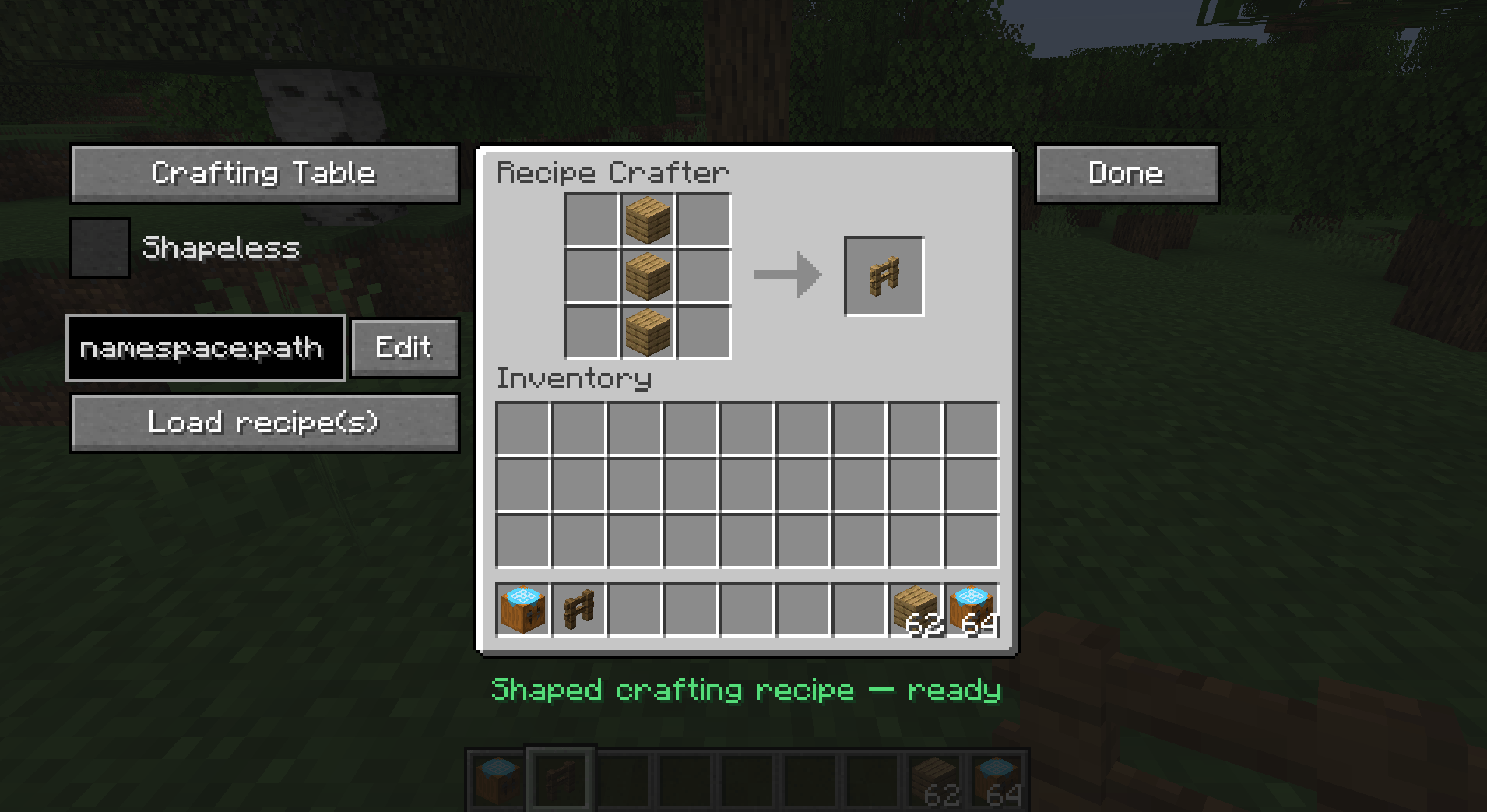
Screenshot 2026-06-12 011117.png
A mod that lets modpackers and map-makers author Minecraft recipes visually, inside a workbench block — no KubeJS, datapack JSON, or external tools required. Recipes are written to a single hand-editable config file and go live instantly.
Place a Recipe Crafter block, open it, and build a recipe by dropping items
into a familiar workbench grid. Pick the recipe family from a dropdown, set the
result, fill in an id, and click Save — the recipe is appended to
config/recipecrafter/recipes.json5 and becomes craftable immediately (no
restart). You can also Export the generated JSON to your clipboard for use
in datapacks/KubeJS, or Load and edit recipes that already exist in the game.
recipecrafter:recipe_crafter) with a custom
Blockbench model.Selected from a dropdown; the GUI swaps to the matching vanilla workbench texture and slot layout for each:
| Type | Vanilla recipe | Layout |
|---|---|---|
| Crafting Table | crafting_shaped / crafting_shapeless |
3×3 grid + result |
| Furnace | smelting |
single input + result |
| Blast Furnace | blasting |
single input + result |
| Smoker | smoking |
single input + result |
| Campfire | campfire_cooking |
single input + result (smoker panel) |
| Stonecutter | stonecutting |
single input + result |
| Smithing Table | smithing_transform |
template + base + addition + result |
Left panel
namespace:path) to load an
existing registered recipe back into the grid for modification.Center
Right
Opened via Done. Fields:
recipecrafter:<result item>; editable.Actions:
recipes.json5, refreshes recipes, and
copies the id to your clipboard.After a successful Save or Export, the crafter wipes itself clean (contents returned to you, type reset) so the next recipe starts fresh. Cancel leaves everything untouched.
Quality-of-life: commit buttons are greyed until the id is filled and the recipe is valid, and the screen fields slide and fade in when it opens.
recipes.json5Located at config/recipecrafter/recipes.json5.
"id".// comments and trailing commas are tolerated./recipecrafter reload (or relaunch) to apply.Example shape:
{
  "recipes": [
    { "id": "recipecrafter:my_recipe", "type": "minecraft:crafting_shaped", ... }
  ]
}

Multiple new models, textures, and armors for your horses to spice up your world!
Multiple new models, textures, and armors for your horses to spice up your world!