Printer 3D
- By
A 3D printer for Minecraft: draw the blueprint of an item, load spools of raw material, and the printer makes you a brand-new copy of it. It works with any item, vanilla or modded
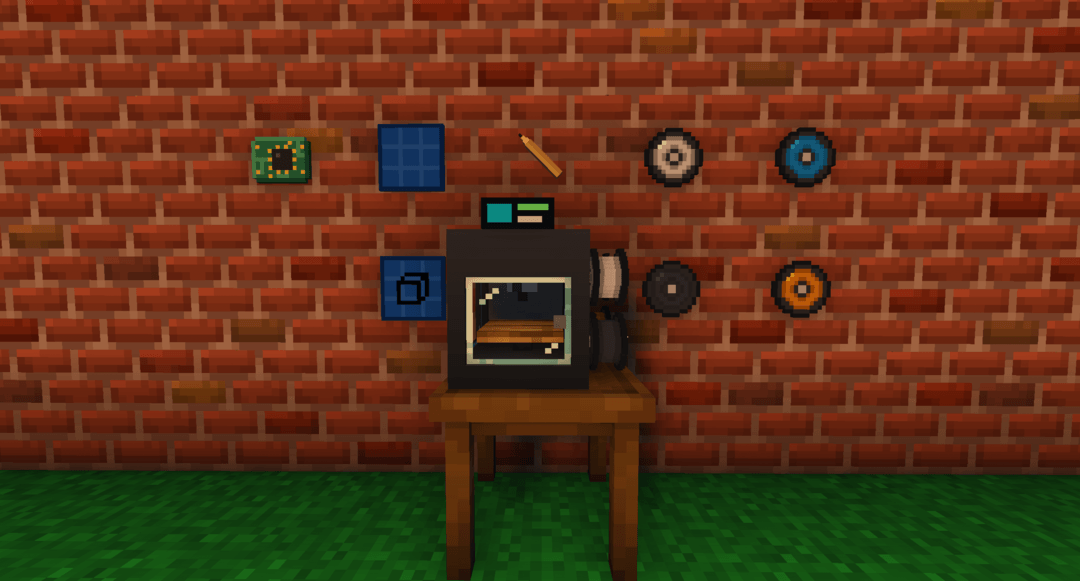
Full item
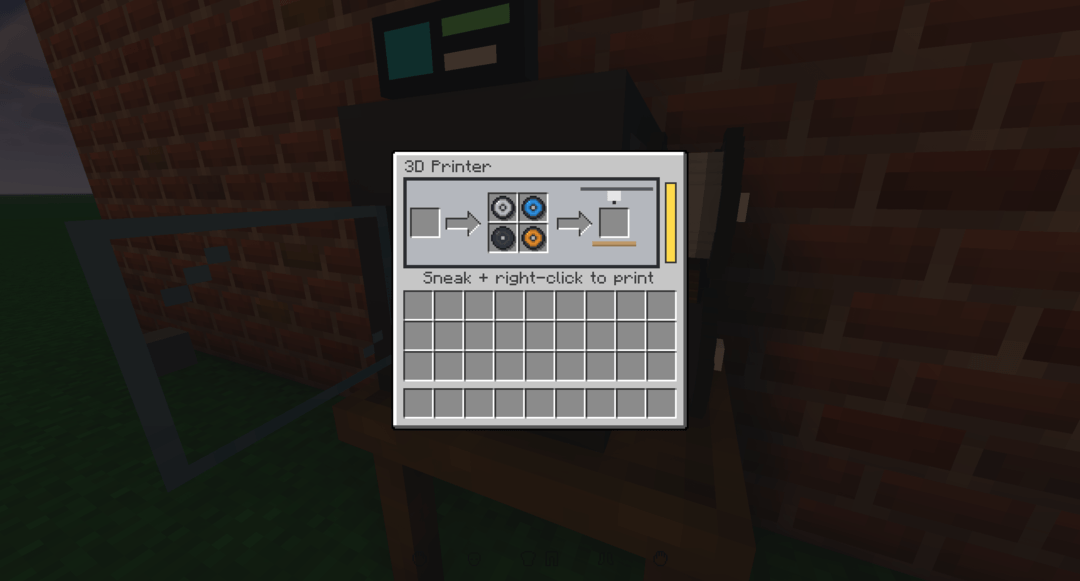
Gui
Mozork | Printer 3D
Create a server, get 25% off your first month

Description
Printer 3D
A 3D printer for Minecraft: draw the blueprint of an item, load spools of raw material, and the printer makes you a brand-new copy of it. It works with any item, vanilla or modded.
Why this mod ?
Duplicating items in Minecraft usually means heavy machines and complex production chains. Printer 3D does the opposite: a single block, four materials, and a blueprint system that is easy to understand.
You craft a blueprint of the item you want, put the blueprint and the spools it needs into the printer, then start printing. A few seconds later, a brand-new copy (no enchantments, no custom name, no contents) comes out in the result slot.
The mod is designed to fit with Furniture Mod: Refurbished (electricity network), Better Combat (the pencil's attack) and your modpacks: items from any mod are recognized automatically.
What the mod does
The 3D printer
- Right-click: opens the interface (blueprint on the left, four spools in the middle, result on the right).
- Sneak + right-click: starts printing.
- While printing, the block cannot be used. The 3D model shows the spools that are really loaded and the part being printed.
- The printer's glass door opens when you open the interface, and closes when you leave it.
- Default duration: 7 seconds (configurable).
- A looping printing sound plays while it works and stops exactly when printing ends, whatever duration is set in the configuration. It also stops if the power runs out or if the printer is broken.
The four spools
| Spool | Typical material |
|---|---|
| Metal | Ingots, nuggets, ores, chains, rails, ammunition… |
| Polymer | Glass, slime, rubber, plastic, wax… |
| Composite | Gems, stone, redstone, sand, ceramic, carbon… |
| Organic | Wood, planks, leather, wool, paper, plants, bones… |
- Each spool holds 100 units.
- One print uses 1 unit of each material the item needs. An empty spool disappears.
- A few items have a fixed cost, see below.
The blueprint system
Crafting a blueprint takes three things in the crafting table:
- The item to copy, top middle (you get it back).
- An empty blueprint, in the centre (it is consumed).
- A pencil, middle right (it loses 1 durability).
| Item | Recipe |
|---|---|
| Empty blueprint | One paper + one cyan, light blue or blue dye |
| Pencil | One stick + one black dye |
| Circuit board | Middle row: copper ingot, redstone, gold ingot |
| 3D printer | See below |
3D printer recipe:
| Iron ingot | Circuit board | Iron ingot |
|---|---|---|
| Gold ingot | Glass block | Gold ingot |
| Iron ingot | Oak slab | Iron ingot |
The pencil
- 50 uses.
- Stacks up to 64 while it is new, like the spools. As soon as it is damaged, it becomes a single item.
- Can be enchanted with Unbreaking.
- You can hit with it: each hit costs 1 durability.
- With Better Combat, it performs a stabbing attack (thrust animation).
Automatic material detection
The mod works out the spools any item needs by itself, in this order:
- Datapack tags
print3d:material/metal,polymer,compositeandorganic(to force a choice). - Common raw-material tags (ingots, logs, gems…).
- The item's recipe: the union of the materials of its ingredients, followed a few levels deep.
- The repair material of tools and armour.
- Keywords in the item's id, then the kind of block.
- Otherwise: composite.
The mod also handles weapons from TaCZ (Timeless and Classics Zero): the weapon model id is kept on the blueprint.
Printable items
Every item in the game has its own switch in config/print3d-items.json (or in the in-game configuration screen). Items from newly installed mods are added automatically each time a world starts.
Disabled by default (you can enable them again):
- Food, drinks and potions.
- Spawn eggs, vanilla and modded.
- Dragon egg (if enabled: 100 organic units).
- Buckets with something inside. The empty bucket stays printable for 1 metal unit.
- Netherite ingot (if enabled: 100 metal units).
- Vehicles from Immersive Vehicles (addons included) and Immersive Aircraft, detected automatically with no dependency.
Never printable: the printer, the spools, the blueprints, and every item made from netherite (armour, tools, blocks…). Only the netherite ingot can be printed.
Power
- With Furniture Mod: Refurbished installed, the printer connects to its electricity network (cables, wrench, breaker). It is powered like any device from that mod, including by the breaker from Watt About Power?.
- Without that mod, it uses FE: 1 FE per second of printing, with an internal buffer of 100 FE.
- With no power, printing pauses and resumes when power is back.
- The mode is configurable:
AUTO(power needed only if CFM is active),ALWAYSorNEVER.
Compatibility (optional)
Everything below is optional. If the other mod is not installed, the matching feature simply stays inactive.
| Mod | What it adds |
|---|---|
| Furniture Mod: Refurbished | The printer joins the mod's electricity network and needs power. Can be switched off: without the compatibility, no energy. |
| Watt About Power? | Its breaker powers the printer through Furniture Refurbished's network. |
| Better Combat | The pencil performs a stabbing attack. Can be switched off in the configuration. |
| JEI / REI | The mod's recipes are shown, with nothing to add. |
| Cloth Config | Adds the in-game configuration screen (Config button in the mods list). |
| TaCZ | Weapons, ammunition and attachments are recognized and printable. |
| Immersive Vehicles / Immersive Aircraft | Their vehicles are recognized and disabled by default. |
What's configurable
Everything can be adjusted from the in-game configuration screen (Mods > Printer 3D > Config, with Cloth Config), or in config/print3d-common.toml. Durations are in ticks (20 ticks = 1 second).
Printer
| Setting | Description | Default |
|---|---|---|
printTimeTicks |
Duration of one print. | 140 |
powerMode |
AUTO, ALWAYS or NEVER. |
AUTO |
fePerSecond |
FE used per second of printing (FE cable only). | 1 |
energyCapacity |
Size of the internal energy buffer, in FE. | 100 |
Blueprints
| Setting | Description | Default |
|---|---|---|
maxRecipeDepth |
How many crafting steps are followed to find an item's spools. | 4 |
preservedNbtKeys |
Only these NBT keys are kept on a blueprint (for example a TaCZ weapon's model id). | GunId, AmmoId, AttachmentId, BlockId |
Compatibility
| Setting | Description | Default |
|---|---|---|
refurbishedFurniture |
Furniture Mod: Refurbished integration. When off, the printer needs no energy. | true |
betterCombat |
The pencil's stabbing attack with Better Combat. Needs a game restart. | true |
Printable items
One switch per item, grouped by mod, saved in config/print3d-items.json.
Multiplayer
- In multiplayer, the server's printable items list replaces the client's.
- The server decides everything: costs, printing, power. Nothing can be cheated from the client.
- Install the mod on both the client and the server.
Requirements
- Minecraft 1.20.1, Forge 47 or newer.
- Optional: Furniture Mod: Refurbished, Better Combat (and Player Animator), Cloth Config, JEI or REI.
FAQ
Can I duplicate any item ? Almost. Every item is recognized, vanilla or modded, except the ones the mod forbids (the printer, the spools, the blueprints, netherite items). You can also disable or re-enable each item in the configuration.
Why does my item ask for the wrong spool ? Materials are worked out from recipes and keywords. To force a choice, add the item to a print3d:material/<material> tag with a datapack.
Can I play without Furniture Mod: Refurbished ? Yes. The printer then uses FE. With the mod installed, you can also switch the integration off: the printer then needs no energy.
Does the blueprint keep my enchantments ? No. A blueprint always describes a brand-new item, with no enchantments, no name and no contents.
The configuration screen doesn't show up. Install Cloth Config. The Config button is in the mods list. Without it, edit the files in config/.
Mod created by Mozork. All rights reserved.
Printer 3D Team
Owner