Potion Container
This is a convenient container that allows you to store multiple types of potions in a more practical and user-friendly way. It features flexible configuration options, allowing you to customize certain aspects to suit your preferences.
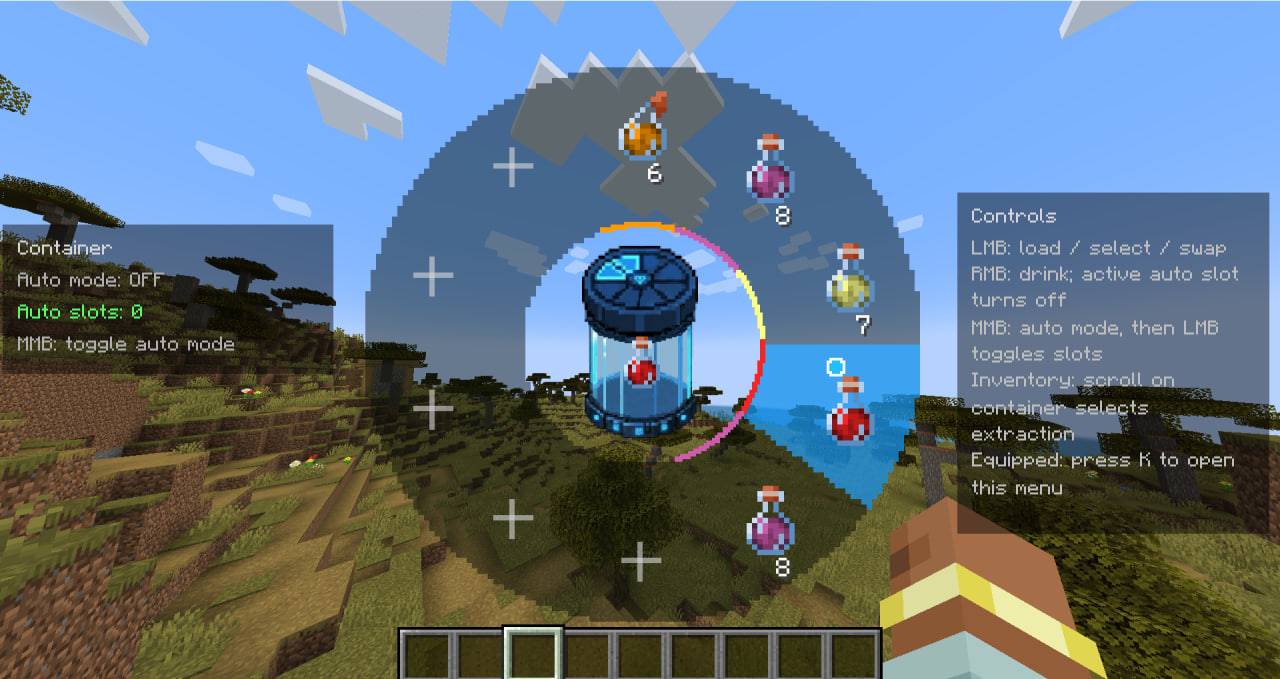
photo_2026-06-13_13-42-18.jpg
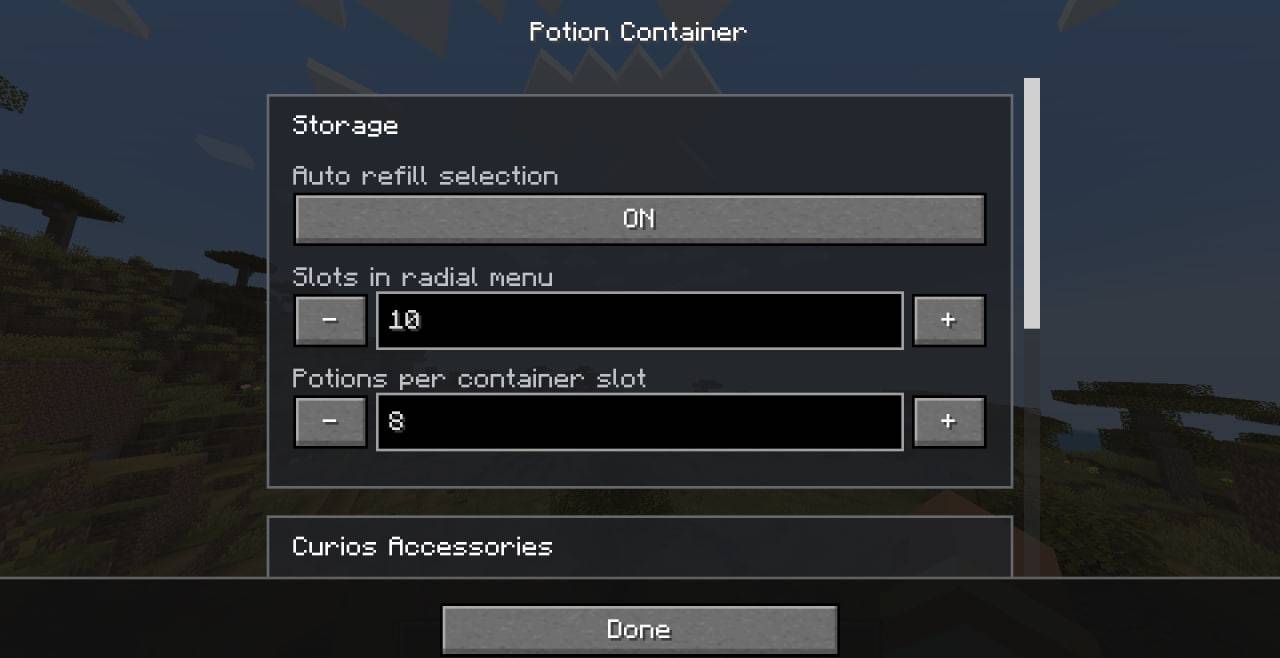
photo_2026-06-13_13-43-23 (2).jpg
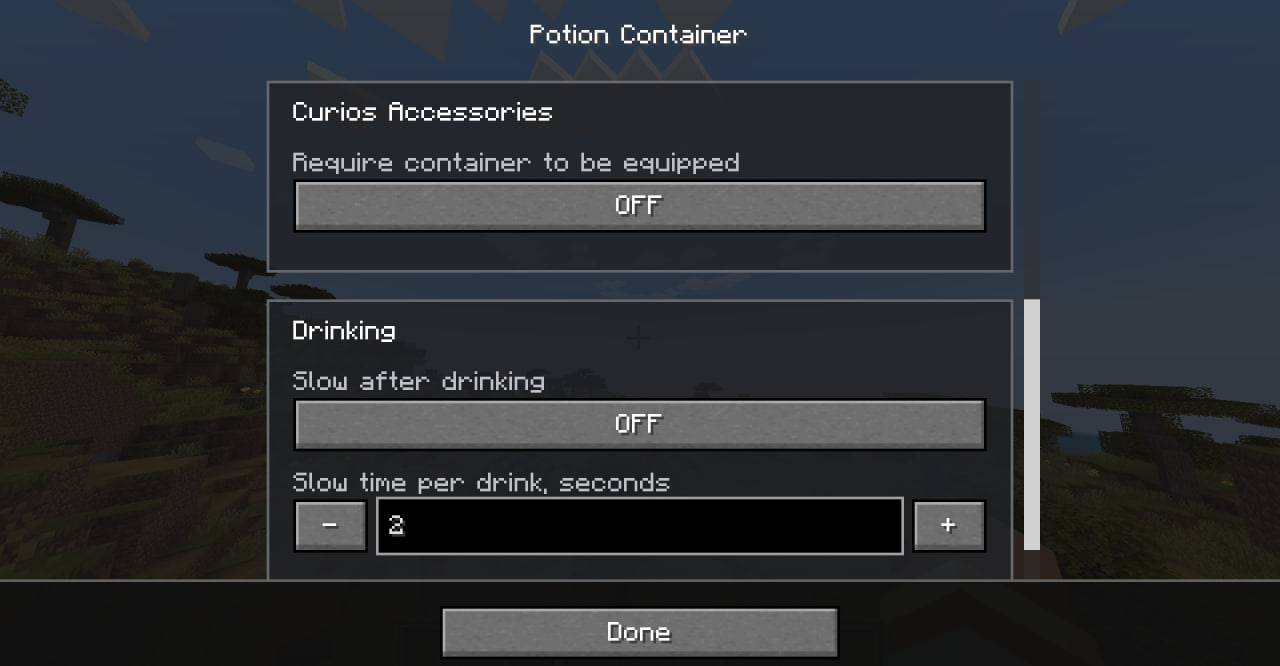
photo_2026-06-13_13-43-23.jpg
Description
Potion Container
Potion Container adds a dedicated potion storage item designed to make potion management faster, cleaner, and more convenient.
Instead of filling your hotbar with multiple potion stacks, you can keep them inside a single container and access them through a radial selection menu. This allows quick access to healing, buffs, resistance effects, utility potions, and any other potion you carry during exploration, combat, or boss fights.
The mod focuses on usability and configurability. Nearly every major feature can be adjusted or disabled through the configuration file, making Potion Container suitable for both casual modpacks and heavily balanced server environments.
Recipes
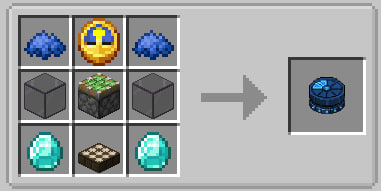
Features
Radial Potion Menu
The core feature of the mod is the radial menu.
By holding the assigned key, a circular interface appears around the center of the screen, allowing you to quickly select one of the stored potion slots. This approach is significantly faster than opening inventories or searching through multiple hotbar slots during combat.
The menu is fully configurable and supports different numbers of visible potion stacks depending on your preferred playstyle.
Potion Storage
Each slot inside the container can store multiple potions of the same type.
The maximum amount stored per slot can be adjusted through the configuration, allowing pack creators to decide whether the container should act as a simple utility item or a powerful potion management tool.
Auto Refill
An optional auto-refill system can be enabled or disabled.
When active, the container can automatically help maintain potion availability without requiring constant manual organization.
Players who prefer a more manual experience can disable this feature entirely.
Adjustable Drinking Mechanics
Potion Container includes several balance options for modpack creators and server owners.
You can configure:
- drinking delays;
- movement slowdown after drinking;
- slowdown strength;
- slowdown duration;
- sound repetition intervals.
This allows the mod to fit naturally into both lightweight vanilla-style packs and more challenging progression-focused modpacks.
Curios Integration
If Curios is installed, Potion Container can optionally require the container to be equipped in a Curios slot before it can be used.
This setting is completely optional and can be enabled or disabled in the configuration.
Configuration
One of the primary goals of Potion Container is flexibility.
Server owners and modpack developers can customize nearly every important aspect of the mod:
- Number of potion stacks shown in the radial menu.
- Maximum potions stored per slot.
- Auto-refill availability.
- Drinking cooldown timing.
- Movement slowdown behavior.
- Radial menu size and layout.
- Curios integration requirements.
For example:
- Disable the auto-refill button if you want players to manage resources manually.
- Disable movement slowdown entirely for a more arcade-style experience.
- Reduce slot capacity to create stricter inventory management.
- Increase the radial menu size for better visibility on large monitors.
- Require Curios equipment for RPG-oriented modpacks.
Localization
Potion Container includes built-in translations for multiple languages:
- German (de_de)
- English (en_us)
- Spanish (es_es)
- French (fr_fr)
- Japanese (ja_jp)
- Korean (ko_kr)
- Brazilian Portuguese (pt_br)
- Russian (ru_ru)
- Ukrainian (uk_ua)
- Simplified Chinese (zh_cn)
The mod automatically uses the language selected in Minecraft.
Why Use Potion Container?
Managing potions often becomes inconvenient once a player starts carrying multiple effects. Valuable hotbar space is consumed by potion stacks, and switching between them can become frustrating during combat.
Potion Container solves this problem by providing a centralized, configurable, and user-friendly way to store and access potions while remaining fully customizable for different gameplay styles.
Whether you want a simple quality-of-life improvement or a configurable potion management system for a large modpack, Potion Container is designed to adapt to your needs.
Potion Container Team