Polybind
- By
Two mods on the same key? Polybind lets every one of them fire, or opens a radial wheel so you pick - tap to repeat your last choice, hold to choose again. Also ships modpack defaults that survive updates without overwriting your changes.
10-pack-defaults-scale2-427x240.png
2-key-binds-screen-scale2-427x240.png
3-shared-keys-scale2-427x240.png
4-wheel-tab-scale2-427x240.png
7-wheel-8-segments-scale2-427x240.png
Description
One key, one winner — until now
Open the controls screen in a big Fabric pack and count the red conflict markers. Those are not cosmetic: Minecraft keeps exactly one keybind per physical key internally, so whichever binding registered or was rebound last silently wins the key, and every other binding sharing it goes dead.
Polybind removes that limit. Every action on a shared key works again, and you decide, key by key, how the key behaves when it's pressed.
What you get
- Every shared keybind fires. Keyboard and mouse both go through the same input path, so both are covered. A binding that asks "is it held down?" and one that asks "was it tapped?" both get the right answer, exactly once, even when another mod has already driven that binding itself.
- Toggles keep toggling. Sneak-toggle and sprint-toggle style bindings are driven through the game's own toggle logic, so they never get stuck on.
- Three modes, chosen per key: All fire, Wheel, or Vanilla. See the table below.
- Smart defaults out of the box. Shared keys default to Wheel, and hold-type actions — walking, jumping, sneaking, sprinting, attack/use, and a handful of recognized modded hold keys — default to All fire instead, because a wheel can't keep a key held for you. Override any of it per key at any time.
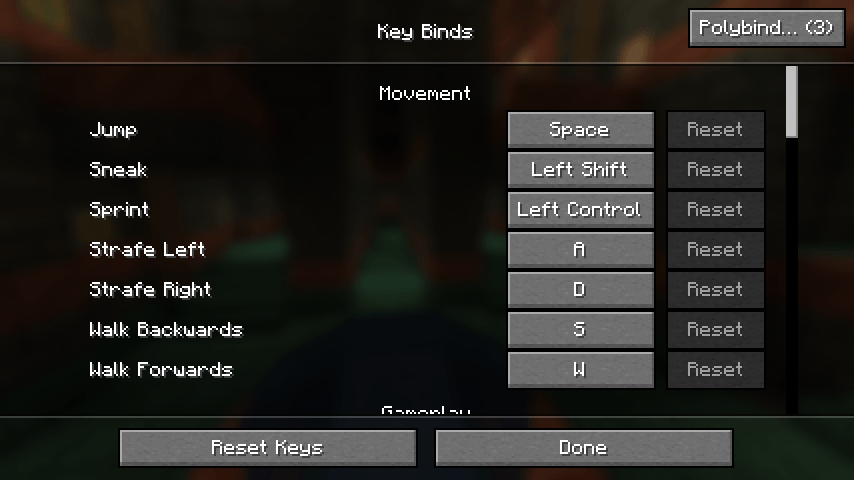
- A screen you'd actually find: a "Polybind…" button, carrying the number of keys that currently
share more than one action, right on the game's own Key Binds screen, plus
/polybind, Mod Menu, and an optional unbound keybind. - Pack defaults for modpack authors: ship default options, keybinds, a server list, and any extra config files, applied before the game loads and updatable later without stepping on a player's own changes.
- Fails safe. If anything ever goes wrong internally, Polybind logs it once and falls back to vanilla behaviour for the rest of the session. It never drops a keystroke.
The wheel
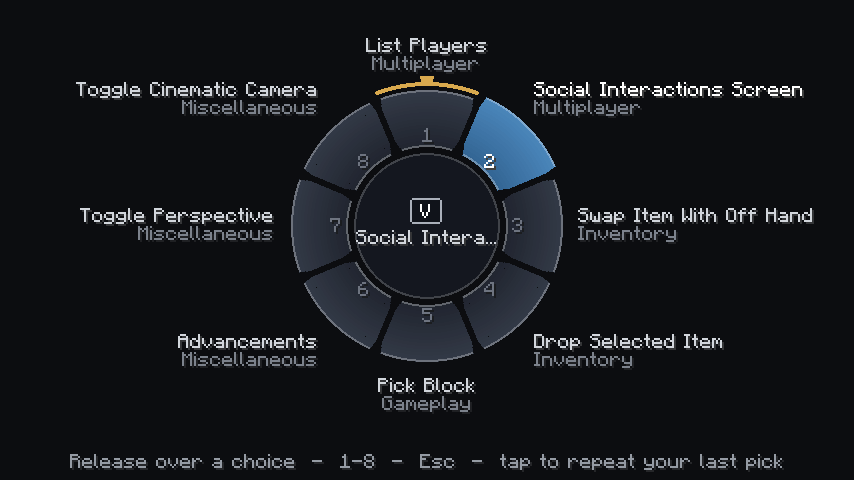
The wheel is a radial chooser: one segment per action on the key, up to eight per page, drawn over a backdrop that dims the world rather than hiding it.
- First press on a key with no remembered pick opens the wheel immediately. Move the pointer onto a segment and let go (or click it, or press its number), and that action fires.
- After you've picked something on that key once, a quick tap of the key repeats that same pick instantly — the wheel never even appears.
- Holding the key down for about 0.2 seconds (the default
wheel.holdThresholdMs, 180 ms) opens the wheel again, with your last pick already highlighted, so re-choosing is one click away. - Picks are remembered across restarts, per key, so this behaviour is exactly the same the next time you launch the game.
Escor right click cancels; scroll to page through more than eight actions; number keys1-8pick directly.
This tap/hold rhythm is the headline interaction: once you've set up your picks, a wheel key behaves almost like a single dedicated keybind for the action you use most, while still being one hold away from switching to something else on the same key.
Modes per key
| Mode | What happens on a press | Good for |
|---|---|---|
| Wheel | First press (or a hold past ~0.2s) opens a radial chooser; a quick tap repeats your last pick. Only the chosen action fires. | The shipped default for shared keys — lets you pick per key without losing anything. |
| All fire | Every action on the key fires, once each. | Hold-type actions (movement, sneak, sprint, attack/use, zoom, push-to-talk) — the shipped default for those, automatically. |
| Vanilla | Polybind stays out of it entirely; the game picks its usual single winner. | Keys you'd rather manage yourself, or debugging. |
A key with no explicit mode of its own simply follows the global default, whatever you later change that to.
The Polybind screen
Open it from the "Polybind…" button in the game's own Key Binds (or Controls) screen —
top right corner, carrying the number of keys that currently carry more than one action — or from
/polybind, the optional "Open Polybind" keybind, or Mod Menu's config button.
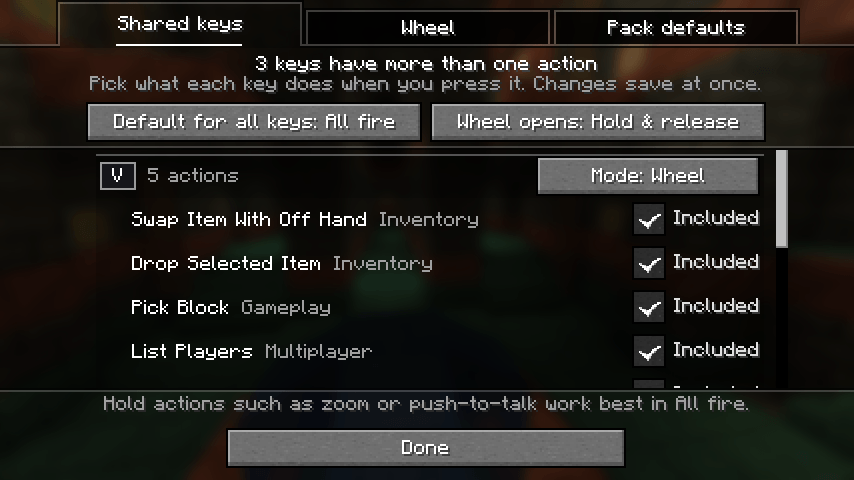
- Shared keys — every key that currently carries more than one action, busiest first: a key cap, an action count, and a Mode button that steps through All fire, Wheel and Vanilla. Under each key, one row per action with its name, category and an Included tick you can clear to leave that one action alone entirely. One row above the list holds the two settings that apply to every key: "Default for all keys" and "Wheel opens" (Hold & release or Click) — the wheel's activation style lives here, next to the default, not on the Wheel tab.
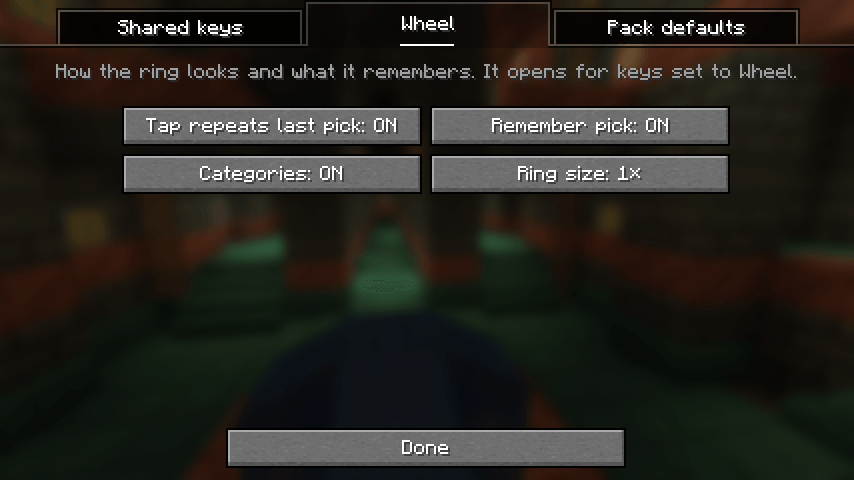
- Wheel — the chooser's own cosmetics and memory: "Tap repeats last pick", "Remember pick", "Categories" and "Ring size."
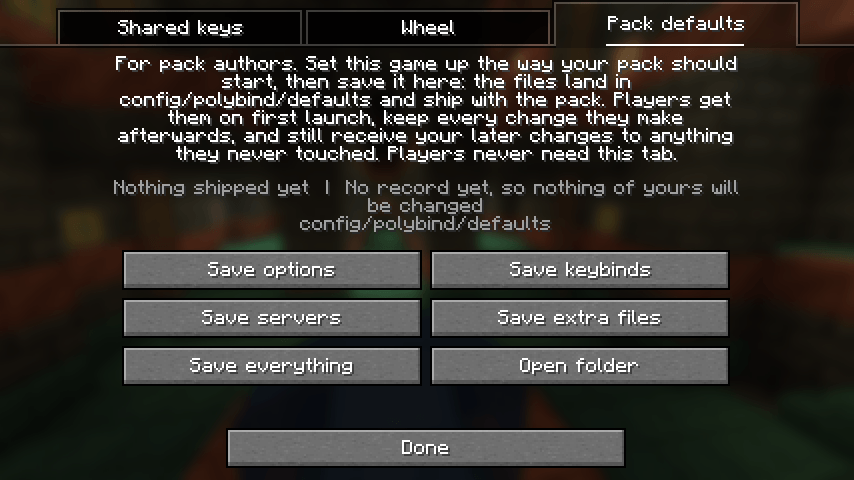
- Pack defaults — the modpack author's tab: four save buttons (options, keybinds, servers, extra files) plus "Save everything," and a status readout of what's currently shipped.
Every change applies immediately and is written to disk as it's made — there's no "apply" button to forget, and nothing needs a restart.
For modpack authors: Pack defaults
Ship the settings your pack should start with. Players get them on a fresh install, keep every change they make afterward, and still receive your later changes to anything they never touched.
Quick start:
- Start the game and set it up the way your pack should start — video and sound options, keybinds, your server, your mods' config files.
- Open
/polybind, go to the Pack defaults tab, press Save everything (or run/polybind defaults save all). - Open
config/polybind/defaults/defaults.jsonand, if you want them, setdefaultDifficultyfor new worlds and list any further config files underextraFiles(a path or a glob, relative to the game folder — e.g."config/sodium-options.json"or"config/mymod/**"). - Press Save extra files again so the files you just listed are picked up.
- Ship
config/polybind/with your pack. Do not shippolybind/journal.json— it lives outsideconfig/for exactly that reason, so a normal export ofconfig/won't pick it up.
The update rule:
| Situation | What happens |
|---|---|
| Fresh install | The player gets everything the pack ships. |
| Existing install, Polybind has never run here before | Nothing changes on the first run, whatever the pack says. |
| Pack update, to a setting the player never touched | The player gets the new value. |
| Pack update, to a setting the player changed themselves | The player keeps their own value, for good. |
Deleted servers never come back on an update, and shipped keybinds become the controls screen's Reset default.
File layout, shipped by the pack:
config/polybind/defaults/
    options.txt      vanilla option lines, no key_ lines
    keybinds.txt     key_<binding>:<key> lines, exactly as vanilla writes them
    servers.dat      optional, vanilla format
    defaults.json    the author's settings (defaultDifficulty, extraFiles, ignoredOptions, ...)
    extra/           a mirror of the game folder, e.g. extra/config/sodium-options.json
Owned by the player and never shipped: <game folder>/polybind/journal.json,
<game folder>/polybind/wheel.json, and config/polybind.json itself.
What not to ship: anything machine- or person-specific. By default that's fullscreen
resolution, sound device, last server joined, language, window size overrides, the "joined a server
before" flag, the telemetry opt-in, dismissed warning dialogs, tutorial progress and GL debug
verbosity — the full, editable list is ignoredOptions in defaults.json.
Commands:
| Command | What it does |
|---|---|
/polybind, /polybind open |
Opens the screen on the Shared keys tab. |
/polybind reload |
Re-reads config/polybind.json. |
/polybind conflicts |
Lists every shared key in chat, ending with a clickable "[Open Polybind]". |
/polybind defaults |
Opens the screen on the Pack defaults tab. |
/polybind defaults save <all\|options\|keybinds\|servers\|extra> |
The same as the tab's four save buttons. |
/polybind defaults status |
What's shipped, where, and whether this install has a journal. |
/polybind defaults apply |
Applies extra files now and reports what options would change on the next start. |
All commands are client-only — none of them reach a server.
Configuration
config/polybind.json is written with sensible defaults the first time you run the game, and an
older file is upgraded in place without losing anything you set:
{
  "enabled": true,
  "excludedBindings": [],
  "logConflictsOnStartup": true,
  "debug": false,
  "defaultMode": "WHEEL",
  "keyModes": {},
  "holdBindings": [
    "justzoom.keybinds.keybind.zoom",
    "key.accessorify.open_widget",
    "key.accessorify.use_spyglass",
    "key.attack",
    "key.back",
    "key.deeperdarker.boost",
    "key.deeperdarker.transmit",
    "key.forward",
    "key.jump",
    "key.left",
    "key.push_to_talk",
    "key.right",
    "key.sneak",
    "key.sprint",
    "key.use",
    "key.whisper"
  ],
  "wheel": {
    "activation": "HOLD_RELEASE",
    "holdThresholdMs": 180,
    "showCategory": true,
    "rememberLastChoice": true,
    "tapRepeatsLast": true,
    "scale": 1.0
  },
  "packDefaults": {
    "enabled": true,
    "applyUpdates": true
  }
}
enabled— master switch;falseleaves vanilla behaviour completely untouched.excludedBindings— keybind translation keys (e.g."key.ponder.ponder") Polybind never touches at all.logConflictsOnStartup— logs every shared key once at startup; the quickest way to find a translation key for the lists above.debug— logs every binding Polybind feeds. Noisy; for diagnosing one specific keybind.defaultMode—WHEELout of the box. The mode every key follows unless it has its own entry inkeyModes, or carries a binding named inholdBindings(see below).keyModes— per-key overrides, keyed on the nameInputConstants.Key#getName()uses, e.g.{"key.keyboard.v": "WHEEL"}. Always wins, hold safeguard included. A key set to the mode it would have followed anyway is left out automatically.holdBindings— translation keys of actions whose whole meaning is "while I am holding this" (walking, jumping, sneaking, sprinting, attack/use, and a handful of hold-type actions from other mods, shipped so the setting works out of the box rather than only after you discover it). A key carrying one of these does not follow aWHEELdefault; it falls back to All fire unless you set that key's mode yourself. An excluded binding does not count, since Polybind never fires it.[]switches the safeguard off entirely; leave the field out of a hand-written file to get the shipped list above.wheel.activation—HOLD_RELEASE(default) orCLICK.wheel.holdThresholdMs— the line between a tap (repeats your last pick) and a hold (opens the wheel), in milliseconds. Default180, clamped 0-2000.wheel.showCategory— show each action's category under its name in the wheel.wheel.rememberLastChoice— remember the action picked last time on each key, across restarts, and pre-highlight it.wheel.tapRepeatsLast— a tap on a key with a remembered pick repeats it instead of opening the wheel. NeedsrememberLastChoice.wheel.scale— ring size multiplier,1.0default, clamped 0.5-2.0 (shrinks further to fit a small window).packDefaults.enabled— master switch for the pack defaults feature.packDefaults.applyUpdates—falsekeeps the first run's values and stops every later push; a value is only ever written when the player's file has no entry for it yet.
Bad values fall back to their default with one warning in the log, numbers out of range are clamped, and a file that isn't valid JSON is left on disk untouched while defaults are used for the session.
Compatibility
Polybind was written and checked against a large 1.21.1 modpack, and every mod in it that hooks Minecraft's keybind handling was reviewed before a line of the mixin was written.
- On "All fire" and "Vanilla" keys, Polybind cancels nothing and overwrites nothing — it runs after the game has finished handling a key event and reconciles the bindings that were skipped. The only thing it ever cancels is a key the wheel has taken over, and only while the wheel is open.
- Mods that deliberately suppress a keybind, or that intercept the key event before it reaches Minecraft's own keybind handling, keep suppressing it exactly as they do without Polybind.
- If anything ever goes wrong internally, Polybind logs it once and switches itself off for the rest of the session; the worst case is plain vanilla behaviour, never a dropped keystroke.
- Mods that move input handling to another thread are fine — Polybind's internal index is immutable and safe to read from any thread.
- An existing
config/defaultoptionsfolder is imported automatically on first run if present, with nothing changed on the player's own settings. - Mod Menu is supported for the config screen entry point, but never required.
FAQ
Does the server need this mod? No. Polybind is entirely client-side. Installing it on a server does nothing, and a client running it joins a vanilla or modded server exactly as it would without it.
Will a pack update overwrite my settings? No. Polybind remembers the value it last applied for every setting. A value you changed stays yours for good; a value you never touched follows the pack's later updates. See the update-rule table above.
Why does pressing W not open a wheel?
WHEEL is the shipped default, but a key you haven't set yourself that carries a hold action —
walking, jumping, sneaking, sprinting, attack/use, and a few others listed in holdBindings — stays
on All fire instead, because a wheel can't keep a key held down for you. On the Shared keys tab
that key's Mode button shows the tooltip "Kept on All fire because [action] is a hold action. Click
to override." — one click sets that key's mode yourself and it stops following the safeguard.
I put push-to-talk or a zoom keybind on a shared key — what happens?
Leave that key on All fire (or add its translation key to holdBindings, or move it to a key of
its own). The wheel gives the action it fires one press and one release; anything that needs the key
held — zoom, push-to-talk, a charge-up — won't work correctly through it.
How do I turn Polybind off for just one key? Open the Shared keys tab and set that key's Mode to Vanilla. To leave just one specific action alone while still managing the rest of the key, clear its Included tick instead.
Does it work with mouse buttons? Yes. Keyboard and mouse buttons go through the same handling and get the same modes, wheel included.
Can I use just the keybind fix, without the wheel or the pack defaults?
Yes. Set defaultMode to ALL (or set individual keys to All fire from the screen) to keep every
shared binding firing without ever seeing a wheel. The pack defaults feature is independent and can
be turned off entirely with packDefaults.enabled: false.
Can I use just the pack defaults, without the shared-key handling?
Yes. Set defaultMode to VANILLA (and clear keyModes) to hand every key back to vanilla's
single-winner behaviour while keeping packDefaults.enabled: true.
How do I reset things back to defaults?
For the shared-key settings, keep clicking a key's Mode button — once it lands back on whatever the
global default is, Polybind stops storing an override for that key automatically. To reset
everything at once, close the game and delete config/polybind.json; it's regenerated with the
defaults on the next launch. For keybinds themselves, vanilla's own Reset button on the Key
Binds screen applies — it resets to the pack's shipped keys if pack defaults set them, or to each
mod's own default otherwise.
Known limitations
- Hold-type actions don't work well through the wheel. The wheel gives the action it fires one press and one release, then lets go — long enough for a tap-style action, not for one that wants the key held. That's exactly why hold-type actions ship on All fire by default; anything you add to a wheel key yourself should be a tap-style action.
- A Wheel key behaves as All fire whenever a chooser can't be shown — with a screen already open, with no player, or with fewer than two actions left after exclusions.
- A missed key release can leave the wheel open. If the window loses focus while the key is
down, the release never reaches the wheel, and it waits for a click or
Escinstead of closing on its own. Nothing is stuck — letting go of the key (once focus returns) closes it normally. - Mods that highlight key conflicts in the vanilla controls screen may still paint a shared key red; that marker becomes cosmetic once Polybind is installed, since Polybind doesn't touch the controls screen itself.
- The wheel shows up to eight actions per page; a key with more than eight scrolls to further pages.
The Polybind Team


Owner