
Description
Pocket Urns
Urns that hold a room of their own. Place it and step inside to access a pocket room. Build in it, sleep in it, then ride the beam of light back out. Pick it up, carry it anywhere, and the room comes with you.
How it works
- Craft an urn
- Place it anywhere: the Overworld, the Nether, the End, or a modded dimension.
- Stand on it. After a short charge, you'll be inside.
- Leave through the top. Step in the pillar of light to be lifted out of the urn.
Every urn has its own room, and the room keeps everything you build in it. Move the urn and the room follows. Two urns never share a room.

Upgrades
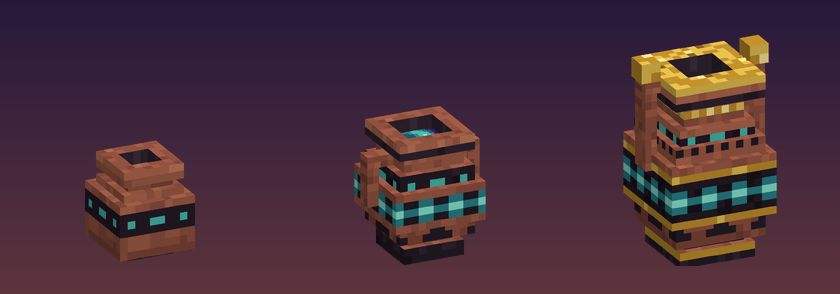
Upgrade a placed urn by right-clicking it with a slip.
| Tier | Floor width | Height |
|---|---|---|
| 1 | 15 | 8 |
| 2 | 19 | 18 |
| 3 | 25 | 30 |
Recipes
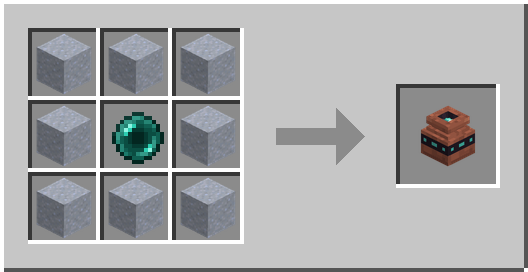
Pocket Urn: the base of the mod.
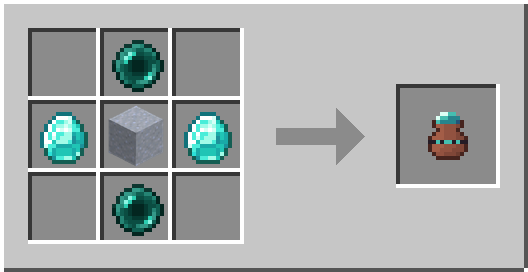
Ender Slip (tier 1 → 2): upgrade to Tier 2
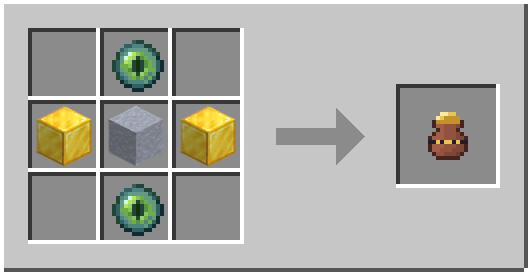
Gilded Slip (tier 2 → 3): upgrade to Tier 3.
Urn Compass: points to your nearest placed urn in the current dimension so you don't lose it.
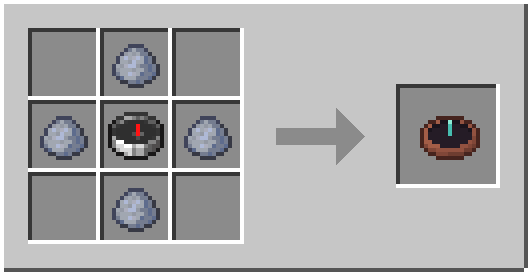
Dyeing
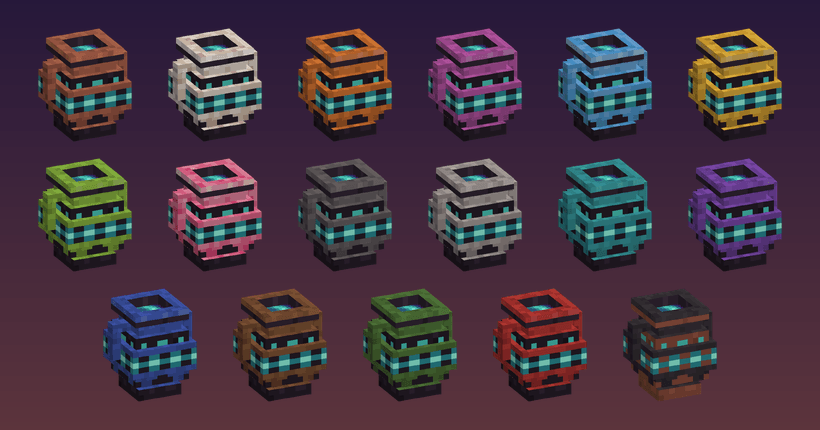
Right-click a placed urn with any dye to glaze it that color. Use a water bucket to wash it back to natural terracotta. The inside is also affected.
The urn stays with you
Losing your entire base because you died in the lava would definitely not be cool.
Your urn is soulbound to you:
- It can't be broken, not even in creative mode.
- You pick it up by right-clicking it with an empty hand.
- It can't be dropped or stored in chests.
- It stays with you when you die.
Sleeping
Beds work inside the room and set your spawn there. For skipping the night, players in pocket rooms share the Overworld's sleep count.
Multiplayer and access
Whoever first places an urn owns it. Two game rules control access, and both are saved per world. You can change them with /gamerule or on the Game Rules screen when you create a world.
| Game rule | Values | Default | Controls |
|---|---|---|---|
pocket_urns:pickup |
owner, everyone |
owner |
Who can pick up, dye, and upgrade a placed urn |
pocket_urns:entry |
everyone, trusted, owner |
everyone |
Who can enter |
With trusted entry, owners choose who comes in. Trust covers all of an owner's urns:
/urn trust <player>lets a player into your urns./urn untrust <player>takes that back./urn trustedlists who you've trusted.
Operators can always pick up and enter any urn.
FAQ
Can I lose my urn?
No. It can't be broken, dropped, stored, or lost on death. You can only lose track of it if you place it somewhere and forget where, and the Urn Compass will lead you back to it.
Does it work on servers?
Yes. Install it on both the server and every client.
Can I put an urn inside an urn?
Not currently.
Requirements
- Minecraft 26.3
- Fabric Loader 0.19.5 or newer
- Fabric API
The Pocket Urns Team


Owner