Physics tree drop
- By
Chop a natural tree's base and watch its connected trunk and canopy fall—while player-built logs and solid obstacles stay protected.
PHYSICS TREE DROP
Chop the base. Watch the whole tree come down.
Break the lowest log of a naturally grown tree and watch its connected trunk and canopy tip away from you. The tree moves through a full fall, collides with the world, and releases normal Minecraft drops when it lands.
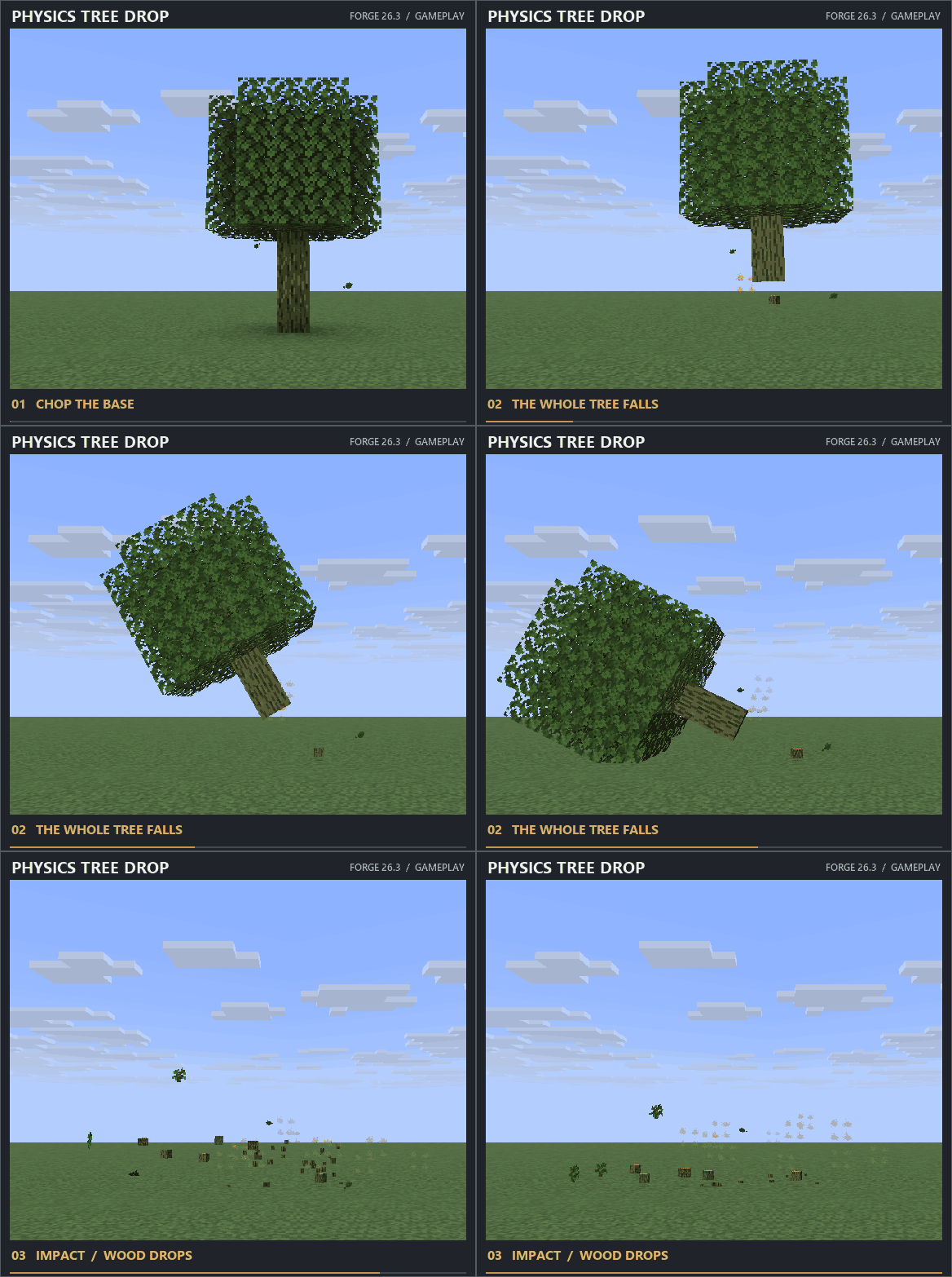
Captured in Minecraft Forge 26.3: the chop, topple, impact, and drops are shown in one live gameplay sequence.
Find a natural tree. Chop at its base. Make room for the fall.
THE FALL, STEP BY STEP
01 — THE CUT
The mod checks the soil, connected trunk, and natural leaf canopy before the tree begins to fall.
02 — THE TOPPLE
The trunk and eligible leaves rotate together instead of disappearing in place. Scraping dust and a wood impact sound help make the movement and landing clear.
03 — THE IMPACT
A solid obstacle stops the tree and stays intact. If the falling trunk hits another eligible natural tree, it can start a second fall. Fallen logs and leaves release their normal block drops.
PROTECTION FOR PLAYER BUILDS
Tree felling should affect the forest, not the structure you built. Physics Tree Drop tracks player-placed logs and excludes persistent leaves, so a connected player-made structure is not treated like a naturally grown tree. Incomplete or oversized trees, block entities, and unloaded areas fail the safety checks before blocks are removed. If the candidate is unsafe, it stays in place—there is no partial felling.
QUICK START
- Install the matching Minecraft version and loader on both the client and server.
- Find a naturally grown tree and stand clear of its fall path.
- Break the lowest trunk log. Let the tree land, then collect the drops.
VERSIONS & LOADERS
Minecraft: 1.20.1 · 1.21.1 · 1.21.11 · 26.2 · 26.3
Loaders: Fabric · Forge · NeoForge
Check the Files tab for a download matching your exact Minecraft version and loader.
Physics tree drop Team

Owner