Perilscope
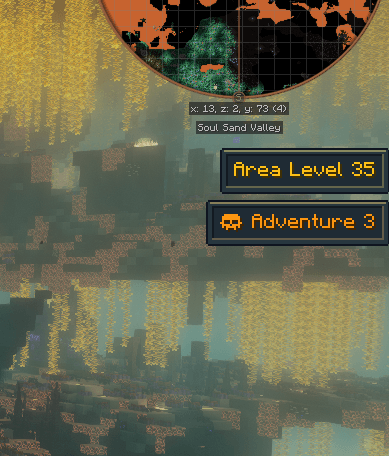
🔭 Know your peril. Perilscope adds two clean, freely movable HUD elements that show how dangerous your surroundings really are: the area level from Dynamic Difficulty and the active zone from Dungeon Difficulty. No more guessing why the mobs suddenly hit twice as hard.
🔎 Overview
| Parameter |
Specification |
| 🎮 Minecraft |
1.21.1 |
| ⚙️ Modloader |
NeoForge |
| 🖥️ Side |
Client & Server (required on both for the HUD) |
| 🤝 Works with |
Dynamic Difficulty and/or Dungeon Difficulty (both optional) |
| ✅ Tested with |
Dynamic Difficulty 1.3.4, Dungeon Difficulty 3.9.1 |
⚔️ What It Shows
- Area Difficulty — the Dynamic Difficulty level at your current position, updated live as you travel. Optionally with the structure and biome bonus next to it.
- Dungeon Difficulty — the type and level of the Dungeon Difficulty zone you're standing in. Only shows up while you're inside a zone and disappears again when you leave.
- Safe zones — settlements and ruins are shown in green without a level, so you can tell at a glance that there's nothing to fear. The list of safe zone types is configurable.
🎨 Colors & Frames
- Difficulty colors — the text shifts from green over yellow and orange to red the more dangerous an area gets. Dungeon zones start at yellow, because even the lowest level is dangerous; green is reserved for safe zones. At the hardest level the frame turns dark red while the text stays a bright, readable red. The level that gets the hardest color is configurable per element.
- Six frame styles — None, Simple, Tooltip, Bevel, Ornate and Panel, all tinted with the difficulty color. The semi-transparent background can be toggled on its own.
- Everything is drawn in code, so there are no textures to blur: sharp at every GUI scale.
🖱️ Drag & Drop Layout Editor
Open it from the mod's config screen (Mods → Perilscope → Config → Layout & Style) or with its own key binding (unbound by default, see Controls → Perilscope).
- Drag an element to move it — it snaps to the screen edges and center (hold Shift to place freely).
- Mouse wheel to scale, right click to show or hide.
- Change frame style, background, colors and visibility with the buttons at the bottom — the HUD updates instantly.
- Arrow keys nudge the selected element pixel by pixel.
- Positions are stored relative to the nearest screen corner or edge, so your layout stays in place at every window size and GUI scale.
🌐 Multiplayer & Servers
All values are calculated on the server and only sent to the client when they change, so the display is always accurate — in singleplayer and on dedicated servers alike. Players without Perilscope can still join a server that has it installed; they just won't see the HUD.
📌 Good to Know
- Dungeon Difficulty has no public API. Perilscope reads its zones through internal classes, so a future Dungeon Difficulty update may temporarily break the zone display (it was tested with version 3.9.1). If that happens, Perilscope switches the zone display off and logs it once — your game keeps running.
- The zone display shows every Dungeon Difficulty zone, not only dungeons. If your Dungeon Difficulty config gives a whole biome or dimension a difficulty (for example the entire Nether), the zone display stays visible there the whole time. That's intended — it's the difficulty that's actually in effect.
- Both integrations are optional: with only one of the two mods installed, Perilscope simply shows the matching element.
⚙️ Configuration
Everything can be changed in-game via Mods → Perilscope → Config or in config/perilscope-client.toml: position, scale, visibility, background, frame style, difficulty colors, the hardest-color level, structure/biome bonus display and the safe zone types.
🙏 Credits
- Built for Dynamic Difficulty by MuonR and Dungeon Difficulty by ZsoltMolnarrr — Perilscope is an unofficial companion and not affiliated with either mod.
- Source code on GitHub under the MIT license. Bug reports and suggestions are welcome in the issue tracker or in the comments.