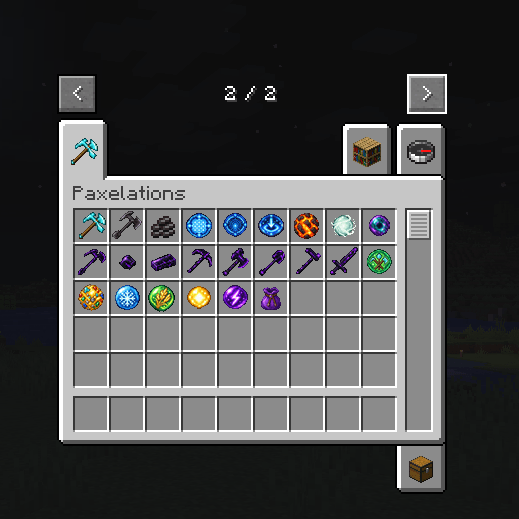
In-game.png
Description
Paxelations
Five tools. One paxel. Your choice of upgrades.
Paxelations combines a pickaxe, axe, shovel, hoe and sword into one versatile tool. Craft your paxel, equip your favourite upgrades, and make mining, building and farming more convenient.
Three paxel materials
Choose from Diamond, Netherite or Crying Obsidian.
Create Crying Obsidian tools through a complete crafting progression:
Crying Obsidian → Nuggets → Bars → Tools → Paxel
Smelt Crying Obsidian in a furnace or blast furnace to produce nuggets. Combine nine nuggets into a bar, then craft the five tools needed to assemble your paxel.
Diamond paxels can also be upgraded to Netherite at a smithing table.
Customise your paxel
Equip one main upgrade and up to two different orbs at the same time.
Choose your main upgrade:
- 3×3 Ability: Mine an area instead of individual blocks.
- Tunnel Ability: Clear space for tunnels.
- Hole Ability: Excavate holes.
- Usage Upgrade: Enable axe stripping, hoe tilling and shovel path-making.
Hold right-click to charge an equipped area-mining ability.
Eight upgrade orbs
- Lava Orb: Automatically smelts compatible mined drops.
- Orb of Softness: Suppresses mining and tool-use sounds and vibrations.
- Orb of Ender: Sends mined drops into your inventory, with overflow dropping nearby.
- Orb of Ore: Mines connected blocks of matching ore.
- Orb of Frost: Freezes a strip of surface water in front of you.
- Orb of Harvest: Harvests connected mature crops without automatically replanting them.
- Orb of Light: Provides night vision while holding your paxel underground, switching off outdoors.
- Orb of Speed: Multiplies your paxel’s mining speed by +1.
Hover over upgrades to see a brief explanation of their effects.
Keep your upgrades organised
The Paxel Pouch provides 27 storage slots exclusively for paxel upgrades.
Hold Left Shift + right-click while holding the pouch, or over its slot in your player inventory, to open it.
To customise your paxel, hold Left Shift + right-click with the paxel in hand.
Repair instead of replace
Depleted paxels remain in your inventory and become unusable until repaired. Repair them in an anvil using their corresponding material. Crying Obsidian tools and paxels use Crying Obsidian Bars.
Recipes and compatibility
A detailed illustrated recipe guide covers the components, crafting layouts and assembly instructions.
Available builds support Fabric, Forge and NeoForge for Minecraft 26.1.1, 26.1.2, 26.2 and 26.3.
Install only the JAR matching your Minecraft version and loader. Fabric also requires the matching Fabric API. For multiplayer, install the mod on both the client and server.
Mod based on the concept of Piercing Paxels by AmyMialee. All artwork is original and copyright © VsUK.
Paxelations Team