Pasty
- By
Copy and paste builds without commands: select, copy, then drag a ghost preview into place. Survival pays in blocks.
# Pasty
**Select it. Copy it. Build it.**
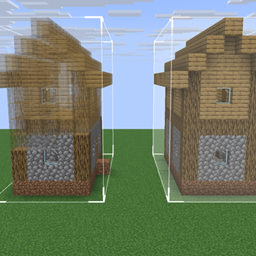
Pasty is copy-and-paste for Minecraft builds, without a single command. Click the corners of something you like, hit copy, and a translucent ghost of it follows you to wherever it should go next. Drag it into place, spin it, mirror it, and confirm — in creative it appears, in survival you pay for it in blocks. One key opens one menu, and everything lives in it.
---
## The loop
1. **Select** — click blocks in the world
2. **Copy**, or **Save** it to your library
3. **Paste** — the ghost appears
4. **Position** with drag handles, a nudge pad, or the drone camera
5. **Confirm** — and it's built
---
## Three ways to select
- **Box** — right-click one corner, left-click the far one. A holographic cube grows to meet your second click.
- **Precision** — pick individual blocks. Left-click adds, right-click removes, both repeatable. Pasting places exactly the blocks you chose — no filler, no bounding box.
- **Wand** — one click grabs every connected block of the same type, flood-filled in six directions. Capped at 10,000; click a stone floor that runs into a cave system and it tells you instead of quietly selecting the world.
---
## Placing things properly
Paste wraps the ghost in a gizmo:
- **Drag handles** on each face — hold and slide the structure a block at a time
- **Rotation ring** — hold the rotate key and click to turn 90°
- **Mirror**, and **Tip X / Tip Z** to roll a structure onto its side
- **Overlap warning** — the zone turns red when the paste would replace existing blocks. It won't stop you; it makes sure you know.
### Drone view
Lining up something big from ground level is miserable, so there's a camera for it. The HUD disappears, the camera detaches and orbits your structure, and the controls tuck into the corners so the middle stays clear. Orbit, tilt and zoom on one side; move the structure on the other. Your character never moves — only the camera — so it's safe in survival and on servers.
---
## Survival is the point, not an afterthought
In creative, pasting is instant and free. In survival, a build costs what it's made of — and there are two ways to pay.
**Build from inventory** — one click. It checks you have everything, takes the materials, places the structure. Short on something? It places nothing and tells you exactly what's missing.
**Build it by hand** — walk up to the confirmed zone and right-click holding materials. Each click lays every block that material builds, bottom-up, and it tells you what it wants next. It's the difference between a build *appearing* and a build *being built*.
### Costs that aren't silly
- Grass, mycelium, podzol, dirt paths and farmland charge **dirt**
- Deepslate charges **cobbled deepslate**; nylium charges **netherrack**
- Ores, infested blocks, ice, spawners and bedrock are **free**
No demanding a silk-touch pickaxe before you can copy a hillside.
### Nothing is one-way
**Undo Paste** puts back whatever the last paste overwrote and refunds the materials. **Pick back up** does the same but hands you the structure to reposition. Cancel a half-built zone and everything you fed into it comes back. Experiment freely.
---
## A library that shows you what's inside
Saves live in a **global folder**, not per world — a house saved in one world loads in any other, and in vanilla's own structure format, so they open in structure blocks too. Every save shows as a **slowly rotating 3D preview** with its size and block count, so two builds with similar names are never a guessing game. **Share** puts the file on your clipboard for Discord; drop a friend's file onto the library to import it.
---
## The Paint Tool
For changing what's already built. Right-click to pick a material from a searchable block list, then left-click blocks to repaint them — hold and drag to paint a stroke. Sneak + left-click copies a material off the wall. In survival it charges the new block and refunds the old one, and it refuses to paint over chests, doors, beds and anything unbreakable.
---
## The rest of it
- **Four clipboard slots** — a house, a tree and a lamppost at once
- **Material swap** — replace every copy of one block in your clipboard; stair facing and slab types preserved
- **Stack** — repeat a paste up to 24 times along any axis, for walls, fences and rows of pillars
- **Cut** — copy and clear in one go, blocks refunded in survival
- **Grow / shrink** a box selection by one block on every side
- **Entities come along** — item frames, paintings and armour stands travel with box copies
- **Include-air toggle** — copy a room hollow, or let terrain show through
- **Optional hotkeys** — copy, paste, undo, rotate, mirror, nudge and more, all rebindable, all **unbound by default**
---
## Controls
**X** opens the menu while you're holding a tool. Rebindable, along with everything else, from the menu's Settings button.
| Input | Does |
|---|---|
| `X` | Open / close the menu |
| Right-click | **Box:** first corner · **Precision:** remove a block |
| Left-click | **Box:** far corner · **Precision:** add a block · **Wand:** flood-fill |
Everything else — copy, paste, save, load, modes, undo, swap, clipboard slots — is a button in the menu.
---
## Getting the tools
**Creative:** Tools & Utilities tab. **Survival:** cheap and early — lapis, an emerald and a plank. The plank decides the handle: oak, birch or dark oak, and the tool is made to match.
```
Copy Tool Paint Tool
. . lapis . lapis lapis
. emerald . . emerald .
plank . . plank . .
```
---
## Multiplayer
Works on LAN worlds and servers that have Pasty installed. Every player gets their own selections, clipboard and placements, and players **without** Pasty can still join — they just don't get the tools.
Playing on a server that *doesn't* run mods? That's **Pasty Client Side**: the same tool working entirely on your computer, with the vanilla Brush. Install one edition or the other, not both.
---
## Compatibility
**Resource packs** can retexture both tools like any vanilla item. **Other mods** work: structures store blocks by registry name with full block-entity data, so modded blocks copy, save and paste normally, and modded ores count as free in survival.
Two limits, which the tool also explains the first time you hold it: a save with modded blocks needs that mod installed to paste (missing blocks are skipped, not fatal), and machines that keep state *outside* the block — wiring networks, multiblocks — keep their blocks and inventories but usually lose their connections. Damaged or older structure files skip the bad entries instead of failing the load.
---
## From the same workshop
- **Pasty Client Side** — Pasty for servers that don't have Pasty.
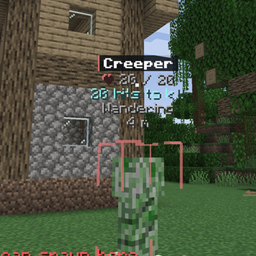
- **Builder's Vision** — press V and the world explains itself: chest contents, mob paths, spawn spots, placement preview.
---
## Modpacks
**Yes.** Include Pasty in any modpack, public or private, without asking. A credit and a link back is appreciated but not required.
Pasty Team