Party Link - Groups, Share Xp, and more
- By
PartyLink adds a custom multiplayer party system with inviteable groups, MMO-style HUD, shared XP, player heads, roles, settings UI, party PvP options, and server-side configuration for Fabric servers.
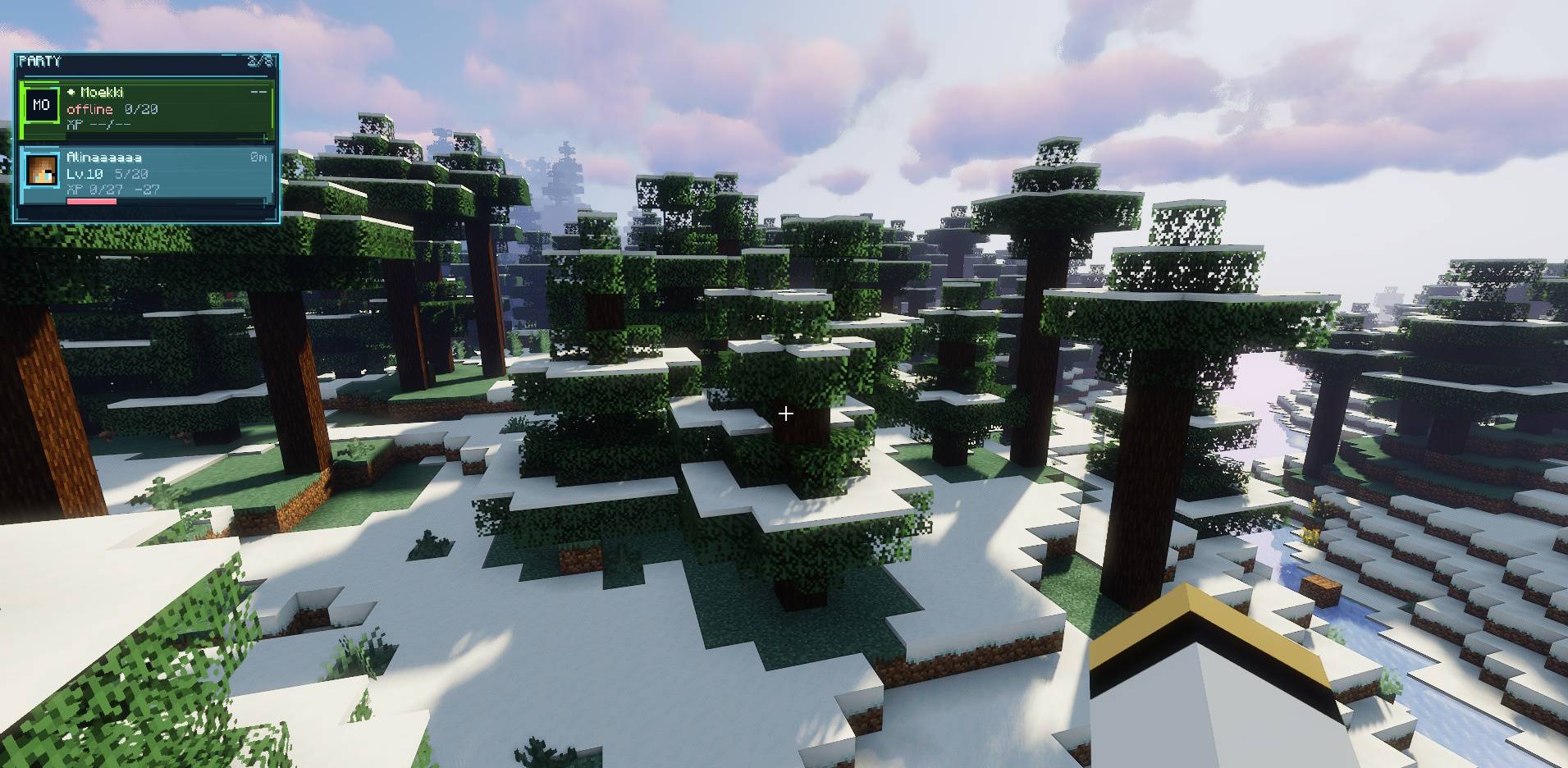
This is how it looks like ingame.
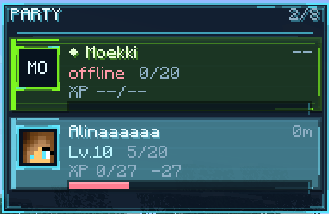
Party HUD
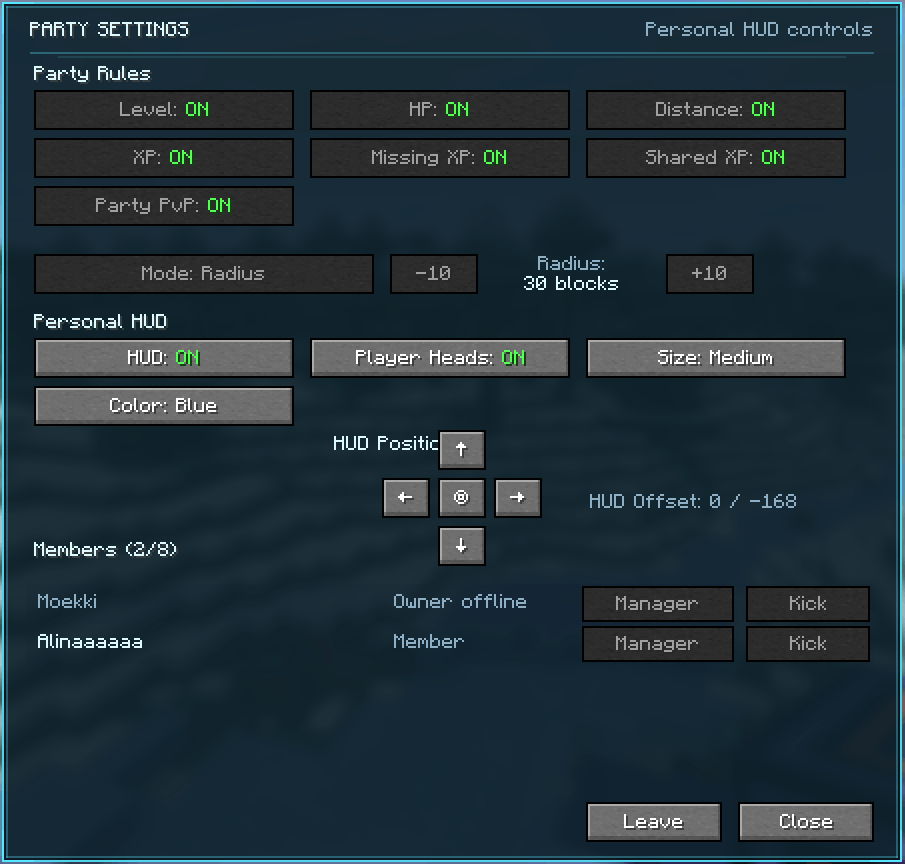
You can customize the HUD.
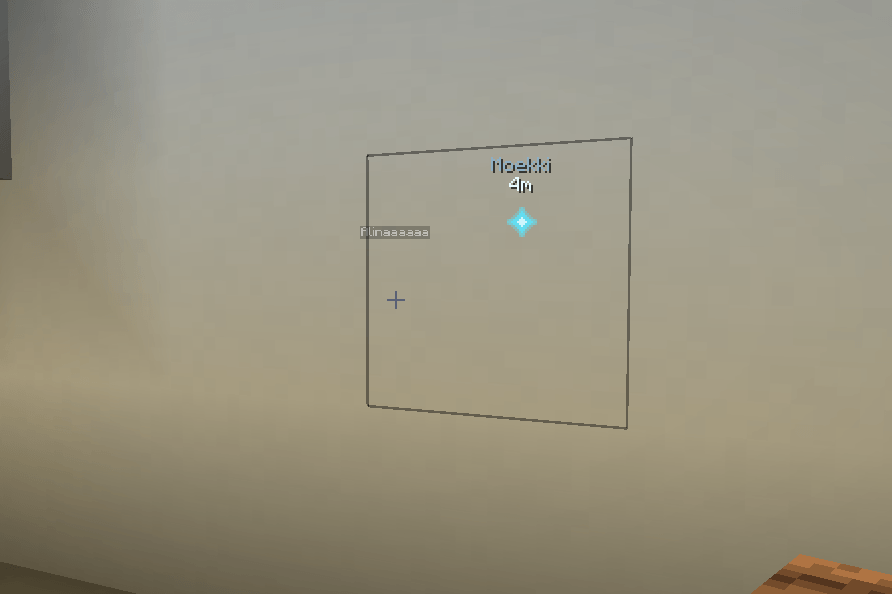
You can now ping a position for other party members.
Description
⚔️ PartyLink
PartyLink is a multiplayer-focused Fabric mod that adds a complete custom party system to Minecraft. Invite your friends, create persistent groups, share XP, manage party roles, customize your HUD, ping locations, and play together with a polished MMO-inspired interface.
PartyLink is designed for survival servers, RPG modpacks, co-op adventures, and any multiplayer world where players want a better way to stay connected as a group.
✨ Main Features
- 👥 Custom Party System - Create parties, invite players, accept invites, leave, kick, and disband groups.
- 🖥️ Custom MMO-Style HUD - See your party members directly on screen.
- 🧑 Real Player Heads - Online party members are displayed with their Minecraft skin head.
- ❤️ Health Display - View current and maximum HP of party members.
- ⭐ Level Display - See player levels inside the party HUD.
- 🟢 XP Progress Display - Show current XP progress and missing XP until the next level.
- 📏 Distance Display - See how far away your party members are.
- ⚡ Shared XP - Share experience with party members based on configurable rules.
- 🛠️ Mending Support - Shared XP uses real XP orb behavior so Mending can repair equipment.
- 🛡️ Party PvP Protection - Prevent friendly fire inside your party if enabled.
- 📍 Party Ping System - Ping blocks and locations for your party with a visible world marker.
- 💾 Persistent Parties - Parties can stay saved across logout and server restarts.
- 👑 Roles & Permissions - Owner, Manager, and Member roles are supported.
- ⚙️ Settings UI - Configure party and personal HUD settings in-game.
- ⌨️ Keybind Support - Open settings or send pings with configurable keys.
- 🌍 English & German Support - Client UI supports English and German.
- 🧩 Public API - Other mods can integrate with PartyLink.
👥 Party System
PartyLink gives Minecraft a real party system. Players can invite others, join groups, manage members, and keep parties persistent across sessions.
Party Actions
- Invite players to your party.
- Accept party invites with a command or clickable chat button.
- Leave your party through command or UI.
- Kick members if you have permission.
- Disband the party as the owner.
- Keep parties saved across server restarts if enabled.
🖥️ Custom Party HUD
PartyLink includes a fully custom party HUD with a clean, futuristic MMO-inspired style. It is built to feel like a real multiplayer interface instead of a simple command-only system.
The HUD can display:
- Player name
- Player head / skin icon
- Health
- Level
- XP progress
- Missing XP until next level
- Distance to party members
- Role highlights and visual accents
🎨 Personal HUD Customization
Each player can customize their own HUD without changing the HUD of other party members.
- Enable or disable your own HUD.
- Show or hide player heads.
- Choose HUD size: Small, Medium, or Large.
- Choose HUD color: Blue, Green, or Red.
- Move the HUD position using an in-game D-pad.
- Reset the HUD to its default position.
⚡ Shared XP
PartyLink can share experience between party members, making cooperative gameplay more rewarding.
Shared XP Modes
- 📍 Radius - Share XP only with nearby party members.
- 🌎 Current World - Share XP with party members in the same world/dimension.
- 🌀 All Worlds - Share XP with online party members across all dimensions.
The radius can be configured from 10 to 200 blocks, depending on the server configuration.
Shared XP is distributed using real XP orb behavior, meaning Mending can still repair armor, tools, and weapons properly.
📍 Party Ping System
PartyLink includes a lightweight party ping system for better communication during exploration, combat, mining, and dungeon runs.
- Use
/party pingto ping the block or location you are looking at. - Use the configurable keybind PartyLink → Send Party Ping.
- Party members see a small world marker directly on the pinged block.
- The marker can be seen through walls as a client overlay.
- The marker shows the sender name and distance in blocks.
- Client chat stays clean - no ping spam.
- Server owners can enable or disable pings through config.
Server Config
partyPingAllowed=true
🛡️ Party PvP Protection
PartyLink can protect party members from damaging each other. This is useful for survival servers, RPG servers, and co-op modpacks where friendly fire should be optional.
- Party PvP can be enabled or disabled per party.
- Server owners can decide whether this feature is available at all.
- If disabled server-side, the setting is hidden from the UI.
- Players outside the party are not affected.
Server Config
partyPvpAllowed=true
👑 Roles & Permissions
PartyLink includes a simple role system for managing permissions.
👑 Owner
- Can change party-wide settings.
- Can promote or demote managers.
- Can kick members.
- Can invite players.
- Can disband the party.
🛡️ Manager
- Can invite players.
- Can kick regular members.
- Can manage party rule settings.
👤 Member
- Can view the party.
- Can customize their own HUD.
- Can leave the party.
⚙️ Party Settings UI
The custom Party Settings screen allows players to manage both party-wide rules and personal HUD preferences.
Open it with:
/party settings
Or use the configurable keybind:
PartyLink → Open Party Settings
Party-Wide Settings
- Show or hide level information.
- Show or hide health information.
- Show or hide XP information.
- Show or hide missing XP.
- Show or hide distance.
- Enable or disable Shared XP.
- Change Shared XP mode.
- Change Shared XP radius.
- Enable or disable Party PvP if allowed by the server.
Personal HUD Settings
- Enable or disable your own HUD.
- Show or hide player heads.
- Change HUD size.
- Change HUD color.
- Move HUD position.
⌨️ Commands
| Command | Description |
|---|---|
/party invite <player> |
Invite a player to your party. |
/party accept |
Accept a pending party invite. |
/party leave |
Leave your current party. |
/party list |
Show all current party members. |
/party kick <player> |
Kick a player from the party if you have permission. |
/party disband |
Disband the party as the owner. |
/party ping |
Ping the block/location you are looking at for your party. |
/party hud |
Toggle your party HUD. |
/party hud on |
Enable your party HUD. |
/party hud off |
Disable your party HUD. |
/party settings |
Open the PartyLink settings screen. |
🛠️ Server Configuration
Server owners can configure PartyLink through:
config/partylink.properties
Available Options
sharedXpAllowed=true partyPvpAllowed=true partyPingAllowed=true maxSharedXpRadius=200 keepParties=true maxPartySize=8 serverLanguage=EN
| Option | Description |
|---|---|
sharedXpAllowed |
Controls whether Shared XP can be used on the server. |
partyPvpAllowed |
Controls whether parties can use Party PvP protection. |
partyPingAllowed |
Controls whether party pings can be used. |
maxSharedXpRadius |
Maximum allowed Shared XP radius. Limited to 10-200 blocks. |
keepParties |
Controls whether parties stay saved after logout or server restart. |
maxPartySize |
Maximum party size. Can be set up to 8 players. |
serverLanguage |
Server-side message language. Supports EN and DE. |
🧩 PartyLink API for Mod Developers
PartyLink includes a public API that allows other mods to integrate with the party system without accessing internal classes.
API Package
com.mki.partylink.api
Included API Classes
PartyLinkApiPartyLinkEventsPartyViewPartySnapshotPartyRolePartyShareModePartyXpShareContext
Basic Usage
PartyLinkApi.isInParty(player);
PartyLinkApi.areInSameParty(playerA, playerB);
PartyLinkApi.getParty(player);
PartyLinkApi.getPartyMembers(player);
PartyLinkApi.getOnlinePartyMembers(player);
PartyLinkApi.getRole(player);
PartyLinkApi.isOwner(player);
PartyLinkApi.isManager(player);
Friendly Fire / Party PvP
if (!PartyLinkApi.canPartyMembersDamage(attacker, victim)) { // cancel custom damage }Shared XP Integration
PartyLinkApi.shareExperience(sourcePlayer, amount);This respects PartyLink's Shared XP settings, server config, radius/mode, and Mending-compatible XP orb behavior.
Events
PartyLinkEvents.MEMBER_JOINED.register((party, memberId) -> { // react to party member joining });Available Events
PARTY_CREATEDPARTY_DISBANDEDMEMBER_JOINEDMEMBER_LEFTMEMBER_KICKEDROLE_CHANGEDSETTINGS_CHANGEDSHARED_EXPERIENCE
API Version
PartyLinkApi.API_VERSION
Current API version: 1
🌍 Language Support
- English client language support.
- German client language support.
- Server-side messages can be configured as English or German.
📦 Installation
PartyLink is a Fabric mod and should be installed on both the server and the client for the full experience.
- Install Fabric Loader.
- Install Fabric API.
- Place PartyLink in the
modsfolder. - Install it on the server and all clients that want to use the custom UI.
💙 Final Note
PartyLink is built to make multiplayer Minecraft feel more connected, more cooperative, and more polished. Whether you are exploring, fighting, mining, farming XP, or playing on an RPG server, PartyLink gives your group the tools to play together like a real party.
Create a party. Share XP. Ping locations. Protect your teammates. Play together.
The Party Link - Groups, Share Xp, and more Team