é éå°ç¹æ¾ç¤º.png
Description
Ordered: Addon
An expansion mod for the restaurant management mod Order To Cook (Ordered). It adds several quality-of-life features to Order To Cook: a helpful Allay Server to run errands, a piggy bank that only stores OTC coins, plus UI and error handling improvements.
Supported Versions & Environment
表格
| Item | Requirement |
|---|---|
| Minecraft | 1.21.1 |
| Loader | NeoForge 21.1.244 or higher |
| Required Dependency | Order To Cook (Ordered) 1.3.6 or higher (Mandatory) |
| Optional Dependency | JEI 19.57.0.449 or higher (required for "Quick Add Dish" and "Missing Ingredient Quick Bookmark") |
"Loader" refers to the base framework for loading mods; NeoForge is one of the common loaders for 1.21.1. "Required Dependency" means this other mod must be installed first for this addon to function properly.
Feature Breakdown
1. Sign Menu Quick Add Dish (Requires JEI)
Order To Cook’s sign menu originally requires manually adding foods one by one, which becomes tedious for long menus. With this addon and JEI installed:
- Open the sign menu interface;
- Locate the desired food item inside JEI;
- Hold Shift and Left-Click that food. It will be directly added into the currently opened sign menu. A status message will appear at the top of your screen to show the result (Add success, item already exists, invalid food, menu full, etc.). An operation hint will also display when opening the menu, so new players know how to use it at first glance.
2. Workstation Missing Ingredient Quick Bookmark (Requires JEI)
The workstation already has a "Check Missing Ingredients" button in its top-right corner: hovering shows which dishes are missing for the active order, and clicking sends the list to chat. This addon extends this function — clicking this button automatically bookmarks all dishes missing from the current order into JEI’s bookmark list (the pinned favorite item panel on the left side of JEI). This lets you easily reference the list while preparing supplies. Thoughtful safeguards:
- Preserve existing bookmarks: If you already bookmarked a dish manually, the mod will not re-add it, nor remove it during cleanup.
- Auto cleanup after completion: When you successfully pack into takeout bags or plate the dish for this order, the mod automatically removes only the bookmarks added by this query for this specific order. No manual unpinning required.
- No accidental deletion on failure: If packing/plating fails due to insufficient materials, missing plates or other reasons, bookmarks remain intact for continued preparation.
3. Linked Workstations Shared Inventory
When multiple workstations are placed adjacent and connected with sinks, dishwashers, stoves, refrigerators and other equipment, they form a unified network. When cooking, the menu draws resources from the whole connected area:
- Ingredients (food stored inside any linked workstation);
- Leather used for packaging;
- Clean Plates.
Simply put: you do not need to stack all materials on one single workstation. Connect workstations together.
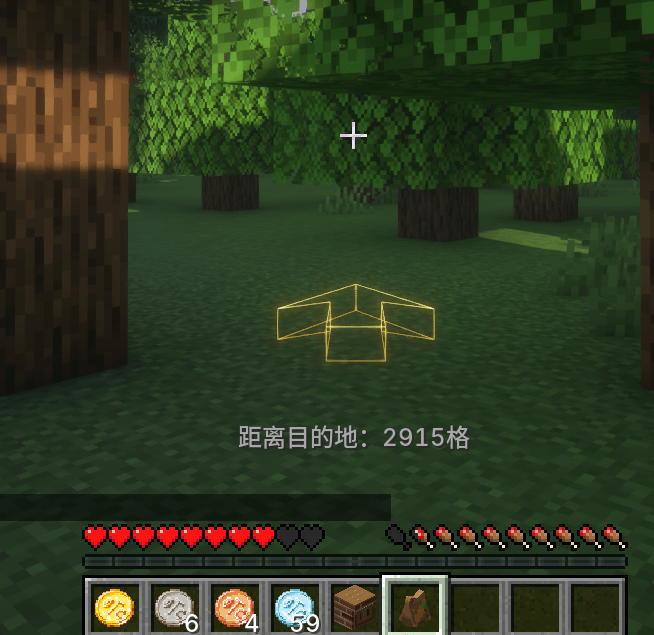
4. Takeout Navigation Arrow
While holding an Order To Cook packed takeout bag in your main hand, a glowing arrow appears roughly two blocks in front of you, pointing toward the delivery destination:
- The arrow lies flat on the horizontal plane, acting like a horizontal compass pointing to the real-world coordinates of the target;
- It tilts upward if the target is above you, or downward if below. Tilt angle calculates dynamically based on height difference, with smooth transitions over elevation changes;
- The arrow renders in world space and gets occluded normally by terrain; it will not draw through walls;
- Automatically hides when within ~1.5 blocks of the target to avoid obstructing your view up close.
5. Allay Server (Printer UI, Added in 1.1.0)
Open the Order To Cook printer interface. Below the "Rename Restaurant" button on the right, a new Allay Server button appears. Spend OTC coins to hire an Allay Server to run restaurant tasks. One Allay Server maximum per printer:
表格
| Item | Rule |
|---|---|
| Hire & Level Up | First click hires level 1; subsequent clicks upgrade level, maximum level 8 |
| Cost | 100, 200, 400, 800, 1600, 3200, 6400, 12800 OTC coins. Coins are deducted from piggy bank first; if insufficient, coins are taken from your inventory. |
| Level Cap | Cannot exceed your Restaurant Level (a level 3 restaurant caps the server at level 3) |
Higher levels unlock more tasks and increase flight speed:
表格
| Level | Available Functions |
|---|---|
| 1 | Deliver packed takeout bags / plated meals to dine-in customers. Will not deliver if dirty plates occupy the customer’s serving spot. |
| 2 | Adds dirty plate retrieval, transporting dirty plates to dishwashers or sinks. |
| 3 | Adds washing dishes at sinks, retrieving clean plates from dishwashers, returning empty plates to plate racks. |
| 4~8 | No new abilities; movement speed increases gradually. Level 8 reaches the old maximum speed. |
The hired Allay Server is a model-only Allay (non-living entity): it has no health, cannot be attacked, and does not count toward mob caps. It respawns beside the printer after chunk reloads. No dismissal function required (levels only increase and never decrease).
Its item transport workflow is complete: it flies to the meal location, picks up the actual item and carries it, then flies to the customer and hands over the item on arrival. Meal delivery, order settlement and coin rewards work exactly the same as if you right-click the customer yourself. It will never pick up takeaway orders requiring player delivery.
Safety details:
- No item disappearance: If delivery fails (e.g. order expires), items are returned or dropped on the ground.
- Idle while owner offline: The server waits beside the printer and keeps held items when the restaurant owner logs out or changes dimension.
- Disappears when printer breaks: Destroying the printer removes the server; no orphaned entities left behind.
- Top-screen status notifications: Messages show for hire success, insufficient OTC coins, level cap reached, restaurant level restriction, etc.
6. Piggy Bank (Added in 1.1.0)
A pink pig-shaped piggy bank block exclusively for storing OTC coins:
- Crafting: Place a chest in the center of the crafting table, with red bricks on the four cardinal directions. Also available directly in the creative menu under "Utility Blocks".
- OTC coins only: Right-click to open a 9-slot container. It only accepts OTC coins of denominations 1, 5, 20, 100, 10000; normal items cannot be inserted.
- Auto linking: Place within a 3×3×3 cube centered on the printer (including vertical and diagonal offsets) to activate automatically. No extra binding required.
- Direct income deposit: Order revenue, tips and special customer rewards are deposited directly into the piggy bank first, skipping your inventory. Any overflow goes to the player following base mod rules. Multiple piggy banks are consumed in order of distance and coordinates.
- Spend from bank first: Printer upgrades, restaurant rename fees, Allay hiring and upgrades withdraw coins from piggy banks first. If funds are insufficient, nothing is deducted from the bank. Supports change calculation for large denominations; returned change deposits back into the piggy bank.
- Data safety: Coins persist with world save. Destroying the piggy bank drops all stored coins; nothing vanishes.
7. Adjustable Arrow Appearance
Arrow height and tilt factor can be modified inside the config file: config/otcaddon-client.toml (client-side config).
表格
| Config Key | Description | Default Value |
|---|---|---|
arrowDropBelowEye |
Vertical offset of arrow center below player eye level. Larger value moves arrow downward | 0.5 |
arrowLeanScale |
Multiplier for arrow tilt angle. Set to 0 to keep arrow always horizontal | 1.0 |
Installation
- Install NeoForge for Minecraft 1.21.1;
- Place both Order To Cook (Ordered) and this mod jar into your
.minecraft/modsfolder; - (Optional) Add JEI to enable "Quick Add Dish";
- Launch the game, no further setup required.
When updating the mod, delete the old jar file and keep only the latest version to avoid version conflicts.
FAQ
Q: Shift + Left Click on JEI food does nothing? A: Verify three conditions: JEI installed; you are inside the sign menu (not player inventory); you hold Shift while left-clicking.
Q: Prompt "Failed to read sign menu data"? A: Order To Cook version is outdated or missing. This addon requires Order To Cook 1.3.6 or newer.
Q: Clicking workstation check button does not update JEI bookmarks? A: Confirm JEI is installed. Bookmarks are only added when the active order truly lacks dishes. If the missing dish is already bookmarked manually, no change occurs (prompt: "Missing dishes are already bookmarked in JEI").
Q: Why do bookmarks remain after failed packing/plating? A: This is intended behavior. Bookmarks are cleared only after successful packing or plating. Failure means ingredients are still missing, so bookmarks stay for continued preparation.
Q: Holding takeout bag, no arrow appears? A: The arrow only works for valid Order To Cook takeout bags held in your main hand with an active delivery target. Expired orders or bags held in offhand will not show the arrow.
Q: Why does the Allay Server refuse to deliver / collect plates? A: Check these points in order: ① Allay level on printer UI is greater than zero (hire it first); ② level does not exceed restaurant level; ③ owner must be online (server idles otherwise); ④ prepared packed bags/plated meals exist at workstation and dine-in customers are nearby; ⑤ Dirty plate collection requires an available dishwasher or sink nearby. The server only handles dine-in orders; it ignores takeaway orders marked with external delivery destinations.
Q: Piggy bank balance is not increasing? A: Check three things: the piggy bank sits within the printer’s 3×3×3 cube; the chunk containing the piggy bank is loaded; the piggy bank has empty slots (overflow sends coins to player following base rules). If the base mod uses custom currency or SDM accounts, payment flows follow base mod behavior and will not forcibly store OTC coins inside the piggy bank.
Q: Will this corrupt worlds or cause server issues? A: This mod only adds one new block (piggy bank) plus the 1.1.0 Allay Server, a non-living model entity. All other features are quality-of-life extensions for existing content. Ensure client and server run identical mod versions to avoid connection mismatches in multiplayer.
otcaddon Team