yoima | OBS Recording Monitor
Create a server, get 25% off your first month

OBS Recording Monitor
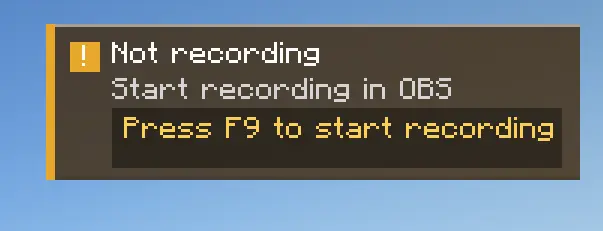
Never lose a recording because OBS was idle.
OBS Recording Monitor is a Fabric client-side mod that watches OBS Studio through obs-websocket and shows a clear in-game warning only when you are not recording. It stays quiet while everything is fine, then gets your attention exactly when you need it.
Why this mod is useful
When you are about to record a boss fight, a build timelapse, or a multiplayer session, the easiest mistake is forgetting to start OBS. This mod checks the recording state for you and warns you inside Minecraft before that moment is gone.
It is designed to be simple:
- No noisy HUD when OBS is already recording
- Clear warning when recording is off
- Separate states for disconnected OBS, auth failure, and invalid settings
- Built-in connection test and setup guide
- Mod Menu integration for easy access
Features
- Monitors OBS recording state over
obs-websocket - Shows a warning only when OBS is not recording
- Supports connection status, reconnect status, and authentication failure feedback
- Lets you move and scale the HUD
- Includes a world-only display option
- Provides an in-game help screen with setup images
- Opens the GitHub issue page directly from Mod Menu
Requirements
- Minecraft
1.21.11 - Fabric Loader
- Fabric API required
- OBS Studio with
obs-websocketenabled - Mod Menu optional, but recommended for the easiest settings access
Quick setup
- Install the mod, Fabric API, and optionally Mod Menu.
- Start OBS Studio.
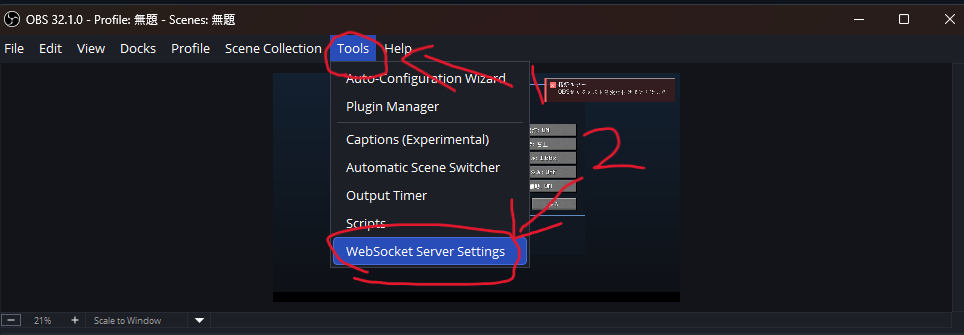
- In OBS, open
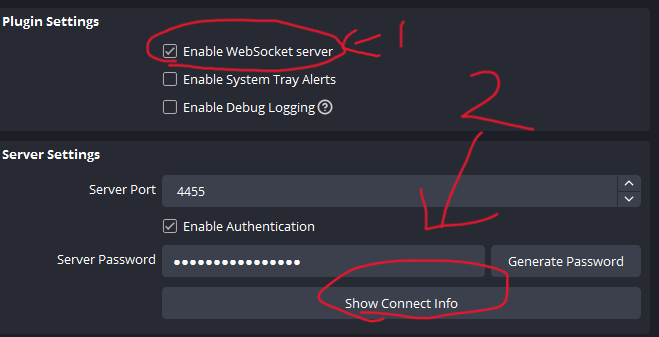
Tools -> WebSocket Server Settings. - Enable the WebSocket server and check the shown port/password.
- In Minecraft, open the mod settings from Mod Menu.
- Enter the OBS host, port, and password.
- Press
Testand save once the connection succeeds.
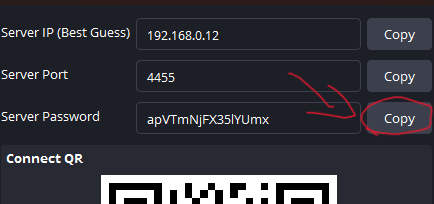
If OBS is running on the same PC as Minecraft, localhost is usually the correct host.
What you see in game
- Recording: no unnecessary warning clutter
- Not recording: immediate HUD warning so you can react fast
- Connection/auth problems: clear hints about what to check next
This keeps the mod practical during real gameplay instead of turning into background noise you ignore.
Troubleshooting
- OBS is not detected: make sure OBS is open and
obs-websocketis enabled - Authentication failed: check the password in both OBS and the mod settings
- Connection failed: verify the host and port, especially if OBS is on another machine
- HUD not visible: check the HUD toggle, scale, and anchor position in the config screen
Feedback and issues
Found a bug or have an idea for improvement?
- In game: open the settings screen from Mod Menu and press
Issue - On GitHub: Open an issue
License
This project is released under the MIT License.
The OBS Recording Monitor Team