NokhFrame
- By
Nokh Frame is an in-game photo studio for Minecraft characters and items. Mod runs on the client with Minecraft 1.21.1 and NeoForge.


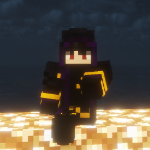
Nokh Frame is a photo studio inside Minecraft. Pose your character with its real cosmetics, or any item, on the backdrop of your choice, and save a clean PNG.
Type /nokhframe, pose, click: the photo is ready.


 Your real character: armor, cosmetic layers and your native name tag, as the game draws them.
 Any item: from Minecraft or any mod, searched by name, ID or
 @mod.
 Skin library: try any 64 × 64 PNG; other players still see your own skin.
 Backdrops: a preset color, any
 #RRGGBB, or your own PNG image.


 Poses: nine ready-made poses, or turn each limb on three axes.
 3D sets:
 .nbt structures and Blockbench models built around the player.
 Placement: move, turn and resize the player, the set or the view.
 Shaders: World mode orbits the real camera, so Iris and Oculus shaderpacks apply.

1. Put the jar in mods: Minecraft 1.21.1, NeoForge 21.1.1 or newer.
2. Join a world and type /nokhframe in chat.
3. Pick Player or Item, a backdrop, a set and a pose.
4. Click Take photo: a clean PNG, without the panel, lands in screenshots.
5. On a server with the mod, the studio needs operator rights or the nokhframe.use permission.
Every option is in the user guide. A bug or an idea? Open an issue.

Nokh Frame est un studio photo dans Minecraft. Mettez en scène votre personnage avec ses vrais cosmétiques, ou n'importe quel item, sur le fond de votre choix, et enregistrez un PNG propre.
Tapez /nokhframe, posez, cliquez : la photo est prête.

Votre vrai personnage : armure, couches cosmétiques et pseudo natif, tels que le jeu les dessine.
N'importe quel item : de Minecraft ou de tout mod, cherché par nom, identifiant ou @mod.
Bibliothèque de skins : essayez n'importe quel PNG 64 × 64 ; les autres voient toujours votre skin.
Fonds : une couleur prédéfinie, un #RRGGBB ou votre propre image PNG.

Poses : neuf poses toutes faites, ou chaque membre réglé sur trois axes.
Décors 3D : structures .nbt et modèles Blockbench construits autour du joueur.
Placement : déplacez, tournez et redimensionnez le joueur, le décor ou la vue.
Shaders : le mode Monde fait tourner la vraie caméra : les shaderpacks Iris et Oculus s'appliquent.

1. Placez le jar dans mods : Minecraft 1.21.1, NeoForge 21.1.1 ou plus récent.
2. Entrez dans un monde et tapez /nokhframe dans le chat.
3. Choisissez Joueur ou Item, un fond, un décor et une pose.
4. Cliquez sur Prendre la photo : un PNG propre, sans le panneau, arrive dans screenshots.
5. Sur un serveur qui a le mod, le studio demande les droits d'opérateur ou la permission nokhframe.use.
Tout est détaillé dans le guide d'utilisation. Un bug ou une idée ? Ouvrez un ticket.

Author / Auteur: NokhXyr | License / Licence: All Rights Reserved
NokhFrame Team