Nexa AI (Minecraft Mod + Paper Plugin)
[NOTE] This page includes detailed information about the mod/plugin. If it feels too much, you can skip straight to using it. Just install the mod/plugin and run the command /nexa <message> to get started right away.
Nexa AI adds an AI agent into Minecraft.
- Works as a Fabric / Forge / NeoForge mod (clients + servers)
- Also available as a Paper plugin at here: Plugin Nexa AI
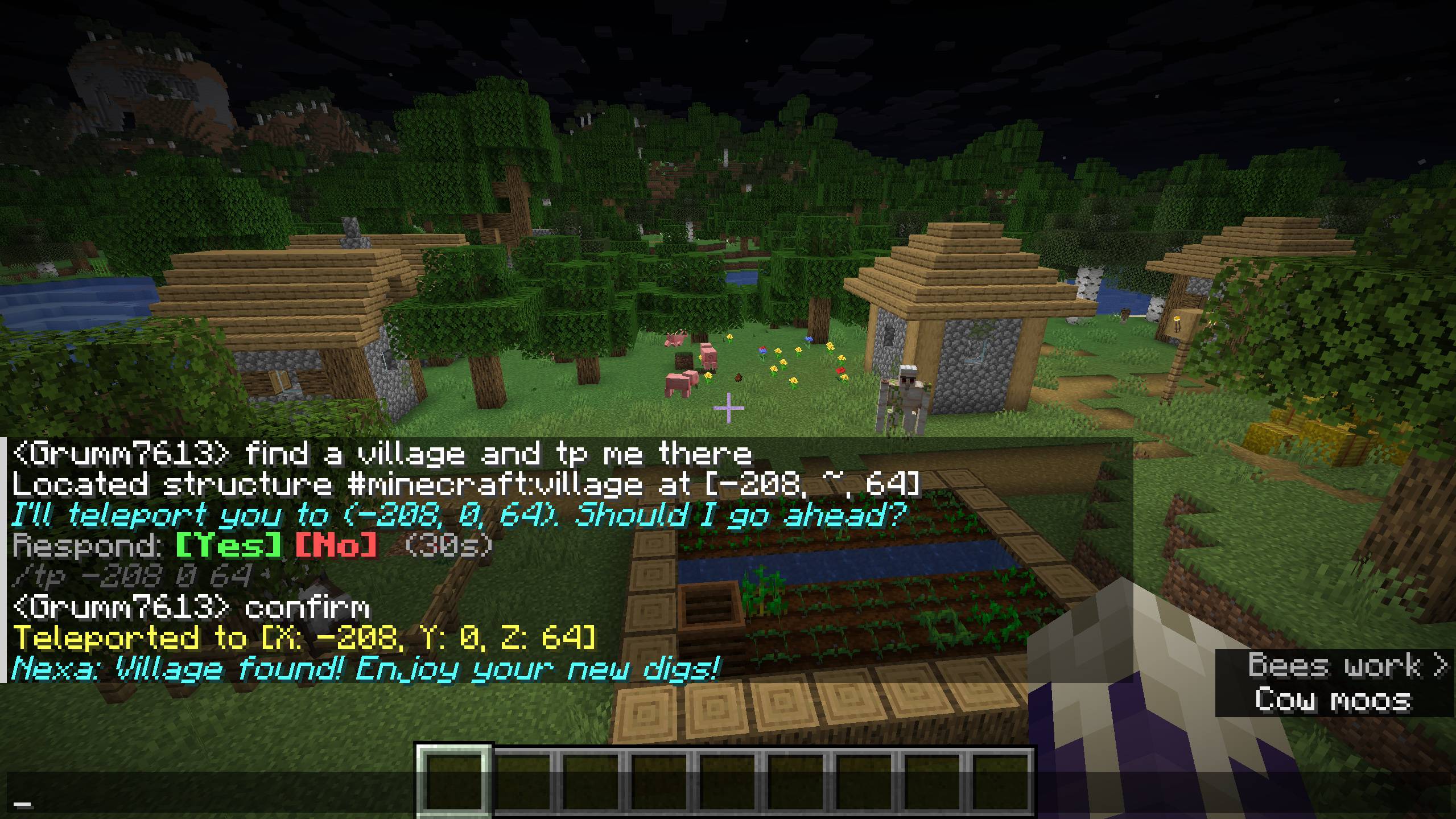
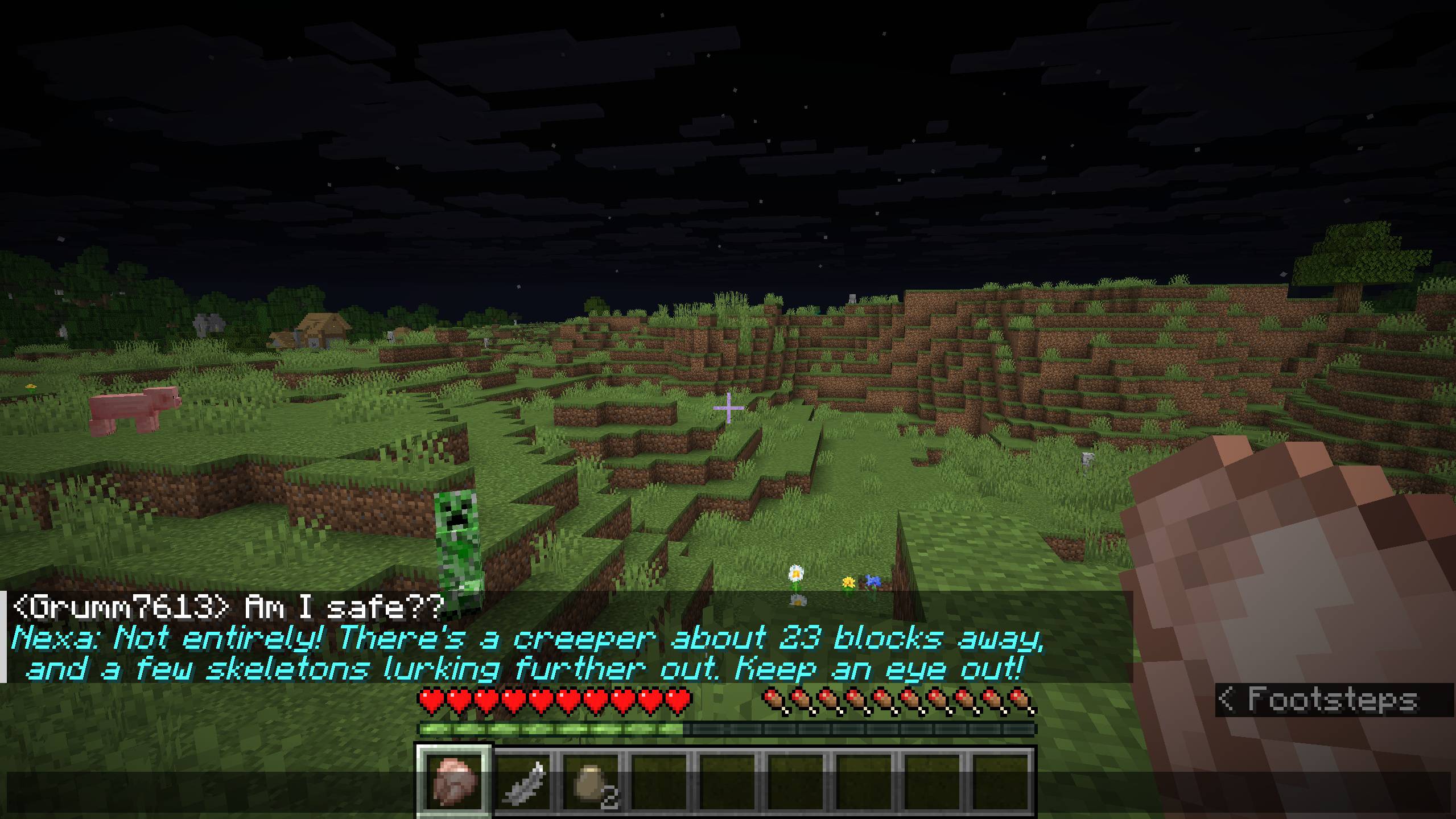
Players can talk to Nexa in chat and (with the right permissions) let it run server tools like teleporting, locating structures, changing weather/time, and more.
Features
- Chat with Nexa directly:
/nexa <message>
- Agent Modes:
- Ask-before-act (default): Privileged actions are previewed and require confirmation before execution.
- Autonomous: Nexa can execute allowed steps automatically (guardrails still apply).
- Bring Your Own Key (BYOK): Connect directly to Google Gemini, Groq, Ollama, or custom OpenAI-compatible endpoints with provider-tailored thinking levels.
- Persistent Conversation Memory: Conversations persist across server restarts and reconnections with automatic smart summarization so context is never lost.
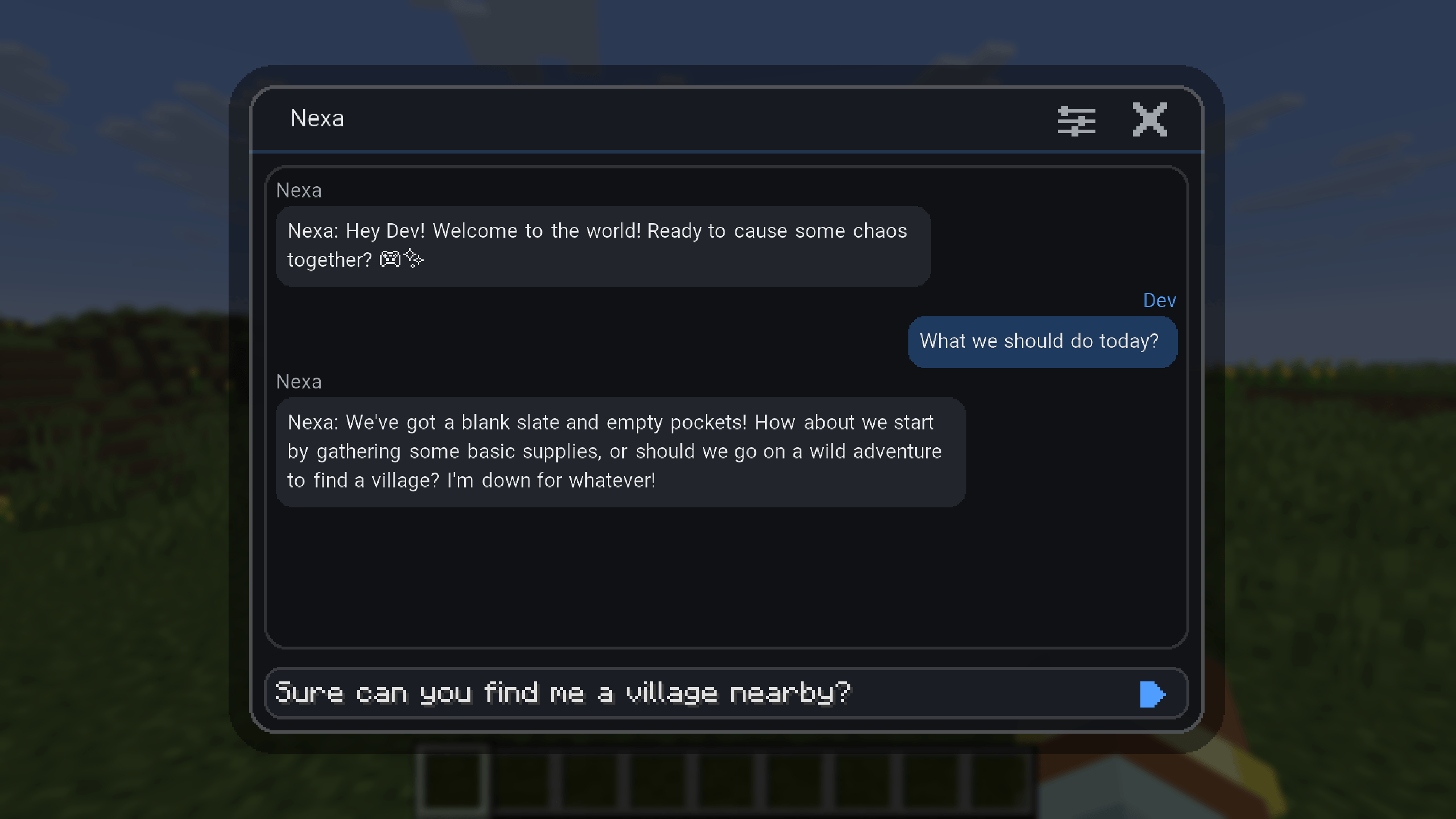
- Client GUI: Open the configuration and chat interface by pressing
N or using the command /nexa-gui /nex-gui (Fabric/Forge/NeoForge clients) with dedicated General and BYOK tabs.
- Built-in Tools ("Function Calling"): Server-aware actions, environment lookups, and client screenshot analysis.
- Server Guardrails: Per-player request limits + global tool cooldown.
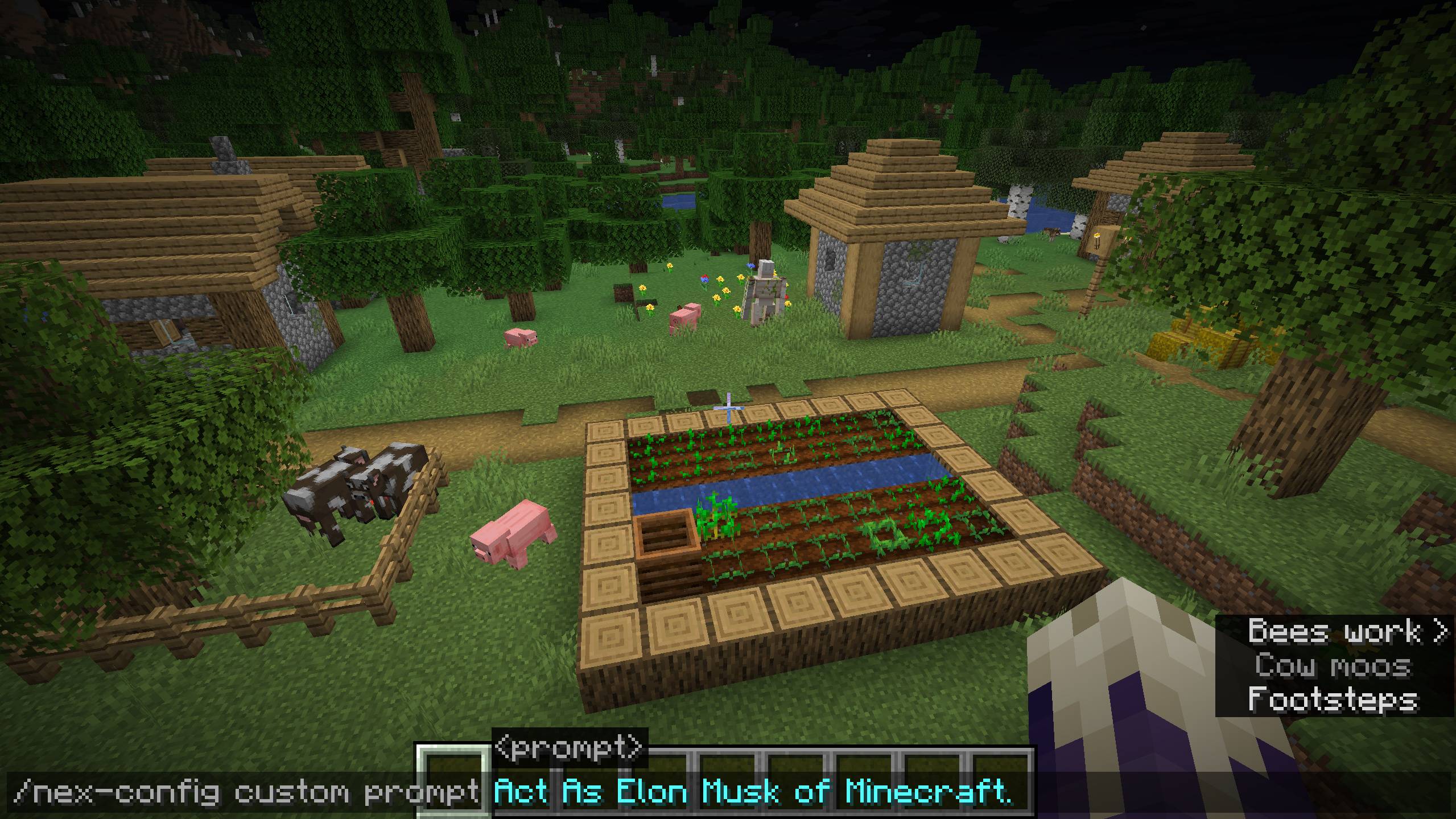
- Customization: Custom assistant name + personality prompt.
- Auto Messages: Optional greeting on join + occasional idle-time messages (server-wide, can be disabled).
- Update Notifications & Feedback: Updates checked and feedback sent securely via proxy.
Supported Targets
- Fabric: Minecraft
26.2
- Forge: Minecraft
26.2
- NeoForge: Minecraft
26.2
- Paper: Minecraft
26.1.2 - 26.2+
All targets share a common core compiled with Java 25 compatibility.
Commands
Chat
/nexa <message> - Chat with Nexa./nexa confirm - Approve queued actions (ask-before-act mode)./nexa cancel - Cancel queued actions.
Client GUI
/nexa-gui (or /nex-gui) - Opens the configuration GUI screen (Fabric, Forge, and NeoForge clients only). Can also be opened with the N key.
Configuration (/nex-config)
/nex-config clearchat - Clear your conversation history./nex-config feedback <message> - Send feedback (rate-limited to once per 24 hours)./nex-config mode show - Show your current agent mode./nex-config mode <ask|autonomous> - Set your personal agent mode override./nex-config limits status - Show limits and cooldown./nex-config limits maxrequests <1..15> - Set max requests per prompt (requires admin/op privileges)./nex-config limits cooldown <seconds> - Set global tool cooldown (requires admin/op privileges)./nex-config custom name <name> - Change assistant name (requires admin/op privileges, max 30 chars / 3 words)./nex-config custom prompt <prompt> - Set personality prompt (requires admin/op privileges, max 1000 chars)./nex-config custom reset - Reset name/prompt to defaults (requires admin/op privileges)./nex-config custom show - View your current custom settings./nex-config automessages enable|disable|status - Toggle join/idle auto messages (server-wide).
BYOK Configuration (/nex-config byok)
Configure server-wide AI providers and custom keys. All players share the active provider, and server operators can configure settings in-game or via the GUI BYOK tab:
/nex-config byok status - Show active provider, configured models, thinking levels, and masked API keys./nex-config byok provider <proxy|gemini|ollama|groq|custom> - Switch the active provider (requires admin/op privileges)./nex-config byok key <gemini|ollama|groq|custom> <api-key> - Set API key for a provider (requires admin/op privileges)./nex-config byok clearkey <gemini|ollama|groq|custom> - Clear an API key (falls back to proxy if active) (requires admin/op privileges)./nex-config byok model <gemini|ollama|groq|custom> <model-id> - Set custom model name (requires admin/op privileges)./nex-config byok thinking <provider> <level> - Set provider thinking/reasoning level (requires admin/op privileges)./nex-config byok baseurl <https://...> - Set endpoint base URL for the custom provider (requires admin/op privileges)./nex-config byok mode <chat|responses> - Set custom provider format: chat completions or responses endpoint (requires admin/op privileges).
Modes
Ask-before-act
Nexa proposes an action preview and waits for confirmation before running any privileged tool. Approve via the clickable buttons in chat ([Yes] / [No]), or with /nexa confirm (deny with /nexa cancel). Previews are generated instantly with exact distances and safety checks. Queue timeout is 30 seconds.
Autonomous
Nexa can execute allowed tools without an explicit prompt. Guardrails still apply (cooldowns, request limits, and required privileges).
AI Providers & BYOK Configuration
Default AI Service
By default, Nexa uses default services. It is free but you could experience rate limiting, overload, etc. It is recommended to use BYOK for optimal performance.
Bring Your Own Key (BYOK) Mode
BYOK allows server operators and singleplayer worlds to connect directly to AI providers, eliminating proxy latency and rate limits:
- Google Gemini: Official Google Developer's AI portal. It gives plenty of free usage. Default model:
gemini-3.5-flash-lite. Thinking levels: minimal (default), low, medium, high. Supports tool calling and screenshot analysis.
- Groq: High-speed cloud inference with generous free usage. Default model:
qwen/qwen3.8-27b. Thinking levels: none (default), default, low, medium, high.
- Ollama: Cloud or local API (
https://ollama.com/v1). Ollama Cloud provides very generous free usage, get a key from their dashboard. Default model: gemma4:31b. Thinking levels: off (default), low, medium, high, max.
- Custom (OpenAI-compatible): Connect to any local or self-hosted endpoint (such as local Ollama at
http://localhost:11434/v1, LM Studio at http://localhost:1234/v1, LocalAI, vLLM) or any custom OpenAI-compatible cloud service. Supports configurable base URLs, custom models, chat or responses API modes, and customizable thinking parameters.
Note: Server BYOK settings and API keys are stored server-side in config/nexa/chatmc_byok.json. Keys are masked in commands and GUI sync. Legacy per-player configs are automatically migrated on first load.
Nexa Tools (Function Calling)
Nexa can call built-in tools depending on player permissions:
Unprivileged Tools (Available to all players)
getPlayerState: Get current player details (position, health, gamemode, dimension, difficulty, last death location).getInventorySummary: Inspect the contents of your inventory, main/off-hand items, and armor.getEnvironmentInfo: Retrieve current environment conditions (time, weather, biome, facing direction, difficulty, dimension).getGameRules: Read the value of server game rules (e.g., keepInventory, doDaylightCycle).getNearbyEntities: Scan for entities (mobs, players) within a 48-block radius.saveLocation: Save your current coordinates as a custom named location.removeLocation: Remove a saved location or clear all saved locations.listSavedLocations: View all your saved locations and their coordinates.getAgentContext: Review Nexa's current operational mode, server defaults, guardrails, and permission privileges.analyzeScreenshot: Capture a screenshot of the client's screen to visually analyze the game state (available when mod is installed client-side).
Privileged Tools (Require nexa.admin / OP status)
locate (executes immediately even in ask-before-act): Find coordinates of structures (e.g., village) or biomes.teleport (queued in ask-before-act): Teleport to specific coordinates.timeSet (queued in ask-before-act): Set the server time (preset like day/noon/night/midnight or a numeric tick value).weather (queued in ask-before-act): Change the server weather (clear, rain, thunder) and specify duration.giveEffect (queued in ask-before-act): Apply status effects with customizable duration, amplifier, and particles.spawnEntity (queued in ask-before-act): Spawn a specific entity (pig, zombie, etc.) at your location or specified coordinates (max 20 entities).
Permissions & Privileges
Nexa integrates with LuckPerms for granular permission control across Fabric, Forge, NeoForge, and Paper.
Permission Nodes
nexa.use — Access to /nexa, /nex-config (including /nex-config byok status), and /nexa-gui (Default: allowed for all players).nexa.admin — Administrative actions (limits/cooldown modification, custom prompts, BYOK provider and key settings, privileged tools, server-wide changes).
Vanilla Fallback (Without LuckPerms)
nexa.use is allowed for everyone.nexa.admin falls back to OP / Gamemaster privileges on dedicated servers, and Creative Mode in singleplayer.
Requirements & Installation
Java
- Minecraft 26.2: Typically runs on Java 25.
Installation
- Fabric: Install Fabric Loader + Fabric API, then drop the
nexa-fabric*.jar into .minecraft/mods/
- Forge: Drop the
nexa-forge*.jar into .minecraft/mods/
- NeoForge: Drop the
nexa-neoforge*.jar into .minecraft/mods/
- Paper: Drop the
nexa-paper*.jar into plugins/ and restart the server.
Tip: Server-side features work with only the server jar installed. Install the client mod to enable the GUI (keybinding N) and screenshot analysis.
Guardrails (Server)
- Agent mode:
ASK_BEFORE_ACT or AUTONOMOUS
- Per-prompt request budget (
maxrequests) and a global cooldown (cooldown)
- Privileged actions are previewed (and can be denied) in ask-before-act mode.
Fair Use, Safety, and Privacy
- Community Built: Please don’t abuse default services (rate limits/guardrails exist for a reason).
- AI Provider Terms: Default service prompts/responses are processed by Google Gemini. When using BYOK, your chosen provider's terms apply.
- Data & Security:
- Server BYOK settings and API keys are stored in
config/nexa/chatmc_byok.json. Keys are masked across commands, packets, and UI screens.
- Player conversation history is saved per-world in
chatmc_history_<playerUUID>.json.
- Saved locations and world configuration are stored per-world in
chatmc_locations.json.
- Only grant server file access to trusted individuals.
- Feedback: Feedback messages submitted via
/nex-config feedback are sent to the proxy with identifying metadata.
Support & Contributions
If you encounter issues, have feedback, or wish to contribute, please join our Discord server.
Discord: https://discord.gg/Wvst4znsgk