Screenshot_1.png
Description
NatureGen
NatureGen is a lightweight, JSON-driven ecological world regeneration mod for Minecraft Forge.
Depends on Helix UI!
It restores natural blocks around active players without scanning the entire world, allowing grass, small vegetation, and controlled sapling recovery to happen gradually and safely during gameplay.
NatureGen is designed as a configurable world-recovery system: it does not simply spam plants everywhere. Every regeneration rule is limited by conditions such as biome, ground type, light level, sky visibility, nearby parent blocks, random chance, and local density caps.
Features
World Regeneration
NatureGen performs periodic regeneration passes around active players.
Current default recovery systems include:
- Grass block recovery from dirt and coarse dirt
- Small grass and fern recovery on valid natural ground
- Sapling scattering near existing parent trees
- Biome-aware tree recovery
- Density-limited sapling placement
- Safe sky and light checks
- JSON-configurable rules
Controlled Tree Recovery
Tree recovery is intentionally conservative.
Saplings are not placed randomly across the whole world. They require:
- A valid biome category
- Natural ground
- Air above the target block
- Visible sky
- Enough light
- Nearby matching logs or leaves
- A low random chance
- A
max_nearbydensity limit
This prevents forests from spreading infinitely or filling the world with saplings.
Default tree recovery rules include:
- Oak / birch saplings in forest biomes
- Spruce saplings in taiga biomes
- Jungle saplings in jungle biomes
- Acacia saplings in savanna biomes
- Oak saplings in swamp biomes
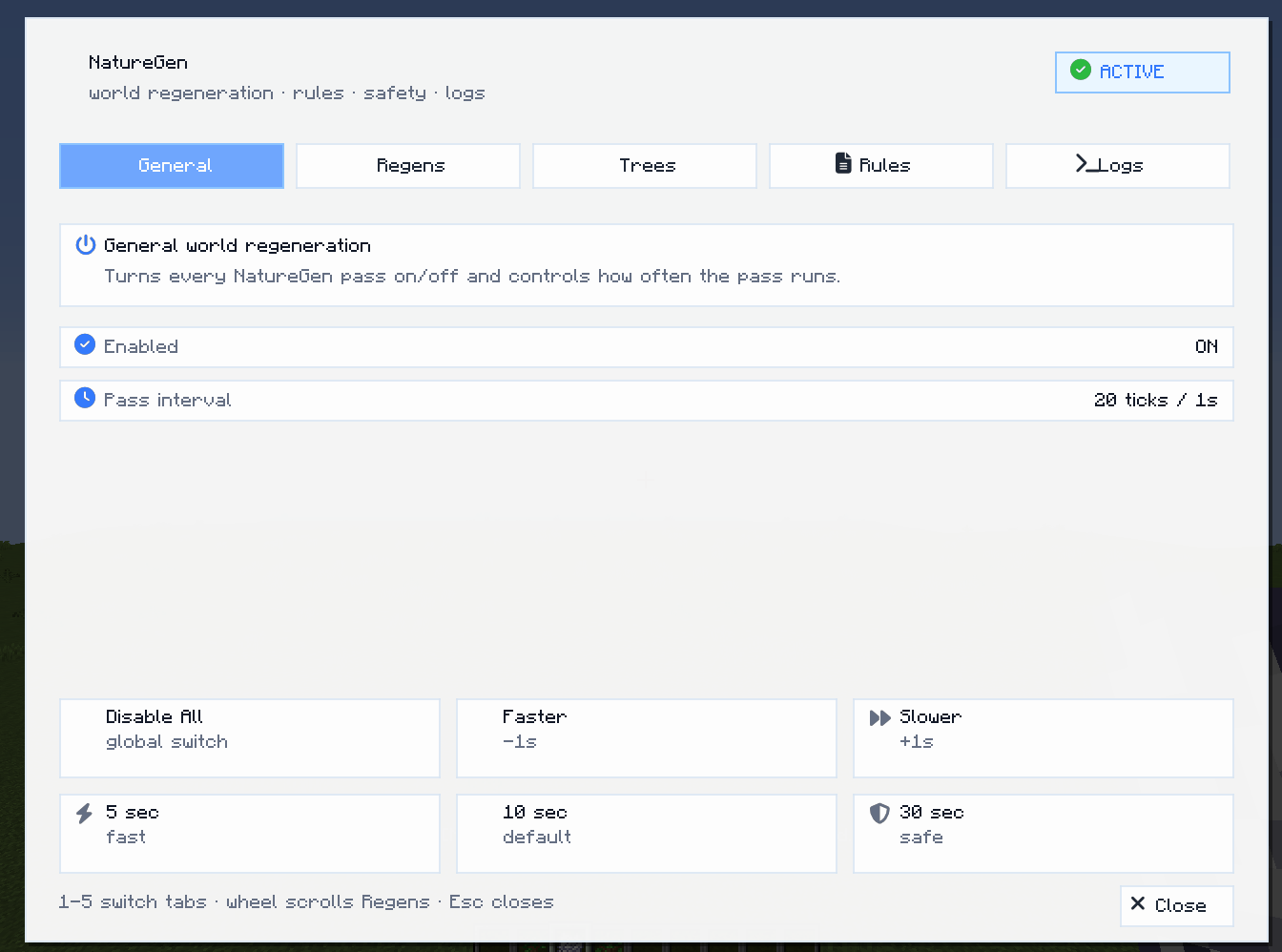
In-Game Overlay Menu
NatureGen includes an in-world configuration overlay.
Press the configured key while already inside a world to open the NatureGen overlay menu.
Default key:
NThe overlay provides quick access to:
- General enable / disable controls
- Regeneration pass frequency
- Active regeneration rules
- Per-rule enable / disable toggles
- Chance adjustment
- Density limit adjustment
- Tree recovery presets
- Rule reload tools
- Logging status
The keybind can be changed in:
Options → Controls → NatureGenRegeneration Rule Editor
The in-game overlay lists all active regeneration rules from:
config/takesome/natureregen/generators.jsonEach rule can be inspected and edited directly from the overlay.
Supported editable values include:
- Enabled / disabled state
- Chance value
- Density limit for rules using
max_nearby
Disabled rules are stored in JSON with:
"enabled": falseJSON-Driven Rules
NatureGen rules are stored as JSON and can be edited manually or through the in-game overlay.
Example rule:
{
  "id": "forest_sapling_scatter",
  "target": {
    "random": [
      "minecraft:oak_sapling",
      "minecraft:birch_sapling"
    ]
  },
  "place": "above_ground",
  "conditions": {
    "biome_category": ["forest"],
    "ground_is": [
      "minecraft:grass_block",
      "minecraft:dirt",
      "minecraft:podzol"
    ],
    "air": true,
    "sky_visible": true,
    "min_light": 9,
    "nearby": {
      "blocks": [
        "minecraft:oak_log",
        "minecraft:birch_log",
        "minecraft:oak_leaves",
        "minecraft:birch_leaves"
      ],
      "radius": 8,
      "vertical_radius": 8
    },
    "max_nearby": {
      "blocks": [
        "minecraft:oak_sapling",
        "minecraft:birch_sapling",
        "minecraft:spruce_sapling",
        "minecraft:jungle_sapling",
        "minecraft:acacia_sapling"
      ],
      "radius": 12,
      "vertical_radius": 2,
      "max": 3
    },
    "chance": 0.018
  }
}
Supported Rule Conditions
NatureGen currently supports:
chanceground_isblock_belowairair_abovemin_lightsky_visiblenearbymax_nearbydensity_limitbiometypesbiome_categorybiome_categories
Commands
NatureGen also includes command-based control:
/naturegen status
/naturegen reload
/natureregen status
/natureregen reload
Use /naturegen reload after manually editing the JSON rule file.
Configuration Files
Main server config:
config/naturegen-server.tomlRegeneration rules:
config/takesome/natureregen/generators.jsonDependency
NatureGen depends on the Helix UI library.
Helix UI is required for the in-game overlay menu, mod configuration interface, visual controls, and FontAwesome-style UI icons.
Required dependency:
Helix UIMake sure Helix UI is installed together with NatureGen. Yes, that's the only one mod using that library, but later there'll be more :3
Design Goals
NatureGen is built around several core principles:
- Regenerate the world gradually
- Avoid aggressive world spam
- Keep all regeneration data-driven
- Make recovery rules understandable and editable
- Provide safe defaults
- Support in-game tuning without restarting the world
- Preserve natural Minecraft-style progression
- Test Helix UI on real mods ;)
Performance
NatureGen does not scan the entire world.
Instead, it samples a limited number of positions around active players at a configurable interval. This keeps the system lightweight and prevents unnecessary chunk-wide processing.
Default behavior is tuned to be conservative and safe for normal gameplay.
Recommended Use
NatureGen is useful for:
- Survival worlds
- Long-running servers
- Post-destruction recovery
- Nature restoration systems
- Modpacks with ecology or survival themes
- Worlds where players want gradual environmental healing
Current Limitations
- Dark oak recovery is not enabled by default because natural dark oak growth requires a 2x2 sapling formation.
- Some biome type support is currently mapped through vanilla biome categories.
- Advanced worldgen-style systems are intentionally out of scope; NatureGen focuses on runtime ecological recovery.
Summary
NatureGen adds controlled, configurable, and safe world regeneration to Minecraft.
It helps the world recover naturally over time without overwhelming the landscape, while giving players and modpack authors full control through JSON rules and an in-game Helix UI overlay.
In future versions support with Dynamic Trees may be added
NatureGen Team