Modside
- By
Analyze your Forge mods to see which ones are client-side, server-side, required on both sides, or libraries, including dependencies and detailed reports.
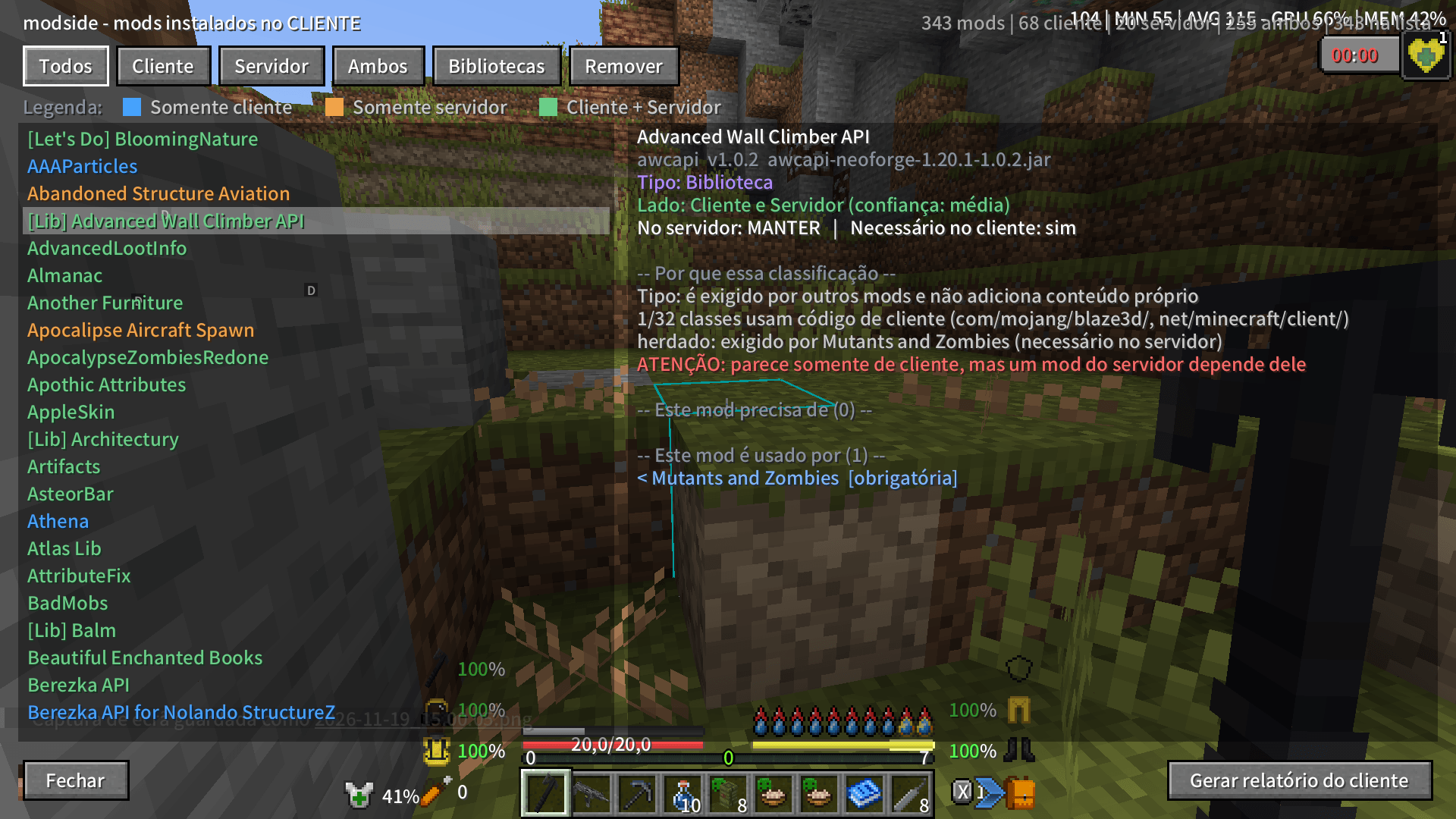
2026-11-19_15.00.15.png
Description

Modside is a utility for Minecraft Forge 1.20.1 that helps you understand the structure of your modpack.
The mod analyzes installed mod files and identifies which mods are:
•client-only;
•server-only;
•required on both sides;
•libraries or APIs;
•dependencies of other mods.
It works on both the client and the server and is optional on both sides. A client can join a server without modside, and the server can also run without every player having the mod installed.
Features
Client
•Press ] to open the modside screen. The key can be rebound in the Controls menu.
•Open it through Mods > modside > Config.
•Browse an organized list of installed mods.
•Use the color legend:
•blue: client-only;
•orange: server-only;
•green: client and server.
•Generate an HTML report of the client-side mods.
The client report is saved to:
Plain Text
config/modside/report-client.html
Server
Run this from the server console:
Plain Text
modside report
Or run it in-game as an operator:
Plain Text
/modside report
The command generates an interactive HTML report, a JSON report, and an auxiliary list of mods that can be removed from the server when applicable.
To print a short summary in the console or in-game, use:
Plain Text
modside summary
Server reports are saved to:
Plain Text
config/modside/report-server.html config/modside/report-server.json config/modside/removable-from-server-server.txt
Client and server reports are kept separate and do not overwrite each other.
Language support
The mod supports English and Brazilian Portuguese.
The configuration file is created on first launch at:
Plain Text
config/modside/modside.toml
Example:
Plain Text
language = "auto"
Available values:
•auto: follows the game language on the client; uses English on the server;
•en: forces English;
•pt_br: forces Brazilian Portuguese.
You do not need to restart the game or server after changing the language before generating a new report.
Known mods
The following file can be edited to adjust the classification of known mods:
Plain Text
config/modside/known_mods.json
Installation
1.Install Minecraft 1.20.1 with Forge 47.x.
2.Place modside-0.2.0.jar in the mods folder.
3.The mod can be installed on the client, the server, or both sides.
4.Start the game or server and use the key or commands described above.
Compatibility
•Minecraft 1.20.1
•Forge 47.x
•No additional mod dependencies
•Optional on the client and server
Notes
The mod analyzes .jar files found in each side's mods folder. Therefore, the client report shows the mods installed on the client, while the server report shows the mods installed on the server.
Modside Team